





juchong
Members
-
Joined
-
Last visited
-
I run a massive Plex server built on Unraid, so in my world, stability is critical. I highly recommend using a USB drive that exclusively uses SLC NAND flash. They're not cheap, but I personally use a 4GB Swissbit drive for my server (link). I've had it in operation for almost two years with zero flash-related downtime. Here's a link to a few USB drives that should also offer similar reliability. All drives are guaranteed to meet industrial specifications and come with datasheets!
-
I have a server with 45 x 18TB drives in it. XFS is not an option because an array of >28 data drives is not supported and the rebuild times on such a massive array is gross. ZFS arrays expanded via the command line to contain > 30 drives seemingly break the GUI. The specific configuration I'm trying to set up is: RAIDZ-2, 15 drives per VDEV, 3 VDEVs total I'm trying to add all the drives in the attached image to a single pool (ZFS or otherwise).
-
Basically what the title says. While playing around with ZFS pools in a VM, I found that removing the drives from a pool seems to mess up the numbering scheme for device numbers in the GUI. Here's a screenshot: NOTE: Refreshing the page does not seem to clean up the "Dev" numbers.
-
For anyone looking for a solution: I resolved this by stopping the Docker process, deleting the image, and reinstalling each container. Unraid seems to have made old Docker configurations incompatible with the latest OS version.
-
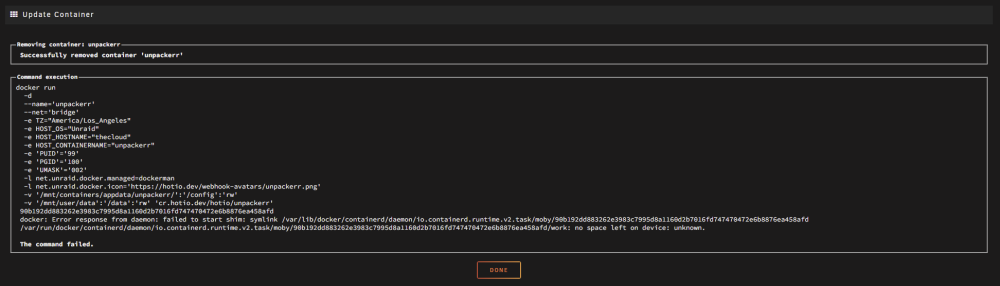
It looks like I've also run into some of the Docker issues others have found recently. I'm not able to edit or start containers for some reason. I've verified that the docker.img and destination drive (/mnt/containers/) has sufficient space. Docker containers seem to be unstable after a reboot and cannot be edited. Help! docker run -d --name='unpackerr' --net='bridge' -e TZ="America/Los_Angeles" -e HOST_OS="Unraid" -e HOST_HOSTNAME="thecloud" -e HOST_CONTAINERNAME="unpackerr" -e 'PUID'='99' -e 'PGID'='100' -e 'UMASK'='002' -l net.unraid.docker.managed=dockerman -l net.unraid.docker.icon='https://hotio.dev/webhook-avatars/unpackerr.png' -v '/mnt/containers/appdata/unpackerr/':'/config':'rw' -v '/mnt/user/data':'/data':'rw' 'cr.hotio.dev/hotio/unpackerr' 90b192dd883262e3983c7995d8a1160d2b7016fd747470472e6b8876ea458afd docker: Error response from daemon: failed to start shim: symlink /var/lib/docker/containerd/daemon/io.containerd.runtime.v2.task/moby/90b192dd883262e3983c7995d8a1160d2b7016fd747470472e6b8876ea458afd /var/run/docker/containerd/daemon/io.containerd.runtime.v2.task/moby/90b192dd883262e3983c7995d8a1160d2b7016fd747470472e6b8876ea458afd/work: no space left on device: unknown. The command failed. thecloud-diagnostics-20230530-2238.zip
-
Hi folks, I wanted to ask for feedback on a massive shift in methodology that I'm considering for my server. If you take a look at my signature, you'll see that I'm running some serious hardware. However, things are about to get even crazier since I've recently acquired a Storinator chassis and a 64-core EPYC CPU. I'm at a crossroads; here are my options: Continue using Unraid and XFS - My overall server capacity is limited and rebuilds take ~3 days to complete. Things are working well-enough, but everything is slow. I feel like I've outgrown XFS. Continue using Unraid, but swap the array to ZFS - ZFS on Unraid is still a beta feature. I'm also not sure whether it's possible to set up ZFS as the primary array format in the Unraid GUI. How stable is Unraid + ZFS? Move to TrueNAS and leave Unraid behind - This will involve LOTS of time investment to bring up services like I have on Unraid already. It's an entirely new system to learn, tune, optimize. The community isn't as vibrant and helpful. Note: Don't worry about moving/storing data between drive format changes. I will have enough drives available to temporarily hold all the data. Also, most of the drives in the array are currently 18TB, so it's not a big deal for me to build ZFS pools with similar drives. PLEASE leave your comments below. I'm very eager to hear everyone's thoughts on this.
-
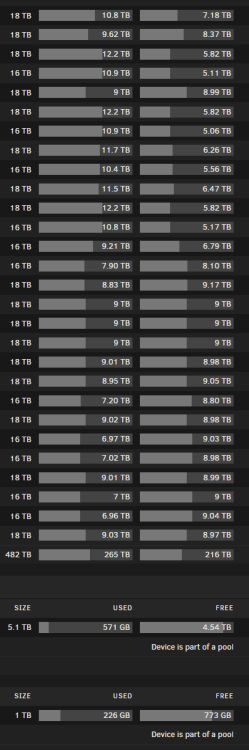
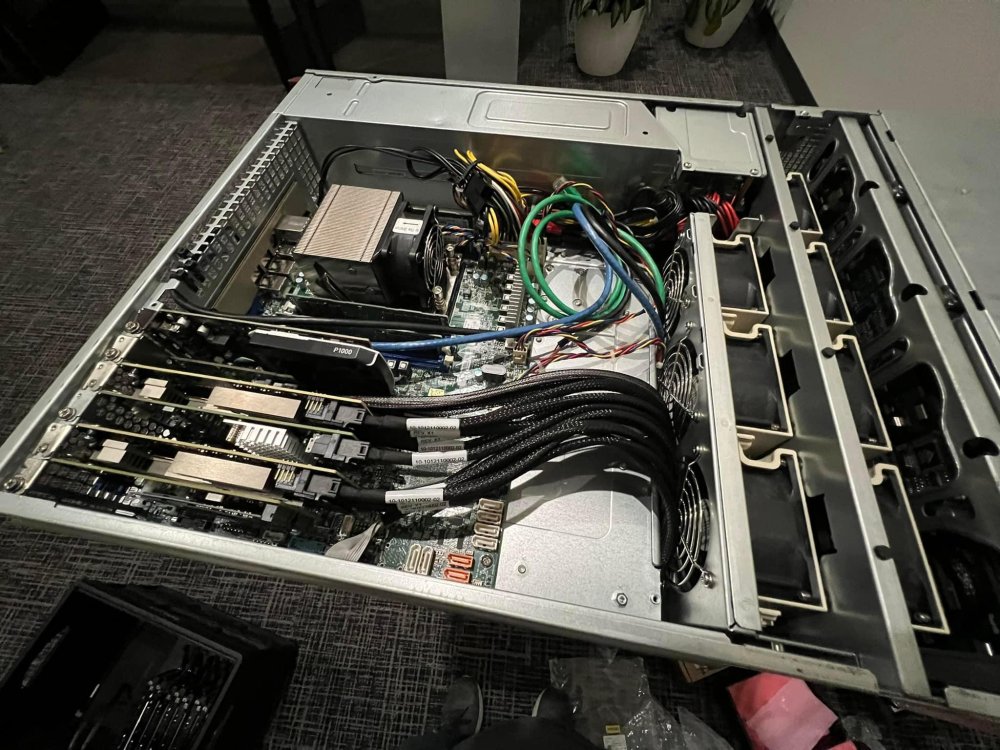
I've had good luck finding 18TB enterprise drives for cheap, so the array has grown significantly since I last posted an update. My signature lists out the hardware, so instead, I'll share a picture of the drive breakdown shown in Unraid, plus a glamour shot of the server itself. Note: This was taken before I added the second P1000 and moved a few cards around. The server is currently colocated rather than being kept at home.
-
Hi folks! I recently put together a Docker container that builds and runs shapeshifter-dispatcher, a utility designed to obfuscate packets to evade IDS, firewalls, and other censorship tools. I'm personally using this tool to evade IDS systems at event venues by obfuscating OpenVPN packets, but I figured others could benefit from it, too. The container does not have a GUI or any other fancy features, but it is very effective at what it's designed to do. Dockerhub: https://hub.docker.com/r/juchong/shapeshifter-docker GitHub: https://github.com/juchong/shapeshifter-docker Base Project GitHub: https://github.com/OperatorFoundation/shapeshifter-dispatcher Enjoy!
-
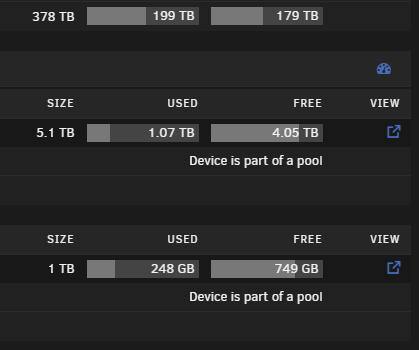
I posted my setup a while ago, but it's seen quite a few updates since then. I consolidated the backup drives into the primary system, so it's now sitting at 378TB usable on the main array. The "unpacking" cache array is sitting at 5.1TB (U.2 NVMEs) usable space, and "containers" array is sitting at 1TB (M.2 NVMEs). All the drives live inside a 36-bay, 4U Supermicro chassis. The server is currently colocated inside a local datacenter. 😁
-
Hi! Long-time Unraid user here. I recently had to run to the datacenter to replace a component and discovered that I was unable to click (tap?) on any dialog boxes that popped up using any mobile browser. I'm using an iPhone 13 Pro running the latest iOS version. No matter what browser I tried (Chrome, Firefox, Safari), I was not able to tap on the "Proceed" button that appears when you initiate a shutdown. I had to resort to using the technician's "crash cart" to log into the Unraid console and shut off the server that way. Is there anything I can do to help debug the issue? Maybe there's another way to manage the server using a mobile browser? Thanks!
-
It's been a while since I played with this since I ended up selling my fusionIO drive in favor of U.2 NVMEs, but ich777 is correct. You can absolutely use his Docker container to build the kernel modules as a plugin, but it'll be a massive pain to keep up with releases. Here's my repository with the build script I was using for testing. YMMV: https://github.com/juchong/unraid-fusionio-build
-
I wanted to thank the team for how seamless they've made the backup and restore process! My USB drive failed last night, but luckily, the latest configuration was stored safely in the cloud. Restoring the configuration was extremely easy and got the server up-and-running in just a few minutes. A+ work, everyone!
-
Your post is what tipped me off to there being a DOS-based utility available. I was already contemplating manually programming the ROM using an external programmer.
-
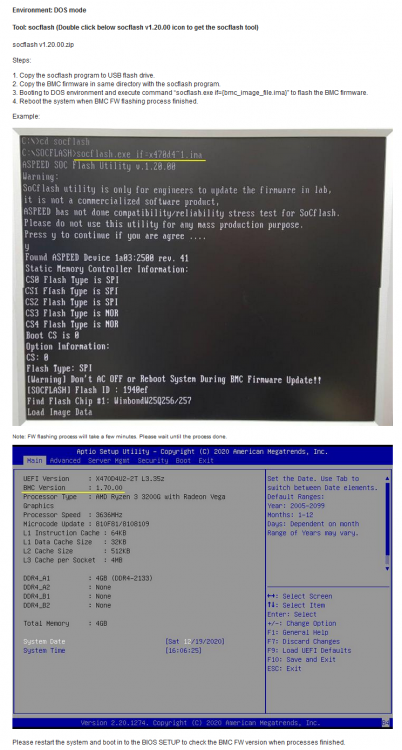
I recently transplanted my E3C246D4U into a new case and accidentally got the UID button on the back of the board stuck. Once I powered the server on, I ran into the dreaded "BMC Self Test Status Failed" error. After a bit of digging, I found a utility posted by ASRock that allows the BMC to be flashed in DOS. This utility, along with the most up-to-date BMC firmware downloaded from their website, got me up-and-running! Here's a link to the ASRock website. I've also attached the utility to this post in case it disappears from the internet. socflash v1.20.00.zip
-
I'm having a similar issue as well... What's going on?!



