





digidep
Members
-
Joined
-
Last visited
Everything posted by digidep
-
running 7.1.4 and IMPI plugin reports connection failed. motherboard - asrockrack E3C246D4U I can connect to IMPI with ipmitool without issue and report back sensors, etc. any known issues with this plugin? EDIT: figured this out. uninstalled the plugin, removed the IPMI folder completely, then re-installed and everything worked.
-
Anyone have a favorite rack mount case? Currently using Fractal node 804, but going to move all the equipment to a rack. Currently have 6 3.5" and 2 2.5" drives.
-
Minus your whole turbo issue
-
Did you ask him if there were any new BIOS?
-
Anyway to mount an optical drive in unraid?
-
Tracked this down to a bad network cable. Guess I need some managed network switches. Sent from my SM-G998U using Tapatalk
-
At some point in the few weeks, seems that my Dockers are limited to 100Mbps. Found this out from a speedtest tracker container. 1000Mbps shows connected in unraid host. Been running for over 1 year without issue. Any ideas on what happened or how to troubleshoot further? Thanks in advance.
-
Sure, I wasn't necessarily worried about CA as much as getting this container updates. I assume, that there are several people that have this container deployed and now no longer able to get updates. In doing some more investigation, looks like the image moved here: https://hub.docker.com/r/filerun/filerun I updated the Docker template and was able to get it to update.
-
Anyone here use filerun docker? Seems like the user has deleted their account. https://hub.docker.com/r/afian/filerun/ This is still published in CA. I couldn't find a support thread in the Container forum.
-
Can you post the link here? Sent from my SM-G998U using Tapatalk
-
you guys all running 6.10?
-
Mine idles at 30C, though have a Noctua NH-D15S on it (140mm fan). I also am paranoid about the CPU temps...so you are not alone.
-
Anyone else here pass through a graphics card to a Windows VM?
-
@Hoopster, are you using a graphic card for your Windows VM?
-
I did on March 1. Everything seems to be okay, but haven't really checked it all out yet, other than the web UI coming up 🤣
-
I'm guessing that you are not from the United States?
-
This newer board looks great! I like the extra network adapter and hdmi. I just have the E3C246D4U2. Who did you talk with at ASRock? Maybe you can entice @Hoopster to upgrade his board and let you know if it works? LOL.
-
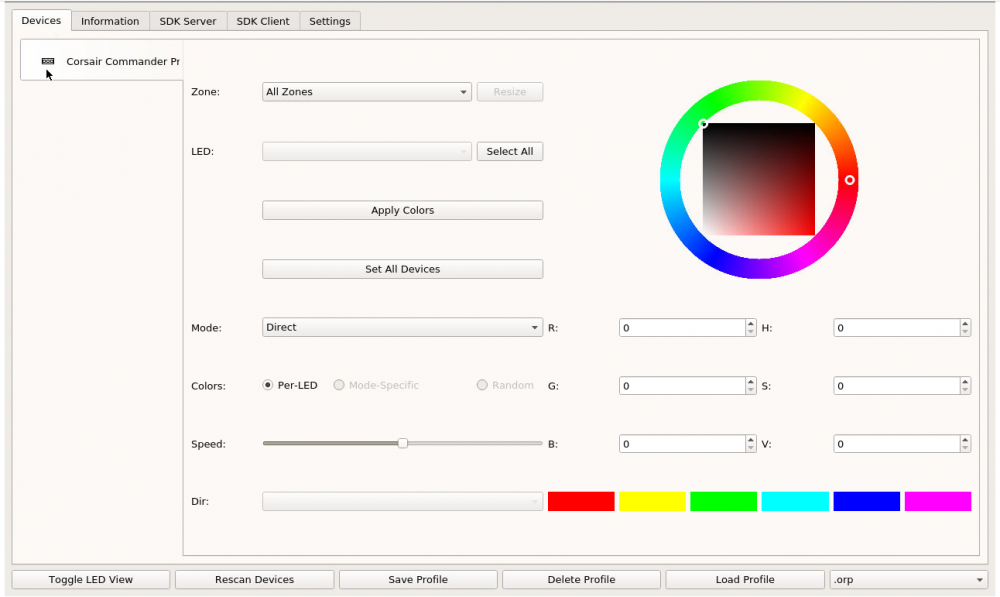
It finds my Corsair Commander Pro, but for the life of me, don't know how to use this application. Anyone successful in using this app?
-
Thanks! Exactly what I needed. All booted up with graphic card passthrough on Big Sur!!!
-
Any way to have the boot manager auto select the bigsur disk when starting? I'm trying to have VM with graphics card pass through, and currently have a wireless keyboard/mouse (logitech) and on the bootloader screen, can't click the volume to boot. Works fine when using VNC as obviously using the host keyboard/mouse.
-
Thanks for this @SpaceInvaderOne. This is great! I am trying to create a BigSur VM and get to "Install macOs BigSur" option, click Continue and get this error: "The recovery server could not be contacted". From my quick google search, either this VM doesn't have network access OR Apple's servers are overloaded. Looking in the logs for the installer, i see "could not connect to the server" messages. Any thoughts? ID 10 T error. I forgot had my router put new devices in Quarantine with no Internet Access. 🤦
-
Based on a thread for another container release for MakeMKV, there was the suggestion of setting PGID and PUID as 0. This does now allow the container access to the optical device and works without issue.
-
Getting "The program can't find any usable optical drives" Log from container start: [cont-init.d] 95-check-optical-drive.sh: executing... [cont-init.d] 95-check-optical-drive.sh: looking for usable optical drives... [cont-init.d] 95-check-optical-drive.sh: found optical drive [/dev/sr0, /dev/sg5], group 100. [cont-init.d] 95-check-optical-drive.sh: exited 0. Extra parameters passed into docker: --device=/dev/sg5 --device=/dev/sr0 root@Tower:~# ls -l /dev/sr0 /dev/sg5 crw-rw---- 1 root root 21, 5 Nov 7 09:56 /dev/sg5 brw-rw---- 1 root users 11, 0 Nov 7 09:56 /dev/sr0 Running container as Privileged doesn't make a difference.

