





Tomr
Members
-
Joined
-
Last visited
-
root@Tower:~# mkdir '/mnt/user/media/test_destination' root@Tower:~# ln '/mnt/user/media/test_source/source.txt' '/mnt/user/media/test_destination/source.txt' ln: failed to create hard link '/mnt/user/media/test_destination/source.txt' => '/mnt/user/media/test_source/source.txt': Is a directory root@Tower:~# ln '/mnt/user/media/test_source/source.txt' '/mnt/user/media/test_destination/source.txt' root@Tower:~# ls -al '/mnt/user/media/test_destination' total 0 drwxrwxrwx 1 root root 0 Nov 27 19:14 ./ drwxrwxrwx 1 nobody users 70 Nov 27 19:14 ../ -rw-rw-rw- 2 root root 0 Nov 27 19:11 source.txt root@Tower:~# source.txt is on the Array. When I first call the hardlinking command, I get the "Is a directory" error, but if I call the command immediately again, it works. If I delete the file from the destination location and link again, it works. But if I delete the destination folder, make a new one, then the error appears again. The error doesn't appear if the source is on the cache disk (Primary Storage). My disks are formatted as BTRFS. Unraid version 6.12.13
-
That didn't help, I've posted a report here
-
I removed one of the drives from the array, created new config and let it recreate parity. But it seems that it's using unassigned device (the one I removed) for some reason. You can see the reads amount on the screen, it's on par with the array disks and is growing with them. dstat and the GUI shows 0MB/s read and write on it though, so it might be a visual bug. But on the other hand, it won't let me spin-down this drive, logs will show: I don't know if it's just a visual bug or Unraid one and I'm screwing up my parity. I first asked on UA's thread and got a response, so I'm writing here now:
-
I removed one of the drives from the array, created new config and let it recreate parity. But it seems that it's using unassigned device (the one I removed) for some reason. You can see the reads amount on the screen, it's on par with the array disks and is growing with them. dstat shows 0MB/s read and write on it though, so it might be a visual bug. But on the other hand, it won't let me spin-down this drive, logs will show: I don't know if it's UA's bug or Unraid one and I'm screwing up my parity. I'm on 6.10.0 RC1
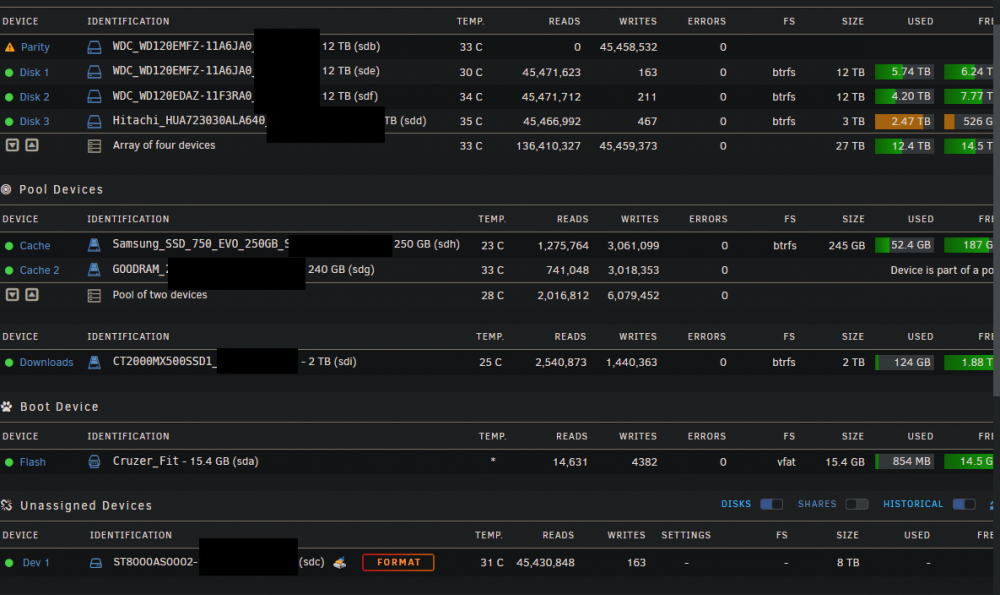
-
Could you update jdupes to newer version? Current version is bugged, see: https://github.com/jbruchon/jdupes/releases for 1.15 release. I personally would like/need at least 1.18.1 for the newer/older filter
-
I wonder why it didn't recognize the correct signature then.
-
The thing is I didn't tell it to format anything. I just added new slot, started the array and it went up straight to cleaning it. Now that I think about it, it's prob because my array is encrypted.
-
Everything went fine, I received email saying so, and I also checked the logs. That means preclear doesn't do anything when adding new drive? That's strange. I thought Unraid should pickup that the disk is precleared and go straight to syncing parity. I didn't format the disk as trurl wrote, just preclear.
-
In 6.9, I did a preclear on disk, using Joe-L, skip pre-read and selected fast post-read. It finished, I got notification on email so I added it to the array (new slot), and unraid clears the disk again ("Clearing in progress"). Is it normal? Or it happened because I didn't click the red "X" button after the preclear? I thought pre-clearing's purpose was to not have to clear it when adding to array.
-
I was said it's unintented behavior and to post there. Not sure if it's a bug or lack of feature, but mover will not move the hardlink if it's on another share, but rather copy the whole thing. It only works if they are on the same share. I suspect it's because mover works on per-share basis, if it is I ask if something can be done about that? Steps to reproduce: Two shares, A And B, both's cache set to Yes with the same pool. touch /mnt/user/A/test.txt cd /mnt/user/A ln test.txt /mnt/user/B/test.txt ls -i | grep test.txt 14355223812252192 test.txt cd /mnt/user/B ls -i | grep test.txt 14355223812252192 test.txt So far so good, they point to the same file. But if I invoke mover now, thing's change. The files point to other inodes, so the file got copied twice, instead of moving the inode and re-linking the files. They are on the same disk, but point to different inodes.
-
Referring to this suggestion to invoke mover before changing cache settings I ask for a "Move Now" equivalent button in share settings so one could move just that share's cache, not the whole array.
-
1) Shares with cache set to "No" wont move files between disks. If you have files in cache and later set the option to these values, mover will never move them to array. One would think that mover will take care of it. I set it to not use cache, so it shouldn't. Same goes for "Only" but from array to pool. 2) If you change the pool of the share and have it set on "Prefer" or "Only", mover will not move the files between the pools nor will it move the files to the array. Same as 1. I set it to use that cache, so mover should reorganize the items to match these settings. 3) If you have a share lets say "downloads" and "media", downloads is cached by one pool and media is cached by other one or not cached at all. Downloads is set to Prefer, media is set to whatever. Steps to reproduce: touch /mnt/user/downloads/test.txt ln /mnt/user/downloads/test.txt /mnt/user/media/test2.txt The link will be created on the pool that is caching downloads. The file will never be moved back to array. I'd expect the file that that is being linked to be copied to the array. All of these can lead to dangerous outcomes and loss of data.
-
I'm evaluating UnRAID for my new NAS, I modified your script a bit. With it, one can create periodic snapshots with various retention policy (eg. keep hourly backups for a day, daily backups for a week etc). You just need to schedule more copy of the script. I think you can't pass arguments to scheduled script, so I deleted them. (Optional) Add this to your Settings->SMB->SMB Extra. This enables file versioning for smb clients. vfs objects = shadow_copy2 shadow:sort = desc shadow:format = _UTC_%Y.%m.%d-%H.%M.%S shadow:localtime = no shadow:snapprefix = ^\(monthly\)\{0,1\}\(weekly\)\{0,1\}\(daily\)\{0,1\}\(hourly\)\{0,1\}$ shadow:delimiter = _UTC_ Here's the code: #!/bin/bash #description=This script implements incremental snapshots on btrfs array drives. Credits @catapultam_habeo #arrayStarted=true #If you change the type you'll have to delete the old snapshots manually #valid values are: hourly, daily, weekly, monthly SNAPSHOT_TYPE=daily #How many days should these snapshots last. RETENTION_MINUTES=$((7*60*24)) #7 days #RETENTION_MINUTES=5 #Name of the shares to snapshot, can be comma separated like "medias,valuables" INCLUDE=valuables #name of the snapshot folder and delimeter. Do not change. #https://www.samba.org/samba/docs/current/man-html/vfs_shadow_copy2.8.html SNAPSHOT_DELIMETER="_UTC_" SNAPSHOT_FORMAT="$(TZ=UTC date +${SNAPSHOT_TYPE}${SNAPSHOT_DELIMETER}%Y.%m.%d-%H.%M.%S)" shopt -s nullglob #make empty directories not freak out is_btrfs_subvolume() { local dir=$1 [ "$(stat -f --format="%T" "$dir")" == "btrfs" ] || return 1 inode="$(stat --format="%i" "$dir")" case "$inode" in 2|256) return 0;; *) return 1;; esac } #Tokenize include list declare -A includes for token in ${INCLUDE//,/ }; do includes[$token]=1 done echo "RETENTION_MINUTES: ${RETENTION_MINUTES}" #iterate over all disks on array for disk in /mnt/disk*[0-9]* ; do #examine disk for btrfs-formatting (MOSTLY UNTESTED) if is_btrfs_subvolume $disk ; then #iterate over shares present on disk for share in ${disk}/* ; do declare baseShare=$(basename $share) #test for exclusion if [ ! -n "${includes[$baseShare]}" ]; then echo "$share is not in the inclusion list. Skipping..." else #check for .snapshots directory prior to generating snapshot #only before we make the actual snapshot #so we don't create empty folders if [ -d "$disk" ]; then if [ ! -d "$disk/.snapshots/$SNAPSHOT_FORMAT/" ] ; then #echo "new" mkdir -v -p $disk/.snapshots/$SNAPSHOT_FORMAT fi fi #echo "Examining $share on $disk" is_btrfs_subvolume $share if [ ! "$?" -eq 0 ]; then echo "$share is likely not a subvolume" mv -v ${share} ${share}_TEMP btrfs subvolume create $share cp -avT --reflink=always ${share}_TEMP $share rm -vrf ${share}_TEMP fi #make new snap btrfs subvolume snap -r ${share} $disk/.snapshots/${SNAPSHOT_FORMAT}/$baseShare #find old snaps #echo "Found $(find ${disk}/.snapshots/${SNAPSHOT_TYPE}${SNAPSHOT_DELIMETER}*/${baseShare} -maxdepth 0 -mindepth 0 -type d -mmin +${RETENTION_MINUTES} | wc -l) old snaps" for snap in $(find ${disk}/.snapshots/${SNAPSHOT_TYPE}${SNAPSHOT_DELIMETER}*/ -maxdepth 0 -mindepth 0 -type d -mmin +${RETENTION_MINUTES}); do #echo "Deleting: ${snap}${baseShare}" [ -d ${snap}${baseShare} ] && btrfs subvolume delete ${snap}${baseShare} #this will only delete empty directory so it's safe to call #even if there are other backups there rmdir $snap --ignore-fail-on-non-empty done fi done fi done

