





DigitalDivide
Members
-
Joined
-
Last visited
Everything posted by DigitalDivide
-
Not sure if what I did was right but it didn't make a difference. I used the port forwarded in Airvpn to create a port forward. Then went into deluge and for incoming port changed it from the 58846 to the new port number generated. Then went to the docker and restarted it. Went back into Deluge and speed is the same... Did I do something wrong?
-
To be honest, I could use a little help here. I'm totally new to this. I'm not sure what to forward the port to. I see in AIRVPN they have a Port Forward section where I can fill out various options I can enter a number or have the system generate one then select the protocol such as udp & tcp Local Port DDNS I have no idea what to put for the last two
-
I'm just joking. Using the single server I was able to connect and able to download a torrent. I still have to verify if it's allowing uploads somehow. Not sure if the speed is what I should expect. I'm getting a download speed of 1.7mbps but on my Raspberry Pi Deluge Server I'm getting almost 5mbps for the same file when running a test. Is there something I can check for a better speed?
-
gee everyone must have more important things to do on a Saturday afternoon...go figure! Ok so regenerated the ovpn file for just one server and I was able to connect to the gui. I guess I now have to run a test and see if it downloads/uploads
-
I disabled the vpn in the docker and was able to connect to the webgui....so how do I determine what the problem is? For the ovpn file, I noticed I had an option to download by continent, country, or by a specific server. Does it matter which I chose? I chose country.
-
So got a little further but still can't access the webgui even though I'm not sure what it is exactly. I'm guessing it's localhost:58946...under deployed host ports I see binhex-delugevpn 8112 58846 58946 58946 8118. I tried them all no success. In the error log which is attached I see the following warning Sat Nov 18 13:33:14 2017 WARNING: file 'credentials.conf' is group or others accessible. Log for_ binhex-delugevpn.html
-
Edited: I'm just bought a subscription for airvpn to try. OH man...Ok I'm trying to install this to use with airvpn which I just purchased, having never used a vpn before. I'm a very casual user here and only installed Emby Server so really not sure what the heck I'm doing... I'm trying to install this docker and am on the advanced page. The only items I managed to figure out was to put in my IPVanish id and password, and select airvpn for vpn_prov. My lan network I'm a little unsure about. It seems to default to 192.168.1.0 but mine is 192.168.0.x...do I put 192.168.0.0? After that I'm totally lost. I've gone through the general vpn thread and quite a few here but in the end it's just a lot of confusing info that's going over my head. Would anyone be kind enough to help me out with the next steps...in easy to understand English?
-
Ok thanks, all done!
-
Just a further question on using a drive that is located on another pc. I shared the drive on my HTPC, then on unraid created an smb share to /mnt/disks/DANIEL-HTPC_HTPC_Media It's sitting umounted. If I mount the drive, does it actually do anything to the shared drive so it's inaccessible from the PC it's actually sitting in? Also what happens when I power off the PC. Does the mounted drive stay mounted or will it cause problems when I power of and on the pc?
-
I'm just planning on running some tests. I live in a condo and the only one who will be accessing the server. I'm not sure if there's a benefit to having it on my unraid server or just better off installing the server on my htpc or even just use Kodi. My HTPC is the only machine accessing the music, movie, tv shows etc. It's still importing all my files, been going on since last night...
-
You know I think that's exactly what I did. I couldn't figure out how to install the darn docker. I deleted the docker and am starting from scratch. I paid more attention this time and now figured out how to actually install the docker by clicking the little drive icon with the arrow. .. Not sure why that slipped past me the first time.... Let's see what happens this time.
-
Drats! Big problem. So I spent the last 7hrs letting Plex find my media via http://192.168.x.xx:32400/manage/index.html# It found my movies and tv shows and music. I tested a few movies and they played fine. I closed the window as I wanted to go back in and add photos. I went into the docker and created a path to my photos, then restarted the service, went back into Plex at the above url, and my library is empty! What the heck? What did I or am doing wrong?
-
Yeah, makes sense. If I install a cache drive, do I need to reinstall or can I move it to the cache drive. Also one last question for now. Can I add a folder to my library that's stored on a diff pc or even maybe copied to the cache drive? My main libraries are for permanent library. But I also download and watch some tv shows that I delete after watching. So don't want to store these permanently on my server.
-
Ok got. Thanks. My media is now being discovered. Pretty slow it seems. I'm guessing I probably should have installed a cache disk for this instead of using my data drives for the container...
-
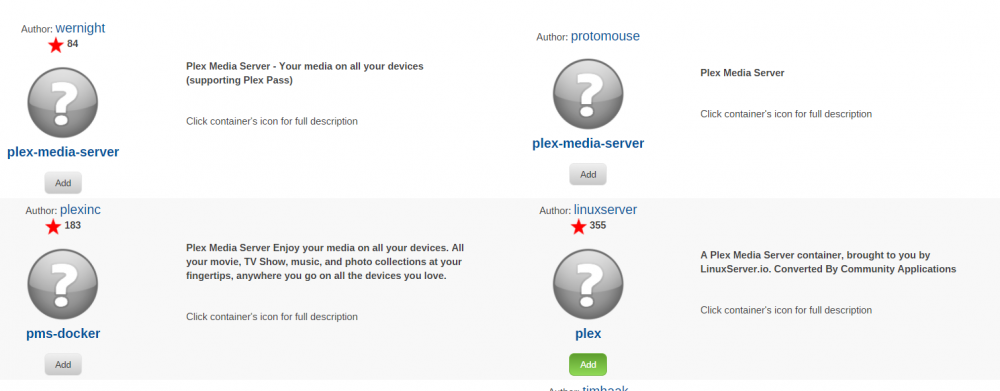
Actually I did install it through the community applications...I think so anyhow. I clicked Add for Plex
-
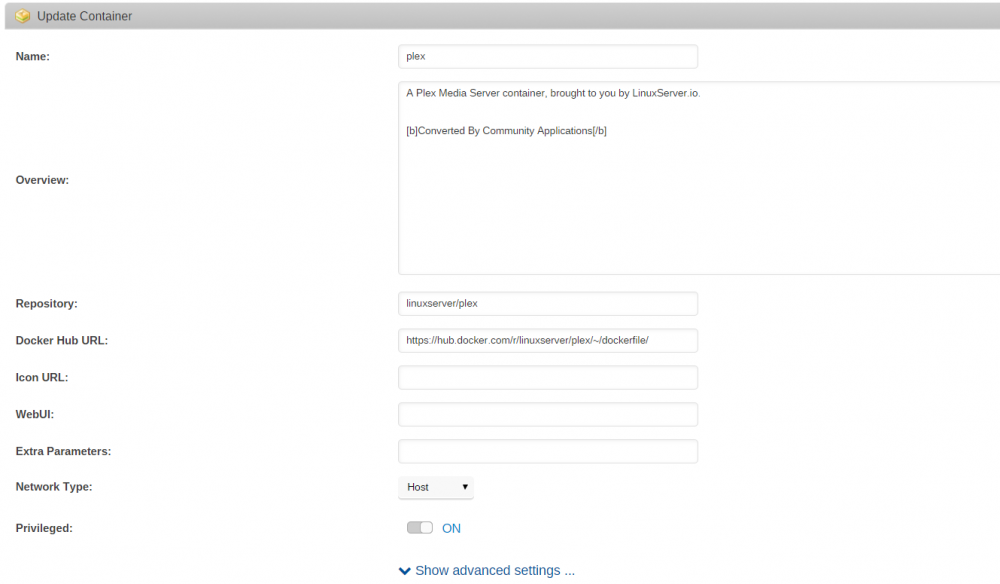
Thanks, got it! That did the trick! Another question. Do I need to put something into the Icon URL and WebUI fields above? What are they for exactly? I'm guessing there's no documentation on a step by step process etc..I hate having to ask so many basic questions. I did read about 45 pages of this thread but I'll be honest, it didn't really help me much.
-
I don't have a Media section in the docker...below is what my docker shows
-
Ok, it found the server. I guess I had to set it to host. I am running into another problem though. In the media player I am trying to add a library. I selected Movies, then add folder. Problem is I"m not seeing my movies, tv shows, music shares from my server. How do I add the folder?. I do see the option of /mnt but that doesn't seem right.
-
Ok, I figured out what my mistake was. For some reason I wasn't actually clicking the right link. I have to admit though that I'm lost. Once I install this do I have to go to the plex website and install the plex media player or plex Server on my htpc? I download the player but it doesn't find the server... Are there any step by step instructions on how to get this all going?
-
Ok, this might sound bad but I can't figure out how to install this docker, being fairly new to dockers. When I go to the Docker tab in template repositories I have https://github.com/linuxserver/docker-plex When I click Add Container I don't get anything...so what exactly am I doing wrong?
-
True. Odd coincidence...I'm not too concerned. My bigger concern is how come I don't have anything under Settings other than Unbalance under User Utilties
-
Not sure what you mean by this. After I installed the plugin I tried to stop and start the Array. When I hit Stop, the disks kept trying to unmount but couldn't. I kept seeing a message "trying to unmount....". It kept up for at least 10min so I had to eventually go to the command line and do a power down.
-
In the settings page, there should be a green link with the text Open Webui ? It isn't there for you ? Nope. Not if you mean the Settings tab in the web gui. I do have Unbalance under the section User Utilities on the Settings tab, but nothing else...
-
This is not good. After installing the plugin and trying to stop the array, I can't unmount the disks. I keeps trying and trying...crap I think I'm going to have to do a power off...
-
I just installed the plugin but can't figure out how to run it. I went to the Settings tab, under User Utilities, I clicked on UnBalance it. I then get a page with the options Enable UnBalance Server Port Run as User Am I missing something or doing something wrong?


