





DigitalDivide
Members
-
Joined
-
Last visited
Everything posted by DigitalDivide
-
Here you go. Now that you mention it, I've been having issues copying files from the cache drive lately. Speed will start out strong then drop to 5mb a sec...Maybe I have to replace it....? tower-diagnostics-20200418-1629.zip
-
Can you remind me how to do that...it's been awhile? Do you mean the system logs on the tools tab? If so se attached. tower-syslog-20200418-2016.zip
-
Emby logs just show this repeating ErrorWarningSystemArrayLogin e":"open /var/lib/docker/containers/5aba6310c42f739d5a06997294306aa75a51c259e2c87ac8dc596297c9b22e93/5aba6310c42f739d5a06997294306aa75a51c259e2c87ac8dc596297c9b22e93-json.log: read-only file system"} e":"open /var/lib/docker/containers/5aba6310c42f739d5a06997294306aa75a51c259e2c87ac8dc596297c9b22e93/5aba6310c42f739d5a06997294306aa75a51c259e2c87ac8dc596297c9b22e93-json.log: read-only file system"} e":"open /var/lib/doc I ended up stopping the array and restarted it. Emby server started up but when I try to acess the webgui I get "Emby Server is loading. Please try again shortly." After 15min it still gives me the same thing...
-
Well, I feel a little stupid asking this but here goes... I have been off the site for quite a while. I just upgraded from .6.5.3 to the newest version of unraid. I've always been using Embyserver, currently on version 4.4.2. After upgrading to the newest version of unraid, emby won't allow me to login as appuser. When I click on the support link for server it takes me to this thread. I'm guessing this is the correct forum from what I'm reading... When I upgraded the server, emby did restart and worked. Today when i noticed I couldn't login to the server, I tried stopping the docker and restarting. Emby server now won't start. It gives me error 403... Would anyone be kind enough to provide some assistance?
-
Still having a small problem. In the Sonarr forum I was asked if I'm running Sonarr as Nobody. When Sonarr is installed, when it runs what user is it running as? When it copies a file to disk, what user owns the file? I've been looking around but other than putting in Nobody in the Permissions, I don't see anything else.
-
Ok thanks, will make those changes. I'm guessing that won't change any existing folders once I save that. Is that correct?
-
I'm encountering an odd issue When Sonaar creates a season folder, Emby is not able to write into the folder. Normally when I had Emby handling the autoorganize, it would create the folder, copy the video file to the folder and then create an nfo file and a thumbnail. I stopped Emby from doing the copy of the file, which Sonarr now handles. But after Sonaar copies the file, Emby is unable to create the thumbnails. If I create the season folder first via logging in and using MC, Sonarr will copy the video file and Emby will create the thumbnails. So Sonarr must be creating the folders with some permissions but I'm not sure how to change or fix this. Any idea?
-
Ok I fixed that and it workd for 2 episodes. However, one episode gave me the following error Couldn't import episode /data/Completed/Titans.2018.S02E05.Deathstroke.2160p.DCU.WEB-DL.DD5.1.H265-NTb.mkv: Access to the path "/data/Completed/Titans.2018.S02E05.Deathstroke.2160p.DCU.WEB-DL.DD5.1.H265-NTb.mkv" or "/tv/Titans (2018)/Season 2/Titans.2018.S02E05.Deathstroke.2160p.DCU.WEB-DL.DD5.1.H265-NTb.mkv.partial~" is denied. I find it odd as it was able to copy the other tv show episodes. For ex, The Blacklist. it copied the downloaded file to the appropriate season folder. I then ran a test. I deleted the Season 2 folder. Then reran Sonarr to check for downloaded files. It then was able to create a season 2 folder and copy the file over. Is this because I was doing some cleanup and created the Season 2 folder via my windows laptop? It was either me or Emby which created the season 2 folder.
-
Well, I looked at that but still can't figure it out. Not sure why I can't figure this out. It's driving me mad. I made some changes as per the link but didn't help. Same issue. Here's what have. Delugevpn has for Container Path /data = /mnt/cache/appdata/data In my deluge settings downloads go to /data and once completed are moved to /data/completed. I don't actually have a /downloads folder. Do I need to create one? Sonarr is configured as Container Path /downloads = /mnt/cache/appdata/data Jackett is configured as Container Path /downloads = /mnt/cache/appdata/data
-
Hi, I have sonarr installed as well as Jackett and Deluge. Everything seems to work fine when it comes to downloading episodes but Sonaar is not copying the completed files to the appropriate folder. In the Sonaar logs I see the following error 9-10-3 14:01:21.7|Error|DownloadedEpisodesImportService|Import failed, path does not exist or is not accessible by Sonarr: /data/Completed/Titans.2018.S02E01.Trigon.REPACK.1080p.DCU.WEB-DL.DD5.1.H264-NTb.mkv I'm wondering if I need to give Sonaar permissions to the folder. To be honest, I'm not even sure how I do that. The path exists and I have Sonaar host path 4 for /downloads configured for mnt/user/appdata/data/Completed/. Anyone who has Sonaar working know what the problem is and can provide some guidance?
-
Hi, I just installed this for the first time and having a bit of difficulty figuring out how to configure it. I'm new when it comes to this. I am using Deluge and have it configured to download completed series to appdata\data\Completed I currently use PrivateHD torrent site where I download my tv shows. I have Sonarr configured to use Deluge and I ran the test and it worked. However System indicates I have no download client setup. For the Indexer I'm not sure what I should be using. In Settings under Torrents, I don't see PrivateHD so not quite sure what to do. I'd appreciate some assistance.
-
Well turns out my problem was not resolved. I tried enabling the AutoAdd plugin which is listed in the preferences in the Deluge Gui, they get added to the download screen but don't actually download. So I disabled that. THe only way I can get the torrents to download is from the Deluge Gui selecting Add, then manually adding each torrent. For whatever reason, whatever was configured before I upgraded the docker, something changed as Deluge will not pick up the downloaded torrents and add them to the gui and download. I'm now wondering if the AutoAdd plug in the Deluge Preferences broke due to the new version of Deluge....
-
I don't see a watched folder option but I noticed under plugins there's one for autadd. It's not enabled. I don't recall if I ever had it enabled but I just did and set it to my torrents folder and it now seems to be working...
-
I'm not using any other software other than the deluge vpn docker. As I said, the torrent files which I save to my torrents folder are not being picked up, either by the docker or deluge, so the files are not being downloaded.
-
Is there a place in the docker where one configures where the torrents should be picked up from or is that a deluge config parameter? I only thought it was a docker issue as the problem occurred when I updated the docker.
-
What happens is I always manually download the torrent to \\TOWER\appdata\data\Torrents. Then deluge grabs the torrent, moves it to \\TOWER\appdata\data and downloads it. Then when done the torrent file is moved to \\TOWER\appdata\data\Saved Torrents. After the upgrade, when I download a torrent to \\TOWER\appdata\data\Torrents. It just sits there and doesn't get picked up, so not moved or downloaded.
-
I don't think is is a problem with Deluge bur rather the docker....in my case I think so anyhow... If you go into the Deluge Console, then click Files, and point to a torrent file you downloaded into a folder, then click Add, does it download? Mine does
-
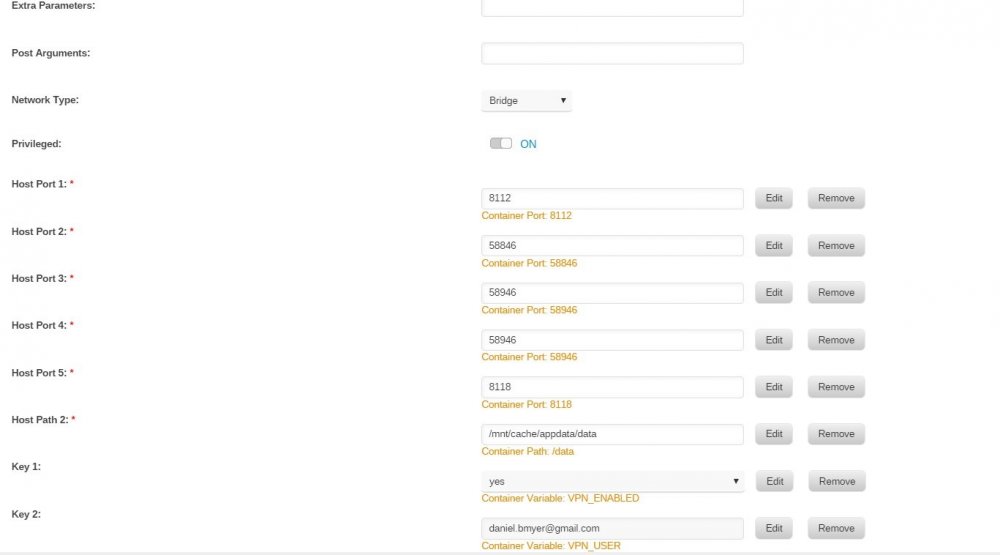
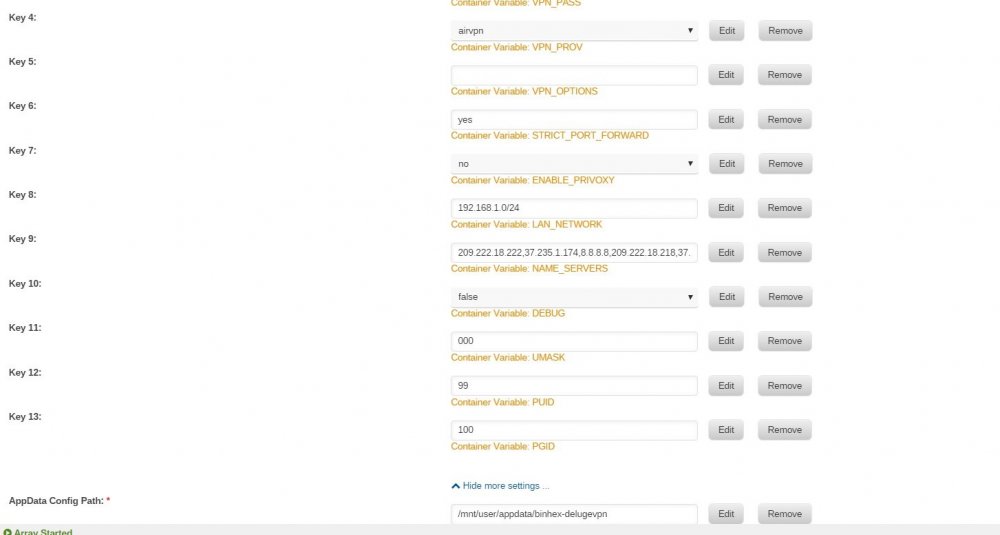
Just discovered that if I go with the deluge console and select add torrent and grab the torrent from the folder I saved it to, it loads it up and downloads the file. So...I'm guessing that somewhere in the docker it's not seeing the folder where I download the torrents to? I'm just not sure where that is configured....
-
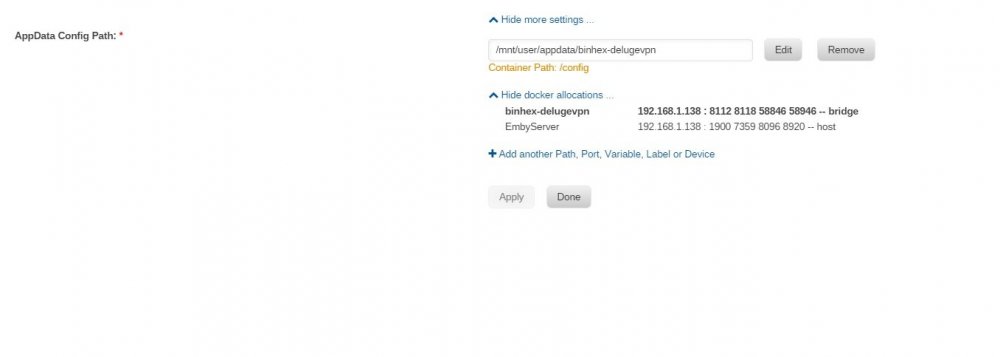
Attached is what I have configured, seems same as it was before
-
I just upgraded to the latest version of this and now none of my downloads are working. I've been using the previous version flawlessly on a daily basis. Updated the version last night and now it's not working. My downloaded torrents are not being picked up although the uploads are working. Not sure where to start troubleshooting as I've been using this for years and never ever had a problem. This is the first ever problem so at a loss right now. Is there a log I can grab for this? I'm also still using Unraid version 6.5.3
-
Wow! That did the trick. I've been trying to figure it out for months, searching all sorts of forums. I guess I should have come here first! Many thanks, much appreciated!
-
Oh man...now I can access that drive but now I can't access my cache drive. WTH is going on? Now when trying to access my cache drive I get the same error. Could there be something going on with the connections? I'm connecting via Add Network Place then pointing to a folder on the drives since Tower doesn't show up when browsing the Network. Ok so I removed the shortcuts under Network Places and I can now access the drives. It's odd, haven't had any problems for 6 months and now I do. I just wish I could get Tower to show up under Network Places
-
Something funky is going on. It wouldn't connect all day, now I just happen to try one more time and lo and behold it worked. I didn't change or do anything. I'm starting to think maybe I would be better off adding it to the array as a cache drive. I use it to store temp tv shows I download and watch.
-
Nope, doesn't show up. I can also type tower\unassndisk into the browser and get the same error. I don't know what happened. It was fine a few days ago.
-
Oops made a mistake. I can play a file from the disk using Emby Server Just can't figure out why I can no longer browse to it


