





DigitalDivide
Members
-
Joined
-
Last visited
Everything posted by DigitalDivide
-
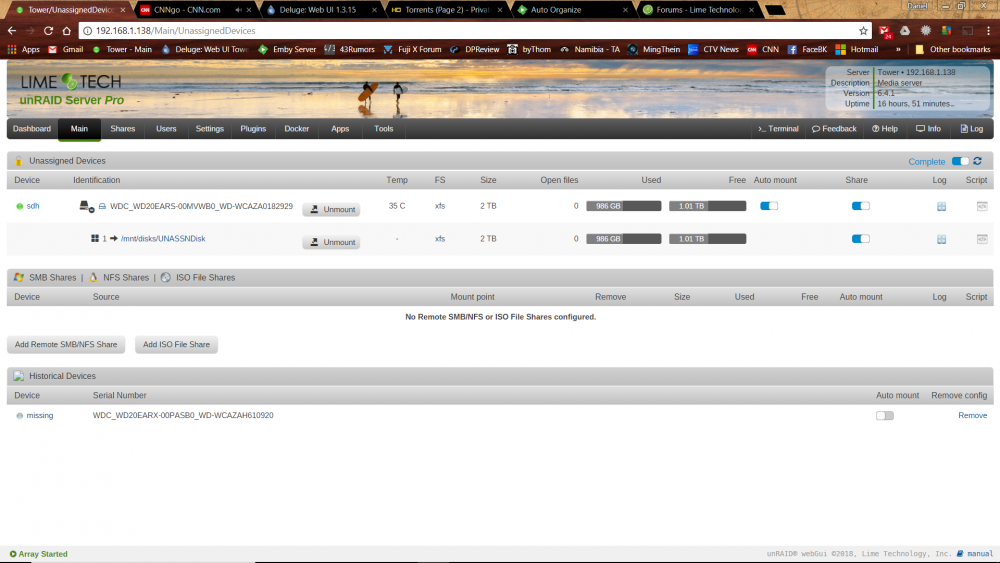
Need a bit of help with my unassigned disk. It's been working fine for the last 6 months or so but yesterday even before I upgraded to 6.4.1 it's became inaccessible. When I click on the share in Windows Explorer, all of a sudden I'm getting "disk is unavailable". If explore the Network, it no longer shows up with the rest of my disks. I use to see it as "Disks" I believe I can use MC and access it and browse it. I can also browse the files via unassigned devices on the main page. However if I go to Emby Server on my tower I can't play any of the files that are sitting on that specific drive. I can mount the device and unmount no problem. I'm at a loss as to what's going on. Any help is appreciated!
-
Yup, I was just reading it now. Ok, no big deal. At least my upgrade went nice and smooth. Just copying my data back to my cache drive and I'll be back up.
-
One last question. I upgraded to 6.4.1 and all looks good. However, I uninstalled the preclear plugin/app but can't figure out how to reinstall. I went to Apps but don't see it anywhere.
-
Ahh ok, thanks!
-
I would like to reformat my cache drive but not sure how. I don't see a format option.
-
Oh very nice. Good to know. Now I'm just reading the upgrade notes to move from 6.3.5
-
Ok, well started in Maintenance mode, then stopped, then started without Parity check..all looks good for now... It's been awhile now...remind me how we make a backup flash? I believe it has to be purchased, is that correct?
-
I tried to stop the array but my tower then became unaccessible. I had to do the dreaded power switch...Is there a way to start up without running a parity check? If I click Start it will run parity. I just ran one last week without errors so don't want to run it again. Not sure if Maintenance Mode will do the trick...
-
My flash has been sitting in the same port for the last 6months...it sits in the back which is nearly impossiblel to touch unless I move my server out of it's place. I hope my flash isn't failing...I'll reboot...keeping my fingers crossed.
-
Well, woke up this morning and seeing something strange going on with my unassigned disk. Can't access the disk all of a sudden via Windows 10 laptop. I can login to Tower and using MC get to it and as well I can access the files via Emby Server Console. When I go to the Tower Main Gui Page I see the following error Warning: Invalid argument supplied for foreach() in /usr/local/emhttp/plugins/unassigned.devices/include/lib.php on line 925 Warning: Invalid argument supplied for foreach() in /usr/local/emhttp/plugins/unassigned.devices/include/lib.php on I tried unmounting the drive and remounting...same problem. I then went to the Apps page and see this error....what the heck is going on? Everything was fine last night when I went to bed. Attached is my syslog. I'm seeing lots of warnings on my disk...not sure exactly what it means.. Warning: parse_ini_file(/boot/config/docker.cfg): failed to open stream: No such file or directory in /usr/local/emhttp/plugins/dynamix.docker.manager/include/DockerClient.php on line 39 Fatal error: Uncaught UnexpectedValueException: RecursiveDirectoryIterator::__construct(/boot/config/plugins/dockerMan/templates-user): failed to open dir: No such file or directory in /usr/local/emhttp/plugins/dynamix.docker.manager/include/DockerClient.php:63 Stack trace: #0 /usr/local/emhttp/plugins/dynamix.docker.manager/include/DockerClient.php(63): RecursiveDirectoryIterator->__construct('/boot/config/pl...', 4096) #1 /usr/local/emhttp/plugins/dynamix.docker.manager/include/DockerClient.php(92): DockerTemplates->listDir('/boot/config/pl...', 'xml') #2 /usr/local/emhttp/plugins/dynamix.docker.manager/include/DockerClient.php(222): DockerTemplates->getTemplates('all') #3 /usr/local/emhttp/plugins/dynamix.docker.manager/include/DockerClient.php(331): DockerTemplates->getTemplateValue('binhex/arch-del...', 'Registry') #4 /usr/local/emhttp/plugins/community.applications/include/exec.php(56): DockerTemplates->getAllInfo() #5 /usr/local/src/wrap_post.php(27): include('/usr/local/emht...') #6 {main} thrown in /usr/local/emhttp/plugins/dynamix.docker.manager/include/DockerClient.php on line 63 tower-syslog-20180219-0853.zip
-
I'm still a little unclear if any of these plugins actually will move the downloaded file to the appropriately folder according to the filename? Am I misunderstanding? I installed the Emby Auto organize plugin but don't see where it allows you to choose where to copy the files to....
-
I suspect there's something already out there for what I'm about to ask but don't know what it would be called... I use Delugevpn and Emby Server dockers. I was looking for something that would watch my completed torrents folder and any new files in that folder it would move to the appropriate folder on another disk that contains the TV Series name So if I download a torrent such as The.Flash.2014.S04E12.Honey,.I.Shrunk.Team.Flash.1080p.AMZN.WEB-DL.DD+5.1.H.264-ViSUM.mkv it would use some logic and move the file automatically to my "The Flash" folder. I have all my tv shows arranged by tv series name.
-
It's from my cable provider it's a router/modem and does wireless. I believe it's a Hitron. Should I be looking at getting a separate router?
-
Is it Airvpn that is causing the problem when you say cpu intensive? It doesn't appear to be my router as I'm running deluge now with the VPN disabled and having no problems. As soon as I enable the vpn, it gets worse. I do have caps set in deluge as per my earlier post about 10 posts back.
-
I'm just surprised it was running so easily on my raspberry pi without any issues on my net. Granted I wasn't using a vpn.
-
One thing I noticed that on my Unraid Dashboard without the DelugeVPN running, my avg cpu load is about 5% with a few jumps up to 18% rarely. With Deluge enabled it jumps to about 20% with jumps to 40%. Not sure if that's a normal amount. Memory stays at about 30% and I only have Emby Server running.
-
It's still killing my network connections even with those settings. Previously to use Deluge VPN I was using a Raspberry Pi torrent server and had all my settings set to -1 and had no problems with my network. RIght now just streaming cnn to my laptop wirelessly seems to be not as smooth. If I turn off the docker, back to normal....
-
The problem is I work from home via a vpn. It seems like since I've been using deluge, my apps crash or lose their connection. Plus my internet is laggy. I'm wondering if my settings above in Deluge for the bw would like about right.
-
While I'm at it, want to make sure I did this correctly. I created a port foward at AIRVPN, then took at port number, went into Deluge, Network, unchecked Incoming Ports, Use Random Ports, and manually entered in the port number I created at AIRVPN. Is that correct? That's the only item I needed to change, nothing for outgoing but random? ...or do I need to create a port in the docker for the AIRVPN port?
-
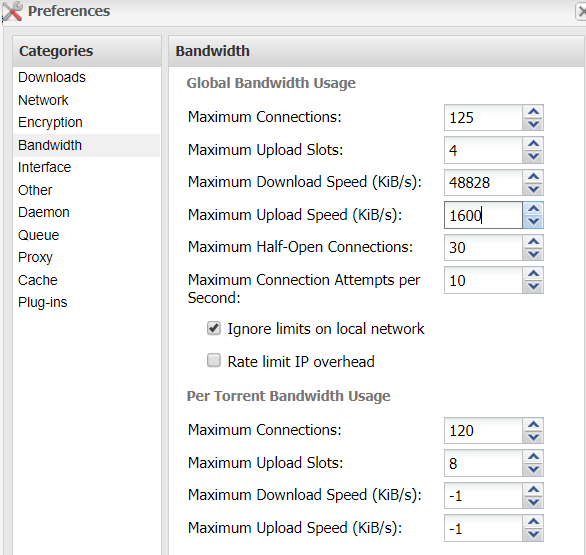
I need some help on this one. So ISP plan is 500mbps down and 20mbps up. Which is megabits right? Deluge is is KiB/s which is Kibibytes rights? So 500mbps = 24414KiB/s and 20mbps = 2441KiB/s...right? So does the below look ok for deluge
-
I installed the DelugeVPN docker and am using airvpn for the last few weeks. Ever since using DelugeVPN and Airvpn, it seems that while my downloads are fine when downloading torrents my overall internet speed seems to have slowed quite a bit for non deluge related items. So, bring up the Unraid main page, browsing internet etc, all seem much slower and I'm wondering if these apps might be causing this and how to check verify what the problem is?
-
I ended up replacing the drive. I remembered I had an extra 2TB drive laying around somewhere so popped that in.
-
Well, if I go to Tools, Preclear, then click Preclear, ,it shows two disks which are unassigned. The disk in question shows Start Preclear on the far right under Status. Do I need to click that to get it started?
-
I haven't used the preclear for awhile but just tried preclearing a disk but I don't think it's doing anything. I'm using version 2017-9-27 The only thing I see right now in the window after 20min is following. Should I be seeing more? I also just closed the browser window that contained the info below....is there a way to see if there's progress? Also before I started the preclear, the disk status was green, now it shows as greyed out but the start preclear button is still showing. /usr/local/emhttp/plugins/preclear.disk/script/preclear_disk.sh --cycles 1 --skip-preread --skip-postread --no-prompt
-
Hmm maybe spoke to soon. I'm getting up to 4 MiB/s. I think I'm good.



