





DigitalDivide
Members
-
Joined
-
Last visited
Everything posted by DigitalDivide
-
For some reason, now when I boot into BIOS it won't recognize my keyboard anymore..
-
I just rebuit a new server and now can't boot from my Unraid USB. The server either boots to Start PXE over IPv4 to back to the BIOS. I tried enabling Legacy USB support, tried selectiing various options. The boot order shows my sandisk for 1 and all others disabled... Just not sure what I'm missing. I have an ASROCK Z690 Steel Legend Motherboard
-
Thanks
-
Nevermind figured it out. Used teh 8pin connector
-
I have a Be Quiet Straght Power 12 750W PS. It has a cable labled CPU1/P4 and CPU2/P8 both 4 pin. I also have an 8pin cable labeled P8. My Asrock Z690 Steel Legent motherboard has two 8 pin 12V ATX connectors. I'm a little unclear which cable to use. I've never come across this before. I'm assuming I can just plug in the 8 pin P8 but not sure. Any one have any idea?
-
I'm rebuilding my server as my motherboard died. Everything was pretty old so starting from scratch. I have everything pretty much done but just wondering if there are any general bios settings that motherboards should be set to for the SATA drives or anything else other than booting from a USB flash drive. I have an ASROCK Z690 Steel Legend. I haven't built a server in a long time and haven't kept up so just wondering if there's something I should be looking out for.
-
I'm hoping I can get some feedback on a question somewhat regarding the above video for the cache drive. In my current server I have 9 drives, 1 is the cache and 2 are unassigned. My new MB has 8 SATA connections. I will be swapping out my hard drive used for the cache for an NVMe M.2 SSD. As my MB has only 8 SATA just looking for best steps to replacing the cache and then putting in the unassigned drive I don't have room for until I replace the cache drive. 1. install all my existing drives except one unassigned drive 2. Boot up and set the drives in the same order they were in my old drive - do I need to do anything else like a new Config or something? 3. Back up cache drive as per video above 4. Power down, take out old cache drive and put in new NVMe one a. Should I now put in my other unassigned drive or should I still leave it out and first get the cache drive working? 5. Boot up server, assign new drive to cache and restore contents 6. Power down and now put in the unassigned drive or should I do it in step 4 above. 7. Boot up and assign drive as unassigned drive
-
Thanks. To be honest, I'm not even sure how I would use it. If I want to say copy a movie to a share on my array called Movies. Do I copy the file to the cache drive, then Mover will copy it to my Array? How does Mover know to copy the movie to my share called Movies? I guess I'm lacking some info on how to actually use a cache drive.
-
Thanks for the info! Much appreciated! Ordered all my new equip.
-
Hi, I am currently rebuilding my server as my motherboard died. All equip is pretty old so rebuilding from scratch. I'm wondering if in my case, there's any benefit to having a cache drive. I basically use my server as storage for movies, music and photos. I have 5 drives in the array. I use Sonaar, Radarr, Emby and Deluge VPN. I use Emby server on my Nvidia Shield TV with Emby to watch movies or listen to music. I also have two unassigned devices not part of the array. Deluge downloads to one drive that is an unassigned device and Sonarr and Radarr will then copy the downloaded file to another unassigned disk. These are all files that are just temporary. Deleted once I watch them. On some occassions I will copy the downloaded file to my permanent library in the array. So I'm wondering if I'm actually getting any benefit of a cache drive?
-
Oddly enough I was just looking at that now but I'm not sure how to replace it. Is there anything installed on the cache drives? Now that my system is dead, I can't tell what's on there. Where are the dockers installed? Can I determine that by looking at the usb boot drive? This is my current build of drives, https://photos.app.goo.gl/5VQoyDtVSawDCG2b8 I guess I can leave both unassigned devices out, just leave in the data drives and cache drive, boot up. Then replace cache drive with a NVMe SSD. Then power down, pop in the unassigned drives and boot back up. Would that work? Can I backup the cache drive, install the new one, then restore the cache drive contents? I haven't played around with building a server in so long...I feel a little lost to be honest. Thanks for the help!
-
I'm rebuilding my server as my current motherboard died. My server is pretty ancient and so rebuilding it. I feel a little out of my league in looking at parts these days. My age must be getting to me.... I've decided the MSI PRO Z690-A DDR4 Motherboard ATX, https://www.amazon.ca/gp/product/B09GLD6LYW/ref=ox_sc_act_title_6?smid=A3DWYIK6Y9EEQB&psc=1 I need to add additional drives (have 9 is my current system) and was wondering if this card would work, LSI Broadcom SAS 9300-8i 8-Port 12Gb/s SATA+SAS PCI-Express 3.0 Low Profile Host Bus Adapter, https://www.amazon.ca/gp/product/B00DSURZYS/ref=ox_sc_act_title_8?smid=A240943LWF17Y3&psc=1 Is there a diff card others would recommend? Also I'm not entirely sure what cables to buy for that, is it simply a SFF-8643 to 4X SATA, I was looking at this one but not sure if it's correct, https://www.amazon.ca/gp/product/B01M1D8ICT/ref=ox_sc_act_title_4?smid=A3DWYIK6Y9EEQB&th=1 Any assistance would greatly be appreciated
-
The problem right now is I'm spending my money on replacing my whole server so upgrading the drives at this point willl have to wait. The motherboard died. It's pretty ancient and so decided to rebuild it. My build that died has 1 parity drive, 5 data drives, 1 cache drive and two unassigned devices I want to keep separate. So 9 drives in total. My parity is 6TB and the rest 4. Once I get it up and running I can work on replacing the drives. I don't see a way of rebuilding my server and swapping out the drives at the same time.
-
I've been looking at that and decided to go with an ATX with 8 onboard SATA ports. Not sure if you know the answer to this but I also am looking at getting this LSI Broadcom SAS 9300-8i 8-Port 12Gb/s SATA+SAS PCI-Express 3.0 Low Profile Host Bus Adapter. I'm just not sure what cables I need to attach that to my drives. I'm assuming it's this one but want to make sure, https://www.amazon.ca/gp/product/B01M1D8ICT/ref=ox_sc_act_title_1?smid=A3DWYIK6Y9EEQB&th=1
-
Well, my current motherboard died as it's pretty ancient. So now it's time to upgrade. Problem is I've been out of building a server for quite some time. I'm looking at getting a Fractal Design Define 7 for the enclosure but really not sure what to get for the motherboard and hoping to get a recommendation. I need support for 10 x 3.5 drives. I really only use my server to store my photos, music and movies which I stream to my Nvidia Shield TV and Home Theater. I mostly only use a few dockers such as Sonarr, Radarr, Deluge VPN, Emby Server. So not really taxing the server. Would anyone be able to recommend a motherboard? Don't want to really spend more than $200 if possible. Thanks
-
I updated Jacket this morning ( Version update eea7..ee02) and now I am getting an error. An error occurred while testing this indexer Exception (privatehd): Invalid status code 503 (ServiceUnavailable) received from indexer: Invalid status code 503 (ServiceUnavailable) received from indexer Click here to open an issue on GitHub for this indexer.
-
Thanks much appreciated!
-
Ok, that did the trick. One last question. I see it contains the data I had on it previously. I can manually delete it all but wondering if it's just quicker to format it. If I want to format it, how would I do that?


-
Do where do I find that exactly. I can't find anyplace where I can change the drive uuid
-
I replaced an unnassigned disk that was going bad by buying a new drive which I used to replace an existing data drive in the array and then used that disk to replace the bad unassigned disk. However, it won't mount. Is it because I need to format it ...which I'd like to do but not sure how once it's all plugged in or is it because it recognizes it as a drive that was in the array? I'm not sure what to do at this point to mount it. I see this in the disk log for the drive Aug 20 06:02:12 Tower kernel: XFS (sdc1): Filesystem has duplicate UUID 7e86783e-dde7-4256-879e-46d4aa1884ae - can't mount Aug 20 06:02:12 Tower unassigned.devices: Mount of 'sdc1' failed: 'mount: /mnt/disks/UNASSNDisk: wrong fs type, bad option, bad superblock on /dev/sdc1, missing codepage or helper program, or other error. ' Aug 20 06:02:55 Tower emhttpd: spinning down /dev/sdc
-
I have an unassigned disk going bad that needs to be replaced. I'm a little unsure what the process is. Do I just unmount it, pop in the new disk? I see the below info for disk1 which is the drive that needs to be replaced. I want to make sure the new disk keeps the same share name. Any guidance would be appreciated.

-
I can get to the ip of teh IPMI interface but could never really get it working after years of trying to. I ended up removing the cmos battery and shorting the pins. Then rebooted and got to the set date and time funtion after buying a vga to hdmi cable which I didn't have. Problem is I now need a keyboard which I will buy today. Hopefully, once I get that set in the bios I should be up and running. I think it's time I started thinking of upgrading my system anyhow. I think I'm going to buy some parts slowly over the next 3-5 months. Just first have to find a good mATX MB/CPU combo
-
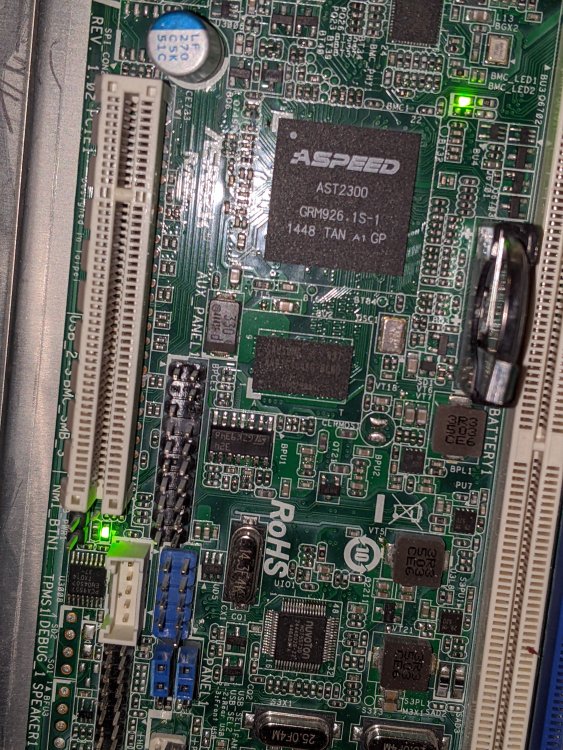
Hoping to get some assistance with my MB. I was moving some stuff around and unplugged my server. When I powered it back up, it won't boot. I'm heading out to get a VGA to HDMI adapter so I can see exactl what's going on but one thing I did notice is that there are two green lights that are on. One starts flashing after a bit but the other remains solid green. If you look at the attached pic, it's the one on the bottom left. Looks like it might be the Non Maskable Interrupt Button but I'm not entirely sure what to do about that. Thought maybe someone here might know.
-
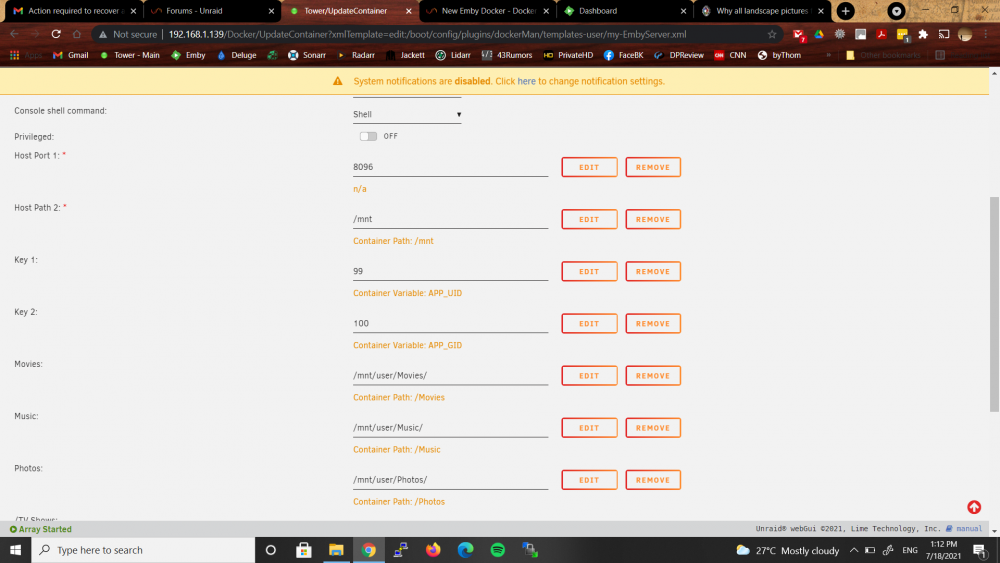
I'm wondering if something recently broke in terms of viewing photos? For some reason Emby is no longer view the jpgs in my photos folder. It was last working a few weeks ago...as far as I recall. I checked the docker config and it's still set to /mnt/user/Photos/ Container path is /Photos If I go to the Emby Server library and check the config it's still set to /Photos I reran an scan of the library. I can see the subfolders for my trips but each subfolder shows no files. They are all jpg. I even created a new library using /Photos and same thing. On the unraid tower shares tab and click Photos I can see the subfolders and if I click the subfolders it does see the jpgs. All my other libraries for music and tv shows which follow the exact same structure all still work oddly. I am running emby server 4.6.4.0 I even restared the docker. Am I missing something?
-
I went from preview, then removed the preview tag. It seemed to update or reinstall but It lost all my settings. So I removed and reinstalled and it installed V3 and all my settings came back. But all is working now.


