DigitalDivide
Members
-
Joined
-
Last visited
Everything posted by DigitalDivide
-
Ok, now this is weird. I was playing around again this morning and tried putting in the ip of deluge for the bypass...for the 20th time...and now it works...I have no idea why lol BUT I'll take it. Thanks for the assistance. Very much appreciated! EDIT: One question. The IP I am using for the bypass is what you listed above but it's the same ip for deluge, radar, sonarr. The only difference is the port. Do I have that correct?
-
Ok, put in the ip I am using for delugevpn into Chrome and I did get a diff ip and am able to browse the web. So, I know that works at least.
-
I'm hoping someone can take a look at my log file to see why I can't use the proxy anymore. I just can't figure this out. In Sonarr I see a message that indicates it can't connect to deluge, the operation timed out. sonarr.debug.txt
-
I'm wondering if I should install privoxyVPN. I'll take a look at it.
-
You are correct. I am using Binhex's DelugeVPN, with Sonarr and Jacket. I have Delugevpn setup to use my airvpn account. I'm not sure how to point my browser to the proxy as I'm not sure what exactly that IP is. Which IP should I be using? Problem is I just configure my stuff and use it and don't really poke around here....until something goes wrong and then at that point so much has changed I can never really figure everything all out.
-
To be honest with you, I don't even know what privoxy is. I just know things were working and now arent. I can get it working by disabling the proxy in Sonarr, but really hate doing that. But I guess I will do so for now
-
I see there was an update to the docker. I removed the preview tag and restarted. Then updated the docker. Now under dockers. Sonarr is showing Unavailable for the version. Sonarr is working though...just wondering if I did something wrong or if this is normal?
-
Even if I'm not using privoxyVPN?
-
I was grabbing shows daily right up until the upgrade to V3. I had upgraded the containers the day before and was able to download. Sonarr stopped working (still using version 2) when V3 was released. Then read about the preview tag for version 3 and so tried that. Still didn't working until I disabled the proxy.
-
Didn't work. I assume for ip of download client, that would be deluge vpn and the ip is what I see on the docker tab for deluge. I tried with and without the port but didn't work. As soon as I uncheck Use Proxy it works.
-
Hi, hoping to get some assistance with Sonarr. Since the upgrade to 3.0 Sonarr has stopped working I use Jacket, Sonarr and DelugeVPN and Airvpn I had in the settings area for Proxy, checked. Then https, hostname and port filled out, then bypass proxy for local addresses. This worked fine until version 3. In reading posts above, I applied the preview tag. However, Sonarr still didn't work. So I uncheck the Proxy box and restarted and Sonarr now works. How do I get my proxy to work? Is what I had configured no longer a viable option and I have to find a diff solution? Thanks in advance.
-
Ok, managed to get the "test" one installed and it resolved my issue.
-
Just uninstalled and reinstalled but same problem. For the previous version do I just put in the following binhex/arch-delugevpn:2.0.4.dev38+g23a48dd01-2-15
-
are there any instructions on how to do this? I have no idea about tags. Do I do this on the command line?
-
HOw does one roll back to the last known working version?
-
I just applied the docker update that was just realesed and now I can't connect to the web gui. I get "the site can't be reached". Worked fine until I applied the update. I went in and disabled the VN Enabled option and it works. I use air vpn and went to the website and my id and password works and my account is active.
-
Just wondering if there's going to be a version 3 update at some point? There's some functionality in version 3 that's not in 2 that I woud like to have...just curious... Is there a way I can keep version 2 and try version 3 preview? if so, how would i go about doing so?
-
I ended up uninstalling and reinstalling. Solved the issue
-
That's what's odd. I already googled it and did a drop database nextclout but it didn't do anything
-
How does one delete a database? I had put in the following typo by accident create database if not exists nextclout I realized my mistake and did it correctly and named it nextcloud but I'm guessing I now have 2 databases created and would like to remove the nextclout.
-
This might be a silly question but for airvpn they have a config generator for the server or country I want to use. You have to select the OS. There's Windows and a Linux option among others I'm assuming I select Linux but just want to make sure that's correct.
-
One more question. Turns out the photo app is totally useless. Sharing of photos was the only reason I installed NC... After doing a bunch of searching I see there's the old gallery app that's been forked. How do I install this if I am even able to. Not sure if this would work on unraid. https://github.com/pandorra2/gallery/releases/tag/quickfix Any help is appreciated
-
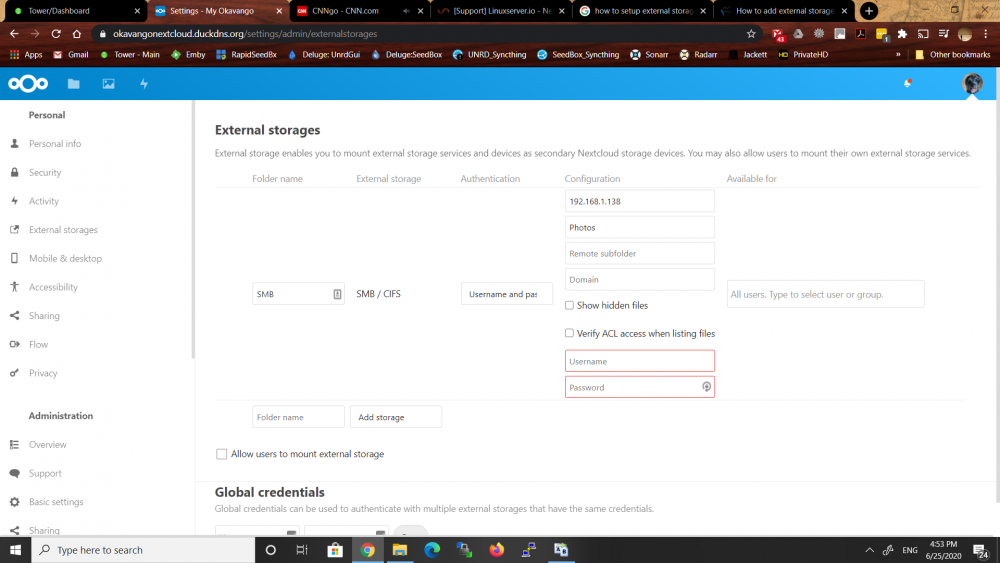
One more question. Would someone provide some assistance on how to setup external storage...I have the following so far but not sure what else needs to be done. I would like to share my Photos share /mnt/user/photos/namibia2017
-
Boy oh boy, my nextcloud is so slow. I uploaded some photos and when clicking on the folder takes forever to view the photos. Clicking on anything in NC is very slow, ex clickng files, apps, settings.. Is there anything I can do to speed this up?
-
For the above, even though I don't have the share link...if I click the white space to the right of the modified time I get the below opening up and if you see the 3 dots next to the share link on the right, they only appear when I click the white space next to where dots should be... Not sure what's going on...