





Rysz
Community Developer
-
Joined
Everything posted by Rysz
-
Well you can try: killall -9 mergerfs And see if that unfreezes your server. I really don't see how it can be mergerFS though, when there's zero indication in the logs (apart from garbage collection, which actually says that mergerFS is still operating normally at that point) and tons of users are using it without any problems... unless something in your configuration causes this (which I don't think either, because it works 90% of the time).
-
Nothing stands out, I honestly have no idea. 😞
-
Can you do: cat /var/log/syslog And see what the last log lines are?
-
Ok, that rules out the theory of a full rootfs ramdisk. Did you test your RAM sticks with memtest in the meantime?
-
Can you try: df -h /
-
Please post the NUT Debug Package found on NUT Settings page.
-
Glad it all works for you now! 🙂
-
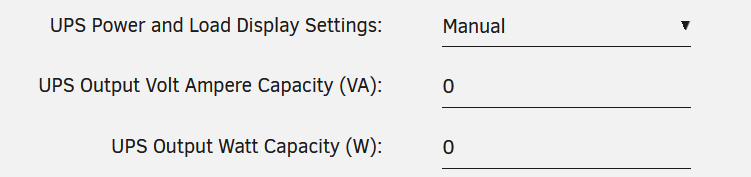
That's great, because from UPS Load the other missing variables can be calculated. Now set these settings: Instead of 0 put here the nominal 2000VA and 1600W of your UPS and you should see the other variables now 🙂
-
Sorry, there's no news on that. It's still a known issue both with APCUPSD and NUT that is likely related to the UPS firmware being different or broken somehow (which in my opinion is the more likely scenario). Again, in my personal opinion, it's a very low quality production UPS (which does make sense at that price) that I personally wouldn't trust to protect my devices in its current state. I've read not many really positive reviews about it either so far, apart from the price point. I think the only option, if it's still new, is to try to return it for another better (APC, ...) model or series that's known to be working better with NUT. This is my personal opinion and not that of the NUT developers.
-
This, but before doing that I'd make sure those drives are in fact dead and not just dropped offline because of another unrelated issue.
-
How did 7 drives just die and how are you so accepting of the fact? Did you try connecting those presumed dead drives directly to a PC to ensure they are in fact really dead? Are you sure your LSI is not just dropping offline because of over-heating or this perhaps being some sort of cabling issue? I'd take a step back and assess the situation once again before just sending out your drives somewhere. It'd certainly help to get better support here if you included your diagnostics package from your server, so please do.
-
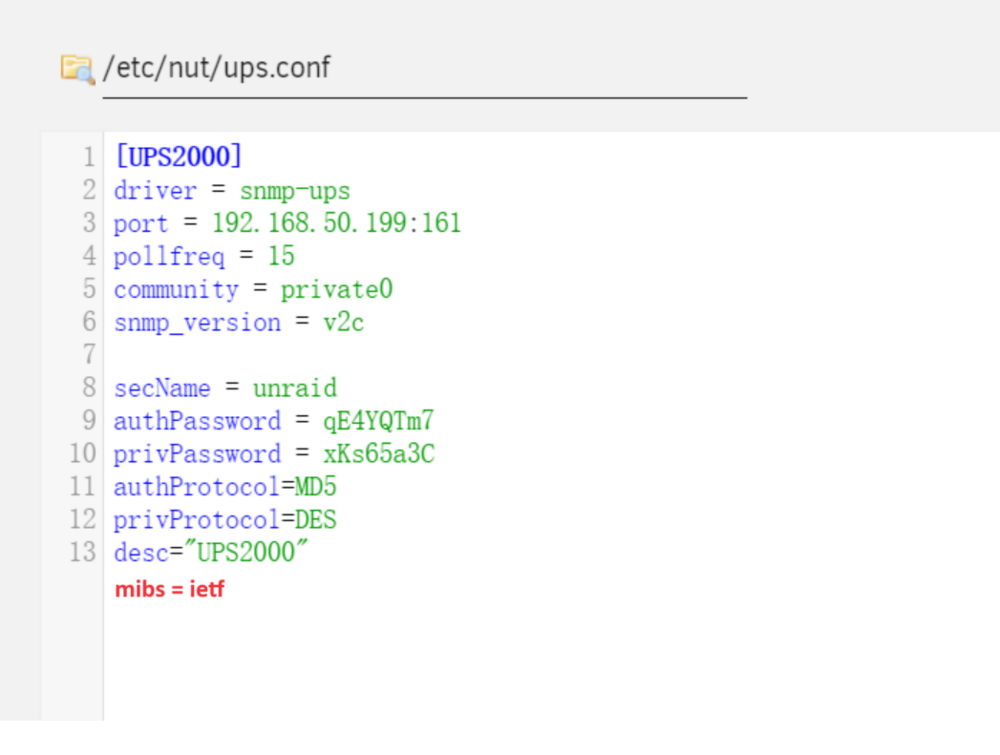
Hello, glad you got it working with SNMP. There is not really a way to improve the values being read, as that is hard-coded into the driver. Can you try adding this setting and see if anything improves?
-
@Squid ?
-
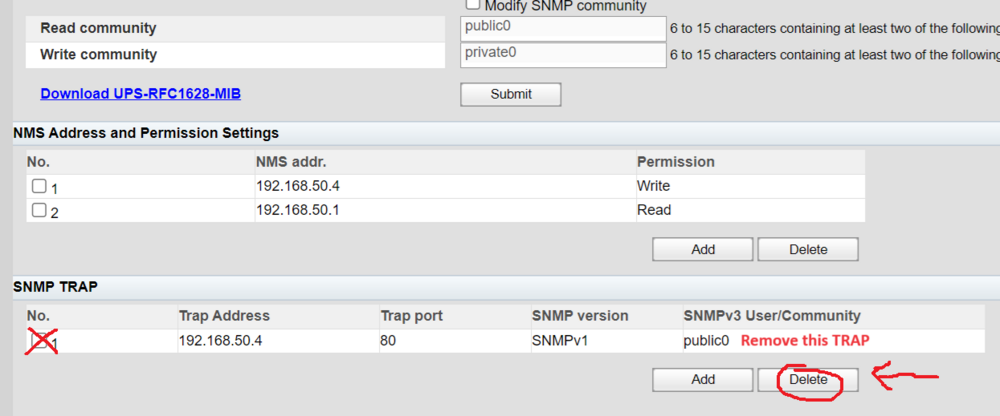
It should work with your UPS because it uses the RFC standard. Can you try changing the settings as follows: If this doesn't work, please run these commands and post the results: nut-scanner -S -s 192.168.50.198 -e 192.168.50.200 -c public0 nut-scanner -S -s 192.168.50.198 -e 192.168.50.200 -c private0 nut-scanner -S -s 192.168.50.198 -e 192.168.50.200 Last resort, check out this Chinese guide I found for your UPS with SNMP: https://post.smzdm.com/p/adm62dkk/ They got it working with SNMPv3. It should definitely work with SNMPv1/SNMPv2 also, but in the worst case you can try the guide from this post and use SNMPv3 (which is far more complicated, but also more secure). Please let me know what worked for you in the end!

-
Can you try put the as the UPS Driver Port: 192.168.50.199:161 Then set Start Network UPS Tools Service to No --> Apply --> Yes --> Apply If it doesn't work then please post the relevant SYSLOG lines so I can see what NUT does... 🙂 Also please download the MIB file from that page and post it here, so I can see if it is NUT compatible!
-
Apparently you don't just need the widget, you also need the PeaNUT program running. "This widget requires an additional tool, PeaNUT, as noted. Other projects exist to achieve similar results using a customapi widget, for example NUTCase." => https://github.com/Brandawg93/PeaNUT
-
Any news?
-
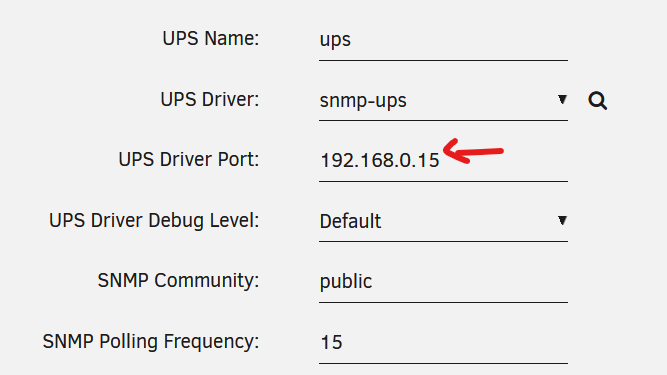
It can also work with SNMP, because for SNMP you would use another driver and not "huawei-ups2000" (that is only for a physical connection to the UPS). If you use SNMP, you would use the driver "snmp-ups" and set the UPS Port to the IP of your SNMP card (see where the red arrow is in the screenshot). This would be an example SNMP configuration: But beware you need to make sure that the network connection to your UPS stays available in a power outage, so any switches also need to be connected to the UPS.
-
Your settings are not correct, please try this configuration instead and let me know:

-
OK, I updated my before post with two more commands to run when it gets stuck - should hopefully narrow down the problem.
-
OK that's very interesting because if you restarted via reboot command it should show more in the syslogs. It should show it shutting down services, the array etc... but there's nothing after your last SSH login, which again makes me think that the ramdisk is full or otherwise unwritable at that point. The next time it gets stuck, don't instantly reboot, but SSH into it first and run the following commands: df -h and cat /etc/mtab and ls -la /mnt Please post the output of those commands here then, before rebooting your server. Feel free to enable mergerFS again and wait for it to get stuck again, just so we can be sure. 🙂 Also... where did you put the mergerFS mount commands, how are you running them?
-
Well there's nothing in the logs to indicate a failure of any kind around those times, related to mergerFS or not. But the fact that it fails to even generate a diagnostics package makes me think that the rootfs-ramdisk (at /) is either full (with some plugin writing to it non-stop filling it up), not accessible or otherwise broken somehow. It isn't even able to write the syslog or any other files into the diagnostics package, which would lead me to my earlier belief that it has something to do with the RAM. How much RAM do you have on your server? How did you shutdown your server after it crashed - because there's nothing in the logs anymore after your last SSH login to the crashed server.
-
OK and where are the logs from what happened before 01am? Because the server seems to have crashed and rebooted at 01am, we need to know what happened before. There's no indication in the logs that mergerFS isn't operating as it should. The opposite actually, it doing garbage collection until the very end of your logs shows it's still running. 🤔
-
Something is taking down your system at night: May 17 01:00:35 Plexified emhttpd: unclean shutdown detected Sorry, but you really need to start listening to us and re-trace your steps on what you have changed/updated recently... especially regarding your plugins. There are a ton of additional (and a few of them of quite invasive nature) plugins installed on your server... any of which could cause this issue. The fact that it isn't even able to generate a non-empty diagnostics package further underlines the fact that there's something seriously wrong with your server at the moment. Again, you need to start listening to the advice given, try disabling your plugins one-by-one and see if and when your server starts working again. You needing some plugins for your daily business doesn't change the fact that it's impossible to diagnose the problem without disabling some plugins at least temporarily. You also, as already pointed out by @JorgeB, need to set up the syslog server to see what is happening before the crashing and not just afterwards. So far we've only seen the logs after the system reboots, not from before, which would likely show the problem.
-
Even after a restart diagnostics can be useful, so please do post them if you're able to access the server now.



