





Rysz
Community Developer
-
Joined
Everything posted by Rysz
-
-
Hey Simon, I'm getting a couple of these warnings when on the frontpage dashboard: [23-Jun-2024 14:04:29 Europe/Berlin] PHP Warning: Undefined array key "refresh" in /usr/local/emhttp/plugins/dynamix/include/DefaultPageLayout.php(715) : eval()'d code on line 390 [23-Jun-2024 14:04:29 Europe/Berlin] PHP Deprecated: abs(): Passing null to parameter #1 ($num) of type int|float is deprecated in /usr/local/emhttp/plugins/dynamix/include/DefaultPageLayout.php(715) : eval()'d code on line 390 I think they are coming from this line (it maybe needs a check if $display['refresh'] exists before doing max/abs) https://github.com/SimonFair/gpustat-unraid/blob/8b3fd1f2631dd9891aa1224ebec5df3d0df8bc0b/src/gpustat/usr/local/emhttp/plugins/gpustat/gpustatus.page#L359 - thanks!
-
I'm not sure I understand your setup, how do you set up dedicated IPs from VLANs for your Dockers? And do you still see the veth interfaces (just not matched to any Docker container names) or nothing at all? Can you provide a screenshot of your interfaces table (inside Data Volume Monitor), if possible?
-
Yes, you have to consciously select the target device in the GUI (which shows the disk ID and diskspace) and then double-confirm to actually wipe it. In that sense, for a Linux command-line utility, it's pretty generous with confirmations (as opposed to e.g. rm) before doing anything. I attached the project repository and manpages to the top post, so it's more visible that I just made this available for Unraid and am not the creator of the tool (which exists on multiple OS). But thanks a lot for the idea, I did now add a warning message to the starter script, to not wipe any disks which are still still part of an array or pool. 🙂
-
nwipe (Secure Disk Eraser) with Preclear nwipe-0.39 was forked and now includes a custom "Unraid Preclear" method. This allows you to pre-clear your disks within nwipe, while keeping the original functionality. For pre-clearing disks on non-Unraid systems, check out the Live CD / Docker container: https://github.com/desertwitch/nwipe-pc#readme You want to RMA a disk? You want to sell a disk? Feeling a bit anxious about it? This helps you make sure your precious data on it is gone for good, before you do. nwipe is a fork of the dwipe command originally used by Darik's Boot and Nuke (DBAN). nwipe is a program that will securely erase the entire contents of disks. It can wipe a single disk or multiple disks simultaneously. It can operate as both a command line tool without a GUI or with a ncurses GUI. It provides a convenient PDF confirmation that your disk was in fact erased. The confirmation also includes relevant SMART values, e.g. for prospective buyers. Here's the websites with the project and documentations: https://github.com/desertwitch/nwipe-pc https://github.com/martijnvanbrummelen/nwipe https://linux.die.net/man/1/nwipe Installable via Community Applications

-
Is everything else working though? There's not really much I can do from a plugin maintainer perspective, as this is a driver/communication problem. In case everything else is working, you can ignore the messages or set up the "Rule-Based Syslog Filters" in NUT Settings, which let you filter out such repetitive messages from the SYSLOG.
-
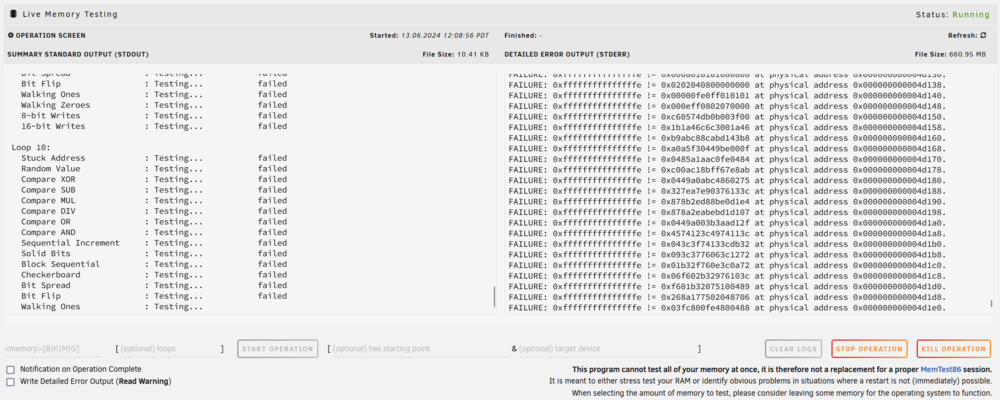
Usually people let memory tests run for around a day or two at most, with 100 loops you'll be good.
-
If this is new and you didn't change anything, your cable is likely on the way out.
-
Thanks for reporting back, it using only one core is normal as the memtester program is not multi-threaded. 🙂
-
Live Memory Tester for UNRAID A diagnostic plugin that lets you test your RAM without needing to reboot. Identify memory problems in situations where a restart is not (immediately) possible or just stress test your RAM. This plugin provides a convenient GUI for in‐place memory testing using the veteran command-line utility memtester. Installable via Community Applications
-
You don't need to change anything, the debug level is mostly for diagnosing protocol problems where NUT doesn't understand what the UPS is "saying". Ideally leave the settings as they are in production (you want to be able to rely on those after all) and just switch off the mains power and see if NUT shuts down the system after your 10 minutes.
-
I can picture this working for your situation, although I've not tried it myself. What you can also try instead of restarting NUT after is the following procedure: Stop NUT first via /etc/rc.d/rc.nut stop 2>&1 | logger sleep 1 Run your USB connect/disconnect commands sleep 1 Start NUT after via /etc/rc.d/rc.nut start 2>&1 | logger Just in case the driver doesn't like being woken up so quick after the USB connect/disconnect commands. The only other command I can think of, to force a USB re-attachment without physically reconnecting, would be restarting the UDEV... generally not recommended and I'm not sure if it would have other negative fallout: /etc/rc.d/rc.udev restart 2>&1 | logger I'm not sure why your UPS would report that if the mains power was not gone, perhaps the input power quality (voltage/frequency) was degraded (e.g. as seen in a brownout situation) and the UPS considered it necessary to switch to battery power because of that. The state seems to have persisted long enough (180 seconds) to cause the shutdown, but this is something that the UPS will have continuously reported to NUT (so it shouldn't have anything to do with the driver start).
-
Shouldn't happen even with lots of power cycling going on, but hard to diagnose after the fact. In any case I couldn't reproduce this on my testing machines, so hopefully an isolated incident not to be repeated.
-
I just tested a 10 minute timeout on my server, it shut down just fine... not sure what happened there. Please post the NUT Debug Package found in NUT Settings.
-
It's just a different program, that's focused only on I/O, you can compare them and pick what you like better.
-
In that case you can just ignore the messages. If they bother you a lot, you can set up "Rule-Based Syslog Filters" in NUT Settings. You might have to tune the filter configuration file a bit to match those lines you don't want.
-
This is regular data staleness, as is unfortunately a problem with some UPS. Does your UPS work normally and this is primarily a log spamming issue, or are there also problems with the UPS itself (e.g. being unavailable, no data in dashboards, ...)?
-
There's certainly no harm in it, although data staleness on its own is a different problem, in your case you're having actual disconnects where the USB device disappears and that in turn causes the data staleness (as seen by the driver). I've only ever seen this happen when some kind of power saving software was in effect on the server (powertop, ...) or the USB cable/USB port were broken (USB port either on the server side or UPS side). It would be interesting, if you have another machine at your disposal, to see if your UPS also disconnects there (e.g. on a Windows machine if you'd hear the connect/disconnect sounds). But probably hard to pinpoint exactly since it appears only sporadically.
-
Hello, sorry you're experiencing trouble. The first thing that would come to mind for me is the USB cable, then the USB port - have you tried another cable or another USB port (some UPS do behave better on USB 2.0 ports)?
-
Glad it works now, it's on the to-do list and not hard to implement. I just haven't found that much time to work on the plugin recently and my priority was getting everything on track and working for the Unraid 6.13/7.0 release.
-
I added the link to the repo for those who don't know the tool (yet).
-
It's a command line utility, not written by me, and there's no Unraid GUI code (hence no code in my repository). It's compiled directly from the source at: https://github.com/Tomas-M/iotop As with all of my plugins, when there's code written by me (e.g. for the Unraid GUI), it's available in my repository. If it's compiled from open source projects, the source code is available through those respective open source repositories.
-
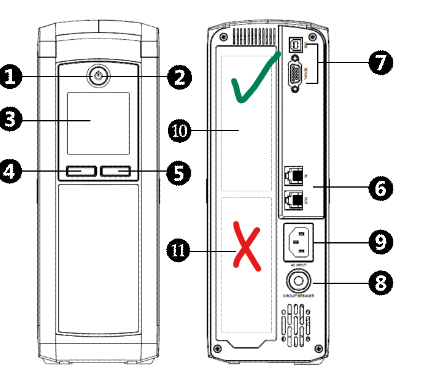
You say when on battery everything immediately "shuts down", you mean a graceful shutdown or the power to everything just gets cut? Are you sure you have connected everything to the top outlets (Nr. 10 in picture)? The bottom outlets (Nr. 11 in picture) just provide surge protection, not battery protection. When you say "it doesn't work" with APCUPSD or NUT - what doesn't work? It doesn't get recognized, it doesn't shutdown properly... gonna need some more details here.
-
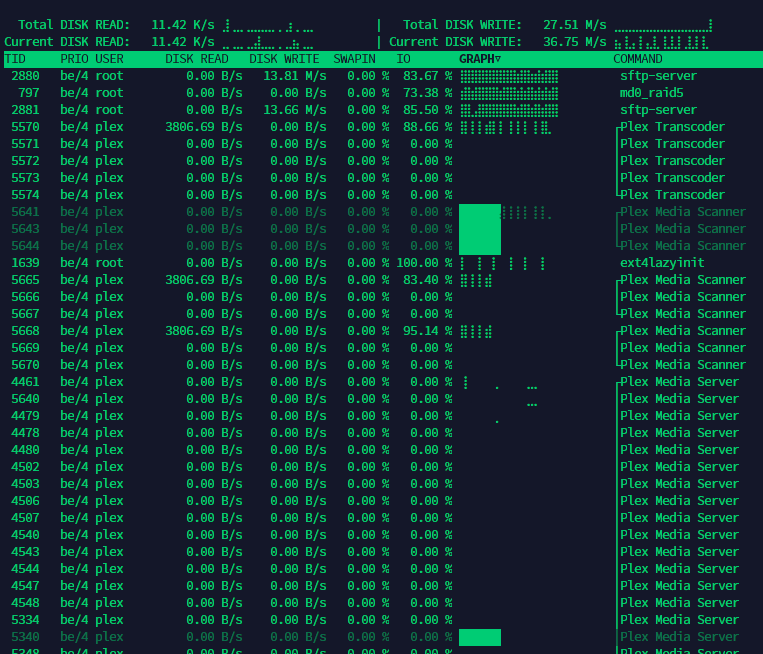
iotop (C Version) for UNRAID Terminal Command: iotop-c / User Manual: iotop-c -h or iotop-c -H inline iotop-c does for I/O usage what top(1) does for CPU usage. It watches I/O usage information output by the Linux kernel and displays a table of current I/O usage by processes on the system. It is handy for answering the question "Why is the disk churning so much?". This is the high-performance C version of the older Python iotop program (as previously found in NerdTools). As opposed to the Python version it does not have any road-blocker dependencies and does not require Python. iotop-c has replaced iotop in various Linux distributions - as, for example, more recently in Fedora. Installable via Community Applications
-
Your configuration is malformed and missing the shutdown command directive. The best course of action would be to "Reset Config" on NUT Settings page and set up NUT again through only the GUI settings on NUT Settings page, that will make sure your configuration is 100% fine and not missing anything (you can confirm the SHUTDOWNCMD directive exists in UPSMON.CONF after). Alternatively edit the UPSMON.CONF with the GUI configuration editor on NUT Settings Page. Line 2 to 7 of UPSMON.CONF right now is: POWERDOWNFLAG "/etc/nut/no_killpower" POWERDOWNFLAG "/etc/nut/no_killpower" NOTIFYCMD "/usr/sbin/nut-notify" NOTIFYFLAG ONBATT SYSLOG+EXEC NOTIFYFLAG ONLINE SYSLOG+EXEC (empty line) Line 2 to 7 of UPSMON.CONF should actually be (change it to this): SHUTDOWNCMD "/sbin/poweroff" POWERDOWNFLAG "/etc/nut/no_killpower" NOTIFYCMD "/usr/sbin/nut-notify" NOTIFYFLAG ONBATT SYSLOG+EXEC NOTIFYFLAG ONLINE SYSLOG+EXEC NOTIFYFLAG REPLBATT SYSLOG+EXEC The SHUTDOWNCMD tells NUT what command to use to shutdown the system. Make sure to put it on line 2, as line 3 is overwritten with the POWERDOWNFLAG. Restart NUT to apply; you can then test if a NUT shutdown works now using (this will shutdown for real): upsmon -c fsd Please let me know if that solved the problem you are experiencing 🙂





