





Rysz
Community Developer
-
Joined
Everything posted by Rysz
-
I've just compiled a new package and updated the plugin to use that, which includes the latest netatalk version (3.1.17) where this issue should be fixed regardless of the "convert appledouble" workaround (I suggest attemping to remove that workaround from the configuration now). Please update and let me know if the problem is now resolved for you either with or without the workaround.
-
Yes, that's indeed possible, but I don't recommend this to anyone switching the backend because if you're switching the backend you're likely already having some kind of problems and not rebooting your system then adds another unpredictable variable to these already existing problems. Rebooting the system makes sure all files of the old backend are 100% gone from the system, as opposed to just uninstalling and reinstalling where we'll have to rely on the uninstallation routine being able to remove all those files.
-
Please install Network UPS Tools (NUT) by desertwitch from Community Applications. The older plugins (including the one in the first post of this topic) are deprecated/now unsupported.
-
Thanks for sharing this, I'm just curious what the use case for this would be, as opposed to running NUT in regular netserver setting without dummy-ups acting as a repeater and simply naming your UPS "qnapups" in the NUT settings.
-
Glad you got it working again! 😉
-
Sorry I don't really know how to help you more here, I think this is a USB connection or USB controller issue more than a NUT issue. It seems the drivers can't see the UPS as USB device. Your UPS series is reported as working with NUT both with blazer_usb and nutdrv_qx drivers, and now you're even using the exact same NUT backend and settings as with the previous plugin (where you said it was working) so it's 100% identical as before as far as NUT is concerned but still not working. That's why I'm guessing it's an issue outside of NUT.
-
Warning for users considering to update an existing NUT installation: Be advised that the default backend (including the UPS drivers) is developed further and subject to change. Backend development can never plan for all UPS devices and updating comes with a chance of degraded UPS compatibility. That means if NUT works well for you and you are happy with everything, updating is not going to bring you much benefit. Most of the changes are intended towards simplifying new installations and users having problems with their UPS devices. Please always read the changelog carefully and consider if you really need these changes on your (working) system. For more detailed information about this and the backends, please read this:
-
Did you also try the blazer_usb driver with the legacy backend? You're now using the exact same NUT backend as with the previous plugin (which worked for you) so there's no reason it shouldn't work anymore (at least not because of NUT). Can you also try another USB port? Check your cable connection to the UPS also if nothing is loose.
-
Thanks, in this case please try changing the backend to legacy 2.7.4 in NUT Settings (requires reboot). Then try again with first blazer_usb and if that doesn't work nutdrv_qx driver.
-
Choose Custom, you'll get a text field to the right where you'll put "nutdrv_qx" (without the quotes) and for the port you'll put "auto“ (without the quotes).
-
First make sure you use the "nutdrv_qx" driver and the port is set to "auto". If that doesn't work, can you try changing the backend in NUT Settings to "legacy (2.7.4)"? Some UPS don't play well with the newer backends.
-
Thanks for the information, this is useful and interesting. I'll see if it's worth including in the default configuration and if so if there could be negative consequences.
-
Hello Hans, In this case, unfortunately, there is currently no way to display your UPS power draw as a NUT chart because your UPS does not report it as an actual variable (ups.realpower). It is calculated from other available variables (ups.realpower.nominal * ups.load * 0,01) for displaying the missing information in the NUT dashboard. The NUT charts, however, at the moment can only display information which is actually existent in the form of a UPS-reported variable. But you can disable the unneeded chart or display another variable of your choosing instead with the "Variable Override" setting in NUT settings. Sorry for the inconvenience!
-
Wouldn't it be easier/more secure to pass through a (e.g. external) sound card to a VM, rather than running this on your file server?
-
Thanks - pull request merged and code included in today's update. ☺️
-
Hadn't seen it yet, that's really cool - I didn't know you could do that. Will test and merge when I get home - thanks a lot. 🙂
-
Thanks for reporting back - glad it works for you this way! Thanks a lot also for the donation offer but no need - always glad to help people with the plugin. 🙂
-
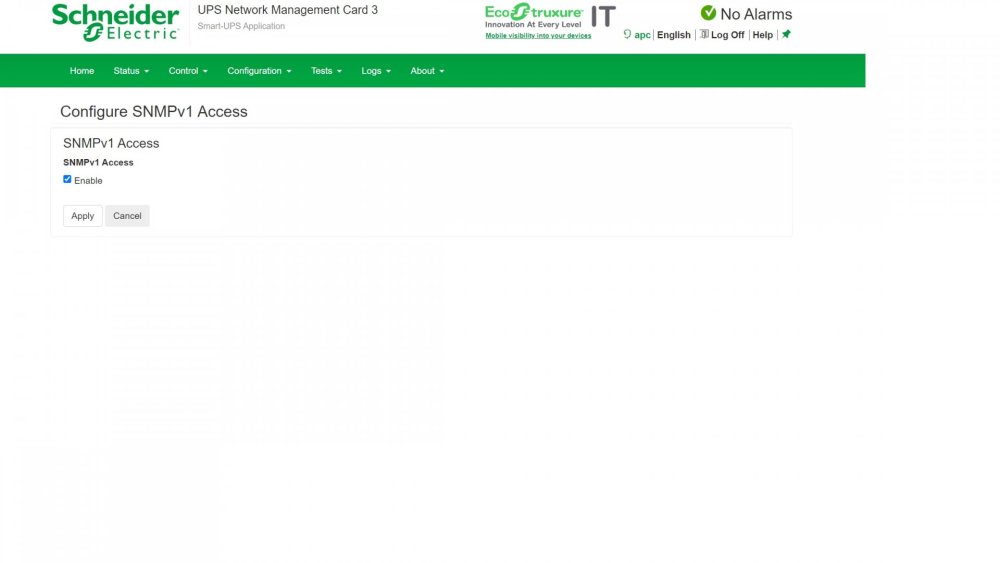
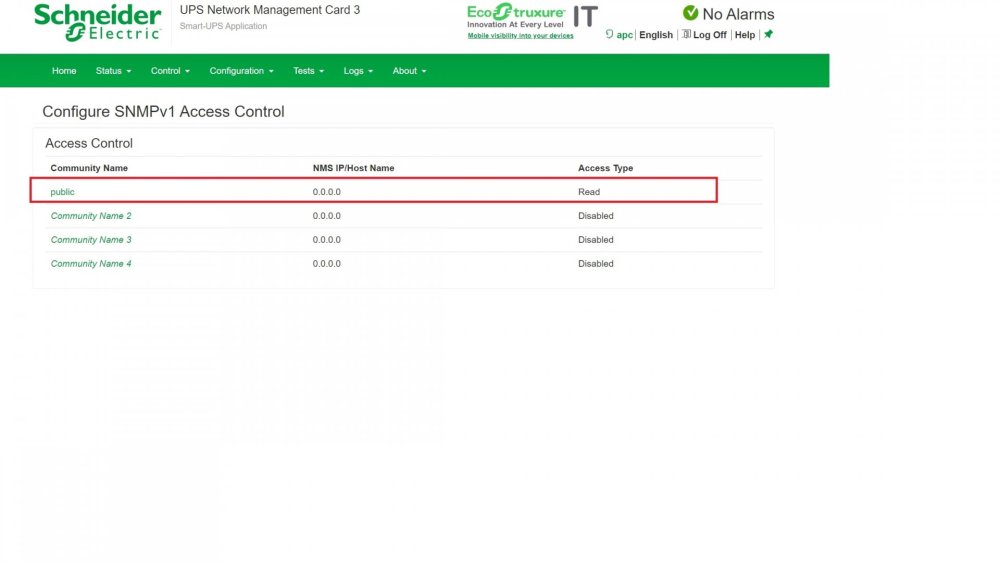
Hello, this seems to be a USB driver compatibility problem with your UPS series, see here: https://github.com/networkupstools/nut/issues/359 I'd suggest you have NUT connect to your UPS over SNMP (network connection) instead rather than USB (cable connection). SNMP would make NUT connect to the UPS' network card and that makes it easier for NUT to read these missing values from your UPS. In the NUT settings for SNMP you'll set: UPS Driver: snmp-ups UPS Driver Port: (ip address of your UPS here) SNMP Community: public If that doesn't work straight away your UPS needs to have SNMP activated/configured first: More information here: https://cdn.cnetcontent.com/b3/87/b387b23c-0e2c-49de-bbb1-74613618fb7f.pdf (page 53/54) https://support.auvik.com/hc/en-us/articles/205162620-How-to-enable-SNMP-on-APC-UPS-devices If you absolutely need to stay on USB and don't want to or can't connect over network (SNMP), then a last resort attempt would be switching the backend to "legacy" in NUT Settings (requires reboot). Please let me know what worked or didn't work for you!
-
Hello, did this also happen on the old plugin or only on the new one now? You wrote it never disappeared changing to the new plugin, so I'm guessing it also happened before? If it also happened before - have you tried another USB port? Your UPS is listed as compatible with NUT, so this looks more like a USB port/cable/controller issue and I've read about other people with your UPS who had the same problem where it ended up being the USB port. If it did not happen before - change the backend in NUT settings to "legacy" (2.7.4) and you'll have the same NUT driver as with the old plugin.
-
Yeah that looks like the problem you're experiencing, hopefully Jim will fix it at some point. 🙂 Glad that the legacy backend works for you, in this case probably best to stick with that for now.
-
Hello, this is not something that the plugin has any control over, unfortunately, it's either what your UPS reports or the NUT driver in the backend chooses to "see" from the values your UPS sends. It's possible your UPS isn't playing well with the newer NUT backend, so I suggest switching to the "legacy" backend in NUT settings - then it'll use the exact same backend (2.7.4) as Simon's version did. If the problem persists even after the backend switch then it's likely your UPS that's suddenly reporting wrong values for some reason because the backend would be the same and the plugin has no control over the values sent from the NUT driver.
-
One example would be merging cloud drives (i.e. rclone mounts) with local files for use with Plex etc.
-
Also leaving this here in case someone should need the latest mergerFS 2.37.1 for permanent installation on their UNRAID system without having to rely on the Docker image anymore:
-
Feel free to test my new plugin with the latest mergerfs-2.37.1-x86_64:
-
mergerFS for UNRAID (6.10+) A plugin that installs mergerFS, a featureful union filesystem, onto UNRAID systems. mergerfs is a union filesystem geared towards simplifying storage and management of files across numerous commodity storage devices. It is similar to mhddfs, unionfs, and aufs. How to install? Installable via Community Applications How does it work? Read the documentation here: https://trapexit.github.io/mergerfs/ After installation the mergerFS binaries are available on your system and will persist reboots: /usr/bin/mergerfs (i.e for mounting) /usr/bin/mergerfs-fusermount (i.e. for unmounting) You can now make use of them via shell scripting, see "mergerFS Settings" for array-status based scripts surviving system reboots. If you do not want to use the in-built event hook scripts, you can also use the binaries through e.g. the "User Scripts" plugin or anywhere else on your system. Special Credits? @trapexit - creator of mergerFS 🏆





