CryPt00n
Members
-
Joined
-
Last visited
Everything posted by CryPt00n
-
Hello, since i use the Samsung 980 Pro nvme in my system it sometime crashes with the following logs. The logs repeat indefinitely and the system is crashed with this. Only hard shutdown is possible. At the restart, sometimes the disk is not detected from the system, so i have to restart again. Could this be a hardware issue? SMART dont gives me any information about this, no errors found with Scrub. Is there another way to test the drive? Other Specs: Intel® Core™ i9-10900 ASRock Z490 PG Velocita 32-GB RAM GTX 1070 Dell H310 Attached SMART report Scrub: UUID: c8c0b930-1ed7-47db-8bec-641f81b3a351 Scrub started: Fri Oct 21 12:58:20 2022 Status: finished Duration: 0:02:51 Total to scrub: 242.47GiB Rate: 1.42GiB/s Error summary: no errors found Logs from crash: Oct 21 11:27:52 server kernel: blk_print_req_error: 103 callbacks suppressed Oct 21 11:27:52 server kernel: I/O error, dev loop2, sector 29120 op 0x0:(READ) flags 0x0 phys_seg 1 prio class 0 Oct 21 11:27:52 server kernel: I/O error, dev loop2, sector 29120 op 0x0:(READ) flags 0x0 phys_seg 1 prio class 0 Oct 21 11:27:52 server kernel: I/O error, dev loop2, sector 29120 op 0x0:(READ) flags 0x0 phys_seg 1 prio class 0 Oct 21 11:27:52 server kernel: I/O error, dev loop2, sector 29120 op 0x0:(READ) flags 0x0 phys_seg 1 prio class 0 Oct 21 11:27:52 server kernel: I/O error, dev loop2, sector 29120 op 0x0:(READ) flags 0x0 phys_seg 1 prio class 0 Oct 21 11:27:52 server kernel: I/O error, dev loop2, sector 29120 op 0x0:(READ) flags 0x0 phys_seg 1 prio class 0 Oct 21 11:27:52 server kernel: I/O error, dev loop2, sector 15745232 op 0x0:(READ) flags 0x0 phys_seg 1 prio class 0 Oct 21 11:27:52 server kernel: I/O error, dev loop2, sector 29120 op 0x0:(READ) flags 0x0 phys_seg 1 prio class 0 Oct 21 11:27:52 server kernel: I/O error, dev loop2, sector 29120 op 0x0:(READ) flags 0x0 phys_seg 1 prio class 0 Oct 21 11:27:52 server kernel: I/O error, dev loop2, sector 29120 op 0x0:(READ) flags 0x0 phys_seg 1 prio class 0 Oct 21 11:27:56 server kernel: btrfs_dev_stat_print_on_error: 489 callbacks suppressed Oct 21 11:27:56 server kernel: BTRFS error (device dm-2: state EA): bdev /dev/mapper/nvme0n1p1 errs: wr 177, rd 30929, flush 0, corrupt 0, gen 0 Oct 21 11:27:56 server kernel: BTRFS error (device dm-2: state EA): bdev /dev/mapper/nvme0n1p1 errs: wr 177, rd 30930, flush 0, corrupt 0, gen 0 Oct 21 11:27:56 server kernel: BTRFS error (device dm-2: state EA): bdev /dev/mapper/nvme0n1p1 errs: wr 177, rd 30931, flush 0, corrupt 0, gen 0 Oct 21 11:27:56 server kernel: BTRFS error (device dm-2: state EA): bdev /dev/mapper/nvme0n1p1 errs: wr 177, rd 30932, flush 0, corrupt 0, gen 0 Oct 21 11:27:56 server kernel: BTRFS error (device dm-2: state EA): bdev /dev/mapper/nvme0n1p1 errs: wr 177, rd 30933, flush 0, corrupt 0, gen 0 Oct 21 11:27:56 server kernel: BTRFS error (device dm-2: state EA): bdev /dev/mapper/nvme0n1p1 errs: wr 177, rd 30934, flush 0, corrupt 0, gen 0 Oct 21 11:27:56 server kernel: BTRFS error (device dm-2: state EA): bdev /dev/mapper/nvme0n1p1 errs: wr 177, rd 30935, flush 0, corrupt 0, gen 0 Oct 21 11:27:56 server kernel: BTRFS error (device dm-2: state EA): bdev /dev/mapper/nvme0n1p1 errs: wr 177, rd 30936, flush 0, corrupt 0, gen 0 Oct 21 11:27:56 server kernel: BTRFS error (device dm-2: state EA): bdev /dev/mapper/nvme0n1p1 errs: wr 177, rd 30937, flush 0, corrupt 0, gen 0 Oct 21 11:27:56 server kernel: BTRFS error (device dm-2: state EA): bdev /dev/mapper/nvme0n1p1 errs: wr 177, rd 30938, flush 0, corrupt 0, gen 0 Thanks in advance for your help Samsung_SSD_980_PRO_1TB_S5G-20221021-1305.txt
-
Sure
-
Yes, running Paper (1.19.2) with Geyser. Working with PC and PS4 Bedrock
-
Hey, any idea on this?
-
Hi, sent them via pm.
-
Hi, do you still need these information? I would really appreciate the feature and would like to assist if i can. Regards
-
Hi, i´m trying to publish FileBrowser to web with nginx proxy manager, but only the shared urls. Wand to allow everything from my lan. Trying since some hours now to find the correct config for npm but seem not to work. Was anyone of you successful? This is my config at the moment: location / { client_max_body_size 0; proxy_pass http://192.168.2.122:80/;} Not my wanted solution, login is reachable from the internet. But in general working atm. This is what i already tried in different variations: location / { client_max_body_size 0; proxy_pass http://192.168.2.122:80/; allow 192.168.2.0/24; deny all;} location /api { client_max_body_size 0; proxy_pass http://192.168.2.122:80/; allow all;} location /static { client_max_body_size 0; proxy_pass http://192.168.2.122:80/; allow all;} location /share { client_max_body_size 0; proxy_pass http://192.168.2.122:80/; allow all;} Here the site is just not loading at all or i receive a message, that something went wrong. Does anyone have an idea how i can solfe this? Regards
-
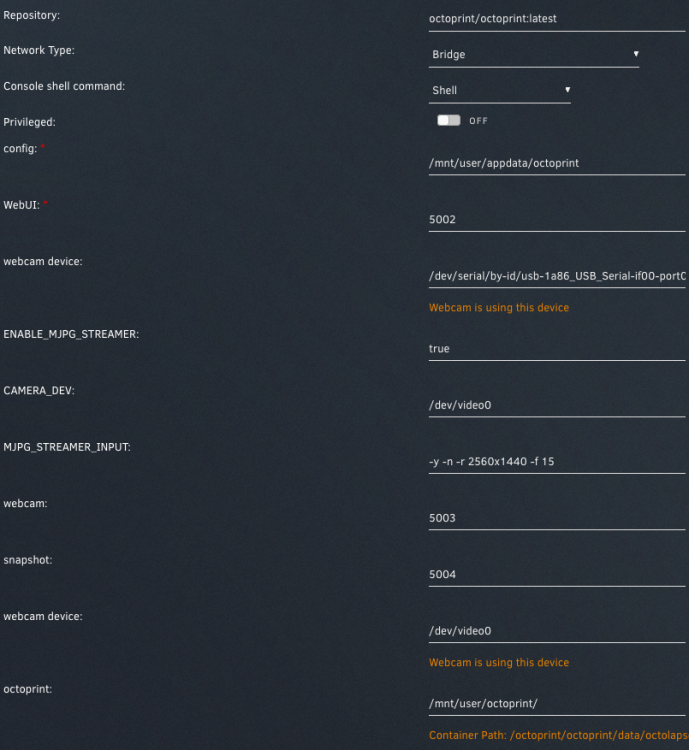
Hi, i´m trying to set up my camera resolution, but it won´t work for me. It´s reset to default every time. I receive the following error in the log: i: Using V4L2 device.: /dev/video0 i: Desired Resolution: 2560 x 1440 i: Frames Per Second.: 15 i: Format............: YUYV i: JPEG Quality......: 80 i: TV-Norm...........: DEFAULT i: The specified resolution is unavailable, using: width 1280 height 720 instead i: FPS coerced ......: from 15 to 10 o: www-folder-path......: /usr/local/share/mjpg-streamer/www/ Due missing file at "/boot/config.txt" i´m not able to test it the "official" way. I laso played with mjpg settings a bit, but no success. Did someone managed to handle this? Regards Marc
-
Hi, this night something happened on my server, i´m not sure what. Dockers where online, but was not able to use them (Pihole online but no dns possible). Even after restarting the server i´m not able to us it. But thats another problem, i fist want to understand why unraid isnt working. On Unraid, the Performance is very poor. Loading times of Dashboard, Settings etc of more than a minute, Docker Page wont load at all. Already watched into enhanced system logs, only can find an nginx issue. But dont know what it means and how to fix it. I have attached the server diagnostics, it would be great if someone could help me. Thanks server-diagnostics-20220114-0936.zip
-
Found it, the Nicehash VM was the problem. I removed the GPU from my Unraid system and the TPU then got assigned to the VM. Unassigned it, rebooted and now its working like expected. Thank you very much for your Help!
-
Have deleted both vfio and the vfio bak file now, tpu is still not showing up in the plugin. I have attached new logs. server-diagnostics-20211126-1944.zip
-
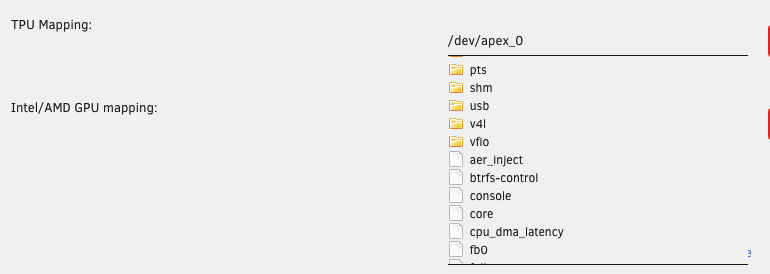
Found the mapping path in a blog article for the setup, will set it correct then afterwards. Logs are attached server-diagnostics-20211126-1803.zip
-
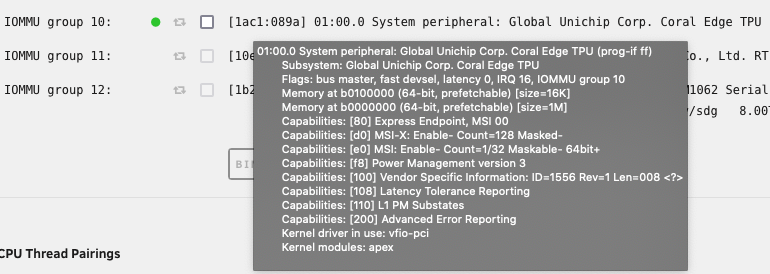
TPU was mapped with apex_0, this one is no longer here. Docker: System Devices: Coral cant find the TPU: frigate config: detectors: coral: type: edgetpu device: pci No its not, thats the reason why i tried to reinstall etc. Sorry, forgot this in the initial post

-
Hi, my Frigate stopped working, it cannot find the TPU. Everything was working fine, removed my GPU some days ago so i had to restart the server. Since then frigate was not starting. TPU is unchecked at Tools > System Devices, but if i hover over the green dot it says that "vfio-pci" driver is in use. Tried to unbind, checked and unchecked the tpu, rebooted and reinstalled the driver, but had no effect. frigate.edgetpu ERROR : No EdgeTPU was detected. If you do not have a Coral device yet, you must configure CPU detectors. Unraid 6.9.2 Frigate 0.9.4 Coral Driver 2021.10.01 M.2 Single TPU Any Ideas on this? Thanks in advance
-
Works for me, many many thanks! Was trying to get it to run with official docker but webcam didn´t worked in my tries. Now i can finally power off my pi.
-
Hi, any news on this? Will updates come?
-
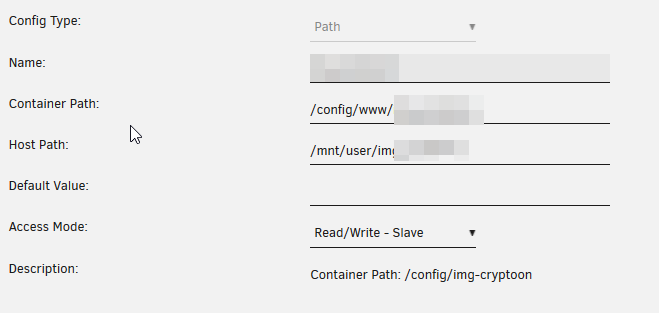
Hi, i want to add a share to my swag container. The share contains some files which should be accessable through a website hosted with swag. I´ve already added it to the container. The folder gets created and it seems that all permissions fit. Compared them to the other files. I can also browse my share through the swag terminal/console, but it seems that nginx cant read/see the files. I also cant access them if i go through the appdata folder with windows explorer and the path to my share. Folder is shown empty.

-
Hi McFex, i dont know exatly why no extra network is needed, just got this hint from a reddit user: I just had to switch to a custom network (br1 in my case) to set an own ip for SWAG and change my config. Maybe someone more experienced could explain this network thing for you/us. EDIT: But one question: Why do you want to use a vm with CentOS for SWAG? You can just create a SWAG docker with own IP on unraid and open the ports just for this address. Same effect, less used Ressources.
-
Hi McFex, i got a solution for my problem on reddit, maybe it also helps you. I configured my nextcloud.subdomain.conf like this: server { listen 443 ssl; listen [::]:443 ssl; server_name cloud.*; include /config/nginx/ssl.conf; client_max_body_size 0; location / { include /config/nginx/proxy.conf; resolver 127.0.0.11 valid=30s; proxy_pass https://192.168.2.131:444; proxy_max_temp_file_size 2048m; } } So i just removed the whole variable things and added the ip/port of my nextcloud docker into it. Now it works fine for me. I think this should also work for your case. I also added my domain (cloud.XXX.de) into my dns so all my devices now connect by domain to the service. Doesnt matter if its inside my LAN or WAN.
-
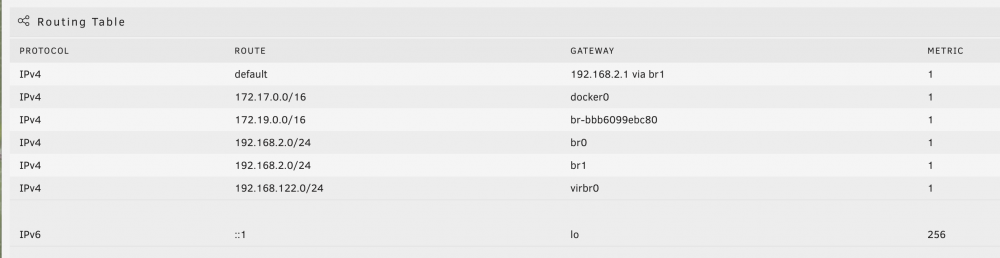
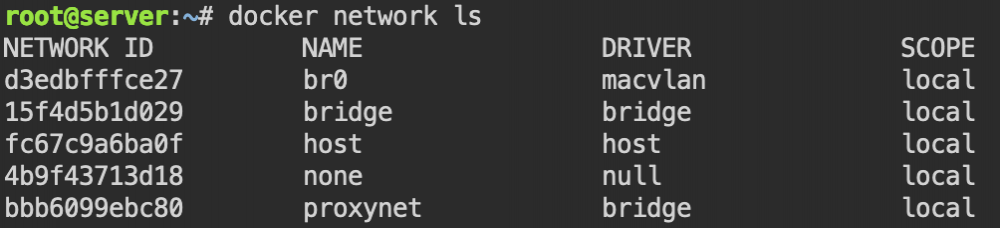
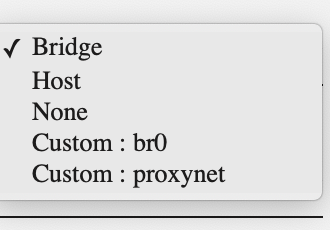
Hi, i´m using SWAG for multiple services now, but want to change the ports/give it an own ip. I want swag to have an own ip in my network, to resolve all my domains in my lan to it and dont have problems with ports (80,443). I´m also running a pi-hole as main dns in my network, but not on unraid, its on a pi 4. I created a own docker network for all services which have to use this reverse proxy like in the spaceinvaderone tutorial, but cant give the correct ip to the docker due subnet issues. I have 2 NICs in my system, the onboard one and a second PCIe NIC. I also tried to create a custom docker network by using macvlan, but then i couldnt enter my network informations like i need. Are I´m on the right way with this or is there a trick i can use to get this run? My NIC configuration: eth0 IP: 192.168.2.131/24 Gateway: 192.168.2.1 eth1 IP: 192.168.2.131/24 Gateway: 192.168.2.1 Available Network types: Routing: Available networks: Docker custom networks: Thanks