





Pillendreher
Members
-
Joined
Everything posted by Pillendreher
-
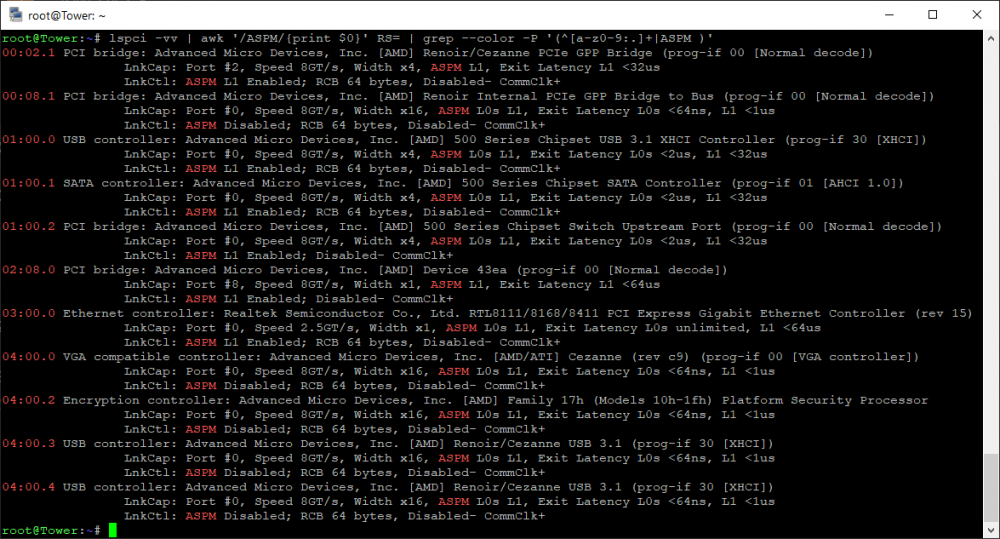
Bei 6 von 11 Geräten wird "ASPM L1 Enabled" angezeigt. ASPM mit dem von Dir verlinkten Befehl zu forcieren ändert daran nichts. Ach, um CPPC gings! Ja, das habe ich im UEFI schon aktiviert!
-
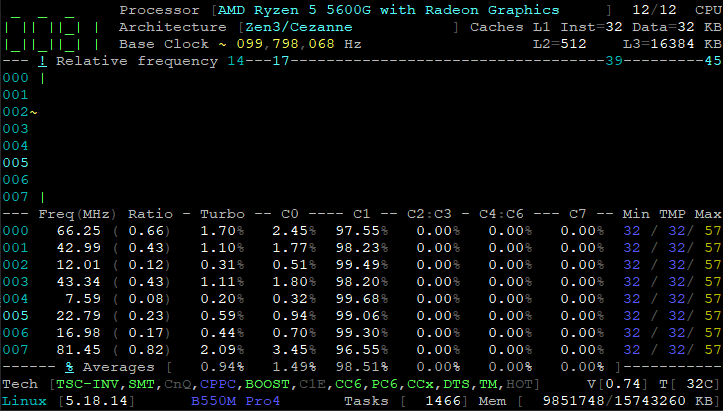
So, jetzt scheint zumindest der Treiber zu laufen: root@Tower:~# modprobe amd-pstate root@Tower:~# cpufreq-info cpufrequtils 008: cpufreq-info (C) Dominik Brodowski 2004-2009 Report errors and bugs to [email protected], please. analyzing CPU 0: driver: amd-pstate CPUs which run at the same hardware frequency: 0 CPUs which need to have their frequency coordinated by software: 0 maximum transition latency: 131 us. hardware limits: 400 MHz - 4.46 GHz available cpufreq governors: conservative, ondemand, userspace, powersave, performance, schedutil current policy: frequency should be within 400 MHz and 4.46 GHz. The governor "schedutil" may decide which speed to use within this range. current CPU frequency is 2.27 GHz. analyzing CPU 1: driver: amd-pstate CPUs which run at the same hardware frequency: 1 CPUs which need to have their frequency coordinated by software: 1 maximum transition latency: 131 us. hardware limits: 400 MHz - 4.46 GHz available cpufreq governors: conservative, ondemand, userspace, powersave, performance, schedutil current policy: frequency should be within 400 MHz and 4.46 GHz. The governor "schedutil" may decide which speed to use within this range. current CPU frequency is 2.84 GHz. analyzing CPU 2: driver: amd-pstate CPUs which run at the same hardware frequency: 2 CPUs which need to have their frequency coordinated by software: 2 maximum transition latency: 131 us. hardware limits: 400 MHz - 4.46 GHz available cpufreq governors: conservative, ondemand, userspace, powersave, performance, schedutil current policy: frequency should be within 400 MHz and 4.46 GHz. The governor "schedutil" may decide which speed to use within this range. current CPU frequency is 2.27 GHz. analyzing CPU 3: driver: amd-pstate CPUs which run at the same hardware frequency: 3 CPUs which need to have their frequency coordinated by software: 3 maximum transition latency: 131 us. hardware limits: 400 MHz - 4.46 GHz available cpufreq governors: conservative, ondemand, userspace, powersave, performance, schedutil current policy: frequency should be within 400 MHz and 4.46 GHz. The governor "schedutil" may decide which speed to use within this range. current CPU frequency is 2.28 GHz. analyzing CPU 4: driver: amd-pstate CPUs which run at the same hardware frequency: 4 CPUs which need to have their frequency coordinated by software: 4 maximum transition latency: 131 us. hardware limits: 400 MHz - 4.46 GHz available cpufreq governors: conservative, ondemand, userspace, powersave, performance, schedutil current policy: frequency should be within 400 MHz and 4.46 GHz. The governor "schedutil" may decide which speed to use within this range. current CPU frequency is 2.28 GHz. analyzing CPU 5: driver: amd-pstate CPUs which run at the same hardware frequency: 5 CPUs which need to have their frequency coordinated by software: 5 maximum transition latency: 131 us. hardware limits: 400 MHz - 4.46 GHz available cpufreq governors: conservative, ondemand, userspace, powersave, performance, schedutil current policy: frequency should be within 400 MHz and 4.46 GHz. The governor "schedutil" may decide which speed to use within this range. current CPU frequency is 2.34 GHz. analyzing CPU 6: driver: amd-pstate CPUs which run at the same hardware frequency: 6 CPUs which need to have their frequency coordinated by software: 6 maximum transition latency: 131 us. hardware limits: 400 MHz - 4.46 GHz available cpufreq governors: conservative, ondemand, userspace, powersave, performance, schedutil current policy: frequency should be within 400 MHz and 4.46 GHz. The governor "schedutil" may decide which speed to use within this range. current CPU frequency is 2.34 GHz. analyzing CPU 7: driver: amd-pstate CPUs which run at the same hardware frequency: 7 CPUs which need to have their frequency coordinated by software: 7 maximum transition latency: 131 us. hardware limits: 400 MHz - 4.46 GHz available cpufreq governors: conservative, ondemand, userspace, powersave, performance, schedutil current policy: frequency should be within 400 MHz and 4.46 GHz. The governor "schedutil" may decide which speed to use within this range. current CPU frequency is 2.30 GHz. analyzing CPU 8: driver: amd-pstate CPUs which run at the same hardware frequency: 8 CPUs which need to have their frequency coordinated by software: 8 maximum transition latency: 131 us. hardware limits: 400 MHz - 4.46 GHz available cpufreq governors: conservative, ondemand, userspace, powersave, performance, schedutil current policy: frequency should be within 400 MHz and 4.46 GHz. The governor "schedutil" may decide which speed to use within this range. current CPU frequency is 2.43 GHz. analyzing CPU 9: driver: amd-pstate CPUs which run at the same hardware frequency: 9 CPUs which need to have their frequency coordinated by software: 9 maximum transition latency: 131 us. hardware limits: 400 MHz - 4.46 GHz available cpufreq governors: conservative, ondemand, userspace, powersave, performance, schedutil current policy: frequency should be within 400 MHz and 4.46 GHz. The governor "schedutil" may decide which speed to use within this range. current CPU frequency is 3.05 GHz. analyzing CPU 10: driver: amd-pstate CPUs which run at the same hardware frequency: 10 CPUs which need to have their frequency coordinated by software: 10 maximum transition latency: 131 us. hardware limits: 400 MHz - 4.46 GHz available cpufreq governors: conservative, ondemand, userspace, powersave, performance, schedutil current policy: frequency should be within 400 MHz and 4.46 GHz. The governor "schedutil" may decide which speed to use within this range. current CPU frequency is 2.43 GHz. analyzing CPU 11: driver: amd-pstate CPUs which run at the same hardware frequency: 11 CPUs which need to have their frequency coordinated by software: 11 maximum transition latency: 131 us. hardware limits: 400 MHz - 4.46 GHz available cpufreq governors: conservative, ondemand, userspace, powersave, performance, schedutil current policy: frequency should be within 400 MHz and 4.46 GHz. The governor "schedutil" may decide which speed to use within this range. current CPU frequency is 2.28 GHz. root@Tower:~# cat /sys/devices/system/cpu/cpu0/cpufreq/scaling_driver amd-pstate Und so sieht corefreq-cli aus:
-
Dann hab ich das richtig gemacht, aber gedacht ich wäre im go-file unterwegs. Keine Ahnung wie ich darauf kam, wahrscheinlich Schlafmangel
-
root@Tower:~# lscpu | grep "cppc" Flags: fpu vme de pse tsc msr pae mce cx8 apic sep mtrr pge mca cmov pat pse36 clflush mmx fxsr sse sse2 ht syscall nx mmxext fxsr_opt pdpe1gb rdtscp lm constant_tsc rep_good nopl nonstop_tsc cpuid extd_apicid aperfmperf rapl pni pclmulqdq monitor ssse3 fma cx16 sse4_1 sse4_2 x2apic movbe popcnt aes xsave avx f16c rdrand lahf_lm cmp_legacy svm extapic cr8_legacy abm sse4a misalignsse 3dnowprefetch osvw ibs skinit wdt tce topoext perfctr_core perfctr_nb bpext perfctr_llc mwaitx cpb cat_l3 cdp_l3 hw_pstate ssbd mba ibrs ibpb stibp vmmcall fsgsbase bmi1 avx2 smep bmi2 erms invpcid cqm rdt_a rdseed adx smap clflushopt clwb sha_ni xsaveopt xsavec xgetbv1 xsaves cqm_llc cqm_occup_llc cqm_mbm_total cqm_mbm_local clzero irperf xsaveerptr rdpru wbnoinvd cppc arat npt lbrv svm_lock nrip_save tsc_scale vmcb_clean flushbyasid decodeassists pausefilter pfthreshold avic v_vmsave_vmload vgif v_spec_ctrl umip pku ospke vaes vpclmulqdq rdpid overflow_recov succor smca fsrm Ich sehe jetzt hier nichts, was auf amd_pstate hindeuten würde? EDIT: Hab mal testweise mein go-file angepasst (hoffe, dort gehört der Befehl hin): Unraid OS kernel /bzimage append initrd=/bzroot amd_pstate.replace=1 Aber der pstate-Treiber ist wohl trotzdem nicht aktiviert: root@Tower:~# cat /sys/devices/system/cpu/cpu0/cpufreq/scaling_driver acpi-cpufreq EDIT2: Das Blockieren des ACPI-Treibers nach dieser Anleitung funktioniert zwar, aber es wird dann nicht der neue, sondern gar kein Treiber mehr geladen: root@Tower:~# cat /sys/devices/system/cpu/cpu0/cpufreq/scaling_driver cat: /sys/devices/system/cpu/cpu0/cpufreq/scaling_driver: No such file or directory root@Tower:~# cpufreq-info cpufrequtils 008: cpufreq-info (C) Dominik Brodowski 2004-2009 Report errors and bugs to [email protected], please. analyzing CPU 0: no or unknown cpufreq driver is active on this CPU maximum transition latency: 4294.55 ms. analyzing CPU 1: no or unknown cpufreq driver is active on this CPU maximum transition latency: 4294.55 ms. analyzing CPU 2: no or unknown cpufreq driver is active on this CPU maximum transition latency: 4294.55 ms. analyzing CPU 3: no or unknown cpufreq driver is active on this CPU maximum transition latency: 4294.55 ms. analyzing CPU 4: no or unknown cpufreq driver is active on this CPU maximum transition latency: 4294.55 ms. analyzing CPU 5: no or unknown cpufreq driver is active on this CPU maximum transition latency: 4294.55 ms. analyzing CPU 6: no or unknown cpufreq driver is active on this CPU maximum transition latency: 4294.55 ms. analyzing CPU 7: no or unknown cpufreq driver is active on this CPU maximum transition latency: 4294.55 ms. analyzing CPU 8: no or unknown cpufreq driver is active on this CPU maximum transition latency: 4294.55 ms. analyzing CPU 9: no or unknown cpufreq driver is active on this CPU maximum transition latency: 4294.55 ms. analyzing CPU 10: no or unknown cpufreq driver is active on this CPU maximum transition latency: 4294.55 ms. analyzing CPU 11: no or unknown cpufreq driver is active on this CPU maximum transition latency: 4294.55 ms.
-
Das wird bei mir ausgegeben: Linux 5.18.14-Unraid. root@Tower:~# cpufreq-info cpufrequtils 008: cpufreq-info (C) Dominik Brodowski 2004-2009 Report errors and bugs to [email protected], please. analyzing CPU 0: driver: acpi-cpufreq CPUs which run at the same hardware frequency: 0 CPUs which need to have their frequency coordinated by software: 0 maximum transition latency: 4294.55 ms. hardware limits: 1.40 GHz - 4.46 GHz available frequency steps: 3.90 GHz, 1.70 GHz, 1.40 GHz available cpufreq governors: conservative, ondemand, userspace, powersave, per formance, schedutil current policy: frequency should be within 1.40 GHz and 3.90 GHz. The governor "ondemand" may decide which speed to use within this range. current CPU frequency is 1.40 GHz (asserted by call to hardware). cpufreq stats: 3.90 GHz:1.77%, 1.70 GHz:8.97%, 1.40 GHz:89.26% (49898) analyzing CPU 1: driver: acpi-cpufreq CPUs which run at the same hardware frequency: 1 CPUs which need to have their frequency coordinated by software: 1 maximum transition latency: 4294.55 ms. hardware limits: 1.40 GHz - 4.46 GHz available frequency steps: 3.90 GHz, 1.70 GHz, 1.40 GHz available cpufreq governors: conservative, ondemand, userspace, powersave, per formance, schedutil current policy: frequency should be within 1.40 GHz and 3.90 GHz. The governor "ondemand" may decide which speed to use within this range. current CPU frequency is 1.40 GHz (asserted by call to hardware). cpufreq stats: 3.90 GHz:2.35%, 1.70 GHz:9.57%, 1.40 GHz:88.09% (46195) analyzing CPU 2: driver: acpi-cpufreq CPUs which run at the same hardware frequency: 2 CPUs which need to have their frequency coordinated by software: 2 maximum transition latency: 4294.55 ms. hardware limits: 1.40 GHz - 4.46 GHz available frequency steps: 3.90 GHz, 1.70 GHz, 1.40 GHz available cpufreq governors: conservative, ondemand, userspace, powersave, per formance, schedutil current policy: frequency should be within 1.40 GHz and 3.90 GHz. The governor "ondemand" may decide which speed to use within this range. current CPU frequency is 1.40 GHz (asserted by call to hardware). cpufreq stats: 3.90 GHz:2.58%, 1.70 GHz:8.94%, 1.40 GHz:88.49% (43083) analyzing CPU 3: driver: acpi-cpufreq CPUs which run at the same hardware frequency: 3 CPUs which need to have their frequency coordinated by software: 3 maximum transition latency: 4294.55 ms. hardware limits: 1.40 GHz - 4.46 GHz available frequency steps: 3.90 GHz, 1.70 GHz, 1.40 GHz available cpufreq governors: conservative, ondemand, userspace, powersave, per formance, schedutil current policy: frequency should be within 1.40 GHz and 3.90 GHz. The governor "ondemand" may decide which speed to use within this range. current CPU frequency is 1.40 GHz (asserted by call to hardware). cpufreq stats: 3.90 GHz:2.56%, 1.70 GHz:8.94%, 1.40 GHz:88.50% (41017) analyzing CPU 4: driver: acpi-cpufreq CPUs which run at the same hardware frequency: 4 CPUs which need to have their frequency coordinated by software: 4 maximum transition latency: 4294.55 ms. hardware limits: 1.40 GHz - 4.46 GHz available frequency steps: 3.90 GHz, 1.70 GHz, 1.40 GHz available cpufreq governors: conservative, ondemand, userspace, powersave, per formance, schedutil current policy: frequency should be within 1.40 GHz and 3.90 GHz. The governor "ondemand" may decide which speed to use within this range. current CPU frequency is 1.40 GHz (asserted by call to hardware). cpufreq stats: 3.90 GHz:2.55%, 1.70 GHz:9.09%, 1.40 GHz:88.35% (41321) analyzing CPU 5: driver: acpi-cpufreq CPUs which run at the same hardware frequency: 5 CPUs which need to have their frequency coordinated by software: 5 maximum transition latency: 4294.55 ms. hardware limits: 1.40 GHz - 4.46 GHz available frequency steps: 3.90 GHz, 1.70 GHz, 1.40 GHz available cpufreq governors: conservative, ondemand, userspace, powersave, per formance, schedutil current policy: frequency should be within 1.40 GHz and 3.90 GHz. The governor "ondemand" may decide which speed to use within this range. current CPU frequency is 1.40 GHz (asserted by call to hardware). cpufreq stats: 3.90 GHz:2.41%, 1.70 GHz:9.16%, 1.40 GHz:88.43% (41958) analyzing CPU 6: driver: acpi-cpufreq CPUs which run at the same hardware frequency: 6 CPUs which need to have their frequency coordinated by software: 6 maximum transition latency: 4294.55 ms. hardware limits: 1.40 GHz - 4.46 GHz available frequency steps: 3.90 GHz, 1.70 GHz, 1.40 GHz available cpufreq governors: conservative, ondemand, userspace, powersave, per formance, schedutil current policy: frequency should be within 1.40 GHz and 3.90 GHz. The governor "ondemand" may decide which speed to use within this range. current CPU frequency is 1.40 GHz (asserted by call to hardware). cpufreq stats: 3.90 GHz:2.26%, 1.70 GHz:8.28%, 1.40 GHz:89.46% (38701) analyzing CPU 7: driver: acpi-cpufreq CPUs which run at the same hardware frequency: 7 CPUs which need to have their frequency coordinated by software: 7 maximum transition latency: 4294.55 ms. hardware limits: 1.40 GHz - 4.46 GHz available frequency steps: 3.90 GHz, 1.70 GHz, 1.40 GHz available cpufreq governors: conservative, ondemand, userspace, powersave, per formance, schedutil current policy: frequency should be within 1.40 GHz and 3.90 GHz. The governor "ondemand" may decide which speed to use within this range. current CPU frequency is 1.40 GHz (asserted by call to hardware). cpufreq stats: 3.90 GHz:2.18%, 1.70 GHz:8.10%, 1.40 GHz:89.71% (38502) analyzing CPU 8: driver: acpi-cpufreq CPUs which run at the same hardware frequency: 8 CPUs which need to have their frequency coordinated by software: 8 maximum transition latency: 4294.55 ms. hardware limits: 1.40 GHz - 4.46 GHz available frequency steps: 3.90 GHz, 1.70 GHz, 1.40 GHz available cpufreq governors: conservative, ondemand, userspace, powersave, per formance, schedutil current policy: frequency should be within 1.40 GHz and 3.90 GHz. The governor "ondemand" may decide which speed to use within this range. current CPU frequency is 1.40 GHz (asserted by call to hardware). cpufreq stats: 3.90 GHz:2.44%, 1.70 GHz:8.03%, 1.40 GHz:89.53% (36377) analyzing CPU 9: driver: acpi-cpufreq CPUs which run at the same hardware frequency: 9 CPUs which need to have their frequency coordinated by software: 9 maximum transition latency: 4294.55 ms. hardware limits: 1.40 GHz - 4.46 GHz available frequency steps: 3.90 GHz, 1.70 GHz, 1.40 GHz available cpufreq governors: conservative, ondemand, userspace, powersave, per formance, schedutil current policy: frequency should be within 1.40 GHz and 3.90 GHz. The governor "ondemand" may decide which speed to use within this range. current CPU frequency is 1.70 GHz (asserted by call to hardware). cpufreq stats: 3.90 GHz:1.93%, 1.70 GHz:8.34%, 1.40 GHz:89.73% (38459) analyzing CPU 10: driver: acpi-cpufreq CPUs which run at the same hardware frequency: 10 CPUs which need to have their frequency coordinated by software: 10 maximum transition latency: 4294.55 ms. hardware limits: 1.40 GHz - 4.46 GHz available frequency steps: 3.90 GHz, 1.70 GHz, 1.40 GHz available cpufreq governors: conservative, ondemand, userspace, powersave, per formance, schedutil current policy: frequency should be within 1.40 GHz and 3.90 GHz. The governor "ondemand" may decide which speed to use within this range. current CPU frequency is 1.70 GHz (asserted by call to hardware). cpufreq stats: 3.90 GHz:2.49%, 1.70 GHz:12.26%, 1.40 GHz:85.25% (42878) analyzing CPU 11: driver: acpi-cpufreq CPUs which run at the same hardware frequency: 11 CPUs which need to have their frequency coordinated by software: 11 maximum transition latency: 4294.55 ms. hardware limits: 1.40 GHz - 4.46 GHz available frequency steps: 3.90 GHz, 1.70 GHz, 1.40 GHz available cpufreq governors: conservative, ondemand, userspace, powersave, per formance, schedutil current policy: frequency should be within 1.40 GHz and 3.90 GHz. The governor "ondemand" may decide which speed to use within this range. current CPU frequency is 1.70 GHz (asserted by call to hardware). cpufreq stats: 3.90 GHz:2.78%, 1.70 GHz:10.33%, 1.40 GHz:86.89% (42064) root@Tower:~#
-
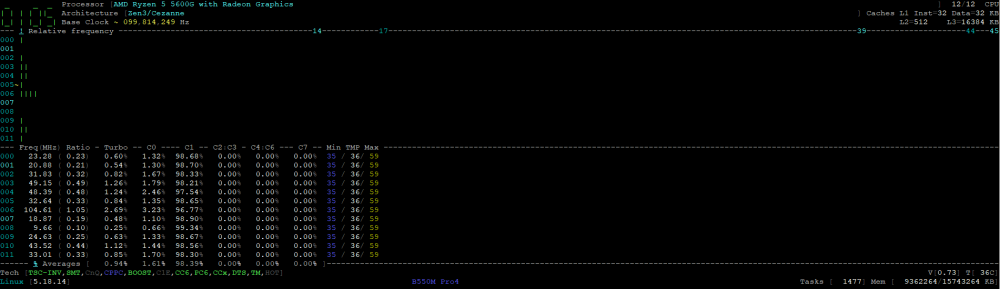
Bin jetzt auf 6.11.0 rc2. root@Tower:~# cat /sys/devices/system/cpu//cpu0/cpufreq/scaling_available_governors conservative ondemand userspace powersave performance schedutil root@Tower:~# grep amd-pstate /proc/kallsyms root@Tower:~# grep PSTATE /usr/src/linux-*/.config CONFIG_X86_INTEL_PSTATE=y CONFIG_X86_AMD_PSTATE=m Woran müsste ich die Verbesserungen nun erkennen? Laut corefreq bleibt weiterhin alles in C1, auch wenn die Frequenz der einzelnen Kerne im Leerlauf natürlich sehr niedrig ist:
-
Ich kriege folgende Ausgabe: root@Tower:~# grep PSTATE /usr/src/linux-*/.config CONFIG_X86_INTEL_PSTATE=y
-
Any of you still seeing the "sleep button" in 6.10.3 under "main"?
-
Hat hier einer Erfahrungen mit der B550 AM4 Plattform? Laut corefreq geht mein 5600G einfach nie tiefer als C1 und ich verstehe nicht wirklich wieso?!
-
root@Tower:~# grep amd-pstate /proc/kallsyms root@Tower:~# Keine konkrete Ausgabe.
-
Bin gerade hierauf gestolpert. Wie aktiviere ich denn diesen neuen "CPU Treiber"?
-
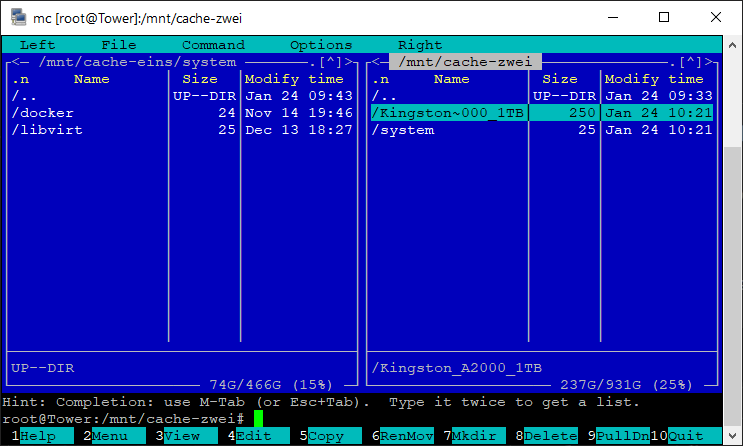
Ah, alles klar. Deswegen ging es dann über SMB, denn da taucht ja nur der Share auf. Ja, siehe hier z.B. Ich erstelle eine Test-Datei auf meinem zweiten Cache-Laufwerk: Schiebe diese mitsamt dem Ordner in mein erstes Cache-Laufwerk in den system Share: Dort liegt aber nichts; vielmehr gibt es jetzt einen system Ordner im zweiten Cache-Laufwerk: Ich habe aber im Moment gar kein Cache-Laufwerk den einzelnen Platten zugewiesen; vielmehr werden Dateien immer direkt auf die Platten geschrieben.


-
Guten Morgen! Ich teste gerade SSHFS (mit dem SSHFS-Win Manager) hinsichtlich des Einbindes der Unraid-Shares in Windows. Hierfür hänge ich /mnt/user in Z: unter Windows ein. Das funktioniert soweit auch. Was mir aber aufgefallen ist: Verschiebe ich nun Dateien/Ordner von Share A nach Share B, werden die einzelnen Laufwerke ignoriert: Anstatt dass die Daten vom Laufwerk, auf welchem Share A liegt, zum Laufwerk, auf welchem Share B liegt, verschoeben werden, wird auf Laufwerk A ein Ordner mit demselben Namen wie der Share B erstellt, sodass das Ganze zwar weiterhin funktional bleibt, aber gleichzeitig die von mir definierten Laufwerke für die Shares ignoriert werden. Anders dargestellt: Auf Laufwerksebene müsste der Vorgang so ablaufen: /mnt/Laufwerk A/Share A/Datei => /mnt/Laufwerk B/Share B/Datei Es passiert aber Folgendes: /mnt/Laufwerk A/Share A/Datei => /mnt/Laufwerk A/Share B/Datei Ist das ein Unraid oder ein SSHFS Problem? Über SMB hatte ich dieses Problem bisher nie, aber da binde ich auch nicht /mnt/user ein...🤔
-
Ja, wird sie - im Moment steht dort "RC6 100.0%" CPU: i3-10100 MB: Gigabyte B460M D3H RAM: 16GB 2666 (1 Riegel von Crucial) HDD: 3x WD "White" (10, 12 und 14 T), 1x WD Green (4TB) und 1x Seagate IronWolf (4TB), die aber alle nach 15 Minuten schlafen und auch mit den entsprechenden PowerTop Befehlen versehen sind) SDD: 2x Kingston A2000 (500GB und 1TB) + SanDisk Ultra 3D 2TB (ebenfalls mit den entsprechenden PowerTop Befehlen) Die SATA Erweiterungskarte ist mittlerweile wieder ausgebaut, da ich meine beiden 850 Evo durch die SanDisk ersetzt habe
-
Beides schon gemacht, aber gebracht hat es nichts.
-
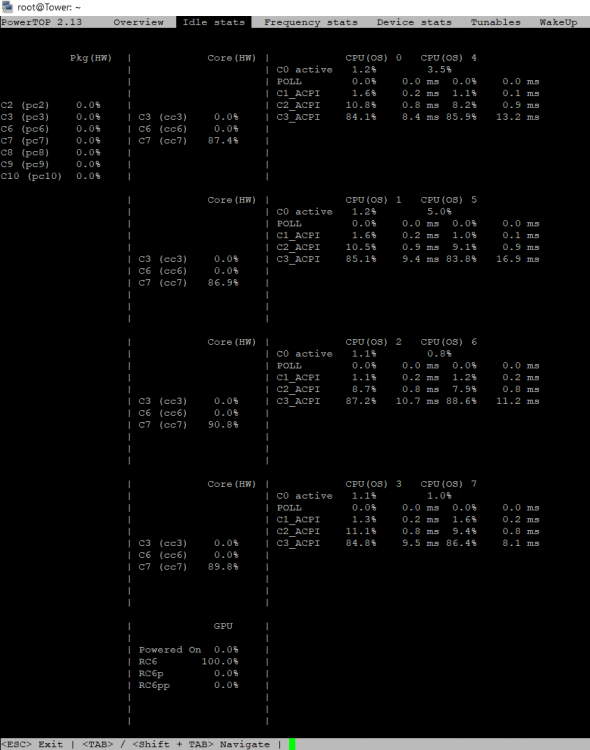
So, ich melde mich jetzt auch nochmal. Woran kann es liegen, dass mir beim "Package" gar nichts angezeigt wird? Verwendet wird ein i3-10100.
-
Hey - thanks for replying I just reinstalled the plugin, stopped SSH, selected unraidssh and pressed apply - unfortunately I still can't login via unraidssh. This is what my sshd_config looks like: # $OpenBSD: sshd_config,v 1.104 2021/07/02 05:11:21 dtucker Exp $ # This is the sshd server system-wide configuration file. See # sshd_config(5) for more information. # This sshd was compiled with PATH=/usr/local/sbin:/usr/sbin:/sbin:/usr/local/bin:/usr/bin:/bin # The strategy used for options in the default sshd_config shipped with # OpenSSH is to specify options with their default value where # possible, but leave them commented. Uncommented options override the # default value. Port 22 #AddressFamily any #ListenAddress 0.0.0.0 #ListenAddress :: #HostKey /etc/ssh/ssh_host_rsa_key #HostKey /etc/ssh/ssh_host_ecdsa_key #HostKey /etc/ssh/ssh_host_ed25519_key # Ciphers and keying #RekeyLimit default none # Logging #SyslogFacility AUTH #LogLevel INFO # limetech - lets be verbose LogLevel VERBOSE # Authentication: # limetech - we need to allow root AllowUsers root unraidssh PermitRootLogin yes #LoginGraceTime 2m PermitRootLogin yes #StrictModes yes MaxAuthTries 6 #MaxSessions 10 #PubkeyAuthentication yes # The default is to check both .ssh/authorized_keys and .ssh/authorized_keys2 # but this is overridden so installations will only check .ssh/authorized_keys AuthorizedKeysFile .ssh/authorized_keys #AuthorizedPrincipalsFile none #AuthorizedKeysCommand none #AuthorizedKeysCommandUser nobody # For this to work you will also need host keys in /etc/ssh/ssh_known_hosts #HostbasedAuthentication no # Change to yes if you don't trust ~/.ssh/known_hosts for # HostbasedAuthentication #IgnoreUserKnownHosts no # Don't read the user's ~/.rhosts and ~/.shosts files #IgnoreRhosts yes # To disable tunneled clear text passwords, change to no here! PasswordAuthentication yes PermitEmptyPasswords no # Change to no to disable s/key passwords #KbdInteractiveAuthentication yes # Kerberos options #KerberosAuthentication no #KerberosOrLocalPasswd yes #KerberosTicketCleanup yes #KerberosGetAFSToken no # GSSAPI options #GSSAPIAuthentication no #GSSAPICleanupCredentials yes # Set this to 'yes' to enable PAM authentication, account processing, # and session processing. If this is enabled, PAM authentication will # be allowed through the KbdInteractiveAuthentication and # PasswordAuthentication. Depending on your PAM configuration, # PAM authentication via KbdInteractiveAuthentication may bypass # the setting of "PermitRootLogin without-password". # If you just want the PAM account and session checks to run without # PAM authentication, then enable this but set PasswordAuthentication # and KbdInteractiveAuthentication to 'no'. UsePAM yes #AllowAgentForwarding yes #AllowTcpForwarding yes # limeteh - disallow forwarding but see below AllowTcpForwarding no GatewayPorts no #X11Forwarding no #X11DisplayOffset 10 #X11UseLocalhost yes #PermitTTY yes #PrintMotd yes #PrintLastLog yes #TCPKeepAlive yes #PermitUserEnvironment no #Compression delayed #ClientAliveInterval 0 #ClientAliveCountMax 3 #UseDNS no #PidFile /var/run/sshd.pid #MaxStartups 10:30:100 #PermitTunnel no #ChrootDirectory none #VersionAddendum none # no default banner path #Banner none # override default of no subsystems Subsystem sftp /usr/libexec/sftp-server # Example of overriding settings on a per-user basis #Match User anoncvs # X11Forwarding no # AllowTcpForwarding no # PermitTTY no # ForceCommand cvs server # limetech - permit only root SSH tunneling Match Group root AllowTcpForwarding yes Match Group root is probably the culprit, huh? "unraidssh" is not part of the group "root": root@Tower:~# id unraidssh uid=1003(unraidssh) gid=100(users) groups=100(users)
-
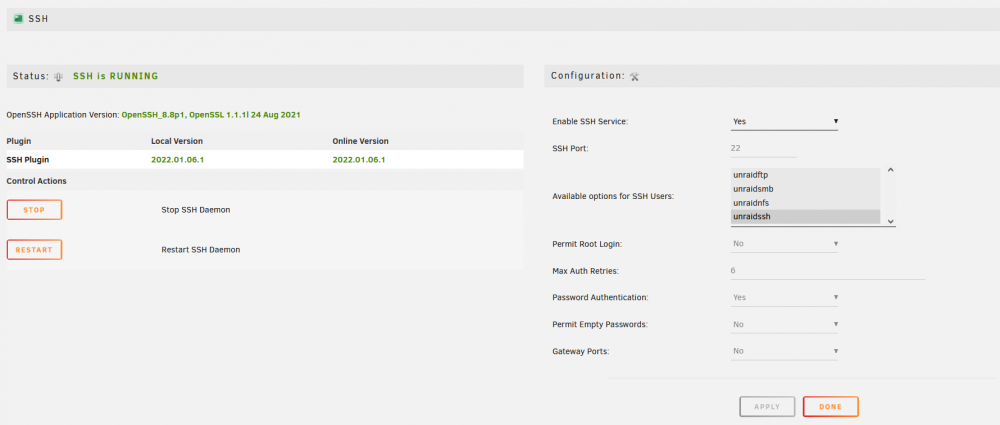
Hi there, I stumbled upon your plugin by doing a web search for non-root login via ssh on Unraid and wanted to give it a try. Unfortunately, it's either not working properly on 6.10 or I'm doing something wrong. I created a user called "unraidssh" for testing purposes and disabled the root login (even though I'm not sure whether that's true, I'm assuming you can't have root login enabled and still use non-root users to login...): Yet when I try to log in via kitty, this is wha happens, even though I enter the correct password: login as: unraidssh Keyboard-interactive authentication prompts from server: | Password: End of keyboard-interactive prompts from server Access denied Keyboard-interactive authentication prompts from server: | Password: And the Unraid log shows this: Jan 9 12:04:47 Tower sshd[28960]: Connection from 192.168.180.30 port 12218 on 192.168.188.24 port 22 rdomain "" Jan 9 12:04:49 Tower sshd[28960]: Postponed keyboard-interactive for unraidssh from 192.168.180.30 port 12218 ssh2 [preauth] Jan 9 12:04:51 Tower sshd[29012]: pam_unix(sshd:auth): authentication failure; logname= uid=0 euid=0 tty=ssh ruser= rhost=192.168.180.30 user=unraidssh Jan 9 12:04:53 Tower sshd[28960]: error: PAM: Authentication failure for unraidssh from 192.168.180.30 Jan 9 12:04:53 Tower sshd[28960]: Failed keyboard-interactive/pam for unraidssh from 192.168.180.30 port 12218 ssh2 Jan 9 12:04:53 Tower sshd[28960]: Postponed keyboard-interactive for unraidssh from 192.168.180.30 port 12218 ssh2 [preauth] I even tried Windows 10's OpenSSH client just to make sure that this wasn't some Kitty issue, but the problem persisted. Could you help me out here?
-
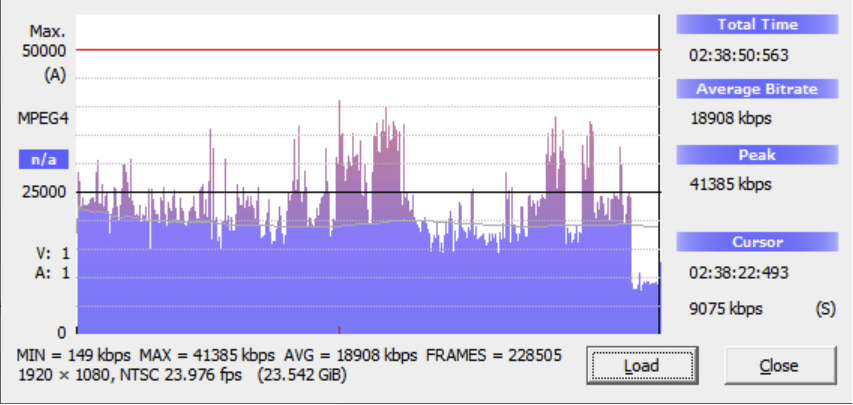
So: Könnte also durchaus mal zu viel sein für die Leitung. Gleichzeitig aber tritt das Problem auch bei Dateien auf, die nicht einmal ansatzweise solche Datenraten aufweisen, beschränkt sich also nicht auf die, bei denen der Upload möglicherweise nicht hinterherkommt.
-
Wireguard site-to-site, sprich die Fritzbox 6591 schickt den Netzwerkvehr des einen IP-Bereichs an den Unraid Server, und die 7490 schickt den Netzwerkverkehr dann dementsprechend an den Raspberry Pi 4. Hier über iperf2 der Verindungstest (6591 zu 7490 Upload, 56,7 Mbit/s Sync im Upload laut Fritzbox): root@Tower:~# iperf -c 192.168.180.44 -p 5001 -t 30 -P 20 [SUM] 0.0-30.8 sec 171 MBytes 46.6 Mbits/sec Und andere Richtung (7490 zu 6591 Upload, 41,3 Mbit/s Sync im Upload laut Fritzbox): root@DietPi:~# iperf -c 192.168.188.24 -p 5001 -t 30 -P 20 [SUM] 0.0000-30.4461 sec 127 MBytes 35.1 Mbits/sec Der Film selber hat eine Datenrate von 21,2 Mbit/s laut Mediainfo.
-
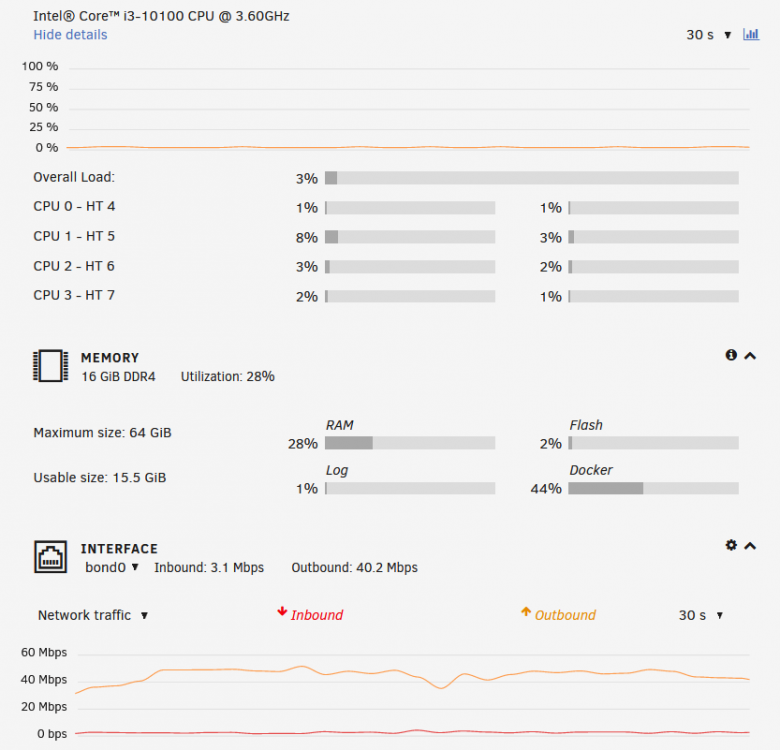
Irgendwas scheint aber tatsächlich mit der "Dateibehandlung" nicht zu stimmen. Ich sitze hier in meinem Zweitwohnsitz und teste gerade. Kodi spielt mir den Film, der auf dem Unraid Server hinter der 6591 liegt, nicht einmal ansatzweise flüssig ab, so als würde die Leitungsbandbreite nicht einmal ansatzweise reichen. Ziehe ich das Ganze aber über SMB über meinen Laptop, wird mein Upload mehr oder weniger voll ausgelastet. Und es sieht auch nicht so aus, als würde das System hier großartig ausgelastet sein:
-
Beide Tests habe ich auf meinem zweiten Cache Laufwerk (Kingston A2000 1TB) durchgeführt, welches auf mnt/cache-zwei/ liegt. Den darauf befindlichen Share "Kingston_A2000_1TB" steuere über SMB als "normalen Unraid Share" an und über FTP über /mnt/cache-zwei, bin mir aber grad nicht sicher, ob ich damit "direkt zugreife" oder aber irgendeinen Umweg gehe?!
-
So, hier die Verbindungsdaten bei direkter Verbindung zwischen dem Unraid Server und meinem PC und bei der Verbindung über die 7530 hinter der 6591 (mit zurückgesetztem BIOS und entfernten poewrtop Befehlen): D:\Programme\iperf3>iperf3 -c 192.168.188.24 -p 5201 -P 120 -t 30 ///DIREKTE VERBINDUNG/// [SUM] 0.00-30.00 sec 3.16 GBytes 906 Mbits/sec sender [SUM] 0.00-30.00 sec 3.16 GBytes 906 Mbits/sec receiver ///ÜBER 7530/// [SUM] 0.00-30.00 sec 3.18 GBytes 912 Mbits/sec sender [SUM] 0.00-30.00 sec 3.18 GBytes 912 Mbits/sec receiver D:\Programme\iperf3>iperf3 -c 192.168.188.24 -p 5201 -P 120 -t 30 -R ///DIREKTE VERBINDUNG/// [SUM] 0.00-30.00 sec 3.43 GBytes 981 Mbits/sec 0 sender [SUM] 0.00-30.00 sec 3.25 GBytes 932 Mbits/sec receiver ///ÜBER 7530/// [SUM] 0.00-30.00 sec 3.34 GBytes 955 Mbits/sec 0 sender [SUM] 0.00-30.00 sec 3.26 GBytes 933 Mbits/sec receiver Und per UDP: D:\Programme\iperf3>iperf3 -c 192.168.188.24 -p 5201 -u -b 1500m -P 120 -t 30 -R ///DIREKTE VERBINDUNG/// [SUM] 0.00-30.00 sec 3.33 GBytes 953 Mbits/sec 852734326.656 ms 1388/224750 (0.62%) ///ÜBER 7530/// Will aus welchem Grund auch immer nicht - der Server sendet, aber der PC empfängt nichts... Gut 950 MBit/s scheint also das Maximum zu sein. Mehr habe ich auch mit keinen anderen Parametern erreichen können. Und jetzt zum Vergleich per FTP (eine einzelne Übertragung): ///DIREKTE VERBINDUNG/// 5.589.731.545 Bytes in 58 Sekunden, also 91,91 MB/s bzw. 735,28 MBit/s ///ÜBER 7530/// 5.589.731.545 Bytes in 58 Sekunden, also 91,91 MB/s bzw. 735,28 MBit/s Und dieselbe Datei per SMB (Wert durch HWinfo64 gemessen): ///DIREKTE VERBINDUNG/// 93,36 MB/s bzw. 746,89 MBit/s ///ÜBER 7530/// 92,45 MB/s bzw. 739,66 MBit/s
-
Hab zuhause noch ne einwandfrei laufende 7530; die werde ich mal ins Mesh einbinden und dann alles über die laufen lassen. Wenn ich dort keine Probleme habe, weiß ich, dass die 6591 das Problem ist.
-
Beides im LAN. Die einzigen Geräte, die bei mir im WLAN hängen, sind mein Handy und mein Laptop. PC, Unraid Server, Shield - alle mit Kabel an der Fritzbox. Muss aber auch dazu sagen, dass ich mit unveränderter Unraid Hardware an meinem vorherigen Wohnsitz mit einer 7490 gar keine Probleme hatte und das Ganze nur seit dem Umzug und der Nutzung einer 6591 rumspinnt. Kann die Fritzbox einen weg haben?!


