





Pillendreher
Members
-
Joined
Everything posted by Pillendreher
-
I've got a quick question: I've made my Nextcloud container available for external use. Right now I'm forwarding port 443 and NPM forwards the incoming requests to the container. Since 443 is very common, I wanted to at least avoid port scans for common ports. Disabling the port forwarding of port 80 in my router makes NPM unaccessable as far as I can tell, so this does not seem to work. Is there any way to go away from forwarding port 80 and 443 and move to let's say 20080 and 20443?
-
Magst du das Video verlinken?
-
Ich hab mir das mal angesehen, verstehe aber nicht so recht, was dieser Docker macht. So wie ich das jetzt laienhaft verstehe, schiebt er sich dazwischen mit einer VPN Verbindung. Auf welche VPN Verbindung bezieht sich das Ganze aber? Kann man da seine VPN Daten (Wireguard) des Unraid Servers eintragen? Und wie bin ich dann "geschützter" im Vergleich zu vorher?
-
The same error message just showed up without any hardware swaps on my part. Have you been able to solve this?
-
Just to make sure I understand this correctly: The remote access lets me open up my Unraid servers's web interface, but I can't access anyting beyond that like my docker containers' web interfaces, right?
-
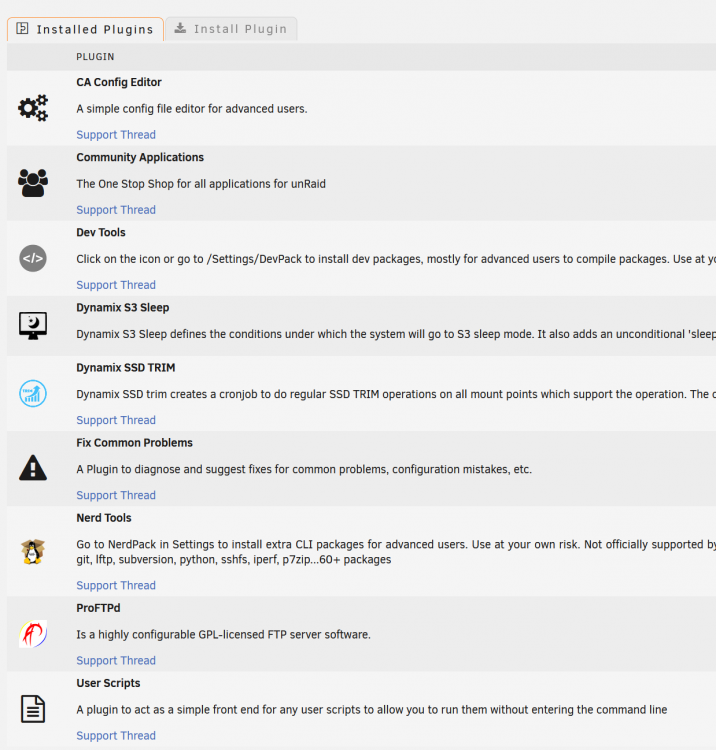
These are my currently installed plugins: The only User script I'm running is an undervolting script for my Intel CPU. I also user Docker images, but none of them actually utilize HDDs unless I tell them to. Is there any way to debug the smart reading? Ie can I pinpoint the source for the smart request?
-
I've suspected that as well, but I don't think there is anything. I'm not running any monitoring software on my Unraid server.
-
Not really. I'm on 6.9.1 and my disks still wake up due to a smart reading:

-
Any of you ever run into the following message? Just started showing up. It goes away once I uninstall the sleep plugin and reappears every time I reinstall it.

-
I've been experiencing the same issue over the last couple of days with the very same behavior. As soon as I put load on the drive, it goes offline and even a reboot doesn't help. I had the same problem a couple of weeks ago back when the drive wasn't housing my Docker files and just acted as a secondary cache drive and iirc I actually managed to fix this, but for the life of me I can't remember what I did...back then it happened when trying to remove unnecessary streams from mkv files - the drive just collapsed. After I changed something though it worked without issue. EDIT: Same issues described here: EDIT2: I found my fix in my backed up config files: Adding "nvme_core.default_ps_max_latency_us=0" to "Unraid OS" in the syslinux configuration made the issues disappear.
-
Since going from Beta35 to RC2, my Docker service has started crashing irregularly. I have not been able to reproduce it, but this is what I get as an error message when clicking on the Docker tab: Docker Service failed to start. Warning: stream_socket_client(): unable to connect to unix:///var/run/docker.sock (Connection refused) in /usr/local/emhttp/plugins/dynamix.docker.manager/include/DockerClient.php on line 682 Couldn't create socket: [111] Connection refused Warning: Invalid argument supplied for foreach() in /usr/local/emhttp/plugins/dynamix.docker.manager/include/DockerClient.php on line 866 Warning: stream_socket_client(): unable to connect to unix:///var/run/docker.sock (Connection refused) in /usr/local/emhttp/plugins/dynamix.docker.manager/include/DockerClient.php on line 682 Couldn't create socket: [111] Connection refused Warning: Invalid argument supplied for foreach() in /usr/local/emhttp/plugins/dynamix.docker.manager/include/DockerClient.php on line 932 No Docker containers installed A restart fixes the issue and Docker is running again. I've attached a diagnostics file. tower-diagnostics-20210103-1321.zip
-
I'd like to request the New Vegas soundtrack playing in the background when using the Fallout theme These look amazing and I can't wait to use them! Thank you!
-
Is there any way to get a readout on the actual voltage levels of the CPU? A before/after comparison would be nice when it comes to undervolting.


