





bclinton
Members
-
Joined
-
Last visited
Everything posted by bclinton
-
Yep....but mine are only about 5 gigs and I have room to spare on my backup drive.
-
The way I backup the appdata folder is using the backup/restore appdata plugin and store it in a backup share along with the plex backup and various other backup files. I then backup the backup share instead of the appdata folder with the rsync script.
-
The way I handle my appdata folder along with plex is back it up to a backup share with appdata backup folders once a week. I do this with other folders that are not really live backup friendly.....that way the script backups a nice clean tar file.
-
That worked! Thanks.
-
Greetings. I see that Unmanic has a new version so I decided to give it a look. Pretty slick! I have a quick question. I have added "--device=/dev/dri" to use my intel CPU in the extra parameter option. I would also like to limit CPU usage with "--cpus='.5" can I add both and if so how do I separate them? Thanks!
-
Awesome news! Can't wait!
-
Update. This morning I did a shutdown on the server rather than a reboot. Figured I would try the VM setup again. This time it started normal. Not sure what or why I was having problems before, but my guess is the shutdown seems to have resolved it. Before I would simply restart the server. Thanks again for helping with this. It is much appreciated.
-
unraid-diagnostics-20220119-1656.zip
-
Thanks for helping me. Here is the log. unraid-syslog-20220119-2246.zip
-
Hi friends. I had 2 existing VM's Windows 10 and Macinabox that were working fine. I haven't used them for months. I recently was trying to install an Ubuntu server VM which I have done so in the past with no issues. No matter what settings I used it would not work, so I tried to run my windows 10 and Macinbox VM's and they too would not work. Looking at the log files for all 3 VM's they end with the same entry that the log below has (qxl_send_events: spice-server bug: guest stopped, ignoring). I have updated to 6.10RC2 since the last time I used VM's...not sure if that is related. I am now unable to add any VM's as I continue to get the same error in the log file. Just looking for something to try. I have rebooted the server and deleted the libvert.img file which deleted my 2 existing VM's. LOG -smp 2,sockets=1,dies=1,cores=1,threads=2 \ -uuid f8fe7cd9-363a-83bb-5c25-481cd180cd51 \ -no-user-config \ -nodefaults \ -chardev socket,id=charmonitor,fd=35,server=on,wait=off \ -mon chardev=charmonitor,id=monitor,mode=control \ -rtc base=utc,driftfix=slew \ -global kvm-pit.lost_tick_policy=delay \ -no-hpet \ -no-shutdown \ -boot strict=on \ -device pcie-root-port,port=0x10,chassis=1,id=pci.1,bus=pcie.0,multifunction=on,addr=0x2 \ -device pcie-root-port,port=0x11,chassis=2,id=pci.2,bus=pcie.0,addr=0x2.0x1 \ -device pcie-root-port,port=0x12,chassis=3,id=pci.3,bus=pcie.0,addr=0x2.0x2 \ -device pcie-root-port,port=0x13,chassis=4,id=pci.4,bus=pcie.0,addr=0x2.0x3 \ -device pcie-root-port,port=0x14,chassis=5,id=pci.5,bus=pcie.0,addr=0x2.0x4 \ -device qemu-xhci,p2=15,p3=15,id=usb,bus=pcie.0,addr=0x7 \ -device virtio-serial-pci,id=virtio-serial0,bus=pci.2,addr=0x0 \ -blockdev '{"driver":"file","filename":"/mnt/user/domains/Ubuntu/vdisk1.img","node-name":"libvirt-2-storage","cache":{"direct":false,"no-flush":false},"auto-read-only":true,"discard":"unmap"}' \ -blockdev '{"node-name":"libvirt-2-format","read-only":false,"cache":{"direct":false,"no-flush":false},"driver":"raw","file":"libvirt-2-storage"}' \ -device virtio-blk-pci,bus=pci.3,addr=0x0,drive=libvirt-2-format,id=virtio-disk2,bootindex=1,write-cache=on \ -blockdev '{"driver":"file","filename":"/mnt/user/isos/ubuntu-20.04.3-live-server-amd64.iso","node-name":"libvirt-1-storage","auto-read-only":true,"discard":"unmap"}' \ -blockdev '{"node-name":"libvirt-1-format","read-only":true,"driver":"raw","file":"libvirt-1-storage"}' \ -device ide-cd,bus=ide.0,drive=libvirt-1-format,id=sata0-0-0,bootindex=2 \ -netdev tap,fd=37,id=hostnet0 \ -device virtio-net,netdev=hostnet0,id=net0,mac=52:54:00:87:42:04,bus=pci.1,addr=0x0 \ -chardev pty,id=charserial0 \ -device isa-serial,chardev=charserial0,id=serial0 \ -chardev socket,id=charchannel0,fd=38,server=on,wait=off \ -device virtserialport,bus=virtio-serial0.0,nr=1,chardev=charchannel0,id=channel0,name=org.qemu.guest_agent.0 \ -device usb-tablet,id=input0,bus=usb.0,port=1 \ -audiodev id=audio1,driver=none \ -vnc 0.0.0.0:0,websocket=5700,audiodev=audio1 \ -k en-us \ -device qxl-vga,id=video0,ram_size=67108864,vram_size=67108864,vram64_size_mb=0,vgamem_mb=16,max_outputs=1,bus=pcie.0,addr=0x1 \ -device virtio-balloon-pci,id=balloon0,bus=pci.4,addr=0x0 \ -sandbox on,obsolete=deny,elevateprivileges=deny,spawn=deny,resourcecontrol=deny \ -msg timestamp=on char device redirected to /dev/pts/0 (label charserial0) qxl_send_events: spice-server bug: guest stopped, ignoring
-
Did you ever figure this out? I had 2 VM's that I used from time to time and both of them are giving me the same error. I am also not able to create a new VM (ubuntu server) as it gives the same error in the log file.
-
Hi friends. I purchased a server from the state via a govdeals auction. It is 2010 hardware with an I3 intel but looks to be never used. I had to clear the MB bios to enter the CMOS setup but now I am stuck again. It has a 3ware Internal 9750-8i LSI raid controller and it is asking for the PW to setup my drives. I tried the default '3ware' with no luck. There are several pins on the bottom of the card and am thinking that I should be able to reset the card to default but not sure which pins to jumper. Looking for someone that may be able to help. Here is a pic of the card.
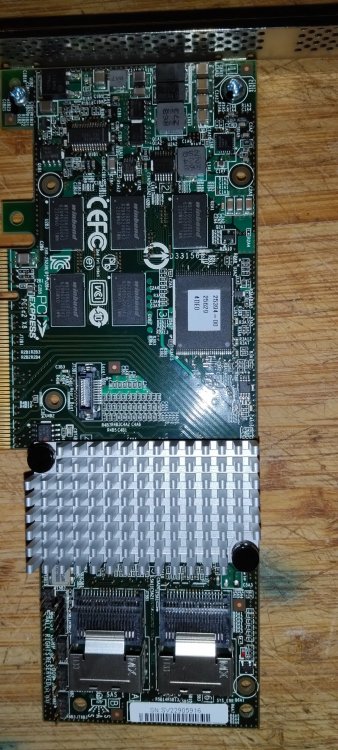
-
Just finished...took about 2 hours. Everything looks good! Thanks a million for the help!
-
It is rebalancing now. Looks like it will take a little while. I am at 63% left and slowly incrementing with 360 gigs to deal with. Fingers crossed
-
I can't believe it is that easy! So unraid will continue to function normal through this process? About how long should I expect it to take? Thanks for this info....I will try this later today!
-
Greetings friends! I have a question concerning my cache drive which is currently a 2TB capacity with 2 1TB SSD drives formatted with BTRFS. When I setup Unraid last year I set the 2 drives up as a raid 1 cache drive with 1TB of usable space. I did something during my learning phase and ended up with one 2TB drive as my cache drive. Everything is working great, and I have no issues, but I would like the cache drive to be mirrored as I really will never need 2TB of space and figured having a second copy would be a good thing in case one fails. My question is, what is the simplest way to do this? Move the data from the cache drive off to a USB backup drive, remove the cache pool and re-add it as a raid 1 BTRFS formatted pool and then copy the data back to it? Was worried about my docker containers mainly as I have many and the appdata folder is on the cache pool and curious as to what steps I should take when I do this.


-
Awesome. Thanks again!
-
Ah. that didn't occur to me.....I think I got it working using the exclude option like you suggested....did a few dry runs to test and it is now backing up the data. Will take about a 30 hours so I'll know tomorrow. I'm wondering what will happen when I do another backup next week to the data. Should I see another folder with the new date along with the most recent incremental copy of the data inside that folder? This is a screen grab of my root on the back up drive along with my change to the script. It looks like the data is being placed in the .01-12-22 folder in their correct sub folders. (I removed the H:M:S: variable so it only used the date) The folder name starts with a "." - is that normal? backup_jobs=( # source # destination "/mnt/user" "/mnt/disks/backup3" Excludes - rsync_options=( --exclude="[Tt][Ee][Mm][Pp]/" # exclude dirs with the name "temp" or "Temp" or "TEMP" --exclude="[Tt][Mm][Pp]/" # exclude dirs with the name "tmp" or "Tmp" or "TMP" --exclude="Cache/" # exclude dirs with the name "Cache" --exclude="[Pp][Ll][Ee][Xx]/" --exclude="[Aa][Pp][Pp][Dd][Aa][Tt][Aa]/" --exclude="[Dd][Oo][Ww][Nn][Ll][Oo][Aa][Dd][Ss]/" --exclude="[Ss][Yy][Ss][Tt][Ee][Mm]/" backup drive.... Thanks for the help!

-
Hi! I would love to try this out. Any chance on providing a youtube video detailing the install and use process?
-
Greetings. I have been happily using .60 for a while now and noticed I am a few versions behind in added features. I ran the 1.3 script on a spare 8TB HD to see what changed. These are my backup paths at total about 4 TB of data. The 1.3 script takes about 2 days to run with the drive in a USB cradle. I was wondering if there was a way to have all backup paths included in one destination folder. When the script finished, I had 3 separate folders since the backup time spanned 3 days. In other words, can I change something in the script to place all 5 backup locations in one destination folder even if the backup takes multiple days? So, if I start the backup on 1-12-22 I will have one folder on the backup disk with all 5 backups in that folder (1-12-22)? (similar to the way script .6 named backup destination folders?) backup paths "/mnt/user/data" "/mnt/disks/backup3/data" "/mnt/disk2" "/mnt/disks/backup3/disk2" "/mnt/user/backups" "/mnt/disks/backup3/backups" "/mnt/user/domains" "/mnt/disks/backup3/domains" "/mnt/user/isos" "/mnt/disks/backup3/isos"
-
That was my problem! Thanks my friend. I feel stupid Now I know to test wireguard from a separate network
-
No, all devices are on 192.168.1.X I am wondering if there is something going on specific with windows causing this error message.
-
Going nuts trying to figure out what is causing my issue with wireguard. Connecting from windows 10 machines. Can access the internet with my browser after connecting to wireguard with the remote tunnelling option however I can not connect to my unraid server. I get "Hmmm… your Internet access is blocked Firewall or antivirus software may have blocked the connection." on 2 different laptops. My server dashboard shows the unraid server online but when I click local access I get the error message. However on my android phone it works fine after I connect to wireguard. I am able to get to my unraid server and use the tunnel for internet access. Looking for suggestions.
-
First of all, the my servers plugin has worked in the past when I have tried it - was also able to vpn into my network and access the server at 192.168.1.XX. This time I am away from home and tried to connect to my unraid server and I see server offline and can't reach server when I try to http into it. I can connect to wireguard on unraid and several docker containers with a web front end as well as access LAN other LAN resources so I know the server is up. The only thing different between this time and the previous time that it worked is I have upgraded the OS to 6.10.0-rc2 from 6.91 (not sure if this is causing or not). I will not be home for several days and was just looking for something to try once I get back or something to try now before I get back home.
-
I must say this has been one smooth upgrade. I previously was a victim of the drives not spinning down issue with RC1 so I rolled back to 6.91. That issue is gone with RC2 and everything else works great. Kudos to the Devs!




