





bclinton
Members
-
Joined
-
Last visited
Everything posted by bclinton
-
I configured it to the tmp path on a totally different nmve drive. Same results. I am going to attach a mp4 file to show what is happening. On a side note....if I am the only one that this is happening to I have no problem blowing away my config and starting fresh. The video was too large to upload.
-
Not trying to bug you to death but figured the updates might help.....I updates the docker container this morning (staging) and now am unable to get to the webui......looking at the container in unraid advanced mode it once again is filling up the docker img space and starting over - it does this over and over and in the meantime I am unable to load the webui......I assume it is queing up the videos it finds in the initial scan and that is causing the docker img file to max out (it is set to 50 gigs)
-
No, I have the unmanic tmp path pointing to a tmp folder in the system share. It did not look to me like unmanic was using the tmp folder that I assigned as it was queing up videos to transcode. It was filling up the 50 gig docker file instead of using the tmp folder that I assigned and once it hit that limit it froze and I was unable to open the Web UI.

-
Hi folks.....coming over from Unmanic. Got it up and running on 2 libraries. I'm still al little fuzzy on the node container being required but it works I would like it to scan the 2 libraries at 2AM M-F. Looking for suggestions on the switches and how I should set them. I have the schedule tab set for 2AM M-F for each library. Wasn't sure about the watch folder option and the ignore schedules option on the main page.
-
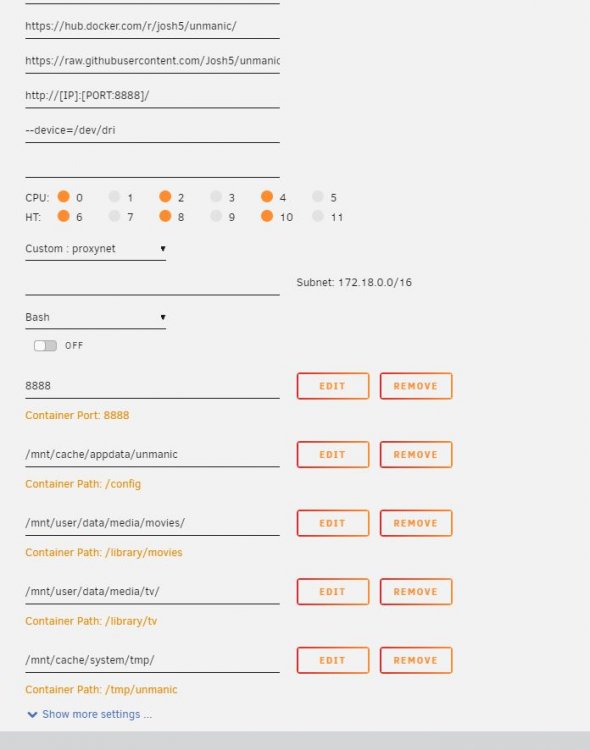
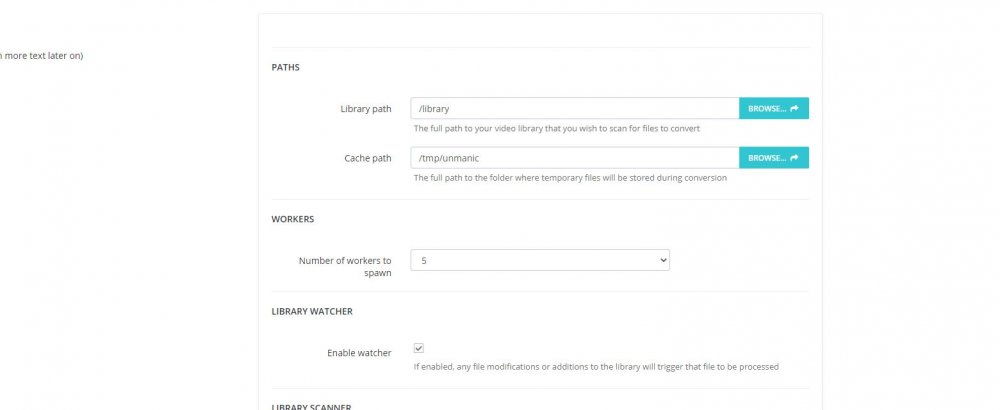
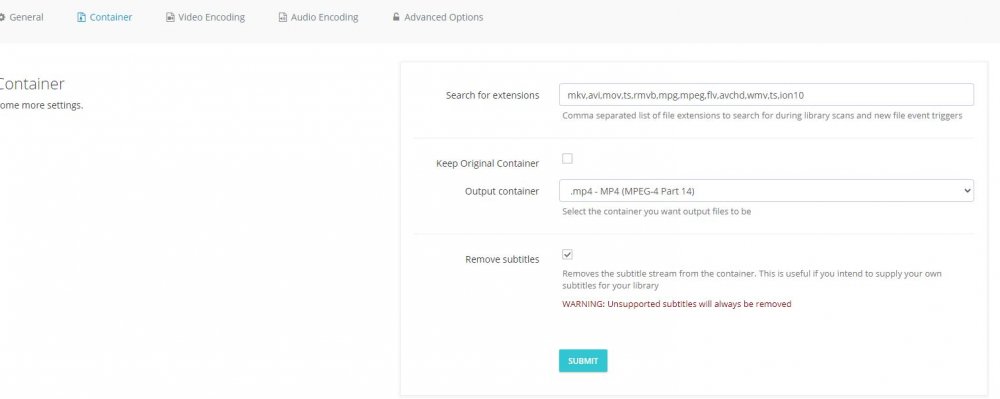
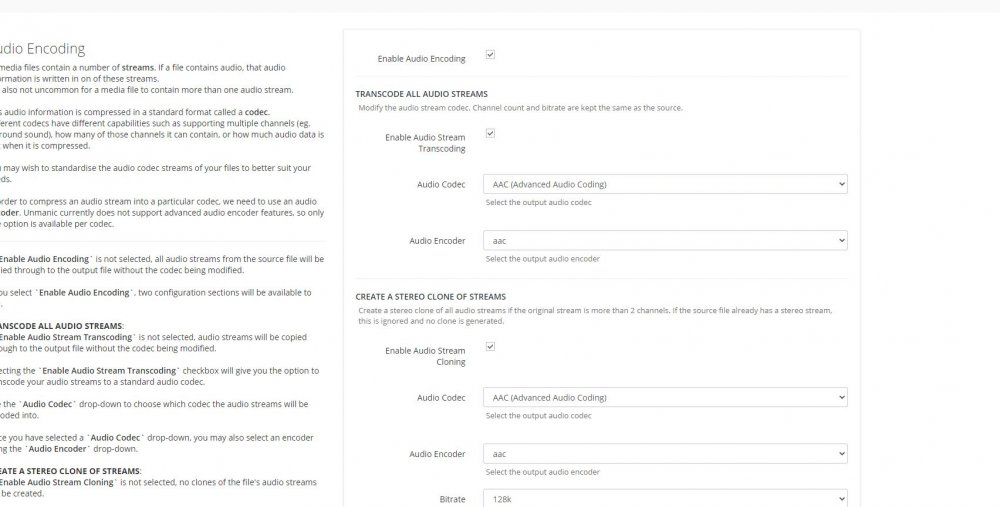
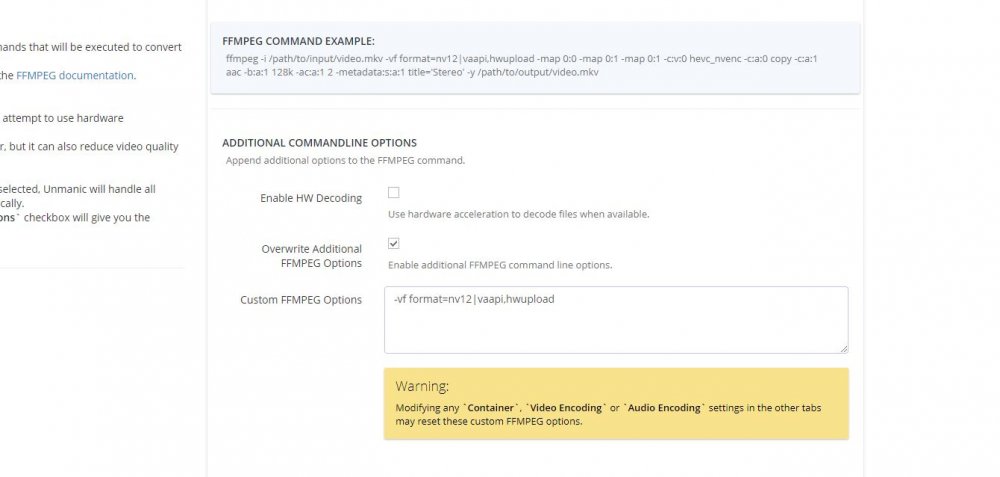
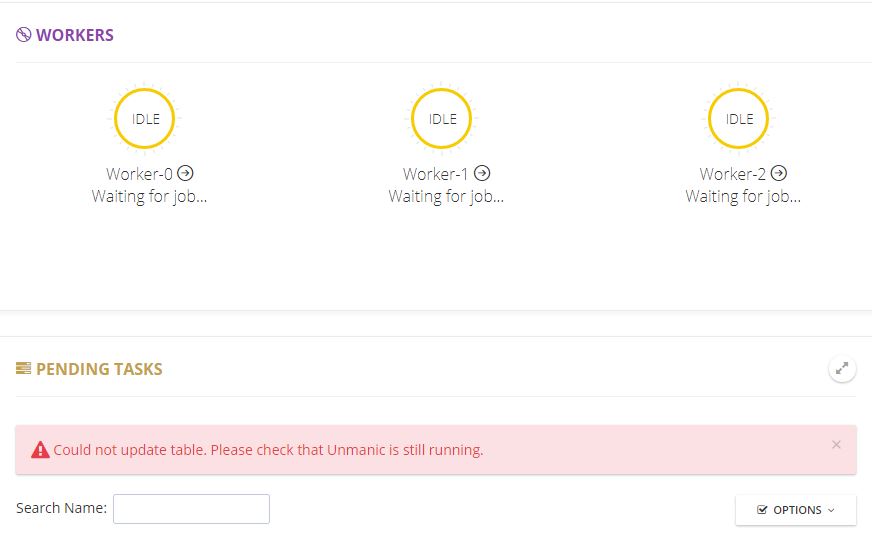
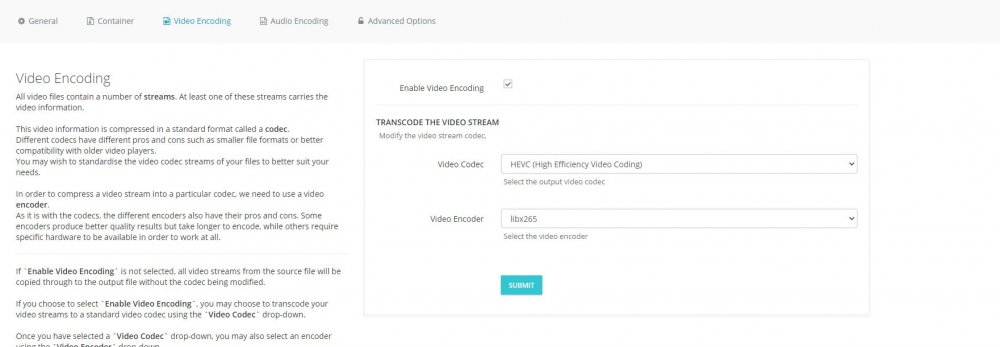
Here are my settings. I was unable to bring up the WEBUI but just changed to the staging branch and it comes up now. It started encoding a file and got to about 3-4% and gave the error (could not update table.... - shown below) I am thinking at this point I could try blowing away the container and starting over with the staging branch......what do you think? The only thing that changed from working great to having these issues was me adding about 25 videos to my movie share and some of them were quite large (25 gigs).
-
Had a look at Tdarr.....looks interesting......but as you said it does not look like a simple setup. I might have to wait for a Spaceinvader video
-
Unmanic has ran great until the last few days. I keep getting can't reach page then it will pop up and load and then give me can't reach page again. I renamed the settings.json and the unmanic.db file and started back up with no change. Any suggestion of what I can try next? I am running Version - 0.0.4+d103d6c Some additional info. I noticed that my space used in the container seems very high. My docker img file is set to 50gigs and the unmanic container seems to be hitting that mark. I have some very large mkv movies files pending to encode. Is that causing my issue? I have my tmp folder set to use another folder on the cache drive which is a 2TB ssd. In the docker screen I can see the space used go up to a point and then start over again. It repeats this so I assume it is hitting a space limit. /config/mnt/cache/appdata/unmanic /library/movies/mnt/user/data/media/movies/ /library/tv/mnt/user/data/media/tv/ /tmp/unmanic/mnt/cache/system/tmp/8.41% 40.51GiB / 46.93GiB <-------------------- filling up my docker img allocated space? I have the mapping setup correctly but it doesnt look like unmanic used the space correctly for the tmp folder /tmp/unmanic------>/mnt/plex_data/tmp/ On a side note....I see folks saying the changed the build version of unmanic. Where do I do that at in unraid?
-
After the update this morning I am unable to get to the login page. My log has this entry. 2021/04/20 06:40:08 Did not find auth-token cookie 2021/04/20 06:40:11 [0;34;49mGET [0;34;49m0[0m 192.168.1.24:8694/api/graphql [0;36;49m3.446236865s[0m unauthenticated Anyone else seeing this?
-
Will do. Thanks!
-
Thanks for sharing this. It worked great and I have been trying to get something like up for a while. Signed.....Newb
-
Greetings friends! After trying several other photo apps Photoview looks like it is the one I am sticking with. My main goal was to try and find an app to replace synology moments and retained my folder structure and included face recognition. IMO Google Picasa was the best one that did that but is now dead. The face recognition with photoview is not bad but is there a way to combine recognized face groups. In other words is ID'ed several groups of my same child and I would like all of those combined into one named group. I see that face recognition is fairly new to the app so was hoping that it would evolve.
-
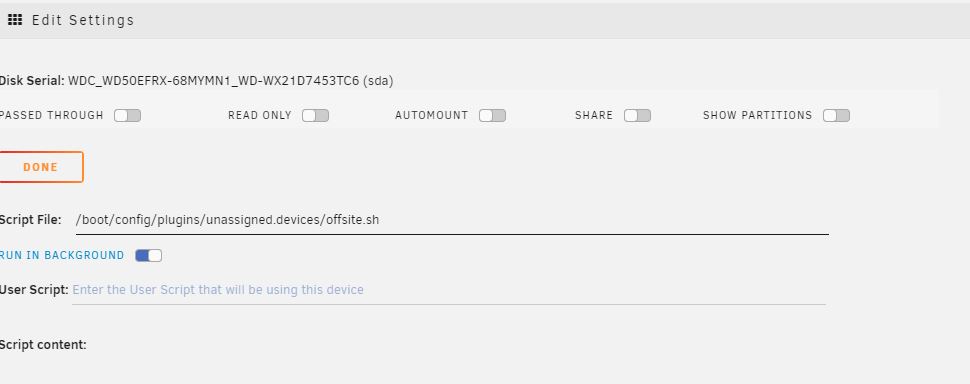
Hi all.....I have noticed that I am unable to unmount the USB disk even after the backup script finishes. I run it in background mode and it apparently affects the unmounting of the drive. I click unmount on the UD entry and it pauses a split second and stays mounted. Looking at the drive settings below it shows the backup script. Is there a command I can run to stop the script manually?
-
Hi folks! Been using Unmanic for a few weeks. Finally finished re-encoding my library and it worked great. I have noticed that in the log files it seems to go back and try to re-encode a number of movies over and over again each time it scans. Is there a way to current it where it does not try and re-encode something it has already completed. Thanks.
-
Thanks for this!
-
Ha! You were right! That was too easy.
-
Hi friends! Looking for advise/guidance.....I currently have swag working with unraid and several containers like Sonarr, Nextcloud etc.....I was wondering if I could use Swag to reverse proxy to other servers I have on my LAN (not on the unraid box). For example I have a synology NAS ruuning my cameras at 192.168.1.22. Is it possible to use Swag to reverse proxy to https://dscam.mydomain.com? I am thinking it would be but am unsure how to setup the .conf file. I am using the custom docker network that SI setup in his videos and it works great for reverse proxying to unraid containers just wasnt sure about LAN devices. A newb looking for advise with trying to make this work TIA
-
It looks like you were right. It was tied to my naming of the subdomain. An update though....I found out my domain provider (namecheap) has dynamic DNS included. After changing the dns settings for my domain and not using duckdns Swag works great. My first test container was sonarr and it works perfect. Now on to adding nextcloud. I must say Nextcloud is pretty slick! Thanks for the suggestions!
-
Will do. Thanks! I think tomorrow I will start fresh with Swag and get up according to SI's video again.
-
Yes. I did that first and it all appeared right. The logs showed success verifying the bclinton.duckdns.org host name. I think my problem is with me missing something with the certificates. Like I mentioned. After all was said and done I am able to log into the bitwarden container with bitwarden.bclinton.duckdns.org fine. The only issues I had was not able to get it installed on the phone (android) and I got the "unsafe site" http error in the address bar. I noticed on Spaceinvaders video he did not get that so I have to have missed something. I agree - Spaceinvader is the best. I am only a week with my unraid (came from synology) and have learned so much.
-
I actually deleted everything and will try again from scratch in the morning. Can you recommend a youtube install video besides spaceinvaders? I have been trying to wrap my head around all of the settings and what I missed all day. I feel drunk
-
I followed the instructions that were outlined in the youtube video - How to Setup and Configure a Reverse Proxy on unRAID with LetsEncrypt & NGINX
-
Here is that section from my docker swag config.
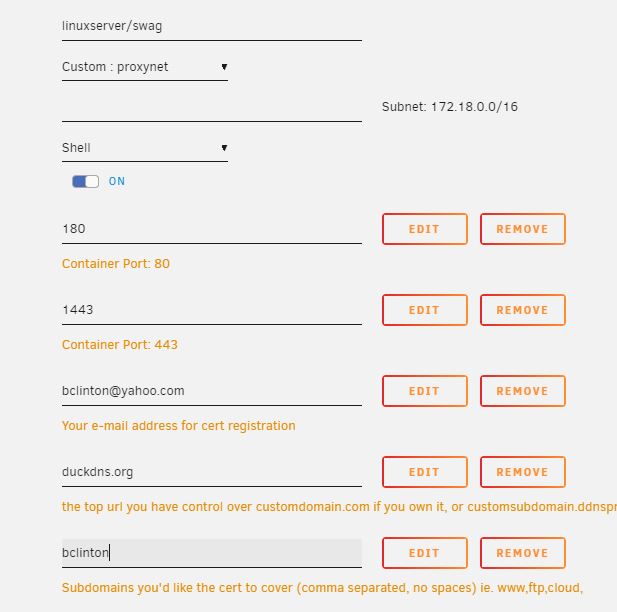
-
I believe it is right. I used the one he provided but I kept all of my naming the same as his, thinking that it would be correct. Here is the one I am using. I am using bitwarden.XXXXXXX.duckdns.org to reach the container from the chrome browsers. One thing that is strange is I am getting the Not Secure warning in the browser address line but it lets me in after I click proceed. #BITWARDEN # make sure that your domain has dns has a cname or a record set for the subdomain bitwarden # This config file will work as is when using a custom docker network the same as letesencrypt (proxynet). # However the container name is expected to be "bitwardenrs" as it is by default the template as this name is used to resolve. # If you are not using the custom docker network for this container then change the line "server bitwardenrs:80;" to "server [YOUR_SERVER_IP]:8086;" Also remove line 7 resolver 127.0.0.11 valid=30s; upstream bitwarden { server bitwardenrs:80; } server { listen 443 ssl; server_name bitwarden.*; include /config/nginx/ssl.conf; client_max_body_size 128M; location / { proxy_pass http://bitwarden; proxy_set_header Host $host; proxy_set_header X-Real-IP $remote_addr; proxy_set_header X-Forwarded-For $proxy_add_x_forwarded_for; proxy_set_header X-Forwarded-Proto $scheme; } location /notifications/hub { proxy_pass http://bitwarden; proxy_set_header Upgrade $http_upgrade; proxy_set_header Connection "upgrade"; } location /notifications/hub/negotiate { proxy_pass http://bitwarden; } }
-
Greetings folks! New unraid user and recently dropped lastpass and am trying to use bitwarden and swag in a docker container. I am able to run the chrome extension for bitwarden on the PC if I log in to the bitwarden server ahead of time with the browser. Otherwise I received the unable to fetch error. I assume once I get the extension working it will not need attention again. My current problem is getting the app on my phones (android) to connect. I am able to access my server through the browser on the phone but the app continues to refuse the connection. (Exception message:Hostname bitwarden.xxxx.duckdns.org not verfied) I followed Spaceinvaders youtube pretty much. Looking for a suggestion to help tackle the phone
-
Thank you for the help. The next disk I will use I will format it in BTRFS. Thanks again for the great script!


