





Salzgablah
Members
-
Joined
-
Last visited
Everything posted by Salzgablah
-
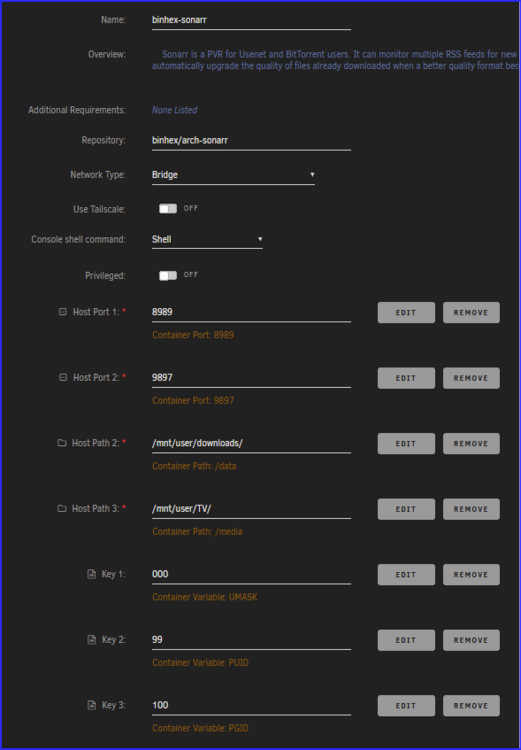
After logging into my Sonarr instance today, I receive the below error and can't proceed to the GUI. Sequence Contains more than one matching element. Since I can't successfully login, I'm not sure how to pull debug logs. Sonarr settings. I've got a few instances of the below in the logs. Not sure if that's relevant as it started a few days ago and things were still working. [v4.0.15.2941] code = Corrupt (11), message = System.Data.SQLite.SQLiteException (0x800007EF): database disk image is malformed database disk image is malformed at System.Data.SQLite.SQLite3.Reset(SQLiteStatement stmt) at System.Data.SQLite.SQLite3.Step(SQLiteStatement stmt) at System.Data.SQLite.SQLiteDataReader.NextResult() at System.Data.SQLite.SQLiteDataReader..ctor(SQLiteCommand cmd, CommandBehavior behave) at System.Data.SQLite.SQLiteCommand.ExecuteReader(CommandBehavior behavior) at System.Data.SQLite.SQLiteCommand.ExecuteNonQuery(CommandBehavior behavior) at Dapper.SqlMapper.ExecuteImpl(IDbConnection cnn, CommandDefinition& command) in /_/Dapper/SqlMapper.cs:line 563 at NzbDrone.Core.Datastore.BasicRepositor1.UpdateFields(IDbConnection connection, IDbTransaction transaction, IList1 models, List`1 propertiesToUpdate) in ./Sonarr.Core/Datastore/BasicRepository.cs:line 396 at NzbDrone.Core.Datastore.BasicRepositor1.UpdateMany(IList1 models) in ./Sonarr.Core/Datastore/BasicRepository.cs:line 246 at NzbDrone.Core.Tv.EpisodeService.UpdateMany(List`1 episodes) in ./Sonarr.Core/Tv/EpisodeService.cs:line 214 at NzbDrone.Core.Tv.RefreshEpisodeService.RefreshEpisodeInfo(Series series, IEnumerable`1 remoteEpisodes) in ./Sonarr.Core/Tv/RefreshEpisodeService.cs:line 128 at NzbDrone.Core.Tv.RefreshSeriesService.RefreshSeriesInfo(Int32 seriesId) in ./Sonarr.Core/Tv/RefreshSeriesService.cs:line 129 at NzbDrone.Core.Tv.RefreshSeriesService.Execute(RefreshSeriesCommand message) in ./Sonarr.Core/Tv/RefreshSeriesService.cs:line 249 Attached is the latest portion of the log from appdata where things started erroring out. sonarr log.log

-
I was able to add remap the 8080 port and create a second port mapping for 80 to my desired port, which allows Tandoor to start. However, when I try to login i get a "Server Error (500)" response.
-
Both my array and cache drives are encrypted with the same key. So when pulling the keyfile, it unlocks and mounts all drives (array and cache). If you are using different encryption keys, I'm not sure how that would impact the process. I would recommend using the same key for all, unless you have a specific reason to use different key's...
-
The new unassigned devices creates the folder and the current version of fix common problems does not have an exception listed for the new folder. Once it's updated, the error should go away. Don't think you'll be able to remove the folder unless you remove unassigned devices plugin.
-
Perfect. Thanks for the advice!
-
I'm in the same boat, error just popped up after the most recent UD update (2023.03.03). Now I've updated all plugins including FCP but there error remains. Should I just "ignore error"? What's next step?

-
I'll come back here if i need anything else but looks like I've got everything to move forward. Thanks a bunch for your help JorgeB!
-
Very interesting. I'll connect it to the MOBO through the SATA port later today instead of the HBA card. I think I have one port left. wild that it impacts a specific HD model like that. How do i initiate a rebuild using the same drive? The "Replacing a Data Drive" seems to be using a new disk that hasn't been in the array before. I actually picked up a new 16TB drive to increase parity, which would allow me to replace this 8TB with my 14TB parity. But it sounds like i'll need to rebuild the Disk3 before i can replace and rebuild parity.
-
See attached. The disk in question is disk3 but the SMART file already has DISK_DSBL in the filename. tower-diagnostics-20230301-1548.zip
-
Today I received a warning that disk3 of my array had an error and is now disabled. The below is from the syslog in the diagnostics. Mar 1 14:41:09 Tower kernel: sd 6:0:0:0: [sde] tag#9163 UNKNOWN(0x2003) Result: hostbyte=0x00 driverbyte=DRIVER_OK cmd_age=19s Mar 1 14:41:09 Tower kernel: sd 6:0:0:0: [sde] tag#9163 Sense Key : 0x2 [current] Mar 1 14:41:09 Tower kernel: sd 6:0:0:0: [sde] tag#9163 ASC=0x4 ASCQ=0x0 Mar 1 14:41:09 Tower kernel: sd 6:0:0:0: [sde] tag#9163 CDB: opcode=0x88 88 00 00 00 00 03 93 cc 06 60 00 00 00 40 00 00 Mar 1 14:41:09 Tower kernel: I/O error, dev sde, sector 15364523616 op 0x0:(READ) flags 0x0 phys_seg 8 prio class 0 Mar 1 14:41:09 Tower kernel: md: disk3 read error, sector=15364523552 Mar 1 14:41:09 Tower kernel: md: disk3 read error, sector=15364523560 Mar 1 14:41:09 Tower kernel: md: disk3 read error, sector=15364523568 Mar 1 14:41:09 Tower kernel: md: disk3 read error, sector=15364523576 Mar 1 14:41:09 Tower kernel: md: disk3 read error, sector=15364523584 Mar 1 14:41:09 Tower kernel: md: disk3 read error, sector=15364523592 Mar 1 14:41:09 Tower kernel: md: disk3 read error, sector=15364523600 Mar 1 14:41:09 Tower kernel: md: disk3 read error, sector=15364523608 Mar 1 14:41:09 Tower kernel: sd 6:0:0:0: [sde] tag#9164 UNKNOWN(0x2003) Result: hostbyte=0x00 driverbyte=DRIVER_OK cmd_age=19s Mar 1 14:41:09 Tower kernel: sd 6:0:0:0: [sde] tag#9164 Sense Key : 0x2 [current] Mar 1 14:41:09 Tower kernel: sd 6:0:0:0: [sde] tag#9164 ASC=0x4 ASCQ=0x0 Mar 1 14:41:09 Tower kernel: sd 6:0:0:0: [sde] tag#9164 CDB: opcode=0x88 88 00 00 00 00 03 93 cc 06 c0 00 00 00 60 00 00 Mar 1 14:41:09 Tower kernel: I/O error, dev sde, sector 15364523712 op 0x0:(READ) flags 0x0 phys_seg 12 prio class 0 Mar 1 14:41:09 Tower kernel: md: disk3 read error, sector=15364523648 Mar 1 14:41:09 Tower kernel: md: disk3 read error, sector=15364523656 Mar 1 14:41:09 Tower kernel: md: disk3 read error, sector=15364523664 Mar 1 14:41:09 Tower kernel: md: disk3 read error, sector=15364523672 Mar 1 14:41:09 Tower kernel: md: disk3 read error, sector=15364523680 Mar 1 14:41:09 Tower kernel: md: disk3 read error, sector=15364523688 Mar 1 14:41:09 Tower kernel: md: disk3 read error, sector=15364523696 Mar 1 14:41:09 Tower kernel: md: disk3 read error, sector=15364523704 Mar 1 14:41:09 Tower kernel: md: disk3 read error, sector=15364523712 Mar 1 14:41:09 Tower kernel: md: disk3 read error, sector=15364523720 Mar 1 14:41:09 Tower kernel: md: disk3 read error, sector=15364523728 Mar 1 14:41:09 Tower kernel: md: disk3 read error, sector=15364523736 Mar 1 14:41:09 Tower emhttpd: read SMART /dev/sde Mar 1 14:41:09 Tower kernel: sd 6:0:0:0: [sde] tag#9173 UNKNOWN(0x2003) Result: hostbyte=0x00 driverbyte=DRIVER_OK cmd_age=0s Mar 1 14:41:09 Tower kernel: sd 6:0:0:0: [sde] tag#9173 Sense Key : 0x2 [current] Mar 1 14:41:09 Tower kernel: sd 6:0:0:0: [sde] tag#9173 ASC=0x4 ASCQ=0x0 Mar 1 14:41:09 Tower kernel: sd 6:0:0:0: [sde] tag#9173 CDB: opcode=0x8a 8a 00 00 00 00 03 93 cc 06 60 00 00 00 40 00 00 Mar 1 14:41:09 Tower kernel: I/O error, dev sde, sector 15364523616 op 0x1:(WRITE) flags 0x0 phys_seg 8 prio class 0 Mar 1 14:41:09 Tower kernel: md: disk3 write error, sector=15364523552 Mar 1 14:41:09 Tower kernel: md: disk3 write error, sector=15364523560 Mar 1 14:41:09 Tower kernel: md: disk3 write error, sector=15364523568 Mar 1 14:41:09 Tower kernel: md: disk3 write error, sector=15364523576 Mar 1 14:41:09 Tower kernel: md: disk3 write error, sector=15364523584 Mar 1 14:41:09 Tower kernel: md: disk3 write error, sector=15364523592 Mar 1 14:41:09 Tower kernel: md: disk3 write error, sector=15364523600 Mar 1 14:41:09 Tower kernel: md: disk3 write error, sector=15364523608 Mar 1 14:41:09 Tower kernel: sd 6:0:0:0: [sde] tag#9179 UNKNOWN(0x2003) Result: hostbyte=0x00 driverbyte=DRIVER_OK cmd_age=0s Mar 1 14:41:09 Tower kernel: sd 6:0:0:0: [sde] tag#9179 Sense Key : 0x2 [current] Mar 1 14:41:09 Tower kernel: sd 6:0:0:0: [sde] tag#9179 ASC=0x4 ASCQ=0x0 Mar 1 14:41:09 Tower kernel: sd 6:0:0:0: [sde] tag#9179 CDB: opcode=0x8a 8a 00 00 00 00 03 93 cc 06 c0 00 00 00 60 00 00 Mar 1 14:41:09 Tower kernel: I/O error, dev sde, sector 15364523712 op 0x1:(WRITE) flags 0x0 phys_seg 12 prio class 0 Mar 1 14:41:09 Tower kernel: md: disk3 write error, sector=15364523648 Mar 1 14:41:09 Tower kernel: md: disk3 write error, sector=15364523656 Mar 1 14:41:09 Tower kernel: md: disk3 write error, sector=15364523664 Mar 1 14:41:09 Tower kernel: md: disk3 write error, sector=15364523672 Mar 1 14:41:09 Tower kernel: md: disk3 write error, sector=15364523680 Mar 1 14:41:09 Tower kernel: md: disk3 write error, sector=15364523688 Mar 1 14:41:09 Tower kernel: md: disk3 write error, sector=15364523696 Mar 1 14:41:09 Tower kernel: md: disk3 write error, sector=15364523704 Mar 1 14:41:09 Tower kernel: md: disk3 write error, sector=15364523712 Mar 1 14:41:09 Tower kernel: md: disk3 write error, sector=15364523720 Mar 1 14:41:09 Tower kernel: md: disk3 write error, sector=15364523728 Mar 1 14:41:09 Tower kernel: md: disk3 write error, sector=15364523736 I've also got the SMART results from the diag package, see below and attached. SMART Attributes Data Structure revision number: 10 Vendor Specific SMART Attributes with Thresholds: ID# ATTRIBUTE_NAME FLAGS VALUE WORST THRESH FAIL RAW_VALUE 1 Raw_Read_Error_Rate POSR-- 074 064 044 - 26762032 3 Spin_Up_Time PO---- 082 080 000 - 0 4 Start_Stop_Count -O--CK 099 099 020 - 1587 5 Reallocated_Sector_Ct PO--CK 100 100 010 - 0 7 Seek_Error_Rate POSR-- 082 060 045 - 175723966 9 Power_On_Hours -O--CK 080 080 000 - 17990 10 Spin_Retry_Count PO--C- 100 100 097 - 0 12 Power_Cycle_Count -O--CK 100 100 020 - 97 18 Head_Health PO-R-- 100 100 050 - 0 187 Reported_Uncorrect -O--CK 100 100 000 - 0 188 Command_Timeout -O--CK 099 099 000 - 4295032833 190 Airflow_Temperature_Cel -O---K 066 055 040 - 34 (Min/Max 27/40) 192 Power-Off_Retract_Count -O--CK 100 100 000 - 27 193 Load_Cycle_Count -O--CK 090 090 000 - 20911 194 Temperature_Celsius -O---K 034 045 000 - 34 (0 23 0 0 0) 195 Hardware_ECC_Recovered -O-RC- 074 064 000 - 26762032 197 Current_Pending_Sector -O--C- 100 100 000 - 0 198 Offline_Uncorrectable ----C- 100 100 000 - 0 199 UDMA_CRC_Error_Count -OSRCK 200 200 000 - 0 240 Head_Flying_Hours ------ 100 253 000 - 6332h+12m+55.571s 241 Total_LBAs_Written ------ 100 253 000 - 29052003840 242 Total_LBAs_Read ------ 100 253 000 - 555730377236 ||||||_ K auto-keep |||||__ C event count ||||___ R error rate |||____ S speed/performance ||_____ O updated online |______ P prefailure warning This drive is through an LSI 9207 HBA SAS card with 3 other drives. I've reset the SAS to SATA cables and all power cords. I'm now running an extended SMART test on the drive. If that comes back clean, and with the above info, do you think the drive is OK or should I start an RMA with Seagate? If you think it's still got some life left, what is the process to re-enable the drive? Couldn't find much in the wiki and links in past posts went 404. ST8000VN004-2M2101-20230301-1548 disk3 (sde) - DISK_DSBL.txt
-
I had this issue a couple days ago, scroll up a bit. I tried uninstalling then installing and it would still show up blank....but a restart of the server actually fixed it.
-
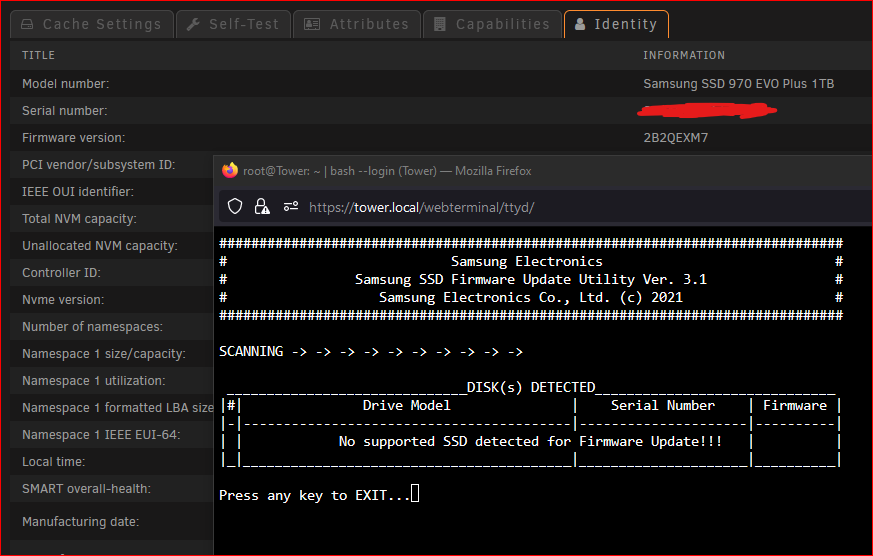
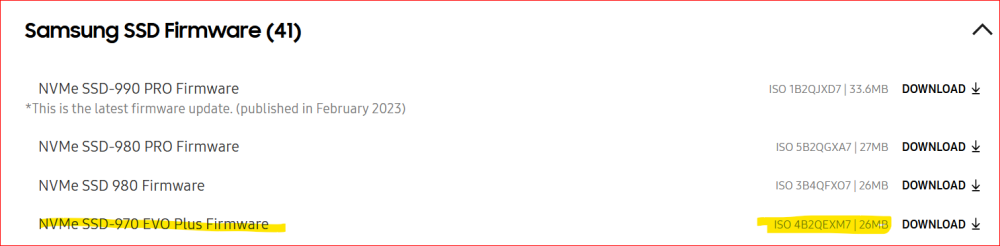
No dice. Tried with the array stopped and with the cache drive out of the motherboard. Cache 2 was removed and only cache was left installed. Firmware listed on Samsung website: None of my other PC's have an nvme slot, otherwise i'd try to remove the old FW drive and update in another Mobo....I'm out of ideas.

-
Once this parity check is complete, I'll first try stopping the array and running the tool again from an external drive. If that doesn't work I'll do as you suggest and remove the 'cache 2' drive to see if it'll pick up the old FW on the 'cache' drive. I'll report back with results. Much appreciated for your help with the instructions and troubleshooting.
-
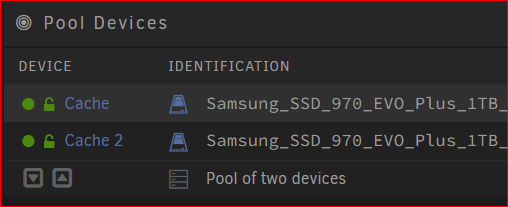
I was able to follow all the steps but the firmware updater does not detect all of my Samsung SSD's. I have two 970 EVO Plus drives in a cache pool together for mirroring. The drive named "Cache" has an older firmware starting with '2B' and Cache 2 already has the updated firmware starting '4B'. I'm looking to update the "Cache" NVME. When running the updater, it only detects "Cache 2" and says that the firmware is already up to date (which is true), but it does not list out the first drive "Cache". Any ideas?
-
With the new version 2023.02.19, I'm unable to see any files when opening up shares. The screen just shows zero files. Everything worked great until this updated version. Is there a way to downgrade versions for plugins? Edit: a server reboot appears to have resolved the issue.

-
That worked. It removed the windows formatting. I also updated the go file to use the new install commands and that worked as well. What's the main reason for using the three install commands instead of the copy and changing permissions? Just reducing the amount of lines in go? Thanks for the pointers and help.
-
I realize this is an old thread, but I just went through the process and hope i can help someone else in the future. I tried using the fetch_key/delete_key from another thread on the forum, but apparently that broke a few versions of UnRaid ago. The below was pulled and compiled from other posts on the forum, spaceinvader videos linked above, plus some trial and error. I should note that I'm currently on 6.11.0. I have a backup server using a passphrase to decrypt and wanted to switch it to a keyfile with the ultimate goal of having a keyfile on a second machine and pulling a copy at startup. This would only allow the server to auto start when the main server is online. To convert my passphrase into a keyfile, the only method I was able to use successfully was the following command in terminal echo -n passphrase >/boot/keyfile This put the new keyfile in boot but that isn't enough as the keyfile needs to be in /root/ upon startup to decrypt and autostart the array. However, root is deleted upon system shutdown. So I added a 'cp' line in the /boot/config/go file to copy this keyfile to root as the system starts. #!/bin/bash cp /boot/keyfile /root/keyfile # Start the Management Utility /usr/local/sbin/emhttp & Once confirmed that the key works, I was able to move the keyfile off /boot as it is a BAD idea to have your key on the flashdrive that's plugged into the machine. So I copied the keyfile on a second server in the 'keys' share and modified the above 'go' file mount the share, copy the keyfile to root, then unmount the drive. #!/bin/bash # cp /boot/keyfile /root/keyfile #commented out the previous method used to test the keyfile. Can remove this line if you have a working keyfile. mkdir -p /keys mount -t cifs -o user=username,password=userpassword,iocharset=utf8 //IPADDRESS/keys /keys cp -f /keys/keyfile /root/keyfile umount /keys rm -r /keys # Start the Management Utility /usr/local/sbin/emhttp & You'll need to modify the username, userpassword and IPADDRESS for what your settings. You can also use the above code from the go file in a user script to run 'At Stopping of Array' so it'll be loaded when you start the array back up. I also created the below script to remove the /root/keyfile after the array has started, that way the keyfile isn't sitting in root while the machine is one (probably not necessary as it is removed automatically at shutdown/restart). #!/bin/bash sleep 120 rm /root/keyfile Hope this helps.
-
I'm able to run each step of the below 'fetch_key' script in terminal without issue, #!/bin/bash if [[ ! -e /root/keyfile ]]; then mkdir -p /keys mount -t cifs -o user='username',password='secret_key',iocharset=utf8 //'IP ADDRESS'/keys /keys cp -f /keys/AMD_array/keyfile /root/keyfile umount /keys rm -r /keys fi but when trying to run the script itself, i'm getting two errors. root@Tower:~# bash /usr/local/emhttp/webGui/event/starting/fetch_key /usr/local/emhttp/webGui/event/starting/fetch_key: line 2: $'\r': command not found /usr/local/emhttp/webGui/event/starting/fetch_key: line 11: syntax error: unexpected end of file My go file for reference. #!/bin/bash # auto unlock array by making use of events to fetch keyfile and delete it after decryption mkdir -p /usr/local/emhttp/webGui/event/starting mkdir -p /usr/local/emhttp/webGui/event/started mkdir -p /usr/local/emhttp/webGui/event/stopped cp -f /boot/custom/bin/fetch_key /usr/local/emhttp/webGui/event/starting cp -f /boot/custom/bin/delete_key /usr/local/emhttp/webGui/event/started cp -f /boot/custom/bin/fetch_key /usr/local/emhttp/webGui/event/stopped chmod a+x /usr/local/emhttp/webGui/event/starting/fetch_key chmod a+x /usr/local/emhttp/webGui/event/started/delete_key chmod a+x /usr/local/emhttp/webGui/event/stopped/fetch_key Did something major change?
-
Redundant pool. I went the path of moving all cache files off the pool onto the array, then started fresh with only one drive in the cache pool. Took a bit longer to move everything off then back on (appdata and vm's), but didn't want to risk it.
-
So I'm on Version: 6.10.3 and have two 1TB SSDs as part of the cache pool. I'd like to split the pool up into two, which means i need to remove one of the drives, but they are encrypted. Per the above, I can't use this method. How do I remove one of the two cache disks in a pool where the drives are encrypted?
-
This is what I was looking for, helped me out as well. Thanks!
-
@jimmy898 and @Froberg, you both were right. Wasn't container based. It was addons with Firefox causing conflicts. It worked on chrome so started digging into the browser. Now it's working as intended. All good on my end.
-
I switched from SWAG to nginx proxy manager to try out other reverse proxy options to see if it fixed my issue. Still have a "Socket Failed to Connect" error after logging in through the reverse proxy. Making me think it's an ABS container issue instead of reverse proxy issue, but could be wrong.
-
When connecting locally via the IP address, everything is working fine. Once i go through my swag reverse proxy, with the above conf, I can connect and login, but continually see a "Socket Failed to Connect" error. This happened on v2.0.1 and the new v2.0.2 version that was just released.





