





domrockt
Members
-
Joined
-
Last visited
Everything posted by domrockt
-
i have no luck so far when i install the custom Thor kernel my Mellanox Nic is not detected anymore, i mean its there in the devices tab but not recognized as usable NIC🥲 can anyone relate? i opened an Issue on Github, maybe its because the NICs are from NVidia
-
if you consider theoretical 15,5 GByte/s slow then yes
-
1) Yes 2) something like this https://www.broadcom.com/products/storage/host-bus-adapters/sas-nvme-9600w-16e about 500 Dollar ish and you can look here for PLX chips https://c-payne.com/index.php?route=product/product&path=66&product_id=86
-
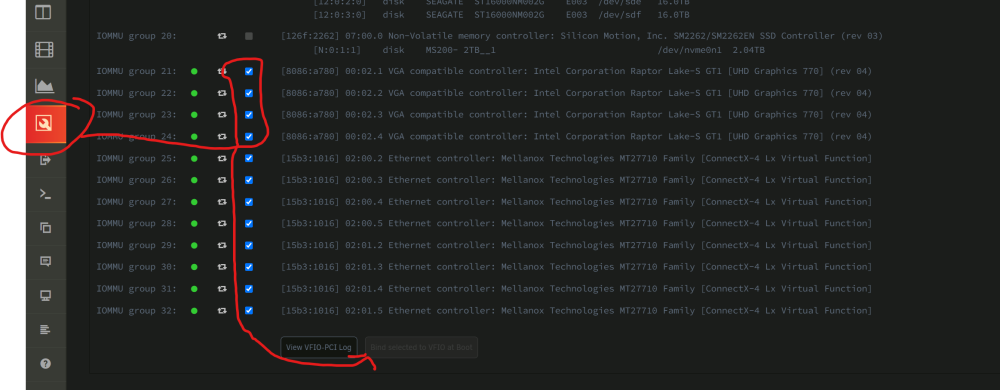
1) Mainboard Bios, enable sriov there 2) install the sriov plugin 3) make a user script with (echo 4 means 4 Virtual GPUs) #!/bin/bash echo 4 > /sys/devices/pci0000\:00/0000\:00\:02.0/sriov_numvfs 4)make it run on array start 5) set 4 VFs in the Plugin 6)reboot 7) bind as many as you wish in the system devices Tab 8)reboot




-
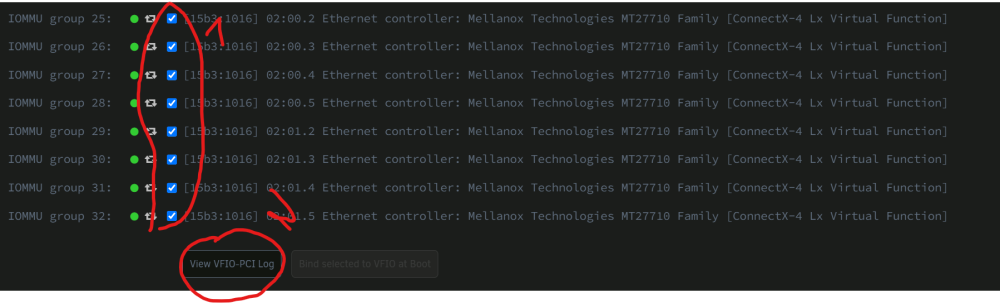
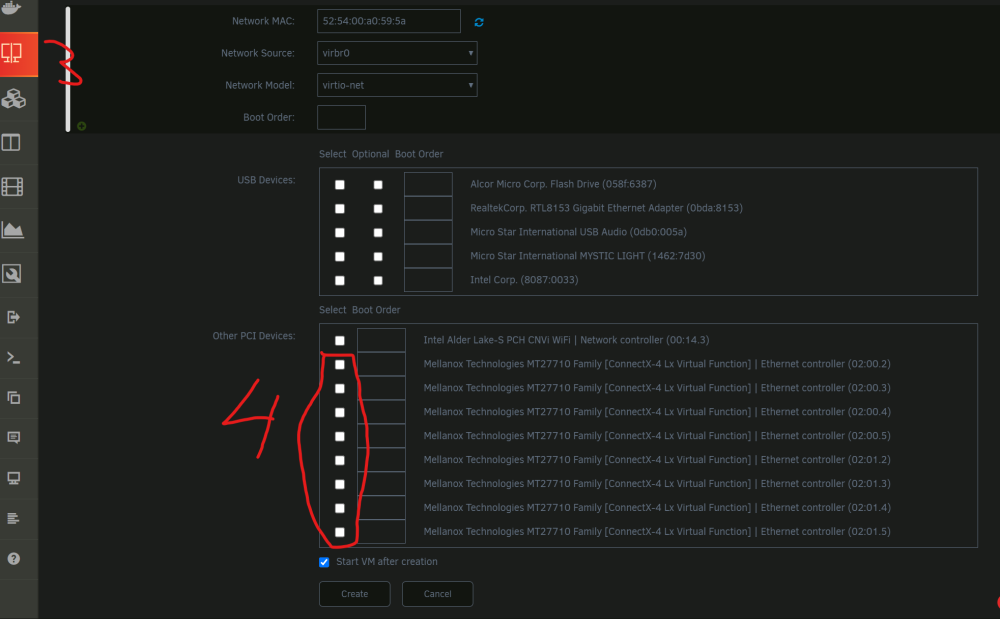
No you need to tick how much you want to use in VM‘s Tick the Box and reboot as usual then create a VM and check those box or boxes if you need more than one in your VM
-
works perfectly, thank you very much for that fast adapting and creating there will be good times.
-
Hello, did you put an new 2tb in the Array? Then the resilver will „Kick“ in here is what to do https://docs.unraid.net/legacy/FAQ/replacing-a-data-drive/
-
I used the docker from the User "fiR3W4LL" you all can find it in the CA and i cant stress enough its a PITA to work with this docker. Yes you are right about that @ich777 good that i did not teached myselfe to create Unraid dockercontainer 🙃
-
i got this thing to work on my Server its a PITA but i gues i can reconstruct my steps for that. there is a docker on Unraid but like i said its a PITA

-
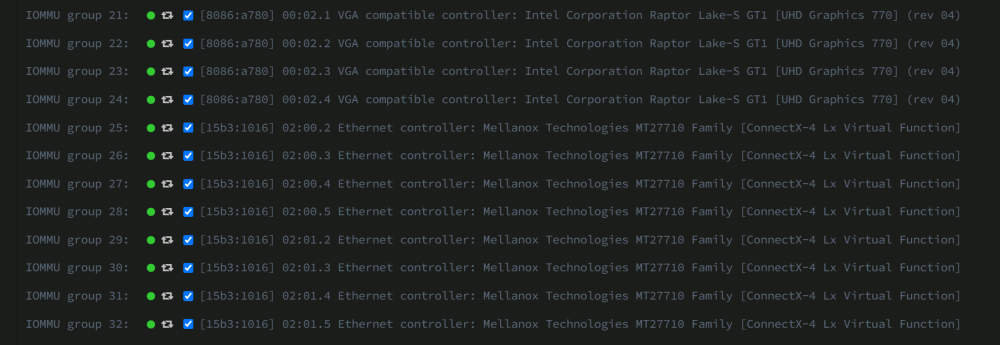
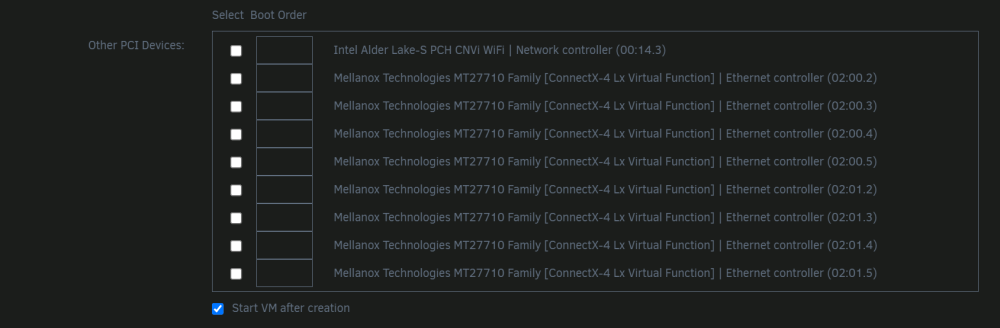
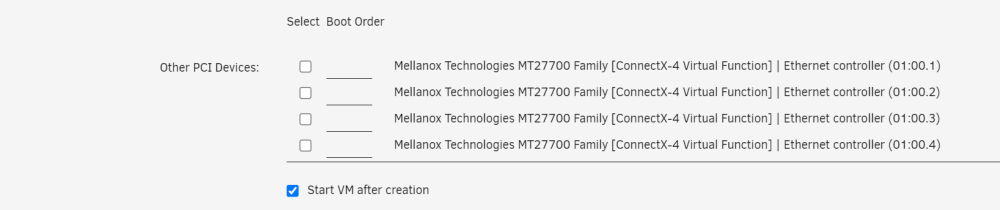
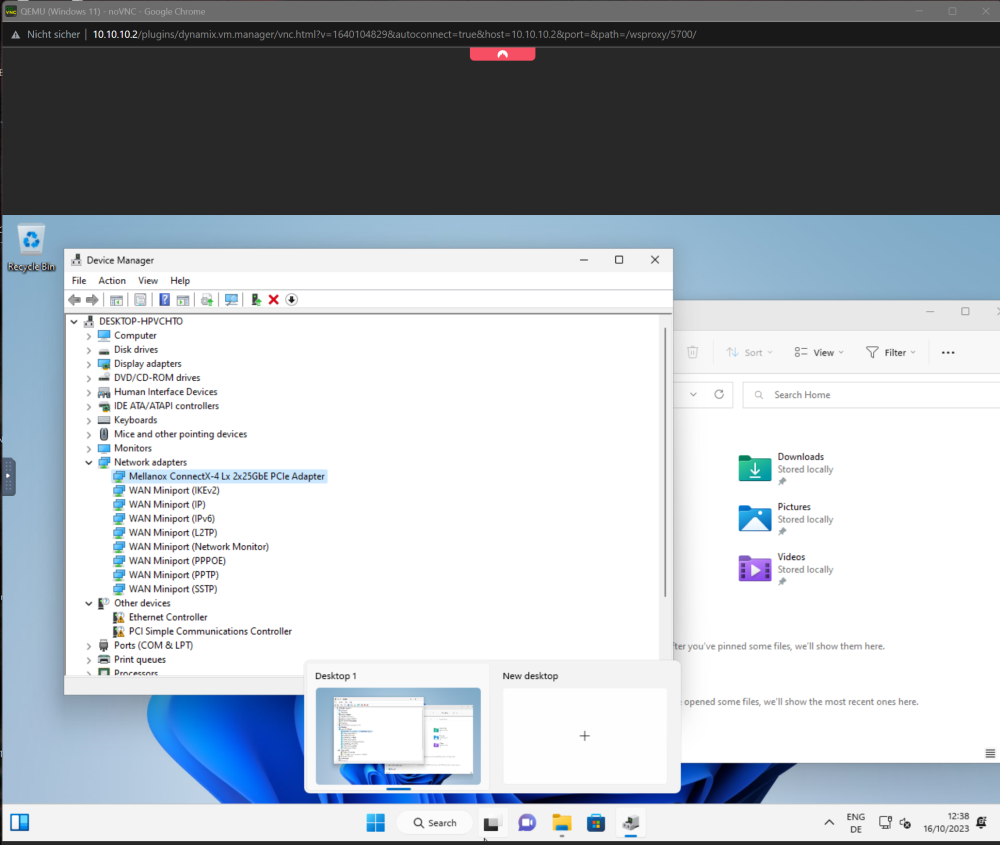
Ok first things first, i get the gist of what the code does maybe an educated gues but i made it work with you guys/gals help. 😅 All this on 6.12.4 So i have an 25gbe dual nic its Mellanox Technologies MT27710 Family [ConnectX-4 Lx] I did 1) Use this command in the Terminal: wget 'https://raw.githubusercontent.com/andre-richter/vfio-pci-bind/master/vfio-pci-bind.sh'; mv vfio-pci-bind.sh /boot/config/ 2) Use this comman in the Terminal echo 4 > /sys/class/net/eth0/device/sriov_numvfs echo 4 > /sys/class/net/eth2/device/sriov_numvfs eth0 and eth2 are my 2 NIC's with this comman i get the Ids from the VFs in the Tools ---> System Devices like so, 15b3:1016 0000:02:01.2 15b3:1016 0000:02:01.3 15b3:1016 0000:02:01.4 15b3:1016 0000:02:01.5 15b3:1016 0000:02:00.2 15b3:1016 0000:02:00.3 15b3:1016 0000:02:00.4 15b3:1016 0000:02:00.5 3) made a user script make it run on start of the array, echo 4 > /sys/class/net/eth0/device/sriov_numvfs echo 4 > /sys/class/net/eth2/device/sriov_numvfs sudo bash /boot/config/vfio-pci-bind.sh 15b3:1016 0000:02:01.2 sudo bash /boot/config/vfio-pci-bind.sh 15b3:1016 0000:02:01.3 sudo bash /boot/config/vfio-pci-bind.sh 15b3:1016 0000:02:01.4 sudo bash /boot/config/vfio-pci-bind.sh 15b3:1016 0000:02:01.5 sudo bash /boot/config/vfio-pci-bind.sh 15b3:1016 0000:02:00.2 sudo bash /boot/config/vfio-pci-bind.sh 15b3:1016 0000:02:00.3 sudo bash /boot/config/vfio-pci-bind.sh 15b3:1016 0000:02:00.4 sudo bash /boot/config/vfio-pci-bind.sh 15b3:1016 0000:02:00.5 /usr/local/sbin/vfio-pci >>/var/log/vfio-pci 4) its done next step on my second Unraid server i have an 100GbE Mellanox x4 and its SRIOV capable but it seems to be deactivated lets see how i activate it via Unraid, i think there are some hints in this thread. *edit* *done* install the Mellanox Plugin open a Terminal and use this command You need to use your NIC ID and you can use any VFs amount your Card allows. mstconfig -d 01:00.0 set SRIOV_EN=1 NUM_OF_VFS=4 now my 100GbE NIC is SRIOV activated then rinse and repeat the steps above 1)- 4) i spun up a VM and voila the NIC is already installed the other not installed is the virtual one from Unraid 😁

-
its done, thx : D
-
i only own an Turkish Steam account maybe its not region locked i would try to send it as a steam gift, we would need to be friends there. i send yn PM with my friend request.
-
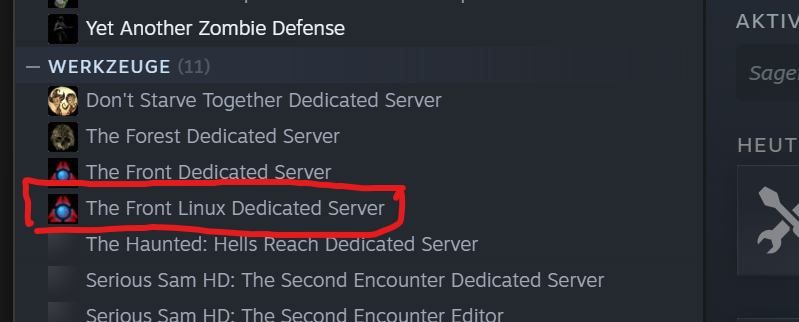
Can "the Front" be dockerized? its new and has an linux dedicatetd server on steam?
-
guten Morgen, geh mal auf deinen Plex ----> Einstellungen -----> Konsole , da sieht man ganz gut woran er arbeitet. Ich hatte oft diese EAE Fehler um das zu lösen muss der Codex Ordner gelöscht werden.
-
It is possible but it was and is a hackwork. there are some theads on this forum on how to do it. if possible get an Intel 12th gen or 13th gen IGPU those run very well with anything you want 4K/HDR and a Brunch of clients.
-
absolut nicht das ist sogar noch besser, ich habe lucky backup nur am laufen weil es eine direkte Kopie der Daten macht unabhängig vom Datei System, quasi copy and paste. was ist damit? das wäre ein perfekter Kandidat für eine 1 zu 1 Kopie Dateisystem übergreifend. Dein Unraid Array hat kein ZFS in deinem Fall. Welchen Backup Dienst man benutzt ist natürlich Geschmackssache Meine Daten sind auch nicht sooo wichtig. Der wichtigste Kram ist auf der Apple und Google Cloud doppelt abgelegt.
-
erst mal Hallo und bring dir gleich die "richtigen" begriffe bei!! also ich würde es so machen "Unraid Array" !!!!KEIN ZFS!!! 12TB parität 8TB Array Datengrab "cache Pool 1" zfs raidz1 2tb ssd 2t ssd 2tb ssd "cache Pool 2" 1 TB nvme ich zähle zZ maximal 7TB an Daten die man "backuppen" könnte ( alle "cache" Pools) davon ein Lucky backup docker benutzen und alles auf das "unraid Array" , bei bedarf das "unraid Array" vergrößern.
-
yes yes yes the IGPU is availale for VMs/Docker/LXC and so on.
-
go in your "Main Tab" in the Unraid GUI, scroll down to flash, then the "browse" button next to "flash" maneuver to the wanted folder and then "upload" the files had to tdo the same.
-
my NIC has the same ATTRS{vendor}=="0x15b3", ATTRS{device}=="0x1015" so this code needs to be in the go file? # create and reload udev-rules cat << UDEVRULES >> /etc/udev/rules.d/99-sriov.rules ACTION=="add", SUBSYSTEM=="net", ATTRS{vendor}=="0x15b3", ATTRS{device}=="0x1015", ATTR{device/sriov_drivers_autoprobe}="0", ATTR{device/sriov_numvfs}="4" UDEVRULES udevadm control --reload udevadm trigger --action=add i just need 4 VFs ?
-
ok i want to try this, what i have Mellanox CX4121A IBM 01GR253 Dual-Port SFP28 SRIOV capable Board i7 13700k SRIOV with IGPU works i tried all Methods none is working afaik i want 4 VFs per Controller i tried to imitade the how to 2 post above mine from @riduxd but with no effect i have no VFs shown so none to bind after the first edit of the go file this are my NICs i would add this to my go file #!/bin/bash # Start the Management Utility /usr/local/sbin/emhttp & echo 12.884.901.888 >> #p8 state nvidia nvidia-persistenced # ------------------------------------------------- # disable haveged as we trust /dev/random # https://forums.unraid.net/topic/79616-haveged-daemon/?tab=comments#comment-903452 # ------------------------------------------------- /etc/rc.d/rc.haveged stop echo 4 > /sys/devices/pci0000\:00/0000\:00\:02.0/sriov_numvfs && /usr/local/sbin/vfio-pci modprobe i915 && sleep 5 echo 2 > /sys/devices/pci0000:00/0000:00:02.0/sriov_numvfs && /usr/local/sbin/vfio-pci echo 2 > /sys/devices/pci0000:00/0000:00:02.0/sriov_numvfs sed -i "s/\(strSpecialAddress.*\)\$gpu_function/\1\"0\"/" /usr/local/emhttp/plugins/dynamix.vm.manager/include/libvirt.php #VF Mellanox echo 4 > /sys/bus/pci/devices/0000:05:00.0/sriov_numvfs echo 4 > /sys/bus/pci/devices/0000:05:00.1/sriov_numvfs # Relaunch vfio-pci script to bind virtual function adapters that didn't exist at boot time /usr/local/sbin/vfio-pci >>/var/log/vfio-pci right?

-
Hold my Beer , i had it working back in 6.12.3 , afaik Sunshine worked fine, parsec worked too. I had to remove all other Displays and add an Virtual one like Amyuni USB Mobile Monitor and something else.. maybe a script that startet that VirtMonitor. its been a while didnt needed that for that long hab my 3060 working for that.
-
i found the culprit, it wont work because the virtual display is broken. Parsec wont show any picture without a "detected" Monitor. when my server boots again i will make more tests.
-
Hey 👋 i got mine today and did a quick passtrough to an Win11 VM. Did a few VM reboots and forced shutdowns and have no reseat bug. *edit* when a Monitor is connected, i cant force close the VM* reseat Bug? iam not at Home right now but iam on 6.12.4 and habe the Intel Arc a770 16GB Limited Edition i read the whole thread right now to be up to Date
-
sure tower-diagnostics-20230919-1121.zip






