





Corvus
Members
-
Joined
-
Last visited
Everything posted by Corvus
-
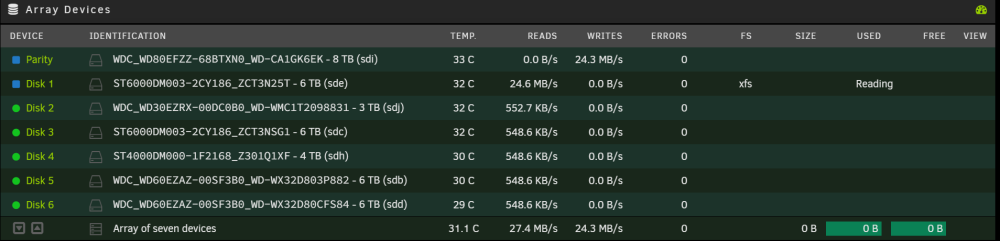
I doubt disabling spin down would fix it. I'm seeing all disks green right now (active), and it's still not going any faster than 25Mb/s. At this rate, it'll take a week! If I stop the procedure now, will I screw up any data/the array?
-
But disk 1 was the previous parity drive. You mean I'll lose the contents of what used to be in the old disk that was in that slot? What are my options now? At this speed, this will take a week! Why isn't this mentioned in the Unraid official documentation?? I followed it exactly.
-
Hey guys, So I'm having a similar issue to the OP, where the parity info is taking criminally slow from my old drive to the new drive. If I do a new config as recommended to the OP earlier in this thread, will I lose any data/shares on the array?
-
Hey guys, So my existing parity drive is 6TB. I want to replace it with a new, bigger drive (8TB), demote the ex-parity drive to an array drive, which will replace an existing 3TB drive. Specs: Intel® Core™ i5-7400 ASRock Z270 Gaming-ITX/ac 16GB RAM I followed the procedure exactly as it says on the official Unraid documentation, and so far so good. It's up to the stage where I'm copying parity info from the old drive (which has now been assigned to the array slow that the old 3TB drive used to be) to the new parity drive (assigned in the same slot as the old parity drive). I started this process early yesterday evening at around 10.30pm. It is now 4pm *the next day* and it's still on 26%! Is this normal? If not, what can I do? I'm scared of stopping/interrupting anything in case I screw my array. Here's my diags.nas-diagnostics-20221217-1603.zip
-
Ok cool thanks. I'll report back after this is all done. Thanks for your help!
-
Yeah I do. I tried copying the recovered files back to the affected drive, and the share now successfully reports those files mixed in with the other files on the unaffected drive in the array. Now I just need to do this whole process 4 more times I forgot that copying to a disk directly bypasses the cache. Although since I've sparked my own curiosity, what's the answer to this question, and where are the settings that govern whether or not it starts copying to the array directly when the cache is full?
-
Ok so I've recovered data from the first drive. I've placed the original drive back into the Unraid array and booted. So far so good. Now I'm trying to copy the data from the spare drive (which is connected to my windows PC on the same LAN) to this specific original drive. It's important that I do this because if I allow Unraid to decide which disk to put the data, it will overwrite recoverable data on the other (now empty) drives which I haven't recovered data from. I've enabled disk share, and I can see the disk in samba shares in Windows. Two problems: 1. Since the original drive is now empty, how do I know what the original file structure was? Disk 6 (which was untouched and still has files intact) has folders that correspond to the shares that I set up in Unraid, however since I set up the array to distribute data in the 'high water' setting, it doesn't contain all the files, naturally. Should I just recreate this folder structure in the original drive which is now empty and start copying my files to the relevant folders? 2. When I copy anything to Unraid, it first gets copied to my cache drive. Since the amount of data I'm copying far exceeds the capacity of my cache drive, what will happen once the capacity is reached? Will it just automatically start writing to the disk itself? Or will it stop and tell me it's out of space until I invoke the Mover script? Where can I go to check this setting?
-
I see what you mean, but I think our situations aren't that dissimilar. The only difference is in the way the data is stored on the array. Nevertheless, I've found a way to copy the recovered data specifically to that original disk once it's installed back into Unraid. I believe with this considered, that the procedure should otherwise be the same.
-
So then why wouldn't they finish the job? Why would they leave one drive untouched? They had all night to do it. Also why? Just for shits and kicks? What does someone have to gain from doing this?
-
Right, but I can't see any option to just delete an entire disk from the webUI, assuming someone got access to it.
-
Thanks, I'll try that when I boot the server again. Turning this option on won't affect my existing shares, right?
-
But how? I know how to copy files over the LAN using Samba file sharing on Windows, but how do I target specific disks? Since the files are distributed equally across the array, Unraid has a unified file structure for all disks. There is nowhere in the file structure that separates by disk.
-
I do, but let's say they somehow got access to my password how the hell would they even delete specific HDDs? I wouldn't even know how to target specific HDDs because the shares are configured to be evenly distributed across the array. Also, I'm the only one with write access to the array, and only from my laptop, which stays in my room at all times. It wasn't just movies and TV series that were deleted, it was also a bunch of documents and photos stored in other shares across the array. Anyway, I'm going to try following the advice contained in this thread: How to Recover Deleted Files [SOLVED] - General Support - Unraid My game plan is to: - shut down the Unraid server, - take out one of the affected HDDs, - plug it into my Windows desktop PC (which has a brand new HDD connected to it to copy over recovered data), - run the recovery program on the affected drive, - copy the data over to the spare drive, - connect the affected drive back into exactly the same SATA port on Unraid, - boot Unraid, - Start array, - Copy data from spare drive over the network to the original drive And rinse and repeat until all drives are done. I still don't know how I'm going to copy the recovered data from the spare drive (connected to my Windows PC) *specifically* to the original drive once it's plugged into Unraid, since the shares are designed to distribute data evenly across the disks. Any ideas? My aim is to preserve the file directory structure exactly as it was, because I have a bunch of Dockers that work together and rely on files located in specific directories, and it took me forever to set it up so it works correctly. I also would like to restore my VMs (which have also mysteriously been deleted) exactly as they were. Does this sound possible?
-
I see. So I have a similar problem in which 5 out of 6 disks were mysteriously erased. I have no idea how that's possible, since I'm the only one with write access, and I haven't changed any hardware/software config in over a year. My game plan is to: - shut down the Unraid server, - take out one of the affected HDDs, - plug it into my Windows desktop PC (which has a brand new HDD connected to it to copy over recovered data), - run the recovery on the affected drive, - copy the data over to the spare drive, - connect the affected drive back into exactly the same SATA port on Unraid, - boot Unraid, - Start array, - Copy data from spare drive over the network to the original drive And rinse and repeat until all drives are done. I still don't know how I'm going to copy the recovered data from the spare drive (connected to my Windows PC) *specifically* to the original drive once it's plugged into Unraid, since the shares are designed to distribute data evenly across the disks. Any ideas? My aim is to preserve the file directory structure exactly as it was, because I have a bunch of Dockers that work together and rely on files located in specific directories, and it took me forever to set it up so it works correctly. I also would like to restore my VMs (which have also mysteriously been deleted) exactly as they were. Does this sound possible?
-
Hello?
-
'11. Reinstall the server array HD' What do you mean by this? Aren't there many HDs (hard drives) in an array? Something similar has happened to me for 5 drives, although I can't see why the files were deleted.
-
Hey guys, My Unraid server has been functioning flawlessly for the past 2 years. However just today I had a look at the Main tab and noticed that 5 of the 6 drives are showing as empty! Previously, my array was half full. I've tried rebooting, but this didn't fix the problem. A parity check reveals no errors. Drives are showing normal operation. I've had a search, and previous threads suggest it could be Sonarr or Radarr, except I've lost more than just movies/TV shows. I've also lost entire shares that contained photos and documents! EDIT: Looks like it would've had to have happened overnight (last night) because I can see from my Tautulli history that a Plex user streamed some content that is now missing. My diagnostic is attached. Please tell me there's some way I can recover this data because I'm freaking out! nas-diagnostics-20221206-1047.zip
-
Anyone?
-
Hey all, After almost 2 years of using Unraid on my current hardware config, everything's been working flawlessly, until I realized my machine rebooted without explanation this afternoon, and upon logging in tonight, I saw the same message. Here's my output from mcelog. Is this something that's safe to ignore? syslog (1)
-
It would only confirm if it's literally any of the current components. We're trying to work out *which* component. Moving Unraid to a completely different computer won't achieve that.
-
Really? So I wouldn't need to do anything special to 'bring back' the array or anything? No special order in how they're plugged in? Just built and boot into Unraid? What about VMs and how they're configured? Surely I'd have to completely rebuild them to work on the new hardware, right?
-
I don't see how that would help, given that a different computer would have completely different hardware specs. It would be impossible to isolate the fault to a specific component. I know that all of the Unraid OS (including my settings) are stored on the flash, but hypothetically, if I were to replace the RAM, motherboard, CPU and PSU, would I lose the array? What would I need to do to preserve the array and all of its related config?
-
So unless I have the money to buy replacement components, there's literally no other way?
-
How else can I go about narrowing down which component it is? I don't want to take the server offline for multiple days because I have people relying on it during lockdown - which unfortunately my entire country is still in.
-
Well I mean, I'm trying to see whether or not we've just ruled that out. Have we or haven't we? If we've ruled it out 100%, there's no point in me doing that, is there? If I do, I'm definitely not starting from scratch, I'll be transferring my backup and license so that my array is intact.
