





weirdcrap
Members
-
Joined
-
Last visited
Everything posted by weirdcrap
-
Your command is working as expected for me, only empty folders were returned. UnRAID V7.0.1 find /mnt/disk13/Movies -type d -empty -print /mnt/disk13/Movies/Robin Hood (1973) /mnt/disk13/Movies/Deep Water (2022) /mnt/disk13/Movies/Spider-Man (2002) /mnt/disk13/Movies/Big Lebowski, The (1998) /mnt/disk13/Movies/Happiness (1998) /mnt/disk13/Movies/John Wick Chapter 2 (2017) /mnt/disk13/Movies/Semi-Pro (2008) /mnt/disk13/Movies/Fifth Element, The (1997) /mnt/disk13/Movies/Tour De Pharmacy (2017) /mnt/disk13/Movies/Gladiator (2000) /mnt/disk13/Movies/Logan Lucky (2017) /mnt/disk13/Movies/A Quiet Place Day One (2024) {imdb-tt13433802} /mnt/disk13/Movies/The Peoples Joker (2023) {imdb-tt21651430} /mnt/disk13/Movies/Cuckoo (2024) {imdb-tt12349832} /mnt/disk13/Movies/Emilia Pérez (2024) {imdb-tt20221436} /mnt/disk13/Movies/Only the River Flows (2023) {imdb-tt27590147} /mnt/disk13/Movies/Prince of Broadway (2010) {imdb-tt1000769} /mnt/disk13/Movies/Indian in the Cupboard, The (1995) I'm not sure why this wouldn't work for you. Is your UnRAID version up to date? Maybe an issue with the find command on your specific version?
-
Isn't possible as in doesn't work at all? I'd recommend opening your own thread and getting help there. This was a discussion around trying to chase down an elusive performance issue with the built in UnRAID OS WireGuard implementation.
-
Oh interesting, it seems like removing the sleeps between the rclone mount commands might have actually made it better? I don't recall why I added them all those years ago, I assume to try and resolve a similar issue. I'm going to do some more testing but it seems I'm on the right track. EDIT: Yeah apparently sleep was my problem.
-
I have a script that runs at array start (using the user scripts plugin) that is meant to mount 6 remote shares split between two different protocols. My issue is, despite the commands all working individually, when they are combined together in a script I will have a single random rclone mount just not run for some reason. I know it isn't running because you can see the rclone mount calls in the syslog and there are only 3 when there should be 4. When it was just rclone for years I don't recall ever having any issues with mounts getting missed but due to problems with rclone dir caching and lidarr getting upset about the files not being there when the download completes I had to switch a few mounts to a "live" filesystem. I don't think it's the addition of the SSHFS calls since they all occur after the rclone mounts... Here is the script with sensitive bits removed: #! /bin/bash logger "Mounting remote shares via rclone..." rclone mount --daemon --allow-other --copy-links --dir-cache-time=1m --max-read-ahead=200M --syslog -v --uid 99 --gid 100 --umask 002 server:/remote/path /mnt/cache/.watch/movies sleep 2 rclone mount --daemon --allow-other --copy-links --dir-cache-time=1m --max-read-ahead=200M --syslog -v --uid 99 --gid 100 --umask 002 server:/remote/path /mnt/cache/.watch/tv-remote sleep 2 rclone mount --daemon --allow-other --copy-links --dir-cache-time=1m --max-read-ahead=200M --syslog -v --uid 99 --gid 100 --umask 002 server:/remote/path /mnt/cache/.watch/4k-remote sleep 2 rclone mount --daemon --allow-other --copy-links --dir-cache-time=1m --max-read-ahead=200M --syslog -v --uid 99 --gid 100 --umask 002 server:/remote/path /mnt/cache/.watch/misc-remote sleep 2 logger "rclone mounting complete!" logger "Mounting remote shares via sshfs..." sshfs user@server:/server/path/ /mnt/cache/.watch/books-remote/ -o StrictHostKeyChecking=no -o allow_other -o Compression=no -o IdentityFile=/mnt/cache/.watch/AutomationSetup sshfs user@server:/server/path/ /mnt/cache/.watch/music-remote/ -o StrictHostKeyChecking=no -o allow_other -o Compression=no -o IdentityFile=/mnt/cache/.watch/AutomationSetup logger "Mounting SSHFS shares complete!" I've rebooted 4 times this morning and the rclone mount that gets skipped is random. Sometimes it's the same mount, sometimes it changes with each run. It's always only a single rclone mount that fails to run. When I go to run the failed mount command it completes without issue though so it's not like there is a problem with the commands itself. I've already tried increasing the sleeps (from 2 to 5) between the mount commands and that had no effect. As you can see in the attached syslog (syslog.txt)the script only ran 3 of the rclone mount commands and the two SSHFS commands. The final rclone command at the end of the log file is me running the last mount manually over ssh. What gives? node-diagnostics-20250201-0714.zip
-
I need to just make a habit of testing the RAM 1st whenever i have issues. Just like in networking it's always DNS in hardware it seems like it's always the RAM.
-
Could the squshfs errors also have been caused by RAM? I noticed Kometa crashed this morning with python general protection faults so I ran memtest and apparently my RAM is toast (4000+ errors in under 10 minutes). It's to late at this point I replaced the USB already but I'm curious if I may have jumped the gun on the USB without checking the RAM (because its almost always the RAM). The RAM being bad explains several things over the past month or so that I wrote off as isolated incidents (my plex db corrupting twice, kometa being very crashy, squashfs errors from the flash). Interestingly there were no parity errors on the last few checks. Usually when my RAM is bad the first indicator is randomly shifting parity errors.
-
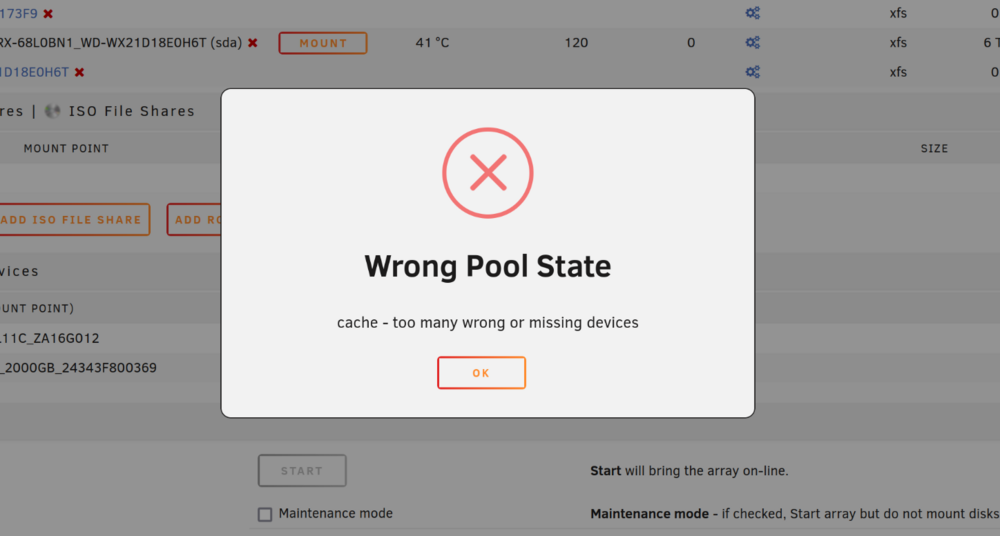
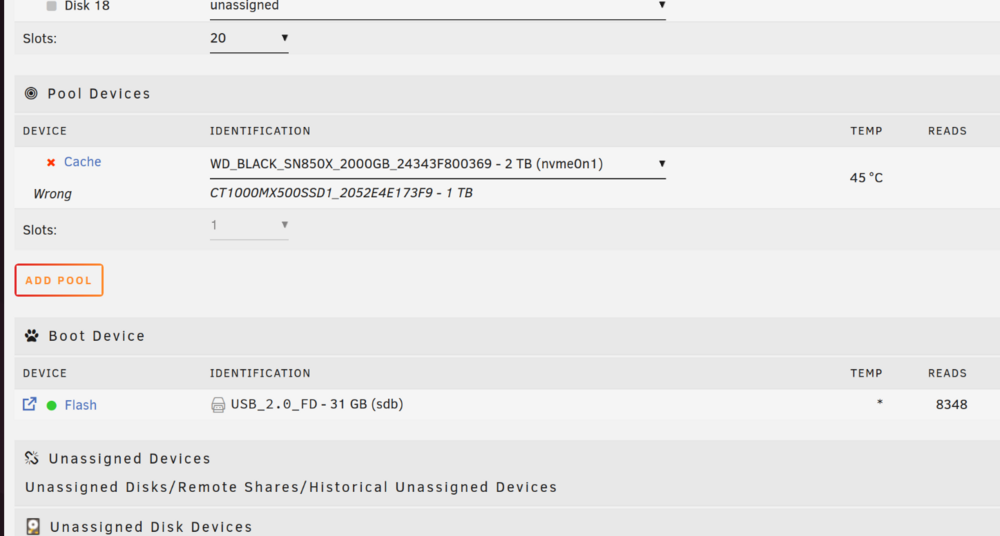
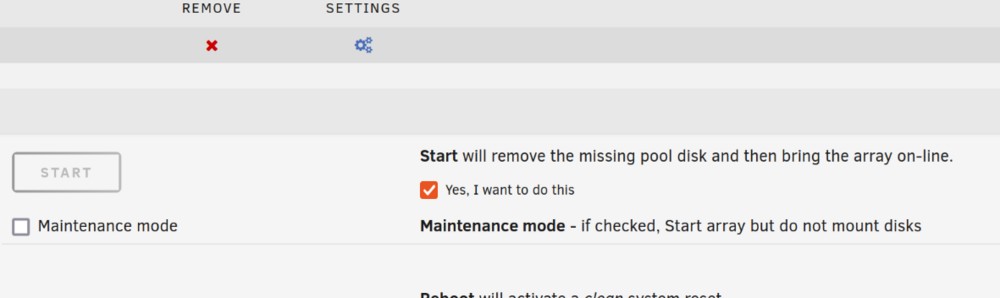
I've followed the advice here and used mover to clear my old cache drive off. I stopped the array and unassigned the old drive and assigned the new one. But when I attempt to start it doesn't give me an option to replace the drive it just tells me the device is missing or wrong? Am I doing something wrong? Do I need to start the array without the cache drive to clear it then stop the array and assign the replacement like its new? It's just a single drive, no pools or anything. EDIT2: It won't even let me remve the pool despite giving me a checkbox suggesting I can do so. It just throws the same wrong pool state error as above. Is this a beta thing? I don't remember ever having this much trouble replacing a cache drive in the past... EDIT3: I figured it out. I hadn't done this since Pools were introduced. I found how to delete the pool and start a new one.
-
Well it locked up real good just a bit ago and had to be hard shutdown. It's been rock solid stable up until that squashfs error showed up yesterday. This was the last thing recorded in the log: Oct 24 11:10:33 VOID kernel: general protection fault, probably for non-canonical address 0x8000000000010: 0000 [#1] PREEMPT SMP NOPTI Oct 24 11:10:33 VOID kernel: CPU: 10 PID: 1344233 Comm: fuser Tainted: P O 6.6.52-Unraid #2 Oct 24 11:10:33 VOID kernel: Hardware name: Micro-Star International Co., Ltd. MS-7D31/MPG Z690 EDGE WIFI DDR4 (MS-7D31), BIOS 1.90 11/08/2022 Oct 24 11:10:33 VOID kernel: RIP: 0010:mem_cgroup_from_slab_obj+0x88/0x9a Oct 24 11:10:33 VOID kernel: Code: 0c 48 01 c7 48 29 fb 89 d8 48 0f af c1 0f b6 4e 24 48 c1 e8 20 29 c3 d3 eb 0f b6 4e 25 01 c3 d3 eb 48 8b 04 da 48 85 c0 74 8a <48> 8b 40 10 eb 06 5b e9 1a 90 ff ff 5b c3 cc cc cc cc 90 90 90 90 Oct 24 11:10:33 VOID kernel: RSP: 0018:ffffc9000b07bd50 EFLAGS: 00010206 Oct 24 11:10:33 VOID kernel: RAX: 0008000000000000 RBX: 000000000000000e RCX: 0000000000000007 Oct 24 11:10:33 VOID kernel: RDX: ffff88801387e400 RSI: ffff8881001dec00 RDI: ffff8880282f6000 Oct 24 11:10:33 VOID kernel: RBP: 0000000000000000 R08: 00000000008a40a4 R09: 000000000000000a Oct 24 11:10:33 VOID kernel: R10: 0000000000000000 R11: 0000000000000000 R12: ffff888109699460 Oct 24 11:10:33 VOID kernel: R13: ffff888107152800 R14: ffff8880282f6b00 R15: 0000000000000000 Oct 24 11:10:33 VOID kernel: FS: 0000146877134740(0000) GS:ffff888890480000(0000) knlGS:0000000000000000 Oct 24 11:10:33 VOID kernel: CS: 0010 DS: 0000 ES: 0000 CR0: 0000000080050033 Oct 24 11:10:33 VOID kernel: CR2: 000014e3ac739860 CR3: 0000000116a26006 CR4: 0000000000770ee0 Oct 24 11:10:33 VOID kernel: PKRU: 55555554 Oct 24 11:10:33 VOID kernel: Call Trace: Oct 24 11:10:33 VOID kernel: <TASK> Oct 24 11:10:33 VOID kernel: ? __die_body+0x1a/0x5c Oct 24 11:10:33 VOID kernel: ? die_addr+0x38/0x51 Oct 24 11:10:33 VOID kernel: ? exc_general_protection+0x2f7/0x331 Oct 24 11:10:33 VOID kernel: ? asm_exc_general_protection+0x22/0x30 Oct 24 11:10:33 VOID kernel: ? mem_cgroup_from_slab_obj+0x88/0x9a Oct 24 11:10:33 VOID kernel: list_lru_add+0x84/0xfa Oct 24 11:10:33 VOID kernel: ? __pfx_proc_fd_instantiate+0x10/0x10 Oct 24 11:10:33 VOID kernel: retain_dentry+0x8a/0xa5 Oct 24 11:10:33 VOID kernel: dput+0x41/0x13a Oct 24 11:10:33 VOID kernel: proc_fill_cache+0x111/0x157 Oct 24 11:10:33 VOID kernel: ? __pfx_filldir64+0x10/0x10 Oct 24 11:10:33 VOID kernel: proc_readfd_common+0x178/0x1c9 Oct 24 11:10:33 VOID kernel: ? __pfx_proc_fd_instantiate+0x10/0x10 Oct 24 11:10:33 VOID kernel: iterate_dir+0x75/0x12f Oct 24 11:10:33 VOID kernel: __do_sys_getdents64+0x6b/0xd8 Oct 24 11:10:33 VOID kernel: ? __pfx_filldir64+0x10/0x10 Oct 24 11:10:33 VOID kernel: do_syscall_64+0x57/0x7b Oct 24 11:10:33 VOID kernel: entry_SYSCALL_64_after_hwframe+0x78/0xe2 Oct 24 11:10:33 VOID kernel: RIP: 0033:0x14687721e053 Oct 24 11:10:33 VOID kernel: Code: 00 16 00 00 00 31 c0 eb c6 66 2e 0f 1f 84 00 00 00 00 00 0f 1f 40 00 b8 ff ff ff 7f 48 39 c2 48 0f 47 d0 b8 d9 00 00 00 0f 05 <48> 3d 00 f0 ff ff 77 05 c3 0f 1f 40 00 48 8b 15 81 6d 11 00 f7 d8 Oct 24 11:10:33 VOID kernel: RSP: 002b:00007ffd6d62ed08 EFLAGS: 00000293 ORIG_RAX: 00000000000000d9 Oct 24 11:10:33 VOID kernel: RAX: ffffffffffffffda RBX: 0000000000415bd0 RCX: 000014687721e053 Oct 24 11:10:33 VOID kernel: RDX: 0000000000008000 RSI: 0000000000415c00 RDI: 0000000000000008 Oct 24 11:10:33 VOID kernel: RBP: 0000000000415bd4 R08: 0000000000000001 R09: 0000000000000000 Oct 24 11:10:33 VOID kernel: R10: 0000000000000007 R11: 0000000000000293 R12: 0000000000415c00 Oct 24 11:10:33 VOID kernel: R13: ffffffffffffff88 R14: 0000000000000002 R15: 0000000000000000 Oct 24 11:10:33 VOID kernel: </TASK> Oct 24 11:10:33 VOID kernel: Modules linked in: xt_connmark xt_comment iptable_raw wireguard curve25519_x86_64 libcurve25519_generic libchacha20poly1305 chacha_x86_64 poly1305_x86_64 ip6_udp_tunnel udp_tunnel libchacha xt_mark af_packet veth xt_nat xt_tcpudp xt_conntrack xt_MASQUERADE nf_conntrack_netlink nfnetlink xfrm_user xfrm_algo ip6table_nat iptable_nat nf_nat nf_conntrack nf_defrag_ipv6 nf_defrag_ipv4 xt_addrtype br_netfilter md_mod zfs(PO) spl(O) iptable_mangle ntfs3 tcp_diag inet_diag nct6683 ip6table_filter ip6_tables iptable_filter ip_tables x_tables efivarfs bridge stp llc intel_rapl_common x86_pkg_temp_thermal intel_powerclamp i915 coretemp kvm_intel kvm iosf_mbi drm_buddy crct10dif_pclmul crc32_pclmul ttm crc32c_intel ghash_clmulni_intel sha512_ssse3 sha256_ssse3 i2c_algo_bit sha1_ssse3 drm_display_helper aesni_intel crypto_simd cryptd drm_kms_helper btusb btrtl rapl btbcm intel_cstate mei_pxp mei_hdcp wmi_bmof mxm_wmi btintel drm bluetooth intel_gtt mpt3sas intel_uncore i2c_i801 mei_me i2c_smbus igc agpgart ahci mei Oct 24 11:10:33 VOID kernel: input_leds raid_class ecdh_generic libahci led_class joydev i2c_core ecc scsi_transport_sas tpm_crb tpm_tis tpm_tis_core video tpm backlight wmi fan thermal acpi_tad acpi_pad button Oct 24 11:10:33 VOID kernel: ---[ end trace 0000000000000000 ]--- Oct 24 11:10:33 VOID kernel: RIP: 0010:mem_cgroup_from_slab_obj+0x88/0x9a Oct 24 11:10:33 VOID kernel: Code: 0c 48 01 c7 48 29 fb 89 d8 48 0f af c1 0f b6 4e 24 48 c1 e8 20 29 c3 d3 eb 0f b6 4e 25 01 c3 d3 eb 48 8b 04 da 48 85 c0 74 8a <48> 8b 40 10 eb 06 5b e9 1a 90 ff ff 5b c3 cc cc cc cc 90 90 90 90 Oct 24 11:10:33 VOID kernel: RSP: 0018:ffffc9000b07bd50 EFLAGS: 00010206 Oct 24 11:10:33 VOID kernel: RAX: 0008000000000000 RBX: 000000000000000e RCX: 0000000000000007 Oct 24 11:10:33 VOID kernel: RDX: ffff88801387e400 RSI: ffff8881001dec00 RDI: ffff8880282f6000 Oct 24 11:10:33 VOID kernel: RBP: 0000000000000000 R08: 00000000008a40a4 R09: 000000000000000a Oct 24 11:10:33 VOID kernel: R10: 0000000000000000 R11: 0000000000000000 R12: ffff888109699460 Oct 24 11:10:33 VOID kernel: R13: ffff888107152800 R14: ffff8880282f6b00 R15: 0000000000000000 Oct 24 11:10:33 VOID kernel: FS: 0000146877134740(0000) GS:ffff888890480000(0000) knlGS:0000000000000000 Oct 24 11:10:33 VOID kernel: CS: 0010 DS: 0000 ES: 0000 CR0: 0000000080050033 Oct 24 11:10:33 VOID kernel: CR2: 000014e3ac739860 CR3: 0000000116a26006 CR4: 0000000000770ee0 Oct 24 11:10:33 VOID kernel: PKRU: 55555554 I had mover running taking everything off of my cache drive in preparation for its replacement. I went ahead and replaced the flash out of caution and the fact that I got a 3 pack for ~$15.
-
a formatting issue or a hardware issue? If i just need to reformat great. If I need to replace it that's fine to. If I have to replace it I just do the key replacement request and then restore my USB backup to the new drive and run the make bootable script? Looks like it's recommended to use the new USB tool now https://docs.unraid.net/unraid-os/manual/changing-the-flash-device/
-
Running the latest beta (v7 b3) but I don't think this is a beta issue. I checked in on my server and noticed that the webui said docker wasn't running. Checked and all my container processes are still up and plex is playing media but something crashed docker. UnRAID managed to force a reboot even though it couldn't get the disk shares unmounted and things seem ok now. I checked the logs and saw this: Oct 24 06:00:25 VOID kernel: SQUASHFS error: xz decompression failed, data probably corrupt Oct 24 06:00:25 VOID kernel: SQUASHFS error: Failed to read block 0x28348c8: -5 Oct 24 06:00:25 VOID kernel: SQUASHFS error: xz decompression failed, data probably corrupt Oct 24 06:00:25 VOID kernel: SQUASHFS error: Failed to read block 0x28348c8: -5 Oct 24 06:00:25 VOID kernel: SQUASHFS error: xz decompression failed, data probably corrupt Oct 24 06:00:25 VOID kernel: SQUASHFS error: Failed to read block 0x28348c8: -5 Oct 24 06:00:25 VOID kernel: SQUASHFS error: xz decompression failed, data probably corrupt Oct 24 06:00:25 VOID kernel: SQUASHFS error: Failed to read block 0x28348c8: -5 Oct 24 06:00:25 VOID kernel: SQUASHFS error: xz decompression failed, data probably corrupt Oct 24 06:00:25 VOID kernel: SQUASHFS error: Failed to read block 0x28348c8: -5 Oct 24 06:00:25 VOID kernel: SQUASHFS error: xz decompression failed, data probably corrupt Oct 24 06:00:25 VOID kernel: SQUASHFS error: Failed to read block 0x28348c8: -5 It sounds like this is a flash issue. Should I even try to troubleshoot or just buy a new stick and replace? I see sandisk are no longer recommended (which is what I've got now) so what are safe name brands to pick up? I'm actually going to best buy here in a few hours to pickup a cache nvme so I can just grab something while I'm there. EDIT: This is just about the only thing local that isn't sandisk, is USB type A, and isn't ridiculously huge storage wise (unraid doesnt need a 256GB flash drive) https://www.bestbuy.com/site/pny-elite-turbo-attache-4-32gb-usb-3-2-flash-drive-black/1498843.p?skuId=1498843 void-diagnostics-20241024-0911.zip
-
@Vr2Iohad it right. Apparently I had left fast boot on by mistake. I swear it was off so I never bothered to recheck the boot settings. I've rebooted 3 times back to back and it came right back each time.
-
No overclocking/undervolting. The K Series CPU is just what came in the mobo cpu bundle I bought, I didn't buy it with the intention of overclocking anything. everything is bone stock for maximum reliability. I assumed it was RAM again as the corsair kit i bought passes memtest but is not listed on the QLV list from MSI so i just assumed it was some DDR5 compatibility nonsense. I figured if I get a new RAM kit that matches up across the board (everyone says compatible with everyone else) and it's still doing this then I can look at other things. It was also doing this with the last kit which was failing memtests. I've got no symptoms besides the failure to boot without messing with the RAM. There are no errors in UnRAID when it's running. What makes you say CPU/Mobo?
-
So you're saying if I had fast boot enabled the BIOS would post but then it goes to black screen rather than to the unraid boot? If so it's not doing that, the BIOS doesn't even post. You can't get into the BIOS settings or anything. You have to shuffle the RAM to get it so you can even mess with the BIOS. But I'll check fast boot when I get over there and report back.
-
Ok I'll have to check and report back. It will take me a bit to get over there.
-
I don't think it is but I'll double check. That's a good suggestion. Why would fast boot cause that behavior and why would shuffling around the RAM seem to "fix" it?
-
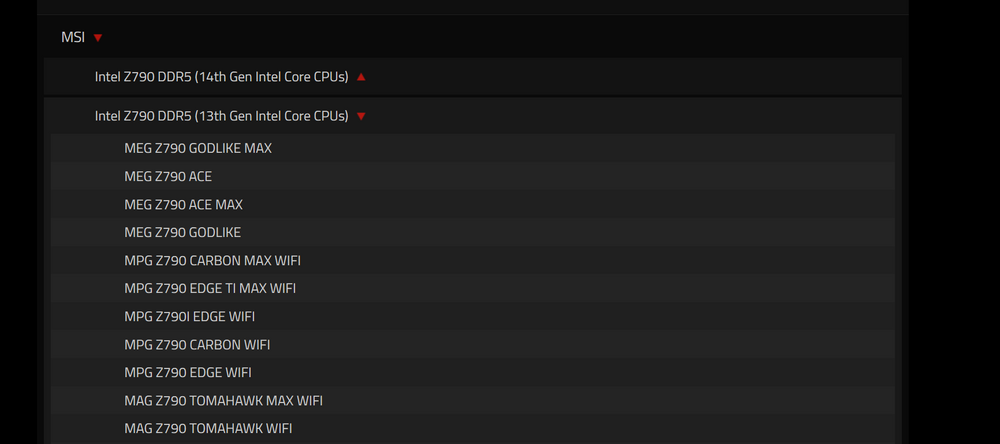
Background: About 6 months ago or so my main unraid server started having issues. It was determined that a RAM slot on the mobo had gone bad and given its age I ended up having to replace the CPU, Mobo, & RAM. I initially picked out a i7-12700k, an MSI Mag Z790 Tomahawk WIFI board, and 2 kits of corsair DDR5 RAM, seemed simple enough. Well the RAM came in and each kit had 1 stick with errors, i contacted corsair, blah blah blah, they tell me mixing and matching separate kits is not recommended on DDR5. Ok news to me, whatever I'll RMA the kits, resell them on ebay and buy a single kit that meets my needs. So I bought a 4 DIMM corsair kit (CMH64GX5M4B5600C36). I checked it real quick on PC Part Picker for compatibility issues because i was in the badlands south dakota at the time and didn't have the time or internet service to really dig into finding "the best" replacement kit, i just needed something on order so it would be there when I got back. It didn't flag any issues other than the CPU not coming with a cooler which I knew. What's happening now: Well the new kit has also been nothing but trouble. The server runs fine and passes memtest left running over night but I can't reboot it without it starting to a black screen and the BIOS not POSTing. If you shuffle the RAM around it will boot again and run fine for months on end until I have to reboot it again. This is without XMP enabled. But after two failed attempts to get a working set of DDR5 for this build I'm nervous to pull the trigger on anything else without extra eyes on my decisions. So a general question for those more in the know on recent hardware developments than me. What is the deal with the seemingly random incompatibility claims? Intel ARK says my 12th gen CPU is compatible with DDR5 up to 4800MT/s. But if you look at corsairs site for the kit I bought they claim it's only compatible with 13th gen Intel CPUs or newer? I'm looking at a G.Skill kit (F5-5600J3036D32GX2-RM5RK) from MSI's list and its the same thing, my mobo is on the QLV list but ONLY for 13th & 14th Gen CPUs. But if you go look at MSI's QLV for my mobo, it lists that exact G.Skill Kit (F5-5600J3036D32GX2-RM5RK) as compatible with a 12th gen K series. So What's the deal? Why do RAM makers seem to be much more limited in their compatibility claims than the mobo maker and intel are? Then I've got kingston over here (KF556C40BBAK2-64 another kit off MSI's QLV list for 12 then CPUs) who makes absolutely zero compatibility limiting claims either on the product page or datasheet for that kit. So who do I trust? Am I just going to have to go kit by kit and check my Mobo/CPU combo compatibility against every single kit i look at? I emailed G.Skill about the discrepancy between MSI's QLV and theirs and am waiting for a response back. If I had known going 12th gen to save a bit of $$ was going to cause me such headaches with RAM compatibility i would have just bought a 13th gen outright. But I'm stuck with the 12th now so I'm trying to make it work.
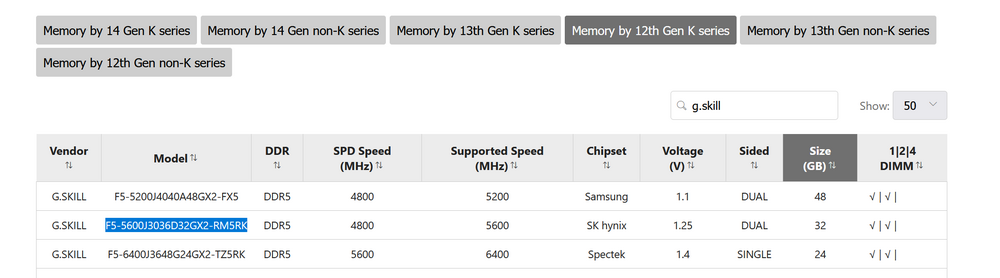
-
I figured it out. It's this script. It's set to run nightly and backup the usb to dir="/mnt/user/CommunityApplicationsAppdataBackup/usb/". I'll see if I can figure out how to add a check for if the array is started or not. EDIT: I can just throw this at the front. tested it on my home server and it works, no execution if the array is stopped. ls /mnt/disk[1-9]* 1>/dev/null 2>/dev/null if [ $? -ne 0 ] then echo "ERROR: Array must be started before using this script" logger "ERROR: Array must be started before using this script" exit fi
-
Yeah sorry I wasn't trying to imply it was your version, just wasn't very clear. My buddy finally got over there to reboot the server. Sounds like I might have two bad sticks. The second one wouldn't post/test yesterday but after removing and reseating it worked so we kept it in. But today again after rebooting the server wouldn't post until he removed this second stick. It sounds like G.Skill wants me to return the kit anyway as part of the RMA so I guess it works out I'm down two sticks instead of just one. Server is back up and everything appears to be working now. I checked the schedule for the appdata backup plugin and it is set to run on Tuesday so I have no idea how that CommunityApplicationsAppdataBackup folder would have been created in /mnt/user/ while my array was stopped.
-
You would think. I was hoping to figure it out by checking the schedule but looking through the diag captured I can't find anything about it. I didn't notice any evidence of the plugin running in the syslog capture either. I've got someone headed that way in a bit to force a reboot hopefully that resolves it.
-
After memtest was finished my helper booted the server up and it sat all night with the array stopped. When I went to start the array this morning this is what happened. I wonder if the appdata backup plugin maybe ran while the array was stopped and created that folder? I don't know how else it would have been created before array start. If I can get the server back up I just need to delete that folder with the array stopped then? Or how do I remove the "bad" version of the folder without affecting the actual share that contains my data? Will the folder persist in /mnt/user/ after the reboot if something isn't automatically recreating it at boot? I have no automated processes that touch /mnt/user/ (besides built in UnRAID stuff) so I would hope that a reboot would be all I need to resolve this. EDIT: I can't seem to find plugin parameters in the diagnostics. I was hoping to check the ca.backup.appdata plugin's schedule to see if it was set to run this morning.
-
But that's just a share on my array? It's not just a random folder I created. It's a share on my other server as well and it isn't causing me any problems. It's from/for Squid's community app data backup plugin before it was taken over by the new dev.
-
The bad stick was located and array booted back up. Things have taken a turn for the weird. Sonarr was throwing all kinds of access denied to path errors. I'm missing a bunch of shares and there are strange errors in the log I've never seen before. It's throwing the below for most if not all of my shares. Node emhttpd: error: malloc_share_locations, 7199: Operation not supported (95): getxattr: /mnt/user/CommunityApplicationsAppdataBackup The data appears to be there on the individual disks still and unraid reported the array configuration was valid before I started it. I tried to reboot the server and am now stuck in an unresolvable retry unmounting shares loop. It claims /mnt/user is not empty but I don't see any open files preventing unRAID from stopping the array. help! EDIT: OK I managed to force a reboot. Waiting for it to come back up now. EDIT2: F*CKKKKKK its not coming back online. I'm going to have to get someone to go over there and see what the hell is going. In the meantime if anyone can shed some light on wtf happened to my shares that would be great. I've never seen this happen before and I don't think testing and removing a single RAM stick would cause all this nonsense. node-diagnostics-20240428-0615.zip
-
I assume this means the FS is fine? Phase 1 - find and verify superblock... Phase 2 - using internal log - zero log... - scan filesystem freespace and inode maps... - found root inode chunk Phase 3 - for each AG... - scan (but don't clear) agi unlinked lists... - process known inodes and perform inode discovery... - agno = 0 - agno = 1 - agno = 2 - agno = 3 - process newly discovered inodes... Phase 4 - check for duplicate blocks... - setting up duplicate extent list... - check for inodes claiming duplicate blocks... - agno = 0 - agno = 2 - agno = 1 - agno = 3 No modify flag set, skipping phase 5 Phase 6 - check inode connectivity... - traversing filesystem ... - traversal finished ... - moving disconnected inodes to lost+found ... Phase 7 - verify link counts... No modify flag set, skipping filesystem flush and exiting.
-
Ok I've got a data transfer going but once that's done I'll put the array in maintenance mode and check the filesystem on the cache disk. Are you saying that you disagree that it is a RAM issue? Or just that if I don't want to address the RAM issue simply recreating the docker.img file is easy? I do like my data uncorrupted so if it is a RAM issue I'll address it, doesn't mean I'm any less mad about having to do it in a server that's less than 2 years old. I've got someone who says the can memtest the sticks for me this weekend so I'll have them do that as well just to rule the RAM out.
-
This is what I figured. Great. Do I need to use the memtest built into the UnRAID USB or can I just grab any old copy? I assume there is nothing "special" about the unraid version? If I can find someone local to do the testing for me I'll have them remove the unraid USB just so it doesn't accidentally boot and start the array if they miss the post prompt or something. I also just realized Kilrah probably meant scrub the docker image not the cache itself (since its xfs). I ran a scrub on loop2 and got no errors. EDIT: Oh wow I didn't look at the previous syslogs in the diagnostics. apparently this just blew up fast. April 8th and 9th both syslog.1 and syslog.2 are nothing but iterative BTRFS corruption errors, just thousands of them. 99% of them all seem to be the same ino (inode?) and a few different off (offsets?): root 13093 ino 10035 off 93798400. Even the single error from today is the same ino of 10035. If it really is a RAM error would ALL the errors be on the same inode? I would think RAM issues would return lots of different inodes and offsets as things are shifted around in memory?




