





Xarishark
Members
-
Joined
-
Last visited
Everything posted by Xarishark
-
This is a very old post but it would be VERY usefull to have a next run switch in the docker settings to not run containers for the next docker enablement....
-
Teamspeak now has a docker container for teamspeak6! Can we please get a teamspeak 6 template? https://github.com/teamspeak/teamspeak6-server?tab=readme-ov-file#2-using-docker-composeyaml-for-more-persistent-setups thanks for your time providing templates
-
Hi @grtgbln You Deemix template has the wrong config path for the internal path. you need to remove the /app part. As it is now the settings folder is in memory and after the container restarts the settigs are lost! Also a 022 umask makes the files uneditable for network management.
-
I never had an errors for over 4 years of usage. @JorgeB It seems logical that that a power issue would show itself on a max drive usage (as all the drives are reading at the same time and even with the prorblematic backplane I could read the data on those two drives just fine on normal usage) a flactuation on the backplane for example would drop the ball when it comes to data reading on a non stable voltage connection. As my backplane is not an expander one and just a 4 sata to sff so no chip that routes data etc. then the only part that remains is the power of the backplane(either the backplane by itself, the power cable to the backplane or even the PSU port on the modular PC. tbf I only moved one of the two disks that were having problems arround. I hope I dont have to come back to update this issue and it was just my cable. Backplane is expensive :( TBF this time I connected 2 out of the 3 molex connections the backplanes give me just ot be sure and on the other backplane I only had one molex connected maybe the moxel port on the backplane is dying and not the cable by itself. Anyway the problem would 100% on the other backplane after max of 10 mins no matter what I tried when I had all the drives there. and other than failing to make the parity sync I could access everything on my drives with no additional delay as I said.
-
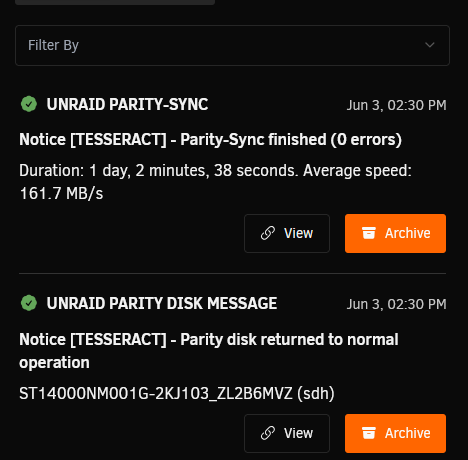
As promised updating after completion. Sync just finished with zero errors. The weird part is on the other backplane I moved the disk with errors to another port and the errors followed the disk arround. so either the disks with two errors were just going over the power stability line because of advanced requirements (power binning???) or I have no other explanations. What do you think? @JorgeB
-
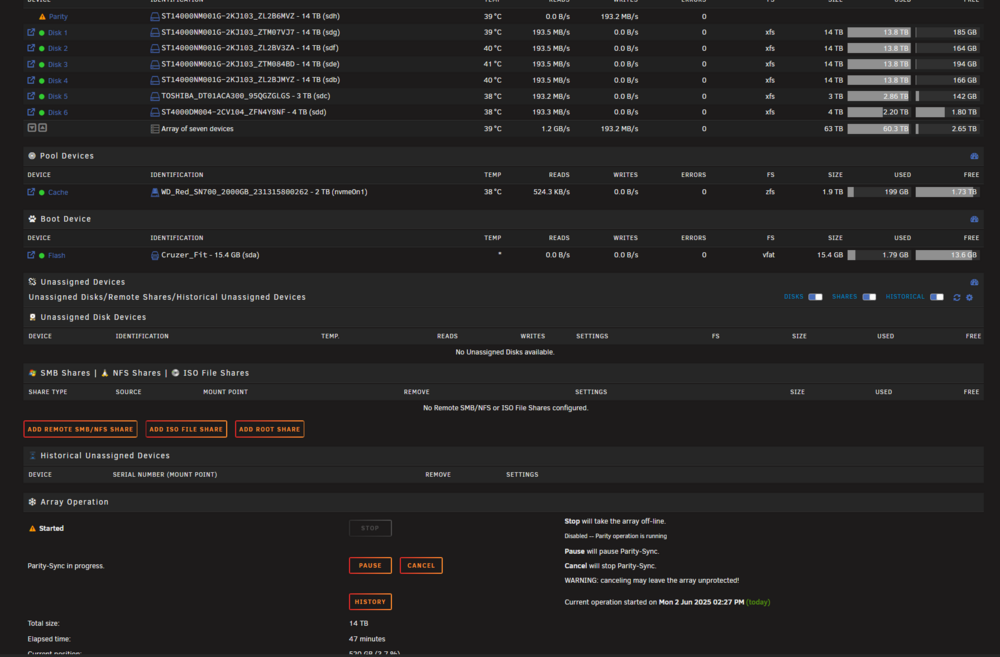
Only splitter I use for power is a molex splitter to give power to the top and bottom backplane but the bottom backplane was not even in use. I replaced the splitter and I also used another sata/molex module on the PSU. I also connected the whole splitter(1 psu to 2 molex) to the bottom backplane for more power draw (backplane gives me up to 3 molex pwr to connect) I moved all the drives to the bottom backplane also. and I moved my sff cables to that backplane. I have started the parity sync and I dont have any drive drops until now. (before I would start getting errors after about 12 mins of sync and by min 40 I would have millions of errors accumulated) I think my top backplane is toast but I Hope its just the splitter I swapped. I will report back when my parity sync is complete. if you have any more things you think I should check until then im open to ideas. Fyi smart atributes for both drives show no problem at all in the reads
-
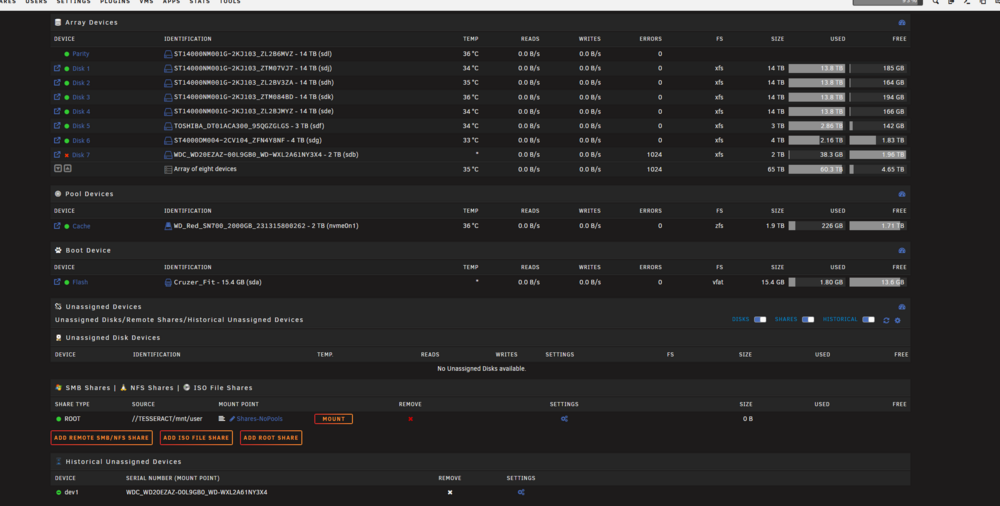
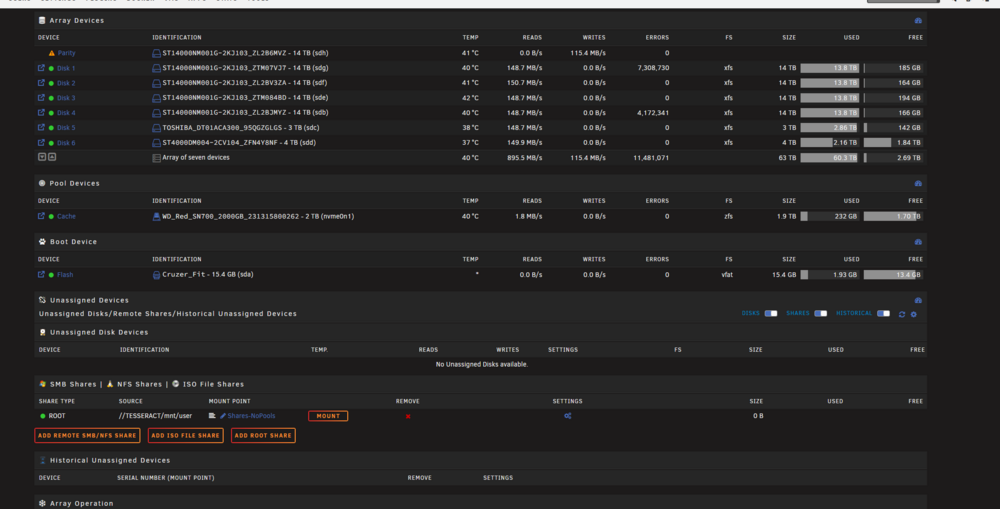
Yesteraday I saw that I got 1000something errors on a 2TB wd drive that my array had not yet started filling. The drive was marked as disabled and I didnt think any more of it. As I had more than enough space left I shrank the array and because of a failed drive I went with the full parity rebuild. All went well with the new config and the parity started syncing as it was invalid after the shrink. While the parity was syncing disk 1 and 4 (exos 16) both started throwing consecutive read errors and then a Power-on or device reset occurred error. that made no sense to me as I run parity check 3 months ago and its the first time I am seeing an error like that. I am thinking something is dying and its not my drives as their short smart was clean on both but I am running a long smart on both just to be sure. This is a shortened log of the errors that both drives get Jun 2 00:16:31 Tesseract kernel: md: disk4 read error, sector=201976400 Jun 2 00:16:31 Tesseract kernel: md: disk4 read error, sector=201976408 Jun 2 00:16:31 Tesseract kernel: md: disk4 read error, sector=201976416 Jun 2 00:16:31 Tesseract kernel: md: disk4 read error, sector=201976424 Jun 2 00:16:31 Tesseract kernel: md: disk4 read error, sector=201976432 Jun 2 00:16:31 Tesseract kernel: md: disk4 read error, sector=201976440 Jun 2 00:16:31 Tesseract kernel: md: disk4 read error, sector=201976448 Jun 2 00:16:31 Tesseract kernel: sd 1:0:0:0: Power-on or device reset occurred Jun 2 00:16:32 Tesseract kernel: sd 1:0:0:0: Power-on or device reset occurred also here is my sys log tesseract-diagnostics-20250602-1209.zip
-
i got the same exact problem after shrinking my array ( its been 3 months since my last parity check) Same exact errors too. on two out of my 6 exos x16 I tried to swap one drive arround but the errors followed the drive to the other slot too. I am running long smart tests on both drives if they pass I am moving the whole setup to a lower row with new power cables and another ccontroller to check if its my backplane dying.
-
I also would like to get this in plugin form with a UI scheduling option etc like the mover or parity check has. Also, I would like to ask for a feature locking files that are x days old that way files can become immutable after let's say 3 days in the server etc. Thanks in advance!
-
So in other words VALVE TIME. its ok I get it. I hope for the best as my client will soon hit the drive limit ( server is 3 months old LOL!).
-
Any idea if they would act behind the same FUSE layer or be separate entities to the user? Is there ANY eta on the feature as i remember this being talked about for years?
-
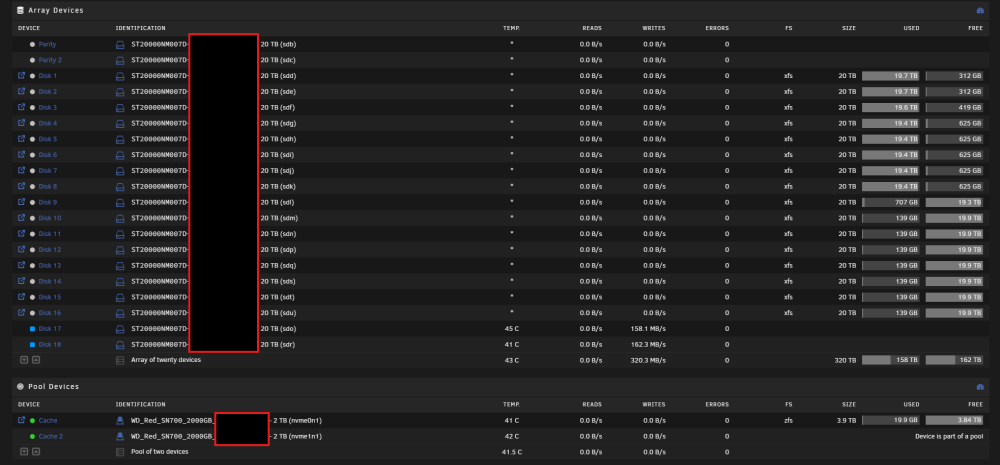
For starters I would like to thank limetech for creating such an amazing product that I use personally and professionally for years now! I currently manage a server for a client on a 48-bay server (24 Bays each side 8U) 1) Is there a consideration or a plan to expand on the 28+2 MAIN array drive limit? 2) If the 28+2 is a drive limit is a hard limit it would be awesome to go the VDEV way and allow us to create another main array that would be functionally in the same pool as the first array but would be a new group of parity drivers and data drives. So, the idea is that you have two Arrays of let's say: ((28+2) + (28+2)) that is served as ONE filesystem after the FUSE layer. The mover would have the same logic of highwater or balance the arrays, so you just fill the first array and then fill the second and both arrays share a single cache pool. Why not just create a new dedicated pool instead!?: The biggest positive thing of unraid is the ARRAY part, only wake up the drives that are working and keep thermals down. Is the perfect LOW COST archiving solution that allows to add one drive at the time without long downtime or sync time after each time a drive is added without having to disable the array or spin all the disk every time you add one (unless you are doing something to the parity ofc). Whoever recommends to "just create a new pool" misses the whole point of the OS. People use Unraid for 2 reasons first the main array simplicity and low power use and secondly the ease of use of the docker system with the apps. This is the status of my clients Array currently. Any ideas or recommendations to what my options are for expansion are welcome! Thanks in advance for you time.
-
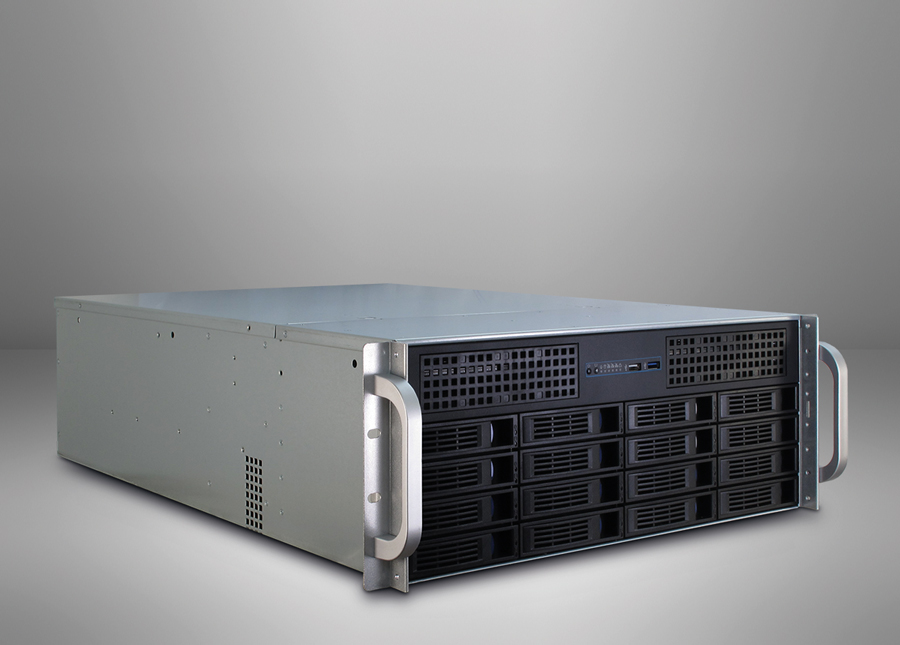
You have already done the IPC 4U 4424 this is the 4416 Model just remove the top 8 Drives and add the 2 5.25" square and you are done!. Thanks for your work!
-
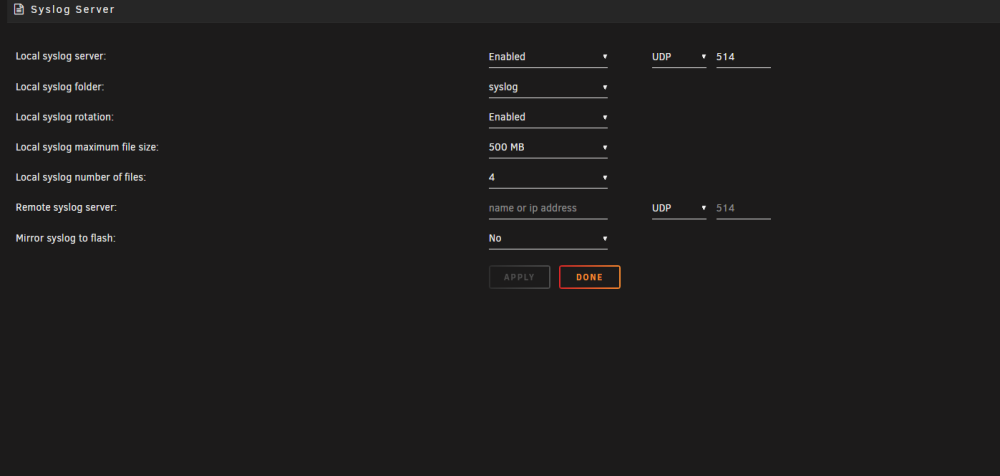
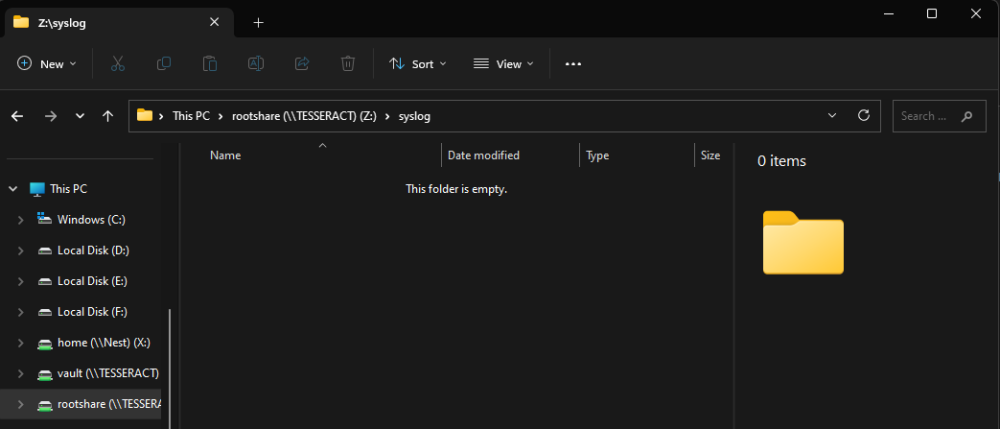
Hey I enabled the syslog server and created a syslog share on my ssd cache but I dont see any logs being created! here are my settings the folder is currently sitting at 0B
-
Should I create a new topic when the crash happens again or just reply here?
-
I was watching a movie on plex and the whole server suddenly became unrensponsive. I dont mind a container crashing etc but whats REALLY annoying is that the smb shares work fine but the webUI is completely unrensponsive. I had to do a forced shutdown but most times the server will come back after about 10 minutes being stuck like that. I had this problem for a while too but its pretty rare tesseract-diagnostics-20230217-1549.zip
-
Hi Today when i connected to my Sab instance I saw about 5 errors saying that the nzb of some movies( all of them in row) where empty nzbs. Im pasting the Log file. If its my Radarr instance at fault I will post on the Support page of this container. sabnzbd (4).log
-
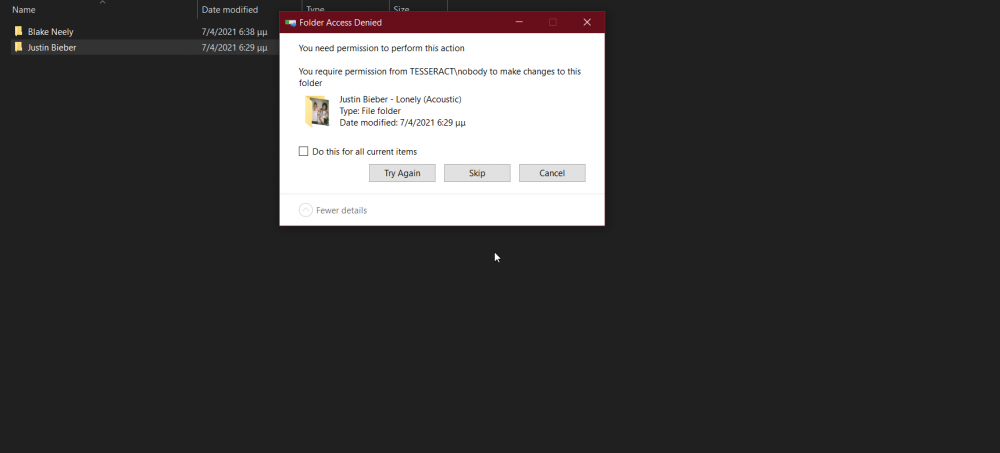
The latest version of Deemix is saving files with wrong permissions! I am unable to move them or delete the files in the download folder over smb( I have one share every other folder made by other containers has no problem) docker permision script is fixing the file permissions. The container is using the default uid's (99 100) as any other container.
-
Hi can you edit the explanation of the "Only move at this threshold of used cache space" to specify that it work with conjunction of the schedule mover script and it isn't a stand alone check?




