





Elmojo
Members
-
Joined
-
Last visited
Everything posted by Elmojo
-
What about them? Please explain things. Don't assume I automatically know what you mean. You just confusing me more! lol
-
You don't think it is, or you don't think it should be?
-
Any of what you mentioned is possible, I guess. That worries me that you're seeing flash drive repairs. :/ I certainly didn't do anything manually, it must have been some sort of auto repair. What did you see about the RAID controller that made you suspicious of it? Just the fact that it is present? It should be in HBA/IT mode, and only passing the drive data through to the OS. I'm not using any of the actual RAID features, unless I did something wrong. ;) I'm not 100% sure of the drive assignments, more like 85-90%. What happens if I do the new config thing, and I get it wrong? Will it corrupt my array data, or will I just maybe have to rebuild the parity from scratch?
-
Ok... I didn't know that, but how does that bear on this issue? I'm not being snarky, I genuinely don't understand. The problem is that the machine just suddenly decided to change the parity assignments, and now it can't seem to agree on what drive was which parity slot. As best as I can tell, it thinks that both slots, and neither one, were drive 5QL. That just sounds like a plain 'ol bug to me. Is there any sort of diagnostic (other than what I already submitted) that could show what it's thinking in the background? Is there a config file that tells it which drive is which parity or something? I'm just trying to understand how this could happen. More urgently important at the moment, what do I need to do to get the server back up and functional? I have about 3 hours before this blows up in my face... 😬
-
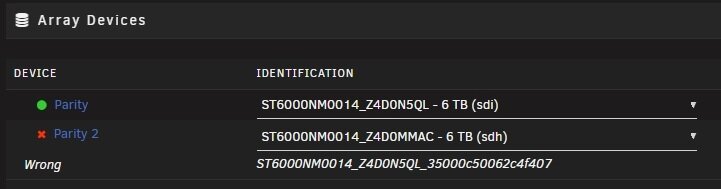
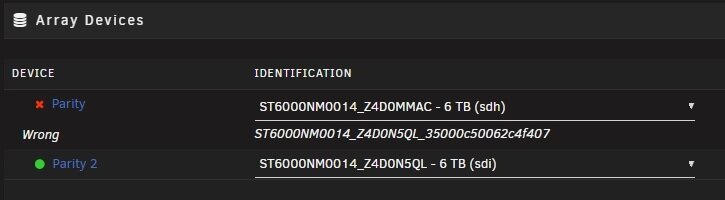
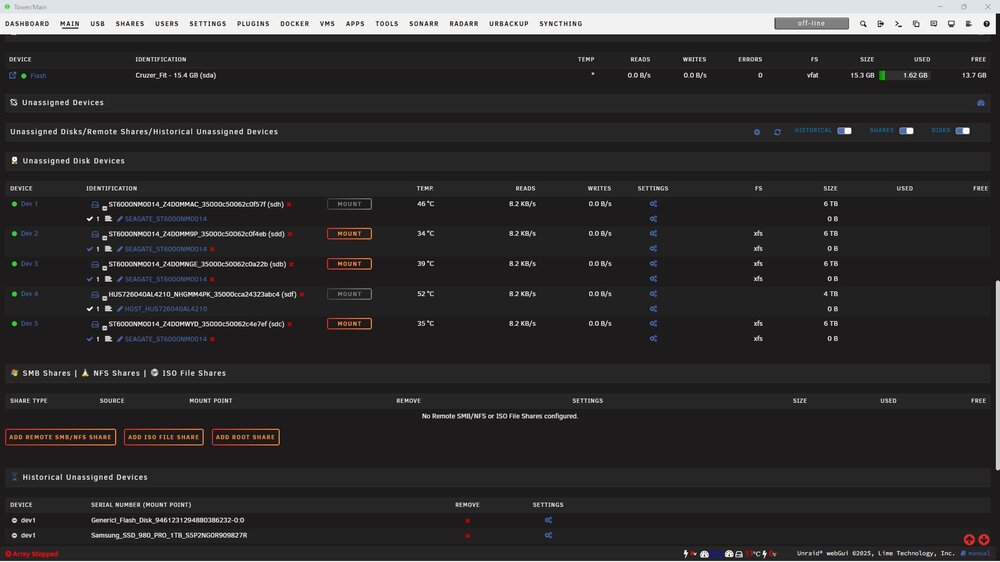
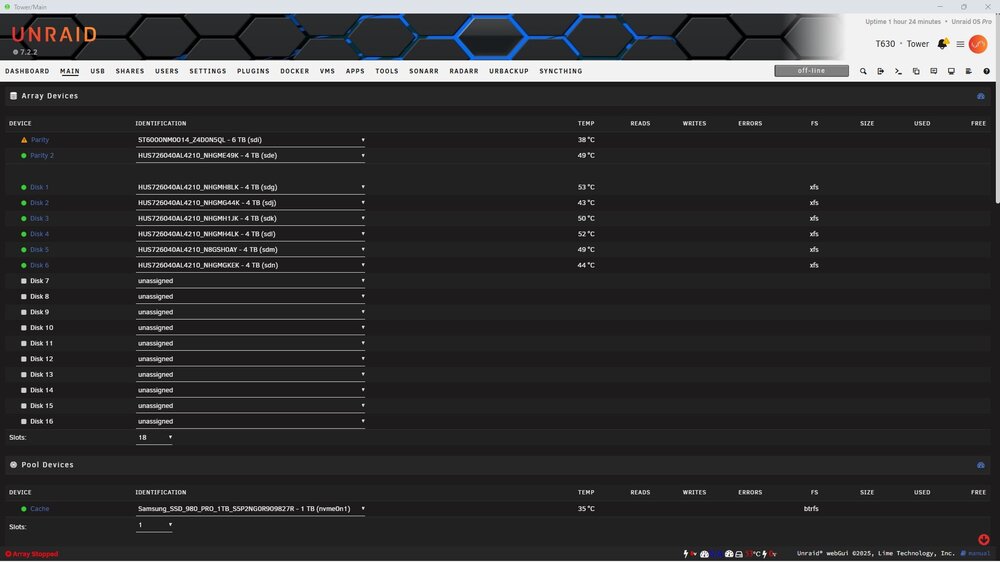
I assume you mean is it going bad? I don't think so, but I really wouldn't know how to check. All drives are showing as physically online, by which I mean that the lights on the front of the chassis are indicating that each drive is connected and online. Also, the error appears to be something specific to unRAID, just from the message it's showing me on the [main] screen. I mean, why does it show that the Parity drive is xxx5QL, but then it says that drive 5QL is 'missing'? I thought maybe that drive got assigned to the wrong parity slot somehow, so I moved 5QL to Parity 2, and assigned drive xxxMAC (the one that I'm fairly sure was one of the parity drives before all this happened) to Parity. Now it says that Parity is "wrong" and is looking for 5QL, even thought that drive is in the Parity 2 slot. (see new screenshots for clearer explanation). I tried flipping the order around, and it doesn't like that either. I'm fairly sure that the correct assignment should be drive MAC (sdh) in the Parity slot, and drive 5QL (sdi) in the Parity 2 slot, but it says these are wrong. At this point, can I just pick and arrangement and go with it? I know I'll have to let it rebuild the parity, again, but I just need this server back up and running ASAP. I did not apply any of these changes, by the way.
-
Diags, in case that's helpful... tower-diagnostics-20260111-1154.zip
-
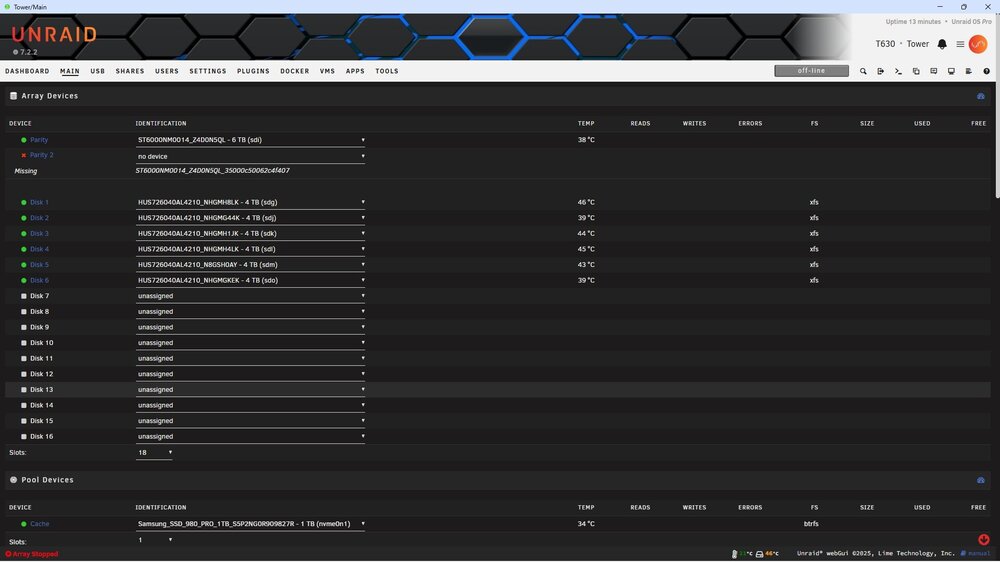
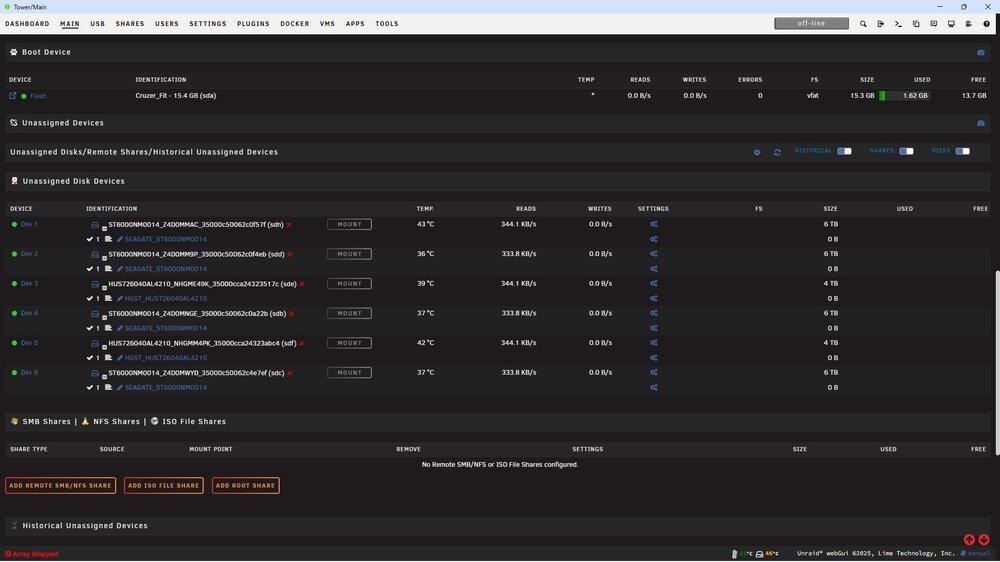
So I recently migrated my server to new hardware. Everything appeared to be up and running well. I had expanded my parity from 2x 4TB drives to 2x 6TB drives, and the rebuild was complete. Today, I decided to complete the last step of the migration, by moving the GPU from my old server to the new one. I shut down the new server, swapped over the card, and booted it back up. No other hardware or software changes were made. Everything came back up fine, except that the array didn't start. (?!) I looked at the [Main] tab, and it says... well, see the screenshots, please. I don't understand. The drive it says is "missing" is the one that's listed right there as "parity". Parity 2, which is currently empty, was previously another 6TB drive of the same model, which is now listed down under unassigned devices, although I have no way of knowing which one it was, since I have several of those drives. I was still sorted out how to handle the expansion of the array, so they were just hanging out in reserve. 1) Why would it just drop a parity drive like that? 2) How can I determine which drive was Parity 2? 3) Can I just add it back in at the top? 4) How can I prevent this from happening again? EDIT: From looking through the logs, I'm fairly sure that (sdh) is/was Parity 2, since it's the only one that isn't flagged as 'pre-cleared'. I had run pre-clearing on the other drives to get them ready to add or swap in later. EDIT 2: This makes no sense. Am I seeing that it's expecting both Parity and Parity 2 to be drive S/N ...DON5QL? That's not possible, right? Has something gone glitched here?
-
They don't work on Dell servers, unfortunately. I had an IPMI script that I'd use on my T630, but that doesn't work on the T640, since Dell disabled direct access to the IPMI interface on this gen of the platform. :/
-
Can you control this? Not directly. I can set the minimum, but even then, it kinda does what it wants based on the load and CPU temps. It doesn't seem to be monitoring the HDD temps, which I find to be a bit odd. I tried setting the minimum to 25%, but it didn't rise above 20%, unless the CPU temp rose for some reason.
-
Just out the back of the machine, and into the room. It has a 12' ceiling, and there's a grille for air to exchange with the space outside the server room. That room stays 24c all the time, due to having it's own climate control. The server itself is on a rack, not inside. I have a short rolling rack with a disk shelf and UPS in it, and the tower sits on top of that. Oddly, most of the drives in the system hover around the low to mid 40s C. A few are upper 40s, and 1 or 2 are over 50c. I don't have a good way of identifying which drives are in each physical bay, so I can't say if it's the upper drives that are running hot or lower ones or whatever.
-
I assume so. I mean, this is an OEM server chassis, with no mods. I have air blanks installed in all unpopulated bays, per Dell spec. I have a floorstanding AC unit sitting sitting in front of the rack that the server is on, and the cold air from the AC is blowing directly into the front of the server intake, where the drives sit. I can't imagine how it could get much better. 🤷♂️
-
Parity rebuild and disk preclearing is all complete. At this point, I have to decide if I want to exchange some of the 6TB drives for the 4TB ones, or just add the 6TB drives to the array. One concern is that a couple of my drives are running rather hot, like 50-52c. I know these SAS drives are rated to run hotter than normal desktop drives, but I think they're only rated for 55c before it becomes an issue. I'm not sure what I should do. The server is in a dedicated, climate-controlled room. The AC is literally blowing directly into the intake of the server. The ambient room temp is maintained at 24c (75F) in order to keep my electric bill from going nuts. :) I can't imagine that Dell build a server that you can't fully populate, so I don't really know what else is going on. The internal fans are running at about 20%, with the minimum set at 20%, so the machine itself doesn't think there's any need for additional cooling. Any ideas?
-
Really? I love it. It's like the more reliable, "serious" version of SATA. I've never had a drive drop out due to a sketchy cable, for one thing. I absolutely cannot say that about SATA. Also, I think the theoretical throughput limit is supposed to be higher for SAS (12Gbps), although in practice you're not likely to saturate either one on an unRAID array, so that hardly matters.
-
Ugh...right. I need to remember to buy at least 3 disks, so I can replace both parity drives, and then start upgrading the data drives. I swear, it never ends! lol Are there any large cap (6TB+) enterprise SAS drives that you're aware of that won't break the bank? I've always had very good success with the DELL/HGST drives, but I'm not sure if those are even still around, and not in larger sizes.
-
Right, which is why I'm preclearing. I'm testing the drives to make sure I don't have any other issues, plus, I'll then have the option to swap them for the 4TB drives or just add them into the array and increase the overall size. I'm leaning towards just adding them for now, then maybe replacing the 4TB drives later with something even larger if I find a good deal. I'm trying to stick with SAS enterprise drives, both for the native interface, and also for the durability.
-
Just a quick update... The parity build is complete and valid. The preclear process is ongoing. It's currently on the zeroing step for all 3 6TB drives, at about 25% complete. Since this is step 3 of 6, and it's been running since we spoke last night, I expect it has a while yet to go. I'll check back in when they're all done. I assume the next step will be to either add those 3 drives to the array (if I choose to use them to expand the array) or use them to swap out for the 4TB drives one at a time, right?
-
Roger that, thanks so much! I've assigned 2 new 6TB parity disks, and they're (re)building now. As you say, that will take quite a while. The estimate is about 9hrs. I'll be tied up until tomorrow afternoon as well, so maybe we can revisit this once I get home and see what's happened after the parity gets settled. If all goes smoothly, I'll add the 6TB disks to blank slots, and let them start clearing. I have the preclear plugin, would that be worth running on them over night? Thanks again for your time and patience.
-
The suspense is killing me... lol
-
Does this help?
-
Ok...the parity rebuild is stopped. So I'm getting confused again. At this point, my best option is to replace both parity drives with 2 of the new 6TB disks, correct? Do I need to let that fully rebuild a new parity set before I move on to adding any of the 6TB drives to the array, or can I do that now? I don't know what you mean by adding them to new slots, or how that's different than adding them to the array, or how either of those processes differ from replacing a 4TB disk with a 6TB disk. It's all becoming a blurr...
-
In any case, do I need to stop this parity rebuild and replace the other parity disk, so it can build once? Also, can I add the new array disks at the same time?
-
Yeah, I think so. In that case, would you just add the new drives to the array, or use the New Config? But there are more small disks than large ones. How would that work?
-
That would have been useful info for me to have processed earlier. Note that I said processed, and not necessarily seen. lol They do, but you want to hear something really stupid? I didn't have a way of labeling the drives, and wasn't expecting to move them, so now I don't know which ones are parity and which ones are data. 🤦♂️ I'll basically have to treat them as blank drives, and copy everything over again, once the array is rebuilt. At least it'll be internally, rather than over the network, which hopefully will be quicker.
-
Wait...EITHER parity? That's not clear from the docs. I thought that just one of the parity disks had to be at least as large as the largest data disk. Well...crap. I guess I'll have to use 2x of the 6TB drives. That will reduce the array size, but that was the original plan anyway, so it'll be okay. Maybe one day I'll be able to afford to replace them with something larger.
-
Well that sucks. I wonder if it was a little bit marginal, and moving it between chassis was enough to kill it? So that being the case, am I better off stopping the rebuild, and going the New Config route?


