





Lolight
Members
-
Joined
Everything posted by Lolight
-
This thread and the referenced thread within might be of interest:
-
Intel has now enabled ECC on Alder Lake CPUs, but only if paired with a W680 chipset. It's still too new of a development with just a couple of vendors announcing motherboards based on that chipset (SuperMicro and ASRock). As a rule an Unraid NAS running on AMD might require troubleshooting or extra research related to the initial BIOS setup and some other issues, more so than on any Intel based systems where the BIOS defaults and the basic architecture are good enough for "set and forget". If you're fine with that situation then AMD might be a good choice for you.
-
An Intel platform might be a better choice for stability.
-
It seems you did your research and are aware of numerous other system builds that have been discussed on this forum. Therefore you must be aware that Unraid has been shown not to have generic compatibility issues with any common hardware. Do you have a particular concern?Unraid will run well on any common modern (and not so modern) hardware. Just choose the processor and pick from the list of the compatible motherboards. https://pcpartpicker.com/list/Do you mean generational compatibility? https://pcpartpicker.com/list/ Just choose the processor and then proceed with the rest. The site will warn you of any possible incompatibilityI think you already have a very good idea what you need. Go with the hardware that is easily available and cost-efficient considering your usage case.If those reviews resemble reality then those drives have been subject to some extreme storage/handling conditions. What was your experience and with which re-seller? Why would you even consider dealing with that re-seller? Do you have a good reason to assume that serverpartdeals.com offer drives backed by Seagate's 5-year warranty?No I don't use those, though heard that it's possible to use Raspberry Pi4's with Kodi and Plex-Plugin, but not without significant problems. I'd assume it's not even worth the trouble. The absolute best alternative to the Shield would be the Odroid N2+ (Odroid C4 close second) running on Coreelec: https://coreelec.org/ Not many have heard of those units and have no idea to where even find them. Those products are normally sold as bare bone boards without an outer case, power supply or remote included but those parts can be added during the checkout. Depending on where you are in the world, you should be able to locate the local(ish) resellers carrying Odroid products, especially if you're in the U.S. or Europe or you can buy straight from the manufacturer's site if in Asia - the factory is located in So. Korea. e.g. the American reseller - https://ameridroid.com/products/odroid-n2-plus?_pos=1&_sid=4bdce95dd&_ss=r The factory site - https://www.hardkernel.com/shop/odroid-n2-with-2gbyte-ram-2/ If you decide to purchase the N2+, then I'd suggest adding an eMMC module to make the unit unbrickable, and an eMMC reader to simplify Coreelec installation, both parts are usually available at the same sites selling the main unit. The process of installing Coreelec is as straight-forward as with any other simple software, just requires a little bit of extra learning up front. The Coreelec community is helpful with guides and member's advise. Once done with the initial software installation you'll get yourself a player that is often preferred to the Shield. Another, much cheaper version would be the X96 Air - comes as a complete unit, no need for extras. But... It has an inferior cooling design and will run hot without extra cooling mods. https://discourse.coreelec.org/t/best-device-for-coreelec-in-2022/14348/144Since your TVs are on the same network then the best option would be Direct Play. You'll need to get media boxes for each of your TVs. Then you wouldn't need to worry about any transcoding on your server. You'll be able to play any commonly formatted 4k movies in full resolution without any bottlenecks. And you won't need to spend much extra money by doing that. There are many kinds of media boxes out there. The most well known (and factory supported) is the Nvidia Shield. But it's not cheap. I use much cheaper boxes that are supported by an online community of volunteers. For their intended purpose the cheap boxes work just as well and some even better than the Shield. If you're interested I'll recommend what I'm familiar with. If you're not familiar with the term of Direct Play here's a quick breakdown: https://support.plex.tv/articles/200430303-streaming-overview/Do you have a proper back-up (including off site) for all of your crucial data? If not, then I'd suggest is what you should be concentrating on.IMO undervolting and underckocking is not worth the trouble considering minuscule (if any) savings at the expense of introducing a huge potential for system instability. If power efficiency is a big priority then go with the i3 8100. What's your plan for streaming? In a direct play scenario you're all set. If transcoding then you have to mention your setup.There are very few quality 500W PSU's out there. Besides, you don't simply save on electricity by going with a lower wattage PSU. The main concern is the overall quality of the PSU and to the lesser extent its power efficiency factor. You can read more here for a simple explanation: https://www.techamster.com/power-supply-efficiency-ratings/Get the best quality PSU that fits your budget. Why multiple smallish hard drives? Every hard drive is a potential failure point - the fewer, the better.The meeting summary - lots of NewEgg's corporate PR spin, very little substance. It's a long episode. If you don't feel like wasting your time on the meaningless at this point "customer first" empty talk then skip to the 1:01:37 mark for Steve's conclusion.No, nothing new. It all depends on who's the seller and what stock they sell - OEM vs retail.
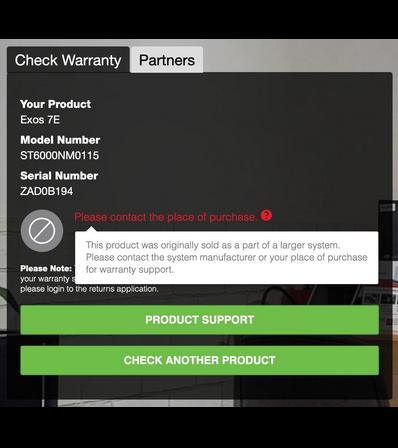 I think you can save quite a bit of money by toning down just about every component in the proposed system. You will not really make the system any longer lasting by over specking.Keep in mind when comparing prices that many Exos drives are being sold without a direct Seagate warranty attached - only warranted by third party sellers. Retailer often omit this important detail. Sometimes they also sell the new-old stock with unknown storage/handling history.Steve goes to NewEgg:Also great to see an avalanche of comments, posted within hours of the GamersNexus' video coming out. Lots of commenters mentioning of something similar happening to them or just in general sharing their consistently worsening over the last few years shopping experiences with NewEgg. The common theme: we will NEVER buy anything from them again...https://www.youtube.com/watch?v=2fnXsmXzphIThe issue affects shucked Western Digital drives only. Shucked Seagate drives are not affected.


