





Lolight
Members
-
Joined
Everything posted by Lolight
-
https://www.newegg.com/super-flower-leadex-iii-sf-550f14hg-550w/p/1HU-024C-00008
-
I'd advise to check out this example of a build first:
-
Check if the board is on the latest BIOS.
-
DRAM-less drives in general are not nearly as fast when moving large files around. According to this site: https://premiumbuilds.com/comparisons/wd-blue-sn550-vs-black-sn750/#Verdict "The Western Digital Blue SN550 is inferior to the Black SN750 in sequential read speed by 44%, sequential write speed by 53%, and 4KB read and write speeds by 25% and 38% respectively." And on top of that please be aware of the following development: https://www.bleepingcomputer.com/news/hardware/western-digital-confirms-speed-crippling-sn550-ssd-flash-change/
-
A better choice would be a WD Black sn750 NVMe Gen 3 (not the DRAM-less WD Black sn750 SE Gen 4)
-
For me it would be because Seagate 8TB externals are SMR drives which are not even worth $10/TB in the NAS environment, IMHO.
-
All of Seagate NAS (IronWolf/IronwWolf Pro) and Enterprise (Exos) HDDs in any capacity are always CMR.
-
I was referring to the 8TB drive sold by Costco. There are currently no SMR drives in capacities of 10TB and larger. With the exception of the recently announced Seagate 20TB model (still unknown at this point when it will hit retail)
-
First try re-connecting the battery to the MOBO - the connector might not be fully inserted. You can get a cheap laptop CMOS replacement battery with a matching connector (2 or 3-pin) on ebay. The connector is very small and tricky to disconnect. Make sure not to damage the socket it's attached to. If that doesn't solve the problem I'm afraid you'd have to RMA your MOBO for a replacement.
-
I don't consider SMR drives to be a bargain, even at $130 per 8 TB prices.
-
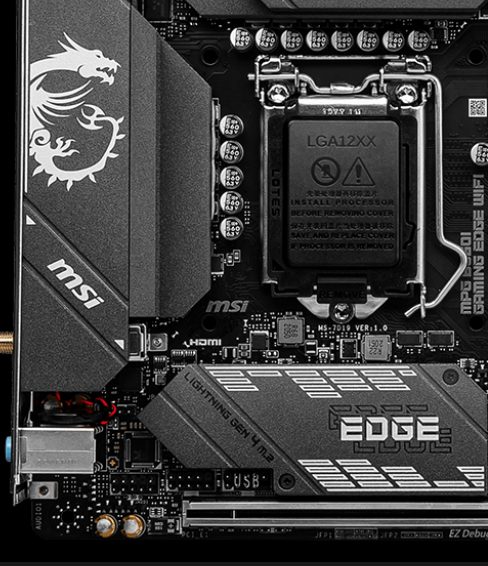
You have to set the date and time manually in BIOS. There's a laptop type CMOS battery on the MOBO (visible as attached to the red/black wire in the left lower corner)
-
WD publishes complete list of SMR drives following user backlash: https://www.techspot.com/news/84973-wd-publishes-complete-list-smr-drives-following-user.html
-
Here's the story and how it has developed (watch the links in sequence). How would anyone even consider buying anything from Gigabyte after watching those videos?
-
You haven't said much about the overall usage. If your NAS is just a file server, there shouldn't be much of a CPU usage beside when transcoding. Did you enable the Plex's hardware acceleration option? If not then that would explain your high CPU load. With the option enabled the i3-8100's built-in iGPU should be able to handle at least a few of hardware accelerated streams instead of taxing the main cores. You cold you also try to direct play on the clients within your home network. The direct play option doesn't need transcoding on your server.
-
I would also consider the latest Gigabyte fiasco (more like a total disaster) of their certain PSU products (search youtube for exploding Gigabyte PSUs). The company's response is absolutely horrific from a customer's stand point of few. Think twice about giving your money to this company!
-
If you don't game then you won't need a stand-alone video card. You also won't need a power hungry processor paired with water cooling (unless you "want" it) and X299 board, or 750W PSU. What is your plan for 4 NVME cards? I haven't been keeping up with BlueIris... Isn't it still only working on an Intel iGPU (Quick Sync)? The processor on your list doesn't come with internal graphics. Do you run Plex with hardware acceleration enabled? Asking, since you probably will have no choice but to run BlueIris in a Virtual Machine environment.
-
An interesting build, thanks for sharing. Wonder if you'll be able to keep the hard drives from running hot (50's Celsius).
-
I think that would be prudent but can't be much of assistance on transcoding. In my setup I've decided to completely remove the power usage and equipment upgrade dilemmas associated with transcoding by connecting my TVs to direct play devices that can easily handle 4K files.
-
It should be fine as long as you get the one without a power disable feature. The part number indicates it doesn't have one. It seems some vendors might be selling old stock, with a suspect handling/storage history and maybe even mixing part numbers.
-
Just came across a guide write up regarding SMR: https://unraid-guides.com/2021/07/21/can-unraid-use-smr-hard-drives-the-smr-vs-cmr-debate/
-
Nvidia Quadro would surely defeat your goal of maximum reduction in power consumption. You haven't mentioned how many trans-coding streams you plan to handle and at what resolution... But depending on those factors the 9th-10th Gen Intel processor's built-in graphics might be a power-saving solution.
-
It's generally recommended to add a SSD cache drive to your system. Just about all newer motherboards have at least a single M.2 socket. The NVMe M.2 SSD drives are very cheap now. You don't need a large one - a 250 GB drive would suffice for your usage. Here's Spaceinvader One on cache:
-
Shoot for the drives designed for NAS - best and the most expensive option, but be aware of WD Reds. At least some of the WD Red drives are built on the SMR tech. Avoid!!! Instead opt for the WD Red Plus drives if you choose to stay with WD. Those are built on the desirable CMR tech. All of the Seagate NAS drives are fine (CMR tech). You can also go with cheaper Non-NAS drives. In that case the only safe option would be to go with a 10 TB or larger Seagate. Smaller Seagates are SMR drives.
-
Are you really sure you wanna go the rack-mounted server setup?
-
It might be a prudent idea. But it's unlikely that any of your old PSU's will fail within the next few years considering their operational loads. And even less likely that they will damage other components if the failure does happen. You might consider opening them up to dust off the internals while checking for bulged capacitors. -


