Lolight
Members
-
Joined
Everything posted by Lolight
-
Not quite. It should work as two 7TB hard drives.
-
I'd guess it's impossible to say for sure until someone actually tries it. Do you plan to purchase one?
-
-
That was a quick and easy answer! Nice to have a real guru around! 👍
-
Interesting that you've mentioned that. The same thing had happened on my recent new build - an immediate reboot after selecting Memtest from the Unraid boot options. I don't have an HBA card so it's unrelated. i also didn't bother troubleshooting and simply booted from another USB stick with Memtest on it.
-
Glad you've solved the problem. I just want to point out that the best way to make sure that the are no memory related problems, on any system, old or brand new, is to run several passes of Memtest86+ (at least 4). If finished without a single error only then you can consider your memory (or configuration if multiple sticks) to be NAS worthy.
-
USB 2.0 flash drives Kingston DataTraveler SE 8GB Mushkin Prospector 16GB Patriot Flex 32GB Sandisk Cruzer Edge 8GB Sandisk Cruzer Fit 16GB Transcend JetFlash 8GB Transcend JetFlash 16GB
-
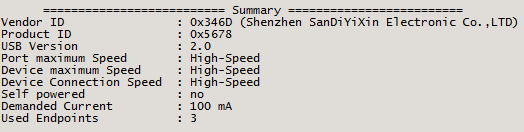
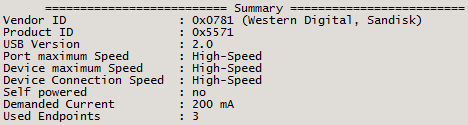
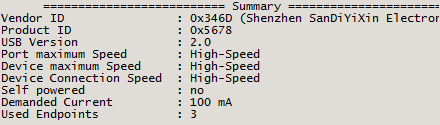
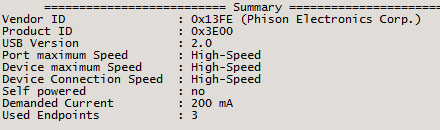
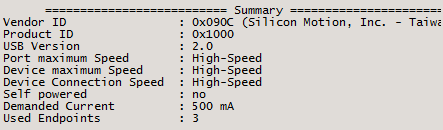
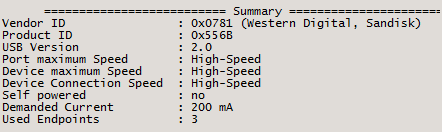
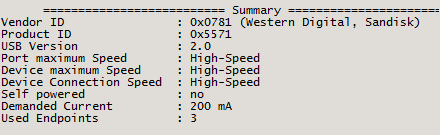
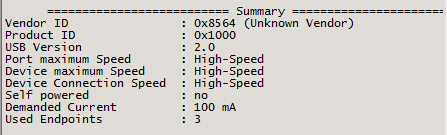
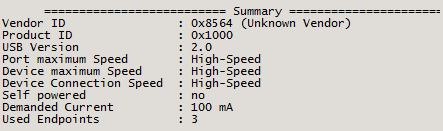
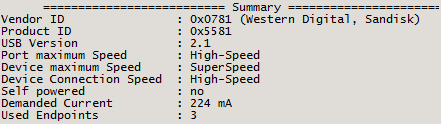
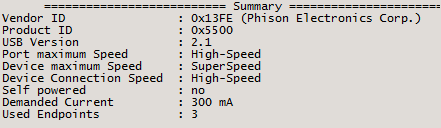
That's the same drive that I've originally purchased for my Unraid based on its small profile, but then decided to place it on the inside of the case, connected to the motherboard via an adapter. Therefore switched to the much bigger, all metal Kingston DataTraveler. Just out of interest, I run a little app called USB Device Tree Viewer, just to see how those two drives compare to each other on specs. The one thing that got my attention was a difference in the demanded current metric, with the Sandisk consuming twice as much current, as Kingston. Then, just as in the Spaceinvader's test, I left them both sitting for a couple of hours, idling. The Cruzer Fit turned out to be much warmer to touch compared to the DataTraveler. I don't know if the higher demanded current design leads to higher running temperatures. My observation leads me to that conclusion but it's all speculative at this point. I also don't know if and how any particular drive's controller handles the sleep mode. A big difference in idling temps in the Spaceinvader's test might be indicative of a sleep mode failure. It would be nice if Spaceinvader would update his test by altering the test parameters, e.g. USB 2.0 vs USB 3.0, low demanded current vs high. The results might allow to establish some patterns on how those two metrics relate to idling temperatures (important to Unraid in case if the USB drives do indeed spend the vast majority of their time in the idle state). Pulled out my small "collection" of old USB drives. It's a very small sample, skewed towards the older USB 2.0 standard. On the demanded current metric alone, some of the USB 2.0 drives showed the lowest numbers, but the spread among the brands is huge!!! 100-500mA As applied to Unraid, the idle state management is probably much more meaningful to the drive's overall temperature and maybe longevity. In conclusion. The USB flash drives are so cheap and easily replaceable, it's probably even silly to ask someone like Spaceinvader to run another test. For whatever it's worth...Here are the app readouts of my drives, (taken at the same USB 2.0 port): USB 3.0 flash drives Sandisk Ultra 16GB Silicon Power 16GB
-
Personally, I've never been brave enough to purchase and install any of the refurbs into my systems. But I'd be genuinely interested to learn about your findings.
-
IMHO (it's all relative): 1. Those smaller Seagate drives are not worth the trouble for the storage space they provide - occupy limited SATA ports and introduce additional failure points. 2. Do you really want an HBA card? With available at the moment 14-20TB drives you might not need one any time soon. 3. Free rack. Do you must use it (like really, really want) in a home environment? Asking because I don't know about your prior experience with server grade hardware (could be addictive (if becomes a hobby 😀) and many other negative things considering home use). 4. The case - seems to be very flow restrictive (related to my point about the free rack). You want to keep your drives cool. Btw the Sligers seem to have much better flowing. 5. Your USB flash drive selection is not great. Go with smaller USB 2.0 drives. They're cooler running and more reliable judging by the board's consensus, e.g. 4-8 GB Kingston DataTraveler SE (cool running, all metal case). But they're becoming hard to find, the USB 2.0 drives in general. Also beware of fakes!
-
More than enough for the listed usage.
-
Definately
-
As I've mentioned that particular Evga model is not great, regardless of selected wattage.
-
Regarding the EVGA BQ PSU.. The brand is great, but their BQ line is not: https://cultists.network/140/psu-tier-list/ Get something like this instead: https://www.newegg.com/super-flower-leadex-iii-sf-550f14hg-550w/p/1HU-024C-00008?Item=9SIAMNPAY45109
-
The motherboard on your list is not cheap. How many drives are you planning on using? Will you be using an HBA card? I think it would make more sense to get a much more modern and efficient $100 i3-10100 accompanied by a $150 motherboard for virtually the same price as your proposed combo.
-
That's right, according to the MB's manual you can only use one M.2 socket (M.2_1) without disabling any of the SATA ports:

-
Pretty much any current Intel (non-F) processor and 16-32 GB of any DDR4 RAM
-
May I ask why you want to keep such an old processor?
-
You won't need to think of any complexities and trans-coding if your client(s) are on the same network and capable of 4K direct play. Even if not direct play capable (assuming TVs) you can still make them compliant via attached devices commonly called media boxes, most often with little cost and associated complexity. In that case you could keep your existing machine (additional 4GB of memory might be advisable) and save on Plex Pass (required for hardware trans-coding) - your machine is still powerful enough to run Unraid as a file server with ease. If you're set on a new machine with Plex Pass (Jellyfin is a free alternative) and transcoding, then any cheap processor from Intel (non-F) starting with the 8th gen (10th gen ideal), compatible motherboard with at least 6 SATA ports and 16-32 GB of DDR4 memory is all you need. No need to overspend on anything more powerful for your usage. Are you re-using your case? The only other major part that is often overlooked is the PSU. Ask if you need help. Make sure to get a good one. To make the process easy and fun use this site - start with the processor: https://pcpartpicker.com/list/
-
Your DIMMs could be fine but your memory controller might still not like them when running in pairs. The sure way to eliminate memory problems is to Memtest each DIMM separately, one by one. Use a different slot for each consecutive test. If finished without errors, Memtest them again but now in pairs. 4-5 passes of Memtest is usually enough to uncover problems.
-
It's quite possibly something as simple as the incorrect orientation of the 4-pin CPU cable. The only way to know is to put everything back in while paying extra attention to the alignment of the various connectors, especially of the 4-pin.
-
Did the LED's light up and fans attempted to spin up when inside the case?
-
It's really more of a preference. Just stay away from SMR drives - a CMR type is what you need. Preferably aim for NAS/Enterprise rated ones (all of those are CMR). Seagate, Western Digital, HGST, Toshiba Doesn't make much of a difference as long as they're designed for NAS/Enterprise. In the above post I've described what has been the cheapest way to obtain such drives in the form of an external consumer drive. All you need to do is just open it up (plenty of videos on youtube) and remove the drive. e.g. Seagate Expansion external.
-
Shucking does still make sense as long as the external Seagates sell at discount to the standalone new Exos/Ironwolf variety. It makes sense because those externals all come with Exos (Enterprise) or Ironwolf (NAS) drives on the inside, if purchased in big enough capacities, starting with 12TB. In addition, the shucked drive is guaranteed to be well protected while in shipping even when the retailer fails on packaging.
-
I've noticed something that I haven't seen mentioned anywhere on this board. I've used a utility named UsbTreeView to compare my Kingston DataTraveler (by Shenzhen ...) against Sandisk Cruiser Fit. https://github.com/MarkoMarjamaa/UsbTreeView To my surprise I've found a big difference in the Demanded Current metric. I've also noticed a big performance difference: Kingston is about twice as fast at writing. P.S. found a site talking about demanded current: "The first category is a USB device which draws 100 mA or less. This sort of device needs no switching because every device is allowed 100 mA as soon as it is plugged in. There used to be a rule that when the USB device was put to sleep, it would have to reduce its current below 100 mA, but so many devices failed to implement this correctly that USB 2 relaxed the rules significantly." http://dangerousprototypes.com/docs/Designing_USB_Devices_for_proper_current_and_MaxPower Makes me wonder... If the drive's elevated current consumption (by design), combined with a failure to switch into the sleep mode is what makes USB drives fail prematurely. My Kingston stays barely warm to touch while plugged in and not actively used. Sandisk seems to be much warmer under the same conditions. Of course, it could be due to the the size difference (surface heat dissipation).