






Batter Pudding
Members
-
Joined
-
Last visited
Everything posted by Batter Pudding
-
I moved the main bulk of the data in by mounting the NTFS disks in the Unraid box and direct copied. Without Parity or Cache in place yet. And likely to keep the shares without Cache as this is mainly going to be a read-only music server. Parity will be introduced once all the files in place, and then I'll let that rebuild itself as I know the maths will take a while.. Cache is more for the other stuff I'll start playing with at a later date. This box is over powered \ over spec'd as I am going to play with a few other features alongside the NAS. But first I just wanted to get the NAS settled into place.
-
I was just getting lost here: https://docs.unraid.net/legacy/FAQ/cache-disk/ as it was talking of a Disks Tab. I thought the Cache was part of the Array. Likely an old memory when I half read about it years ago when setting up my first Unraid. Now I understanding the idea of how this is separate to the Array as there can potentially be multiple arrays in v7. Literally creating the thing was where my confusion mostly lay. Got it now.
-
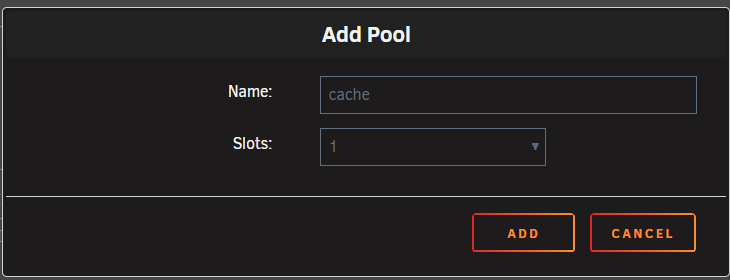
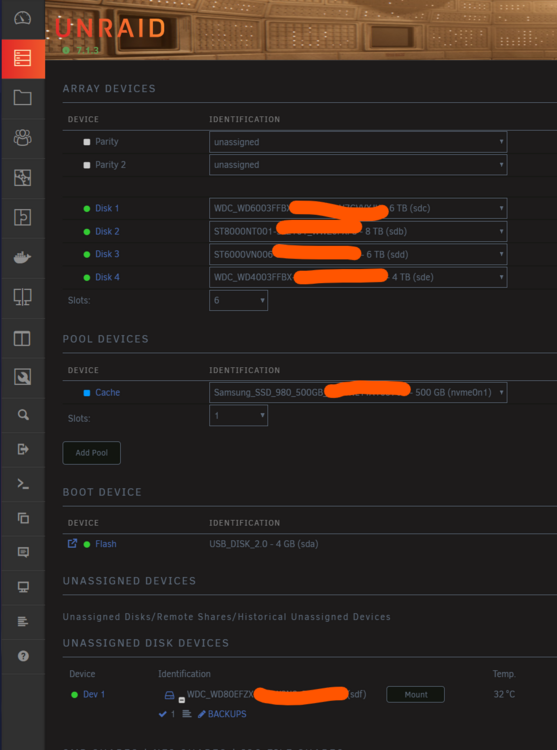
Well, it ain't obvious but clicking "Add Pool" offers to name the pool "Cache" So I added it there: Looks like I now have a Cache... but still never found the "Disks" Tab. Instructions need an update I think. Array restarted, Cache formatted, now gotta work out how to tie it in correctly. But that just needs some reading. Far more importanly I got rid of that Noob tag for the forum.
-
🤣All this talk of "pools" is making me nervous. Especially around electrical kit. I am getting more confident now I just need to press that "Add Pool" button and busk from there... I assume the array would then know what to do with it. I'm gonna hit the button and let you know if anything explodes.
-
I assume part of my problem is I read all the docs for version 6, and I think something has now changed for version 7.
-
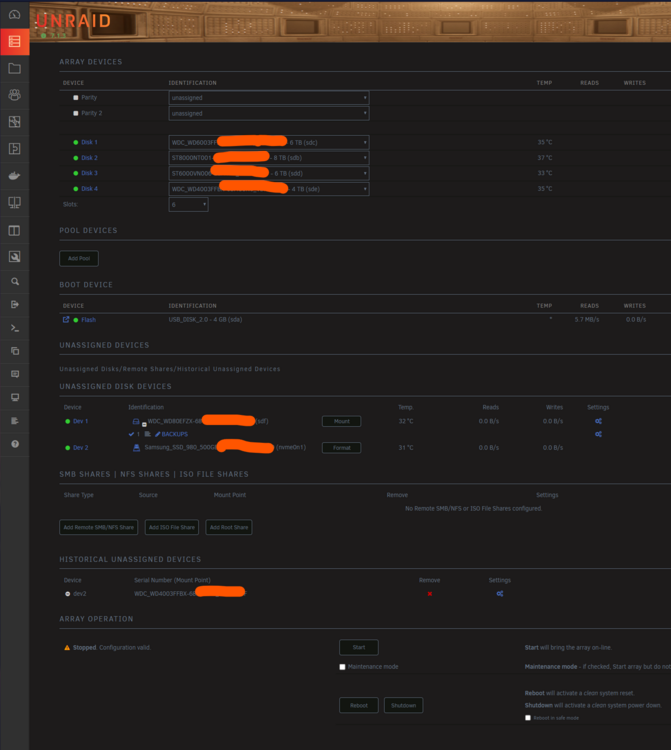
Still hitting the language barrier. Is the Cache added as a "New pool"? That "AI" is also describing something that does not exist. It looks like it is cloned from the normal manual as it says "go the Disks tab". That is lifted from the standard help page and I still can't work out where my DIsks Tab is. 🙂 The second screen shot is talking about BTRFS, ZFS and multi-device pools. Not something I thought I was dealing with here My stopped array. Under Unassigned Devices I have "Dev1" which I am due to add as a Parity drive once I have a day to spare to do the parity calcs. That's easy. And Dev2 is the M2 ready to add as a Cache drive. Do I hit "Add Pool"? I thought I was adding the Cache to the current array?
-
I can't even get to that point. Can't see how to assign the M2 drive as a cache drive. Assume I'd stop the array, and then assign it like I would a Partiy or Array drive. Nope, nothing. Try and make sense of the help file: https://docs.unraid.net/legacy/FAQ/cache-disk/ and can't find the "Disks" page On the "Main" page where I handle all the other devices there is no hint. I see it listed as an Unassigned Disk Device... but no way to elevate it to being the cache. I also see the Share page with errors about a missing cache. (I assume a default warning) If I try and locate the page you show I cannot select "Cache" in 1,2,3 I know I am missing something dumb simple here. My other Unraid box is only backup running urBackup, so never setup a cache there. Though my copying today I wonder if I even need to bother with a Cache drive. That was copying 10 times faster than my old server direct to the array. 😁 This is also my target. Number one job here is a NAS for music\film\tv storage for KODI. Old system was just files on a Win7 box accessed from separate Devices via SMB. Have almost completed that migration and will soon be able to shutdown\scrap the old box permantly. Task I will do soon is setup MySQL on this new server and attempt to import my old database. Main KODI is just a default Windows install, but I am pretty comfy with using DB Browser for SQLite. So think it i probably time for a full SQL server database.
-
LOL!! Doing some housekeeping today. Shuffling stuff from 20 year old server to my PC. From old server to new unraid server. And from my PC to the new Unraid. All via SMB. Connecting to the new server using two separate names at the same time as I swap between my read only and write access users. And DAMN is this thing fast. I don't think I had realised how old and junk the old machine had got. Watching stuff move at KB/s transfer rates... and then on Unraid watching 120MB/s transfers. 😁 Best the old box wants to do today is 11MB/s. Data is moving literallly ten times as fast across my network now. Likely a lot to do with the upgraded disk controllers. And this is direct to array - no fancy Cache drive in place yet (cos ain't worked out how to get that to work as Manual is clearly out of date for v7)
-
Problem solved by talking to support via ticket system. They could clear the flag
-
I didn't follow this through as it didn't quite fit. I also didn't quite trust the access rights thing. So went for a simpler option more fitting to Unraid's share rules. One of the reasons I had "shares of sub-folders" is how I had KODI setup. I had been trying to maintain old paths with minimal change. Something that I had to abandon once I learnt no !! in share names. I have now simplified that setup by using less shares and longer UNC paths for KODI. Lots of search/replace editing of the SQL databases needed, but now things are running okay. Just have three audio, tv and film shares and KODI can work within that. Sources used to have a SMB share each, now instead they are just using longer UNC paths. On my main PC the "sub-folder" share I used to use is much better handled now by using two different user SMB accounts to the same server. I liked to "drop in" newly ripped CDs directly into a single folder. This works so much better with my "different" server/user hack and just restarting the Workstation service. Wish I had found that before, it is such a simple trick. As they say "Necessity is the mother of invention"
-
Okay.... that didn't take long. There is likely a neater answer, but I can dump the temp connection by just restarting the workstation service from a command prompt. Quicker than rebooting the PC, but same effect on the network. If I dropped that into a script I kill all the SMB connections. net stop workstation net start workstationQuick experiments also seem to not have disrupted anything else I was doing. Left other explorer windows open to different servers (with cached credentials) and editing docs. Just forgotten the connection I had not ticked the box to remember. (Will test more later...)
-
I wanted to be able to flip between users. So experimented with an idea that worked for me. Triggered by half reading your new SMB post. As a test, I just added it to the hosts file and tried to login. Didn't bother with Credential Manager. Though no doubt if I ticked the box to remember the details it would have done so. To Windows it is a different SMB machine. The idea was to forget credentials when logging out of the PC. Though I'll also just look for a "drop connection" option too as that can be rigged to a desktop script if I put my mind to it. I'm just messing around with options on this new server build trying to find a way to make it as flexible as the old Windows box was. I'm want to avoid having to keep logging into UNRAID to change folder rights. Looking for minimal options to reproduce the more flexible abilities of MS SMB. Not being able to make a share to a sub folder has borken part of my work flow that I am looking for simple answers to, whilst doing other experiments along the way. I have stupidly confusing needs. I want a "standard" read-only user for all round the house for media access (music films) but I need my main login on my desktop to have write access to some work folders every day, but other folders "on demand". Just a mad overlapping of oddities as that is how my head works. My aim is a "normal" user on my PC who stays logged in, details in credential manager. And then an alternate user who logs into a "different" server who gets full write access, but credentials don't get stored. So I can logout from them once I have finished the task. When I rip a new CD I want to add it to the server, but don't want permanent write access to the whole of the Music folders. On my old setup I could give myself write rights to a folder slap in the middle of my media server file tree. This I now cannot do unless hacking around with LNKs. I also don't want to move folders around as I have had enough of hacking SQL databases today to update the paths for KODI as it is.😁 I'm just rearranging things to fit Unraid's rules, whilst using the excuse to improve things.. I'm replacing a server so old it is running an ABit motherboard with a Core 2 Quad CPU in it... and when was the last time you heard of ABit? Thought it was about time to retire the 20 year old Win7 box I was using as a media server. 😂 (Obviously none of the hard drives are that old)
-
A sharing of some knowledge to get rid of my Noob status. (And then I go off on a tangent with some daft rookie questions...) Edited to note: I am re-writing this post a bit to add other gems of Samba wisdom. I'm a Windows networking guru... so lets solve some old puzzles in Unraid. @Frank1940 this one is for your Samba FAQ I see people complaining that they don't like how they can only login with one username using SMB from their windows box. Complain no more as there is an easy trick. Just give your server multiple names. Now you can login with different users. Yeah, we all know the trick that you can login wih server name or IP address. \\unserver\share \\192.168.1.13\share These are treated as different users, so you can login with different accounts. But some of you like using names. There is a simple hack for that. On your Windows box, open the file c:\windows\system32\drivers\etc\hosts and add a few lines. # Copyright (c) 1993-2009 Microsoft Corp. # # This is a sample HOSTS file used by Microsoft TCP/IP for Windows. # # This file contains the mappings of IP addresses to host names. Each # entry should be kept on an individual line. The IP address should # be placed in the first column followed by the corresponding host name. # The IP address and the host name should be separated by at least one # space. # # Additionally, comments (such as these) may be inserted on individual # lines or following the machine name denoted by a '#' symbol. # # For example: # # 102.54.94.97 rhino.acme.com # source server # 38.25.63.10 x.acme.com # x client host # localhost name resolution is handled within DNS itself. # 127.0.0.1 localhost # ::1 localhost 192.168.1.13 unserver 192.168.1.13 different 192.168.1.13 banana 192.168.1.13 ostrich Yeah, you need to save this file with admin rights, blah blah, toggle the read-only flag. If you don't know how to do that then don't mess with system files 😁 And no, you don't even need to restart either computer for this to work. To use the above, just open File Explorer and type in \\different\ and login with some valid credentials. Or map a network drive if you still live in the world of Win95. What I have done in the above example is tell the Windows PC where to find four different computers called unserver, different, banana and ostrich. And to Windows this means they are four different computers. So you can store four different sets of credentials. Obviously change the IP address to suit your server. Above assumes your server is on 192.168.1.13 Waffle below... Personally I like to have my file server as a read-only server on my network. Don't like accidentally deleting stuff. Or being held ransom by a ransom virus encrypting things. So I login with a "read only" user most of the time. Then some days I want to suddenly login as a user with write access, but can't be bothered to restart my windows box to do that. This is where the above trick comes into play. Especially as you can edit that hosts file at any time and add more names. Edited to add another solution to an old puzzle... Unraid is weird. I learnt something new today. All my Windows PCs in this house use different user names. In the Windows to Windows world if Fred tried to click on \\Win7Server\ from the network neighbourhood, the Windows PC would throw up a login window as Fred was unknown to the Win7 box. I could then login with Known Credentials for the Win7 box. Even though Fred knocked at the door, I could login as Charlie with Charlie's WIn7 password. Try that with Unraid and you just plain get Rejected. You can see the Unraid server in network neighbourhood, but you'd be rejected. To fix. Go to Unraid, give Fred an account but NO rights to anything. Just an account. Just let Unraid know that Fred is legit. Now go back to your Win10 machine and attempt to connect. NOW you will get acknowledged by the Unraid box and it asks you for credentials. Now you can login as a known user, but not need to be Fred. You can login as Charlie now. Notice I did not restart ANYTHING here. Just added the Fred account on Unraid, then stepped back to the Win10 box and tried again. Now here is an odd thing. If you now tick the box on the Windows box to Remember the username and password you connect to Unraid with (Charlie) you can go onto Unraid and delete fred. Now you have taught the Windows box to approach Unraid as Charlie with known good credentials it will be forever happy. TODO: I will turn this into a better FAQ at some point... I have knowledge and solutions to share... Edit: Forgive me for piling off tangent with a heap of random rookie questions later in this thread... we all have to learn somewhere...
-
I don't login that often. Blame it on Unraid running too reliably solid. I logged in this week for first time in ages and am greeted with this warning: "Your email address is blocked in our system because it has rejected too many of our messages. Please change your email to keep your account secure." And yet all the messages seem to be getting through fine. My "We've Missed You! Your Account is Active Again" message, arrived. My notifications from the forum, etc. are arriving I don't see what is not arriving. I look back in my mailbox and I see plenty of emails from the past couple of years from topics I am subscribed to. I just usually read without logging in. How to I clear that error? Can I request my email address gets "unblocked" from the system some how? Yes, I know it is a carp ISP email address, but it is working fine now. Thanks
-
@itimpi Got it. That makes sense. @Frank1940 If I edit a linux file like that I'd stay with command line and knock rust off my ability with vi. Or which ever simple text editor is in play here. My basic *nix abilities can be tracked back to the late 1980s \early 90s... (SunOS 3\4) Even ran Mandrake linux at one time. The only problem I get with Linux is once I get something setup and running, I then leave it like that for years and years and forget the basics of how to change things next time I need to dive in. 😁 Solid reliability catches out my memory. I take more notes now. One of the things that attracted me to Unraid was working with a mixed set of hard disk sizes, and the simplified front end. So I try and work within the rules where possible.
-
@JorgeB Thanks for confirming. @Frank1940 That's useful. I've hacked around with smb.conf before and good to get a reminder of where it is. How do I make things "stick" between reboots\OS Upgrades? Do I need to find the copy of this on the USB stick?
-
@JorgeB I'm not here to argue pros and cons of something. Just understand the limitations I need to work within on UNRAID. Coming from a security background it is just a bit of a head adjustment. Especially as I am weird 🤪 with my !!file names!! - always have been. Unless I missed it in the docs, it could be worth noting this limitation in the manual. I assume only the top\root level is restricted to the simplified character set? I have subfolders that I want to copy in with all kinds of weird and wild Unicode characters including Japanese. As long as these will still work as subfolders on XFS I am not going to worry. It does scupper my original plan where I was going to attempt to do an invisible swap which would have maintained my odd SMS share names. A good excuse to redesign. @Frank1940 Yeah - I am aware that people like to have a "no security" \ "no password" setup. Something that has always horrified me about any system when that appears in conversation. Maybe I am just too paranoid.
-
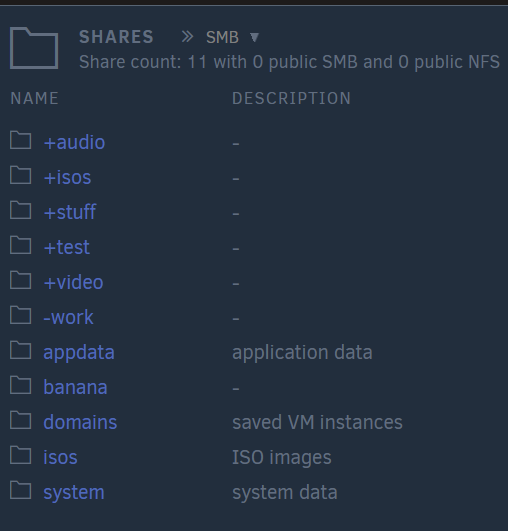
I'm mainly trying to check I am not missing anything. The more I read, the more I realise things are dumbed down \ lowest common denominator on UNRAID. So I just gotta redesign my current system as I still want to bail from that old Windows "Server". Part of this is also my OCD as I like having folders grouped by ! and + symbols. Which the ZFS rules are therefore banning. Kinda awkward when I had already setup test folders as "+audio" and "+video" which now are being forced to be renamed due to ZFS's limitations. This made sense to me as I could have My Folders separated from the System folders. Unraid wants me to alpha sort everything into a mush, though I have worked out that ZFS seems happy to let me use a dash or underscore. I think my brain could get round that. I also need to fully understand the network write access and be in full control of it. If the server is on my network, it has to be secure by default.
-
Thanks @Frank1940 I will look into that. I've also been trying to redesign things in my head. There is a typo in my post as "No sharing" should say "Now Sharing" as I realise I need to change things. I am just really surprised as to how limited things are. I was expecting networking to be a step up from Windows, but if everything is running on a "Lowest common denominator" of ZFS I find it all a little bizarre. You know how security mad I am with SMB and I have a nice complex setup on the Windows box that lets different users at different parts of the file tree in different ways. Partly a protection against my own accidental deletes, and also a protection again potential encryption viruses. I'll look at your hard link idea, but I will also investigate ACL a little more. Though my initial question stands - why am I limited to how I name my shares? Why can't I use !Audio! as a share name when I don't use ZFS? I don't follow the logic of that one. Why can't I name a file folder and share differently? This is such a basic thing in Windows application of SMB.
-
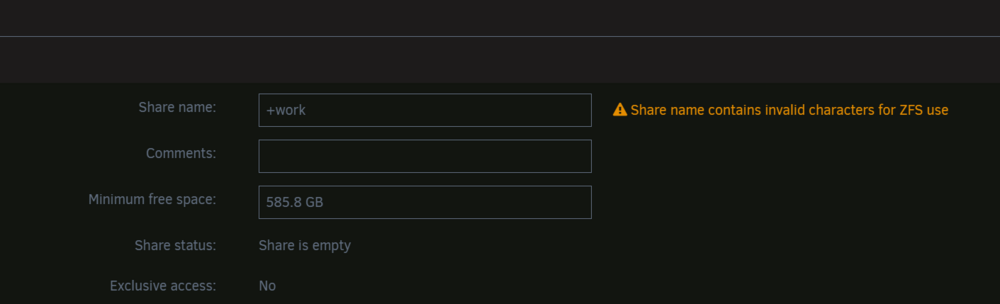
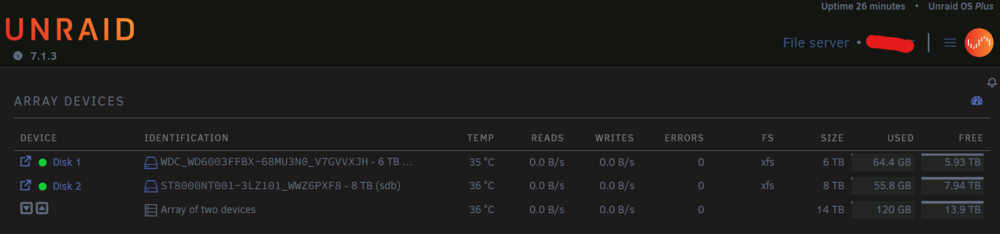
Setting up a new UNRAID box. Just upgraded it to v7.1.3 from v7.0.1 (and previously v6.x.x) The plan is to retire an old Windows machine I use with SMB shares. A media server with music and video and many hard disks. Multiple SMB shares. I had setup User Shares on Unraid as +Audio, +Work, etc as I wanted to mimic the old drives. Adding that special character so I can tell it apart from system folders. Project then parked for months. Power up again today, upgrade to v7.1.2. Today after the upgrade to v7.1.3 I am now getting warnings "Share name contains invalid characters for ZFS use" Why would I get warnings about ZFS when I don't use ZFS? Why are non-alphanumeric characters being blocked? I tried to fix it, but it does not let me start with +, !, or similar characters. How would I set the SMB share name to ones I am used to that use characters like "!!" ? I am still in early setup stages so nothing is on here yet. The plan is to bring one disk at a time from the old PC, copy data in, add the same SMB shares as I had before. Am used to using anything as SMB share names in Windows, so this is a little confusing getting limitations. If it is just a limitation I need to put up with, then fine. I just assumed I must be missing something obvious. 😁 I'd call my Windows knowledge Advance, but Linux still Noob. Edited: I realise I'm probably about to answer most of my questions the more I dig. Surprised how different sharing and SMB are in Unraid compared to Windows. Now sharing of sub-folders is going to make me have to redesign how my system works. I currently have a MUSIC folder with a sub-share of NEW-CDs. Both of these with their own SMB shares. The NEW-CDs folder had different rights allowing me to drop things into it without give full write access to the whole music folder. If shares can only be done from the top level this is causing a lot of re-thinking.🤔
-
I've been using gPodder on an old Windows box for many many years. So have a large database of my downloads. I now want to move this over to UNRAID. Has anyone tried this? Can I just pull the database and config over from the Windows PC and drop it into the UNRAID gPodder folder and it read it? I'm guessing as it is Python and SQL it *should* work...
-
@Sypower - thank you. This worked. After lots of tearing hair out in confusion. Unraid v6.12.13 on an AMD Ryzen 5 4600G, AsRock B550 board. New modern kit. When using the Lime "USB Flash Creator" it does not make something that is recognisable as UEFI by my motherboard Even if I make sure the folder is named "EFI" and run Make Bootable (on win10). It does not work. The USB is seen as a plain non-UEFI USB by the BIOS. Using your trick of getting Rufus to use the Debian ISO and then replacing all the files works perfect. Didn't even need to run the make_bootable script. Now my motherboard sees two USB options. A plain USB, and the UEFI USB. UEFI: USB DISK 20 PMAP. Partition 1 USB: USB DISCK 2.0 PMAP With only the Lime solution I did not have that UEFI option. Need to get your solution to be more visible for other people with problems like me. The official help files are a bit of a dead end. Personally I feel there may be something broken with the official tool on Windows. Note also for others - my BIOS is at defaults. No Fast Boot, No CSM, Secure Boot stuff all still ticked. The only thing I have change from a "Set Defaults" of the BIOS is to set the time.
-
Have you checked no firewall software blocking the app? Also make sure the Win11 PC is in the "private" network and not "public" network for file sharing. If you go into Windows File Explorer and look at Networks can you see your UNRAID box? (I don't have a Win11 box to hand to take a screen shot, but can likely talk you through it)
-
Or read that another way... you have just taken a large disk related load off of the UNRAID box and it is now stable. I would be concerned for either the disks or the PSU. Something ain't right in that box. You can see how quiet this thread normally is as a picture of how stable this backup software generally is.
-
Ideally a second Unraid with Urbackup in a different location. Until then my unraid server is in a fireproof safe with a flotation device...





