





Groto
Members
-
Joined
-
Last visited
-
It’s not related to Unraid 7 because when I posted last week, I was still on 6.12.15. I just tried updating to 7 now and it made no difference.
-
Yikes. I don’t trust myself enough to do that big of an overhaul. I’d be worried about losing my data not being able to restore things .
-
Did you figure out this drop out issue? I've been running unraid for about 5 years on a Core i7 3770K. Just swapped the hardware yesterday to a AMD 5950X and RTX 3090. I haven't had a GPU in there before. My log is full of "RmInitAdapter" and the GPU drops in and out of GPU statistics and the Nvidia driver plugin page just like you describe. I'm running the latest nvidia driver and still on Unraid 6.12.15. I haven't tried updating to 7 yet. Seems like several of us are having this problem now.
-
I have this exact scenario with my second cache drive with smart errors. Did your replacement go well? I am not clear on the instructions either. How did you do it without losing any data? I need to replace my second drive as well. Thanks!
-
Does this container allow someone to connect directly via a VNC client app rather then through the Web UI? If so, how do I set that up?
-
I have 2 redundant cache drives in a cache pool, but one has SMART errors. Where can I find Unraid's documentation to replace a single drive so that it rebuilds the data from the other one? Thank you
-
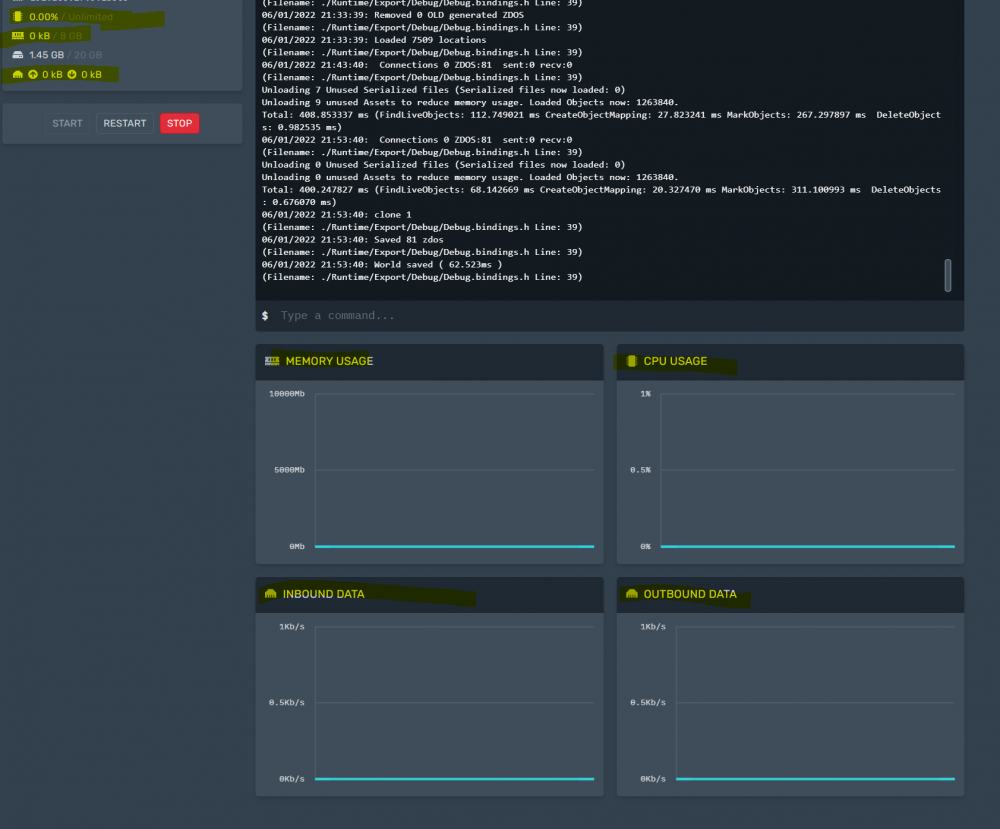
Also another question... my cpu/ram usage and other graphs all show zero. Any ideas? Thanks
-
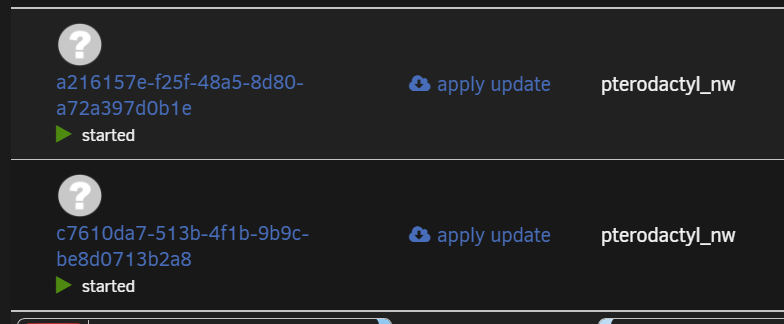
Question... I am new to pterodactyl and I realize it will create these bogus looking images that we just need to leave alone... but why does it say apply update to each one? I wouldn't want to do that correct? My panel and daemon containers are up to date. Thanks
-
@Squid Thank you for fixing this! @thecode Can you clarify what you mean by doing from the sidebar worked? I am trying to understand how to install this since it won't show up in community apps since it is a fork. Thanks!
-
I sure hope someone can figure this out. Honestly would be hard to even use unraid without this anymore it's such a great feature. I just reverted back to 6.9.2 for now.
-
I went ahead and deleted the file since I don't use VMs currently and ran scrub again. No errors found, I rebalanced to RAID 1 and now my drives show up as a total 1TB for the 2x1TB drives, so looks like everything is working properly. Thank you! As soon as I have time I'll bring the server down to run memtest. Those “single” mode listings are now gone and they all say RAID1 now.
-
I haven't run memtest yet, but I ran the scrub and had 4 uncorrectable errors: UUID: 337ea1f9-e2bb-4f1e-bc50-437fe84e43e2 Scrub started: Tue Apr 19 21:06:23 2022 Status: finished Duration: 0:04:32 Total to scrub: 270.31GiB Rate: 1010.63MiB/s Error summary: csum=4 Corrected: 0 Uncorrectable: 4 Unverified: 0 These are the details: Apr 19 21:10:55 milkyway kernel: BTRFS warning (device dm-7): checksum error at logical 367830970368 on dev /dev/mapper/sdb1, physical 367830970368, root 5, inode 26598, offset 52375552, length 4096, links 1 (path: system/libvirt/libvirt.img) Apr 19 21:10:55 milkyway kernel: BTRFS error (device dm-7): bdev /dev/mapper/sdb1 errs: wr 0, rd 0, flush 0, corrupt 21, gen 0 Apr 19 21:10:55 milkyway kernel: BTRFS error (device dm-7): unable to fixup (regular) error at logical 367830970368 on dev /dev/mapper/sdb1 Apr 19 21:10:55 milkyway kernel: BTRFS warning (device dm-7): checksum error at logical 367830974464 on dev /dev/mapper/sdb1, physical 367830974464, root 5, inode 26598, offset 52379648, length 4096, links 1 (path: system/libvirt/libvirt.img) Apr 19 21:10:55 milkyway kernel: BTRFS error (device dm-7): bdev /dev/mapper/sdb1 errs: wr 0, rd 0, flush 0, corrupt 22, gen 0 Apr 19 21:10:55 milkyway kernel: BTRFS error (device dm-7): unable to fixup (regular) error at logical 367830974464 on dev /dev/mapper/sdb1 Apr 19 21:10:55 milkyway kernel: BTRFS warning (device dm-7): checksum error at logical 367884857344 on dev /dev/mapper/sdb1, physical 367884857344, root 5, inode 26598, offset 106262528, length 4096, links 1 (path: system/libvirt/libvirt.img) Apr 19 21:10:55 milkyway kernel: BTRFS error (device dm-7): bdev /dev/mapper/sdb1 errs: wr 0, rd 0, flush 0, corrupt 23, gen 0 Apr 19 21:10:55 milkyway kernel: BTRFS error (device dm-7): unable to fixup (regular) error at logical 367884857344 on dev /dev/mapper/sdb1 Apr 19 21:10:55 milkyway kernel: BTRFS warning (device dm-7): checksum error at logical 367884861440 on dev /dev/mapper/sdb1, physical 367884861440, root 5, inode 26598, offset 106266624, length 4096, links 1 (path: system/libvirt/libvirt.img) Apr 19 21:10:55 milkyway kernel: BTRFS error (device dm-7): bdev /dev/mapper/sdb1 errs: wr 0, rd 0, flush 0, corrupt 24, gen 0 Apr 19 21:10:55 milkyway kernel: BTRFS error (device dm-7): unable to fixup (regular) error at logical 367884861440 on dev /dev/mapper/sdb1 Do I need to delete libvirt.img to fix this? I think that is for VMS, but I am actually not using any VMS at the moment and only briefly did. Thanks
-
Thank you. I will give these a try and report back.
-
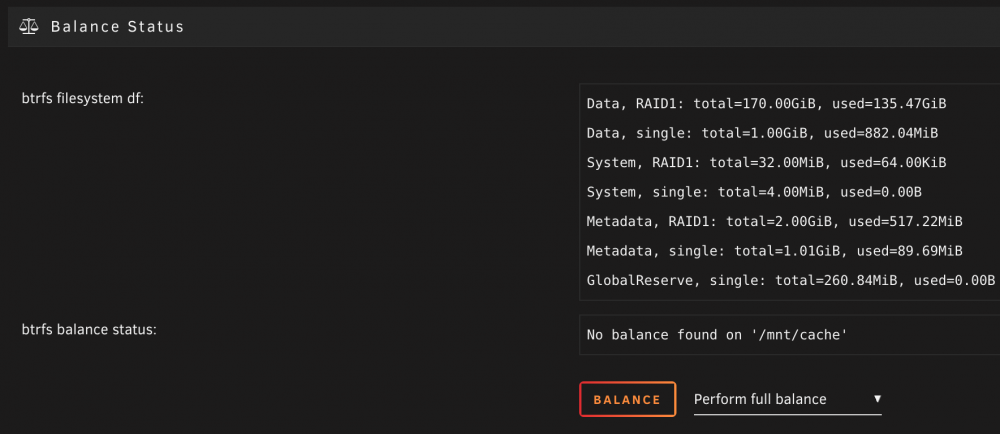
Hi. I added a new (second) cache drive to my existing pool. It auto-balanced the drive and my understanding is that mirroring RAID 1 is the default; however, you can see from my screen shots it shows the double the capacity like RAID0. How do I fix this? I tried switching to RAID 0 balance and then back to RAID 1 and still doesn't work. I seem to have these "single" modes that I do not think should be here. Thanks

-
I made this change to make Heimdall work with NginxProxyManager, but now none of the dynamic apps work anymore, so I don't see the extra info on each of the heimdall tiles. Any ideas? My apps use https://subdomain.domain for the URL on each one instead of the IP address.




