





Belcraig
Members
-
Joined
-
Last visited
Everything posted by Belcraig
-
I'm removed the drive that was failing, having re plugged it back in the server nolonger even recognised the device. do i just recreat the dockers etc.. and it will pick them back up?
-
thanks server-diagnostics-20250901-1258.zip
-
seems i've lost the cache pool...
-
thanks Jorge Label: none uuid: 9294ac5d-3e72-4a7d-85f3-a05d9527a03d Total devices 1 FS bytes used 384.00KiB devid 1 size 20.00GiB used 536.00MiB path /dev/loop2 Label: none uuid: a2c1fa2c-f854-4540-8ada-acd019fd6f37 Total devices 1 FS bytes used 416.00KiB devid 1 size 1.00GiB used 126.38MiB path /dev/loop3 Label: none uuid: 01cc169c-ab3e-4f2b-86e3-5382b85f07e7 Total devices 3 FS bytes used 391.84GiB devid 2 size 931.51GiB used 419.36GiB path /dev/sdc1 devid 3 size 232.88GiB used 232.88GiB path /dev/sdf1 devid 4 size 238.47GiB used 186.47GiB path /dev/sdg1 regards
-
HI all, I was using co-pilot to help me pass though a keychron keyboard to my VM,as unairds 'usb' was seeing it but passing it through as a stadnard keyboard by editing the VM XML file. when i got/noticed an error (from the fix common problems plugin) that my var/log was getting full, even though my system had only been on for a few days. looking atthe logs. One of the ssd in my cache pool had lots of write and read errors - i assumed the drive was faulty/faulty cable. i reseated the drive and restarted the server. it didnt take while for erros to pop up. so i thought i would replace the drive, i stopped the array removed the drive and restated the array. the array seems to hang for an age - (to total sizeof the pool was 1.6 TB but the free space was ~1.2 TB) i assumed this would correct itself and then i could add the new drive. rather than stop the array again i restarted the server instead. this time it boots in unraid but the web GUI no longer works. looking around there are posts about it not working when there are problems with Cache, so as i kenw i had a problem with cache, i progressed through ther terminal to remove the fault drive from the cache pool and add the new drive. i have done that - hopefully sucessfully, but on restart of ther server, i still have the issue i can get into unriad but the web gui is not loading. As an aside, i am currently looking at moving the server to a new cpu/motherboard. if the time taken to fix this would be too long or it would be better to start afresh please let me know as that might be the better option. Any help anyone can give me would be grratfully recieved. thanks tower-diagnostics-20250901-1152.zip
-
i've done the cache. UUID: 01cc169c-ab3e-4f2b-86e3-5382b85f07e7 Scrub started: Mon Jun 9 18:57:00 2025 Status: finished Duration: 0:22:49 Total to scrub: 902.78GiB Rate: 675.26MiB/s Error summary: verify=444 csum=285513 Corrected: 285957 Uncorrectable: 0 Unverified: 0
-
the main array you mean its an xfs filesystem, i dont think it has scrub.. do i need to repair it
-
ok so i noticed that when i was changing the cable that the heat sink on the card looked loose so i have also replaced the raid card - operating in HBA mode. Parity has rebuilt the drive and the array lloks to be fine, but in a few weeks i'm expecting the drive to go again. attached are the diagnostics. server-diagnostics-20250609-1835.zip
-
sorry diagnotics here I'ce correctly de attached and then re-atttached the drive - including full parity write back tot he disk, it goes for a few weeks then just drops off. I've changed the cable in the system. This is the thrid time it has done this. server-diagnostics-20250604-1951.zip
-
I'm having the issue in a similar matter, the disk is passing tests and i've changed the cable, is the disk failing and so should i just RMA it back (lessthan two years old) is there seomehting somewhere else that could be causeing the issue. thanks for help in advance. I'm running 7.0.0. server-syslog-20250604-1312.zip
-
is it plugged directly into the computer? i know mine didnt work until i put it on a 2m extension cord some distance away.
-
Sorry Austin, I'm on 6.12.6 and conbee for me is rock solid...
-
Hi guys, not sure where to star this one... I'm running unraid Vs 6.12.6, I've got a vm that is mounted on a m.2 drive as an unassigned device - not in the domains section. (WD Blue SA510 - read speed 560, write speed 510) The unraid MB is a S2600CWR. I recently was fixing one of my kids computer (hardwared) and i copied some of the downloaded software back onto the server and noticed that it tranferred quickly. i ran a quick iperf to find his PC was getting scores in the region of 90 MB transfer and 900+ bandwidth. I went back to the VM and ran iperf 16MB transfer 140 Bandwidth, with the vm on a disk in the machine shouli not be getting faster speeds than this? The network proprties has a transmit/recieve speed of 10/10(Gbps). Even the laptop i'm on now on a wireless network is reporting 34 Transfer rate and 305Mbits/s. I've gone through a few options like increasing the packet size etc.. was wondering if there was something i'm missing within the VM settings that might be the issue - I've tried reseating the M.2 drive. Thanks for any help in advance
-
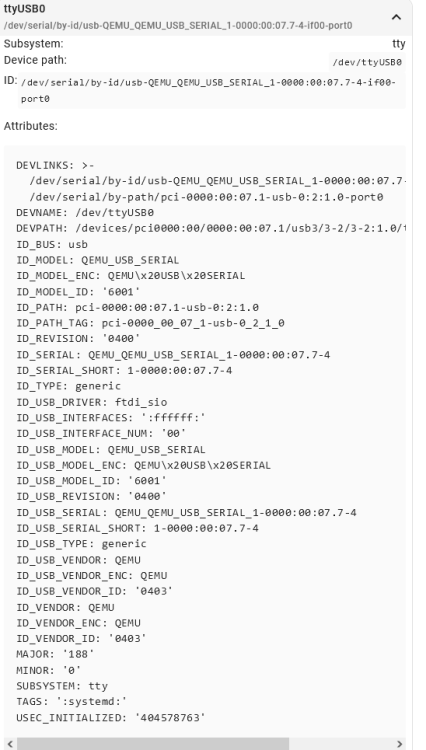
For anyone else running though this and struggling like i did, here are the Basic errors i made spelt out. in the hope it will help someone, or me if i ever need to go though this again in the future. After spending several hours going through this forum and some home assistant ones - i undid everyting and restarted from scrach and found a basic error/assumption i had made on unraid that solved my issue. I updated the conbee 2 firmware folling this - Conbee Firmware update (this is the only change i didn't roll back.) i plugged the conbee stick into a USB extension cable (2m) and moved it away from other elecrtical devices. UNRAID: in USB Manager - this is were my basic mistake happened... i mapped the device NOT the port by clicking on the monitor not the usb symbol. -previously i was mapping the port instead of the device. Made sure connect as serial only was selected, powered up the VM. USB manager showed "connected(Serial). in HA: Version 2023.10.3 latest at time of writing. HA Did not detect the conbee stick as being connected - attaching the via the port It was detecting it. - but failing Settings --> System --> Hardware -->all Harware. the stick now shows as dont exactly know why but hey ho.. going back to device and services and adding the integration Zigbee home automation, and follwoing the promts set a new network up for me without any problems. Hope this helps someone or future me...




-
If anyone else has this issue, in the end i rebuilt the VM and pointed it to the vdisk, and it booted up fine, got the erropr once more but a restart of the server fixed the issue for me, so unsure which actually fixed it or a combination of both.
-
hi guys, i update my graphics driver on My VM, and when rebooting windows was flashing, i couldn't get into uninstall/roll back the driver. i use "GitHub - danioj/unraid-autovmbackup: automatically backup kvm virtual machines and configuration" to do a weekly back up of my system so i thought easy way out just restore last weeks back up. I copied last weeks Vdisk image to the folder - (renamed the V-disk as it have a date stamp) and started the VM. the screens are black and not coming on. i restarted the VM and removed the pass through graphics card. and the system boots fine into VNC. however re-adding the graphics card (AMD) produced the following error in the logs. 2023-09-23T22:14:51.260475Z qemu-system-x86_64: kvm_set_user_memory_region: KVM_SET_USER_MEMORY_REGION failed, slot=7, start=0xc804300000000000, size=0x200000000: Invalid argument kvm_set_phys_mem: error registering slot: Invalid argument googling tells me If you get this crash after booting macOS in KVM with AMD GPU passthrough you'll need to disable Above 4GB decoding on your BIOS/UEFI Setup although its not a macOS i'm booting into i thought that this might help me When i boot into the bios i dont see an option for this... Anyone able to offer any help please. thanks in advance.
-
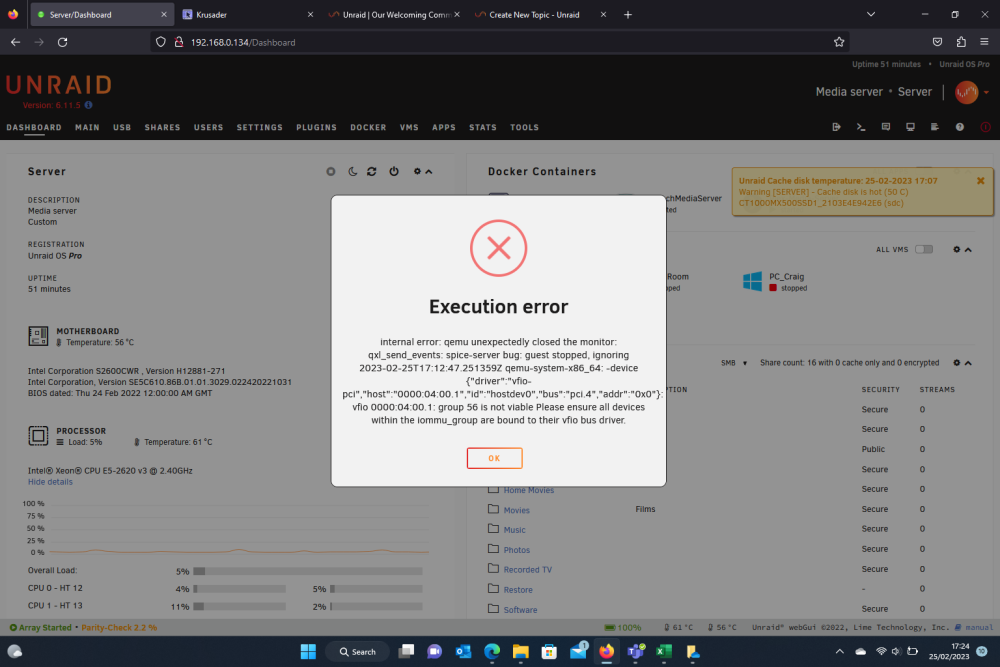
tidying up my VM'S and i accidently deleted my main VM. (thought i'd named it differently) anyway. not too bad i use squids user script to make weekly backup and the data is on the array so no great loss.. Copied the vdisk back to the share where it should be, renamed it to remove the date for the back up. tried to boot the vm and i get the following error. rebooted the server and copied the XML file over again, but i'm still getting the following. Any advise on what i should be doing to fix this?
-
i had a similar problem to this, I set the first graphics card as virtual and then added the actual card as a second graphics card once the system booted i was able to launch adrenaline to do the updates. not sure if the consistant resets or this actually fixed the problem but it them worked for me, once updated removed the virtual graphics card.
-
Hi All, Hoping someone can help me dignose and solve an issue. I recently updated my sons computer and as a result he got a new graphics card. i took the old graphics card out of his system and thought i would update the graphics card in unraid that i use from my win 10 VM. Currently there is an Nvidea k5000, and the card i want to replace it with is an AMD 6600 XT. I powered down the server swapped out the card and restarted the server, however, unraid now restarts itself after 4 mins of uptime. - the VM is not running, I've bearly had time to get into the settings of the VM to edit them so i know it cannot be the VM settings. the card works fine my my sons rig with a 450W PSU so i know the card isn't a problem. According to several online PSU calculators i need 650W psu and in the server are two (switchable) 750W (80 platimum) PSU's. with 100W head room and 80 platinum. without taxing the card i'm finding it hard to believe that its either of the PSU's. Can anyone make any sygesstions at all? thanks
-
Hi Guys, Anyone able to point in the right direction... Only recent things i canthink of, I have had a issue with FPS in some normally otherwise ok games recelently, loaded performance manager and played but didn't show graphics card playingup here or idenitifiy any bottom neck. server-diagnostics-20221227-1429.zip
-
yes thankyou
-
Perfect thanks
-
i Don't seem to have that as a variable?
-
hi Ich thanks for the dockers, I'm having an issue with updateing the Terraria one, The info says a restart should load the latest version, but it isnt doing that? latest version 1.4.3.2 docker version 1.4.3.1 you able to look at this at all thanks
-
While looking around that lovely man @SpaceInvaderOne made some scripts and a video on how to capture your own VBIOS. for those who arrive here look for the following video. How to Easily Dump the vBios from any GPU for Passthrough - YouTube


