





nicx
Members
-
Joined
-
Last visited
Everything posted by nicx
-
Nach einigen weiteren Tests mit sowohl dem Marvell als auch dem ASM Controller habe ich festgestellt, das meine ersten Tests mit dem Marvell Controller wohl nicht ausreichend waren. Mit dem Befehl dd if=/dev/zero of=/mnt/disk1/test.img bs=128K iflag=count_bytes count=10G teste ich ja lediglich die Performance der ersten Disk im Zusammenspiel mit der Parity, nicht aber die der anderen Disks. In meinem Fall hängt diese disk1 und auch die Parity-Disk am SATA Controller des Mainboards, d.h. der Erweiterung-Controller war hier überhaupt nicht involviert🤦♂️ Habe ich das soweit richtig verstanden? Also habe ich den Test mal mit jeder Disk durchgeführt: Die Disks am Mainboard Controller (disk1 und disk2) hatten durchweg ca. 170-200MB/s. Die Disk am Marvell Controller (disk3) bot lediglich knapp 50MB/s. Ein Austausch des Controllers auf den ASM1166 (PCI4x) erbrachte auch für diese Disk dann ebenfalls ca. 170-200MB/s: root@nas:~# dd if=/dev/zero of=/mnt/disk1/test.img bs=128K iflag=count_bytes count=10G 81920+0 records in 81920+0 records out 10737418240 bytes (11 GB, 10 GiB) copied, 52.4511 s, 205 MB/s root@nas:~# dd if=/dev/zero of=/mnt/disk2/test.img bs=128K iflag=count_bytes count=10G 81920+0 records in 81920+0 records out 10737418240 bytes (11 GB, 10 GiB) copied, 62.3242 s, 172 MB/s root@nas:~# dd if=/dev/zero of=/mnt/disk3/test.img bs=128K iflag=count_bytes count=10G 81920+0 records in 81920+0 records out 10737418240 bytes (11 GB, 10 GiB) copied, 58.6474 s, 183 MB/s Ich vermute nun mal dass dies schlicht die Grenze der kleinen Evo SSDs ist wie von dir @mgutt angesprochen. Was mich noch ein wenig verwundert: Wenn ich den Test mit der disk3 ein paar mal wiederhole (das ist die Disk am Erweiterungs-Controller), dann sind hier ab und zu (so ca. bei jedem fünften Mal) erhebliche Performance Einbrüche nach unten festzustellen: root@nas:~# dd if=/dev/zero of=/mnt/disk3/test.img bs=128K iflag=count_bytes count=10G 81920+0 records in 81920+0 records out 10737418240 bytes (11 GB, 10 GiB) copied, 265.577 s, 40.4 MB/s Dies ist mir bei den anderen disk1 und disk2 am Mainboard nicht aufgefallen. Diese schwanken immer zwischen 150 und 200 MB/s. Gibts für den eklatanten Einbruch eventuell eine Erklärung oder eine Idee wie ich der Ursache auf den Grund kommen könnte?
-
I think this could even help when using nextcloud and its "preview generation" for videos/photos (which I am already using). The longer I think about it the more I tend towards the i5
-
good point, currently I don't need HW transcoding, maybe in future... I will keep that in mind.
-
Hi, For my "new" Unraid server I have the choice between the following CPUs / Hardware: i7-4790 in a Dell Precicion T1700 i5-7500 in a Dell Optiplex 3050 The i7 comes with hyper threading (8 vs 4 cores), the i5 is much more newer and supports a higher ram speed. I am using no classic VMs, but Docker containers (about 15). Which CPU would you prefer and why?
-
Ich probiere den Controller einfach mal aus Danke @mgutt für deine Ausführungen 👍
-
@mgutt der SLC Cache liegt bei 3GB... inwiefern das viel oder wenig ist: Keine Ahnung Glaubst du denn das ein SATA-Controller Upgrade trotzdem auf https://www.amazon.de/dp/B08F56WKW7/ref=pe_27091401_487024491_TE_item lohnt? Das wäre dann der besagte ASM1166 PCI4x Controller. Oder kann ich mir das Geld sparen?
-
@mgutt guter Hinweis, danke dir! Hier die Performance Ergebnisse: root@nas:~# dd if=/dev/zero of=/mnt/disk1/test.img bs=128K iflag=count_bytes count=10G 81920+0 records in 81920+0 records out 10737418240 bytes (11 GB, 10 GiB) copied, 55.902 s, 192 MB/s root@nas:~# dd if=/dev/zero of=/mnt/disk1/test.img bs=128K iflag=count_bytes count=10G 81920+0 records in 81920+0 records out 10737418240 bytes (11 GB, 10 GiB) copied, 81.8906 s, 131 MB/s root@nas:~# root@nas:~# dd if=/dev/zero of=/mnt/disk1/test.img bs=128K iflag=count_bytes count=10G 81920+0 records in 81920+0 records out 10737418240 bytes (11 GB, 10 GiB) copied, 51.3179 s, 209 MB/s root@nas:~# Immerhin, ich denke aber trotzdem dass der SATA Controller hier einiges an Performance bringt, korrekt?
-
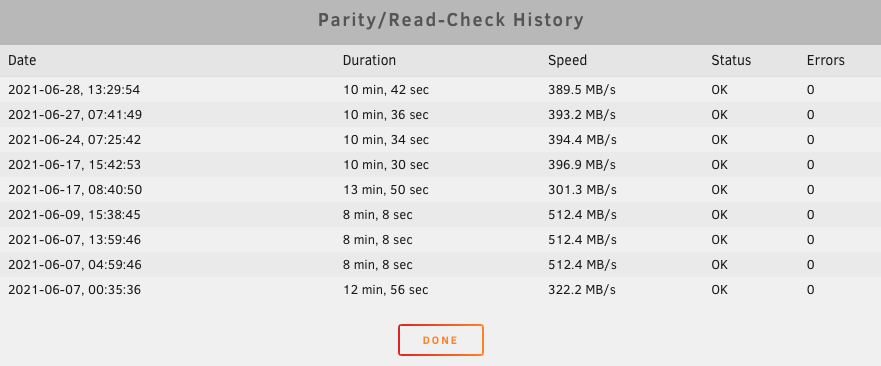
Nachdem nun mein Testserver einige Wochen im Betrieb ist habe ich übers Wochenende die Live-Migration durchgeführt. Bzgl. der SATA Performance kann (bzw. muss) ich erst einmal mit dem Einsatz des besagten Marvell-SATA-Controllers leben (der bestellte ASMedia ASM1166 Ersatzcontroller aus China kam leider nicht an, wurde beim Zoll festgesetzt root@nas:/mnt/user/appdata/nginx/www# ./diskspeed.sh diskspeed.sh for UNRAID, version 2.6.5 By John Bartlett. Support board @ limetech: http://goo.gl/ysJeYV Warning: Files in the array are open. Please refer to /tmp/lsof.txt for a list /dev/sdb: 545 MB/sec avg /dev/sdc: 554 MB/sec avg /dev/sdd: 469 MB/sec avg /dev/sde: 428 MB/sec avg /dev/sdf: 428 MB/sec avg /dev/sdg: 119 MB/sec avg Die Einzelplatten performen sehr gut (/dev/sdg ist eine klassische 5400er HDD), das Array hingegen hat Luft nach oben: root@nas:/mnt/user/appdata/nginx/www# dd if=/dev/zero of=/mnt/user/test.img bs=1G count=5 oflag=dsync 5+0 records in 5+0 records out 5368709120 bytes (5.4 GB, 5.0 GiB) copied, 123.461 s, 43.5 MB/s root@nas:/mnt/user/appdata/nginx/www# dd if=/dev/zero of=/mnt/user/test.img bs=1G count=5 oflag=dsync 5+0 records in 5+0 records out 5368709120 bytes (5.4 GB, 5.0 GiB) copied, 78.4803 s, 68.4 MB/s root@nas:/mnt/user/appdata/nginx/www# Ist das nun genau dem SATA-Controller geschuldet? Oder gibt es noch andere Ansätze?

-
great, thanks for your help. I will switch to that integration in HA and to the integrated UPS solution in Unraid!
-
I want to access the/a NUT network server with my Home Assistant instance. With NUT Plugin I can switch the mode from "standalone" to "netserver", is that possible with the integrated UPS solution, too? I thought that was not possible.
-
ok thats a solution, but just not my preferred one I just don't like red warning entries in the UI
-
I am using NUT because I need network access to the NUT server. And as far as I understand the integrated UPS manager is not able to do that.
-
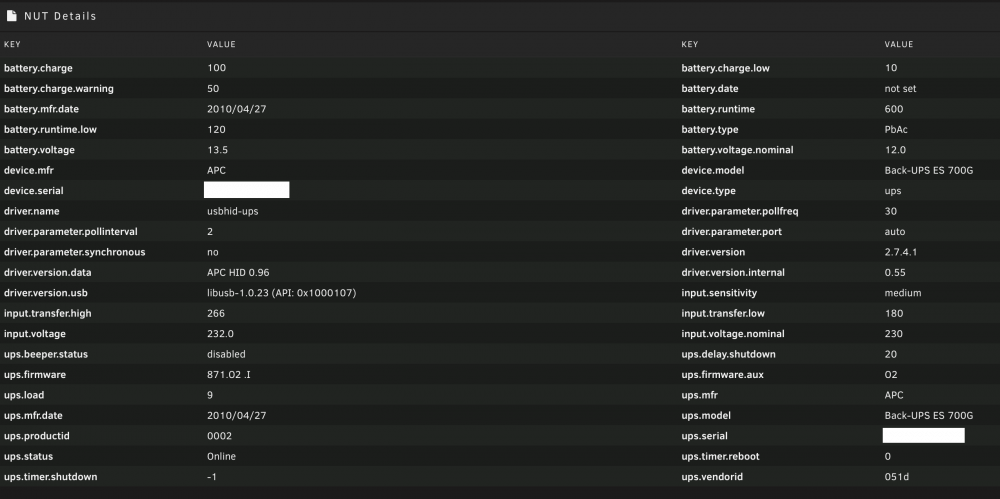
hi, I just get used to Unraid and installed the NUT plugin. I was wondering about the red "w": any hints how to get it working without any red warning signs? In Addition here are the automatically detected details of my APS UPS:

-
@Squid ok that is a good point... thanks for that! Manually it just works. Any idea how to get it fixed? Maybe some kind of "sleep" in the script? Maybe I will just try to use the "User Sripts" Plugin instead of the boot config script. I suppose it should work when creating a script running "At first Array start only". Any experience with this workaround solution (or any other workarounds)?
-
Hey, I am using docker-compose on my Unraid system, too. I installed it manually via curl and everything is working as expected. But after a reboot docker-compose is gone. For sure I added the installation to my boot config: root@nas:# cat /boot/config/go #!/bin/bash # Start the Management Utility /usr/local/sbin/emhttp & # add the following lines to /boot/config/go on your unRAID server. COMPOSE_VERSION=$(curl -s https://api.github.com/repos/docker/compose/releases/latest | grep 'tag_name' | cut -d\" -f4) curl -L https://github.com/docker/compose/releases/download/${COMPOSE_VERSION}/docker-compose-`uname -s`-`uname -m` -o /usr/local/bin/docker-compose chmod +x /usr/local/bin/docker-compose How can I find out what the problem is?
-
@sonic6 wow, what a great and simple idea... I could have thought of that myself 🙄 Thanks a lot for your hint, that is really enough 👍
-
@mgutt or any other experienced user: any hints to my question or ist it just not possible (yet?)?
-
hey @mgutt, great script, thanks a lot. One question: I am using it "heavily" every 2 hours with notifications enabled. Is it possible to get only notifications when an Error occurs? I don't need the "Everything OK" notifications
-
Thats really a pity that there is still no fix for this. The user comfort suffers but extremely if you do not want to use chrome.
-
Hi everybody, I am new to UNRAID but already thrilled I have different scripts running with this plugin, so far, so good. But when I click on the "Show Log" button in the GUI I only get a new popup window with the UNRAID dashboard, no logs When I clock on "Download logs" the download is working correctly, I only cannot show the logs directly in the GUI. Any advice? Thanks! EDIT: It works when using Chrome on Mac OS, but I was using Safari. Any hints why it is not working with Safari? EDIT2: With the knowledge that only Safari has this problem I found different topics regarding that issue. Unfortunately with no solution or fix since years But anyway I am very glad that it has nothing to to with this great plugin "CA User Scripts"
-
Danke fürs Feedback. In meinem Fall nutze ich nextcloud sowieso nur mit external directories, d.h. ich habe meine Userdaten auf extra Shares. MariaDB habe ich wie du in einem extra Container laufen. Im Grunde würde ich es dann so handhaben: * Alle Daten die für den Betrieb des Services/Containers selbst notwendig sind (z.b. configs) liegen direkt beim Container unter appdata * Alle reinen Userdaten (Dokumente, Medien, Software und eben auch die Maildirs für den Mailserver) würde ich auf jeweils eigene Shares im Array legen und in den Container mounten.
-
habt ihr aus Profi-Sicht hier zu meiner Frage noch eine Einschätzung eurerseits?
-
So mein Unraid Server läuft und ich bin echt begeistert. Hätte ehrlicherweise nicht gedacht dass alles so smooth einzurichten geht, und die Community ist dazu wirklich grossartig Mein Testaufbau mit 3 SSDs und 20 Docker Container läuft, alles ist super schnell, im Array ist schön zu sehen das lediglich die Parity-SSD und 1 Daten-SSD "belastet" wird, die zweite SSDs hat nichts zu tun (solange die Datenmenge natürlich nicht anwächst und die Kappa einer SSD überschreitet). Ich denke das ist wirklich so SSD-schonend wie möglich. Eine Frage noch, zwar eher nicht direkt zum Thema passend, aber zumindest ein wenig "speicher-relevant": Ist es empfehlenswert alle Docker-Mounts für Persistance Data grundsätzlich direkt nach appdata zu mounten oder eventuell auf einen eigenen Share? Mir gehts vor allem um die Userdaten hier, und das Handling dieser beim Backup/Restore, vor allem bei "grösseren" Containern wie Mailserver und Nextcloud. Konkretes Beispiel: Ich habe einen Mailserver-Docker installiert und frage mich ob ich die User Maildirs auf /mnt/appdata/mailserver-docker/maildata belasse oder auf einen eigenen Share z.b. /mnt/user/mail lege?!
-
Erst einmal vielen Dank für eure Tips und auch die spannende Diskussionen :) Ich habe mich nun für folgende Vorgehensweise entschieden: * Austausch des SATA-Controllers auf einen ASMedia ASM1166 * Erstellung eines SSD-Only Arrays mit 6 250GB SSDs für Daten und 2 Parität-SSDs (2 SSDs habe ich dann zusätzlich übrig, die baue ich aber erst einmal nicht ein da ich die Datenmenge nicht brauche) * Keinen Cache-Pool * 2-stündliche Backups auf interne 3TB SATA HDD (über "Unassigned Devices") * Tägliche Auslagerungs-Backups auf externe 3TB USB HDD (über "Unassigned Devices") Passt das so aus eurer Profi-Sicht? :) Einzige Frage die ich mir noch stelle: Soll ich das Array XFS oder BTRFS formatieren? (BTRFS-)Snapshots brauche ich mit obigem Backup-Konzept ja nicht wirklich.
-
ah ok, das mit unraid nur genau 1 array möglich macht meinen plan wieder zunichte, danke für den hinweis. dann würde ich wahrscheinlich dazu tendieren sowohl die einzelne interne 3tb sata hd als auch die usb haüd über das plugin unassigned devices zu integrieren. klingt für mich erst einmal einfacher als den cache pool workaround zu gehen, bei cache denkt mein hirn immer an schnellen speicher was ja in meinem fall nicht passen würde diese sata controller habe ich im einsatz: https://www.amazon.de/dp/B07PJFZRRW/ref=pe_3044161_185740101_TE_item, zumindest bisher habe ich dabei keine probleme bemerkt. ich habe aber ehrlicherweise auch nicht direkt danach gesucht



