





Dalarielus
Members
-
Joined
-
Last visited
Everything posted by Dalarielus
-
DMed to you :)
-
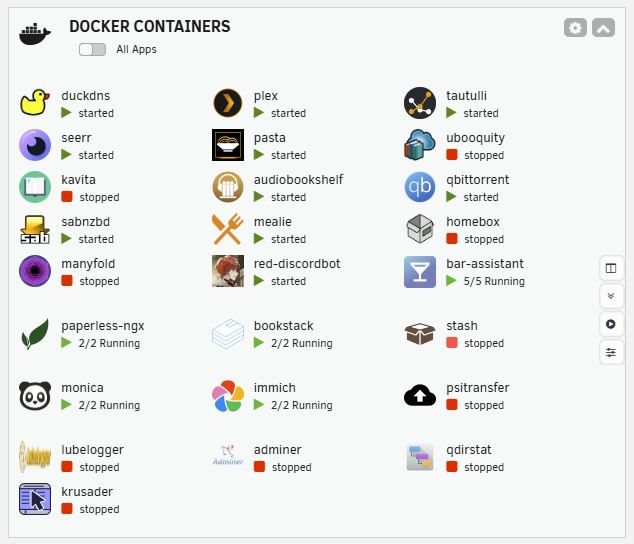
Not sure if this is a bug introduced in the newest update, or a setting that I've missed, but after the update any line with a folder on it appears to have wider spacing than lines that don't. Is there an obvious setting that I'm missing? >.<
-
THANK YOU! This one has slowly been driving me mad for a while, but I wasn't sure if it was just something I'd misconfigured >.<
-
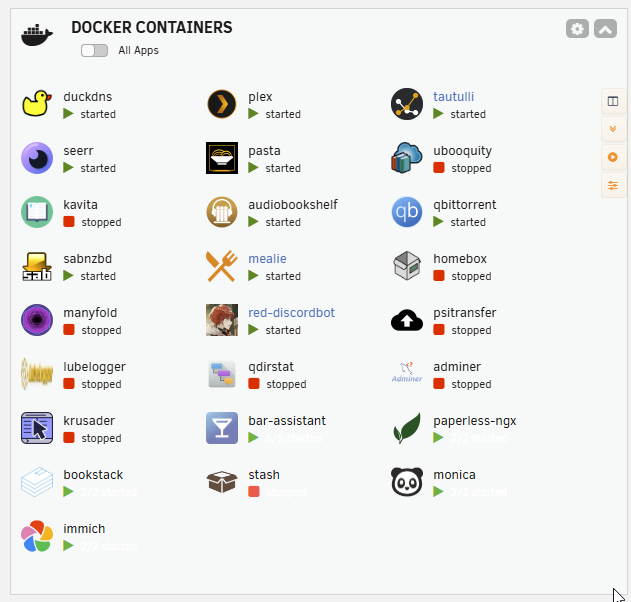
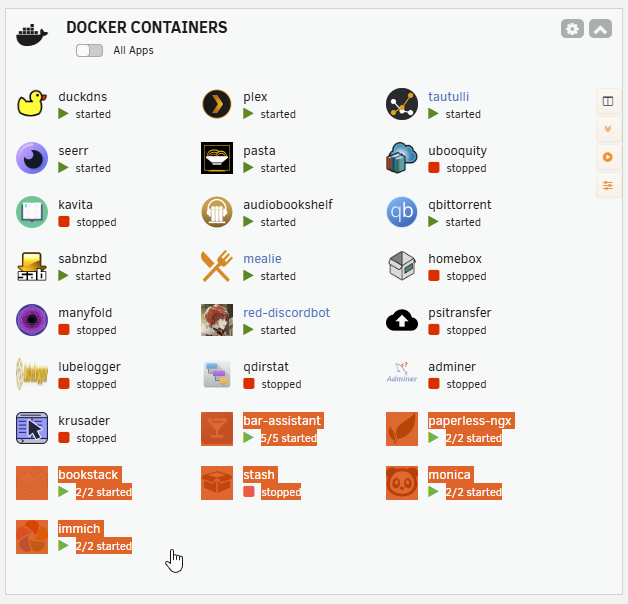
I think there may have been a bug introduced in a recent update - all of the status text for my folders is whited out.
-
Do we know what happened to this plugin? The author is a veteran contributor, and I use a good number of their plugins. Are they OK?
-
I'm having issues with the Recycle Bin plugin. I've just updated to the most recent version of the plugin, as well as upgrading Unraid to 7.0.1. Recycle bin is catching deleted files in the correct folders on my shares, but the WebUI shows total size as "?", and when I try to restart it from the plugin config I'm getting the following syslog output; Mar 7 22:03:24 Tower ool www[2862496]: /usr/local/emhttp/plugins/recycle.bin/scripts/rc.recycle.bin 'restart' Mar 7 22:03:24 Tower recycle.bin: Stopping Recycle Bin Mar 7 22:03:24 Tower nmbd[2177]: [2025/03/07 22:03:24.839522, 0] ../../source3/nmbd/nmbd_workgroupdb.c:279(dump_workgroups) Mar 7 22:03:24 Tower nmbd[2177]: dump_workgroups() Mar 7 22:03:24 Tower nmbd[2177]: dump workgroup on subnet 192.168.1.163: netmask= 255.255.255.0: Mar 7 22:03:24 Tower nmbd[2177]: #011WORKGROUP(1) current master browser = TOWER Mar 7 22:03:24 Tower nmbd[2177]: #011#011TOWER 40849a03 (Multipurpose server) Mar 7 22:03:24 Tower nmbd[2177]: #011#011******** 40819a03 (Samba 3.0.37) Mar 7 22:03:24 Tower nmbd[2177]: [2025/03/07 22:03:24.862149, 0] ../../source3/nmbd/nmbd_workgroupdb.c:279(dump_workgroups) Mar 7 22:03:24 Tower nmbd[2177]: dump_workgroups() Mar 7 22:03:24 Tower nmbd[2177]: dump workgroup on subnet 10.253.0.1: netmask= 255.255.255.0: Mar 7 22:03:24 Tower nmbd[2177]: #011WORKGROUP(1) current master browser = TOWER Mar 7 22:03:24 Tower nmbd[2177]: #011#011TOWER 40849a03 (Multipurpose server) Mar 7 22:03:26 Tower recycle.bin: Starting Recycle Bin Mar 7 22:03:27 Tower recycle.bin: Recycle Bin inotify starting Mar 7 22:03:27 Tower nmbd[2177]: [2025/03/07 22:03:27.064657, 0] ../../source3/nmbd/nmbd_workgroupdb.c:279(dump_workgroups) Mar 7 22:03:27 Tower nmbd[2177]: dump_workgroups() Mar 7 22:03:27 Tower nmbd[2177]: dump workgroup on subnet 192.168.1.163: netmask= 255.255.255.0: Mar 7 22:03:27 Tower nmbd[2177]: #011WORKGROUP(1) current master browser = TOWER Mar 7 22:03:27 Tower nmbd[2177]: #011#011TOWER 40849a03 (Multipurpose server) Mar 7 22:03:27 Tower nmbd[2177]: #011#011******** 40819a03 (Samba 3.0.37) Mar 7 22:03:27 Tower nmbd[2177]: [2025/03/07 22:03:27.064731, 0] ../../source3/nmbd/nmbd_workgroupdb.c:279(dump_workgroups) Mar 7 22:03:27 Tower nmbd[2177]: dump_workgroups() Mar 7 22:03:27 Tower nmbd[2177]: dump workgroup on subnet 10.253.0.1: netmask= 255.255.255.0: Mar 7 22:03:27 Tower nmbd[2177]: #011WORKGROUP(1) current master browser = TOWER Mar 7 22:03:27 Tower nmbd[2177]: #011#011TOWER 40849a03 (Multipurpose server) Mar 7 22:03:27 Tower recycle.bin: Recycle Bin inotify exiting Mar 7 22:03:27 Tower kernel: inotifywait[2863283]: segfault at 0 ip 000000000040288b sp 00007ffc27ddeb70 error 4 in inotifywait[402000+2000] likely on CPU 5 (core 1, socket 0) Mar 7 22:03:27 Tower kernel: Code: 00 00 48 89 da 89 ee 48 8d 7c 24 70 e8 fe 0e 00 00 48 8b 54 24 28 48 89 de 89 ef 48 8d 4c 24 70 e8 7a 0f 00 00 48 8b 44 24 70 <48> 83 38 00 0f 84 6f 05 00 00 80 7c 24 4d 00 0f 85 fd 02 00 00 48
-
Sorry to necro an old post, but to build on this; The /root/.config directory lives in RAM and does not persist through a reboot. To make these changes survive a reboot, I created a directory on my flash (/boot/config/neofetch) and placed config.conf and unraid_ascii.txt there. I then created the following userscript; #!/bin/bash mv /root/.config/neofetch/config.conf /root/.config/neofetch/config.conf.bak cp /boot/config/neofetch/config.conf /root/.config/neofetch/config.conf cp /boot/config/neofetch/unraid_ascii.txt /root/.config/neofetch/unraid_ascii.txt and set it to run at first array start.
-
Kind of an odd one - while a backup is running I can see the files being created in my backup folder using Windows File Explorer, but when it completes they all disappear. I can still see them using the file browser on the Unraid web interface and they're definitely still there. What might cause this?
-
Potential bug - During my first scheduled run, no log was generated. While the backup was running, the status/log tab indicated that the backup was not running, and the abort button was inactive. On attempting to share a debug log, it returned `Your debug log ID: Logfile does not exist!` Also, is it possible to exclude all files with a certain extension? Is it as simple as adding `*.ext` to the excluded folders/files list? Thanks!
-
After brief experimentation, it looks like it's not possible. I tried `/mnt/user/appdata/binhex-plexpass/Plex\ Media\ Server/Media/localhost/*.bif` and just `*.bif` as exclusions, and both produced a backup that included the bif files >.<
-
I wonder if that's recursive. The way Plex stores it's metadata is odd, or at least not very human friendly. I have a folder called /appdata/binhex-plexpass/Plex Media Server/Media/localhost/ which contains a serial numbered folder for each object in my Plex library, each one containing several files - including the bif file that I don't want to backup. Obviously it wouldn't be possible to exclude each numbered folder individually. My only worry is that declaring `/appdata/binhex-plexpass/Plex\ Media\ Server/Media/localhost/*.bif` as an exclusion would only exclude bif files located in /.../localhost and not anything deeper. Hmm. Time to experiment! Edit: Escaped my spaces
-
My Plex folder alone, not including other AppData is approximately 300GB - this is because of the *.bif files used for video preview thumbnails. I don't see the need to back them up, because they will be regenerated as a scheduled task if needed, and not including them in backups would save me about 270GB of disk space, and 40mins of time on each backup. There is literally no need to back them up - they aren't user generated content and my system can replace them in about three days if I ever had to restore. @KluthR - The ability to exclude certain filetypes would be an *extremely* useful addition. Even moreso if you can exclude certain filetypes on a per-folder or per-tree basis! Edit: Spelling.
-
Is it possible to exclude files of a specific type from appdata backups? I don't see the need to backup my Plex video thumbnails, which are all stored as *.bif files, but they're mixed in with the other metadata (non *.bif files) - I'd like to exclude only *.bif files from my backups, without excluding the whole metadata folder.
-
Is anyone having issues with the latest update? My pages aren't rendering properly, and are taking a very long time.
-
Would it be possible to request that the NestyBox SysBox Container Runtime be added as a package? https://github.com/nestybox/sysbox It would make it a lot easier and safer to experiment with Docker in Docker setups
-
UnRAID 6.10.2 appears to partially break iotop. After updating, I reinstalled my packages (and had to install python2 to be able to open iotop again), but am now seeing the following warning; CONFIG_TASK_DELAY_ACCT not enabled in kernel, cannot determine SWAPIN and IO % Running; echo 1 > /proc/sys/kernel/task_delayacct appears to fix the issue, but it seems like a bit of a hacky workaround.
-
I know this is resurrecting an old thread, but just wanted to say thanks and point out that the solution mentioned here is still very much relevant. I was attempting to run an LSI 9201-8i in IT mode with the p20 firmware on an ASUS Z170M-PLUS motherboard. With the HBA inserted, the system would not boot. On connecting the card to another motherboard and erasing the HBA BIOS, the HBA now boots and runs perfectly - in fact it's currently preclearing my new parity disk
-
I cancelled it in the usual manner from the Unbalance WebUI, but at one point the interface became unresponsive for a few minutes. When it terminated, the file that had been in the process of moving was corrupted (literally cut in half). At the time, I simply replaced the file and moved on, though in hindsight this is the first parity check that has been run since then.
-
Further update: File integrity check completed without errors. I'll run memtest while I'm at work tomorrow. At this point I can only assume either a memory error, or some kind of parity mistake caused by cancelling an incomplete job on Unbalance while I was still figuring it out?
-
I have been running it, but somehow it managed to completely escape my mind! When the file integrity check finishes, I'll be running memtest.
-
Update: Second parity check completed without errors. Scheduled parity checks have been changed to NOT update parity in the event of errors. I'm now going to run a scan with the File Integrity plugin.
-
Perhaps a scan with the File Integrity plugin?
-
Right - I'll change that to non-correcting immediately. Is there any way of determining which files are occupying a sector that has thrown a parity error so that they can be checked manually? My second parity check is almost complete, and hasn't found any errors so far. I have no SMART warnings, all of my drives are passing SMART testing and there are no worrying noises coming from any of them. I haven't run memtest lately, but that's going to be my next step. Is that something that I should consider working into a regular maintenance cycle? Thanks!
-
Further info on hardware specs: Motherboard: Asus Z170M-PLUS CPU: Intel i7 7700 RAM: 32GB DDR4 Corsair (Non-ECC) Cache: 2x 1TB SSD Array: 1x 10TB WD White Label (Parity) 2x 8TB WD White Label (Data 1 & 2) 1x 6TB WD Blue (Data 3) (Recently added, older than the other disks) Unraid version: 6.9.2
-
Hello! I've been running Unraid for a few months now and my system has completed two scheduled parity checks without any errors. Today, the scheduled parity check returned 7 errors. Since the last parity check, I have added a new disk (passed a pre-clear) and moved some data to it using unbalance. I haven't had any unclean shutdowns, and I use a UPS. Is there an easy way to find out where these errors came from? Could it have been a result of using unbalance? Do I have a hardware problem? So my plan is to run another parity check tonight and see if there are any more errors. If there are, I'll be running memtest. Is there any other action I should be taking right now? tower-diagnostics-20211105-2312.zip

