





TCMapes
Members
-
Joined
-
Last visited
Everything posted by TCMapes
-
@ich777 - Okay thanks for the information.
-
Also as soon as i remove the password portion i can use the console open publicip:7778 to connect to it. The in game "Join Multiplayer" lists my server but that also fails to connect. Only the console open command works.
-
@ich777 - I have figured it out but the container is not honoring the Password= part of my game.ini file. It looks like the docker is just not parsing it during boot. Attempt #1 to fetch config (only-if-cached) from https://api.steampowered.com/ISteamApps/GetSDRConfig/v1?appid=1857950) [2025.12.10-17.22.33:208][ 0]LogVein: Superadmins set: [2025.12.10-17.22.33:208][ 0]LogVein: - [2025.12.10-17.22.33:208][ 0]LogVein: Admins set: [2025.12.10-17.22.33:208][ 0]LogVein: - [2025.12.10-17.22.33:208][ 0]LogHttpServerModule: Starting all listeners... There should be a line LogVein : Password=test132 during startup. Here is my Game.ini ;METADATA=(Diff=true, UseCommands=true) [/Script/Vein.VeinGameSession] ServerName=MapesVein SuperAdminSteamIDs= AdminSteamIDs= Password=test123 HTTPPort=8080 [/Script/Vein.ServerSettings] GS_HungerMultiplier=0.5 GS_ThirstMultiplier=0.5 GS_MaxThirdPersonDistance=600 GS_ShowScoreboardBadges=1 [OnlineSubsystemSteam] GameServerQueryPort=27018 bVACEnabled=0 [URL] Port=7778
-
Where can I find the server name and password configuration for the Vein dedicated docker?
-
When i enable validation flag to true the docker gets the latest version of Valheim but it resets my server data. What is wrong?
-
I am having issues with Windows 11 VM and Server 2025 VM with this month KB5060842 causing the system BSOD with unsupported CPU. Boots fine with no pinned CPU's but once I PIN a CPU or select more than 1 unpinned CPU it BSOD. Has anyone found a fix for this or experienced this with their windows VM
-
Seems to only happen when TDARR is transcoding files
-
I don't disagree but this system has been stable for years. Not sure what component is failing or what is going on. Syslog is not evening sending information about hardware issues.
-
Need some assistance with diagnostics on why my system is randomly rebooting. Any feedback would be greatly appreciated. foundation-diagnostics-20250416-0813.zip syslog
-
Sorry if this has already been answered. How can I run BepInExPack_Valheim mods on the ich777 valheim composed docker? Anyone have instructions on how to add mods manually?
-
Sounds good then I will abandon and start moving data with unbalanced so i can reformat my drives as xfs and my cache pools as btrfs
-
So you are suggesting I go back to xfs for the array and not bother with ZFS?
-
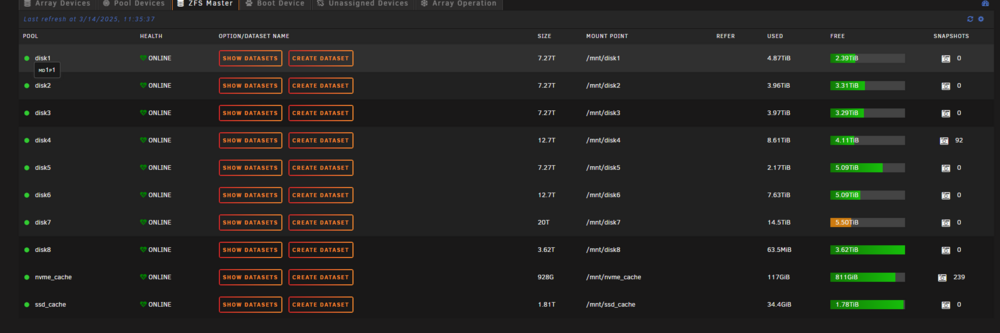
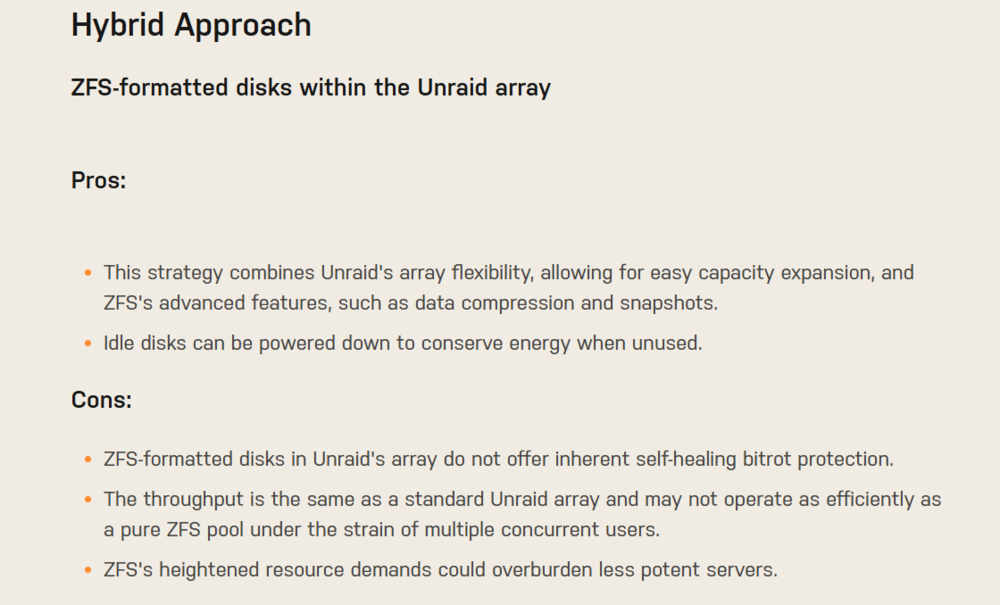
That is not my understanding of how Unraid Array behaves with ZFS. You do get some benefits from the provide article, "https://unraid.net/blog/zfs-guide" I am not running ZFS in separate pools just the drives are formatted as ZFS with no ZFS Pools. I am just not sure if I need the Archive RAM feature of ZFS in the Unraid Array setup of ZFS. I am actually hoping the newer version of Unraid will allow more of the native ZFS pool features. Thought was doing this way would future proof me for where Unraid will ultimately go with Opting all features of ZFS in the native Unraid algo.


-
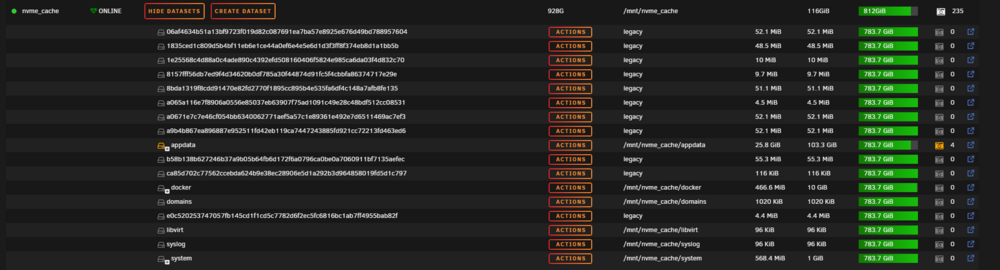
My only real tweak was to add to the boot drive config folder was modprobe.d zfs.conf to increase the the Archive Ram for ZFS. options zfs zfs_arc_max=64000000000 I played with Synoid and user scripts to take zfs snapshots of my appdata share for my dockers to do an alternative backup but have since stopped doing that cause I saw some weird issues with drives filing up during the process. I am running zfs master but have refresh turned off. I have not really grasped how to hand zfs snapshots and what the are legacy datasets in my zfs formated drives. Would love to know what legacy mount points even exists. `
-
I wanted to start a topic for users that are doing the Hybrid ZFS setup with Native Unraid Array and ZFS formatted drives. Feel free to let me know how your performance has been after moving to ZFS. I am also looking for suggestions on how to optimize and improve the overall experience with Hybrid ZFS arrays in Unraid.
-
I had a question about exclusion patterns. Should I list the pool and dataset like this:/nvme_cache/docker/*?
-
I feel like i should be able to do this and kill all linked snapshots.

-
I have an issue were snapshots are being created and the drive fills up while the snapshot is being created. This is particular issue with sabnzbd docker and the pool drive is zfs. I tried running 'zfs list -H -o name -t snapshot | xargs -n1 zfs destroy -R' to purge all snapshots on the nvme_cache pool but I get message snapshot is cloned. I want to purge the cloned snapshots what am I missing?
-
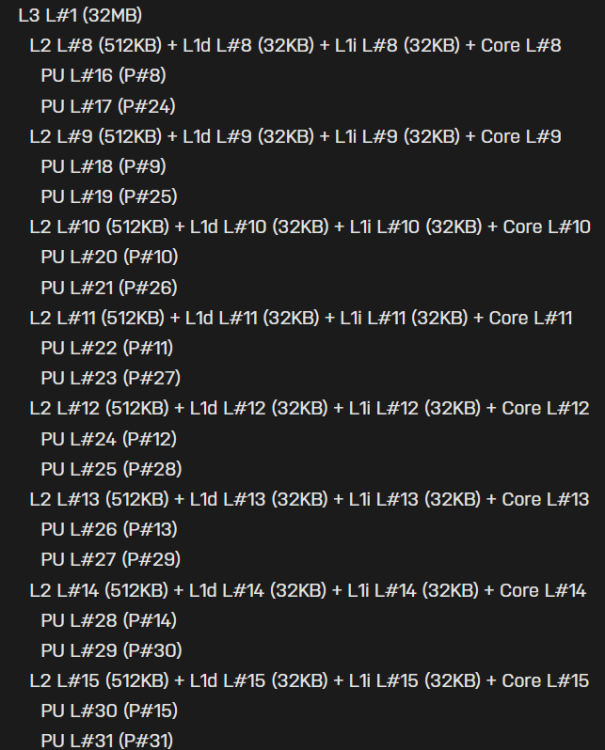
If you are curious to see how your CPU is handle in unraid the following two commands can show you dies layout for CPU isolation. For the chiplet designs coming out is best to put your workhorse vm on a single chiplet intead across multiple. Hope this helps. lscpu -e and lstopo lstopo Machine (126GB total) Package L#0 NUMANode L#0 (P#0 126GB) L3 L#0 (32MB) L2 L#0 (512KB) + L1d L#0 (32KB) + L1i L#0 (32KB) + Core L#0 PU L#0 (P#0) PU L#1 (P#16) L2 L#1 (512KB) + L1d L#1 (32KB) + L1i L#1 (32KB) + Core L#1 PU L#2 (P#1) PU L#3 (P#17) L2 L#2 (512KB) + L1d L#2 (32KB) + L1i L#2 (32KB) + Core L#2 PU L#4 (P#2) PU L#5 (P#18) L2 L#3 (512KB) + L1d L#3 (32KB) + L1i L#3 (32KB) + Core L#3 PU L#6 (P#3) PU L#7 (P#19) L2 L#4 (512KB) + L1d L#4 (32KB) + L1i L#4 (32KB) + Core L#4 PU L#8 (P#4) PU L#9 (P#20) L2 L#5 (512KB) + L1d L#5 (32KB) + L1i L#5 (32KB) + Core L#5 PU L#10 (P#5) PU L#11 (P#21) L2 L#6 (512KB) + L1d L#6 (32KB) + L1i L#6 (32KB) + Core L#6 PU L#12 (P#6) PU L#13 (P#22) L2 L#7 (512KB) + L1d L#7 (32KB) + L1i L#7 (32KB) + Core L#7 PU L#14 (P#7) PU L#15 (P#23) L3 L#1 (32MB) L2 L#8 (512KB) + L1d L#8 (32KB) + L1i L#8 (32KB) + Core L#8 PU L#16 (P#8) PU L#17 (P#24) L2 L#9 (512KB) + L1d L#9 (32KB) + L1i L#9 (32KB) + Core L#9 PU L#18 (P#9) PU L#19 (P#25) L2 L#10 (512KB) + L1d L#10 (32KB) + L1i L#10 (32KB) + Core L#10 PU L#20 (P#10) PU L#21 (P#26) L2 L#11 (512KB) + L1d L#11 (32KB) + L1i L#11 (32KB) + Core L#11 PU L#22 (P#11) PU L#23 (P#27) L2 L#12 (512KB) + L1d L#12 (32KB) + L1i L#12 (32KB) + Core L#12 PU L#24 (P#12) PU L#25 (P#28) L2 L#13 (512KB) + L1d L#13 (32KB) + L1i L#13 (32KB) + Core L#13 PU L#26 (P#13) PU L#27 (P#29) L2 L#14 (512KB) + L1d L#14 (32KB) + L1i L#14 (32KB) + Core L#14 PU L#28 (P#14) PU L#29 (P#30) L2 L#15 (512KB) + L1d L#15 (32KB) + L1i L#15 (32KB) + Core L#15 PU L#30 (P#15) PU L#31 (P#31) lscpu -e CPU NODE SOCKET CORE L1d:L1i:L2:L3 ONLINE MAXMHZ MINMHZ MHZ 0 0 0 0 0:0:0:0 yes 5083.3979 2200.0000 3696.7129 1 0 0 1 1:1:1:0 yes 5083.3979 2200.0000 3838.7380 2 0 0 2 2:2:2:0 yes 5083.3979 2200.0000 4712.8442 3 0 0 3 3:3:3:0 yes 5083.3979 2200.0000 4323.0791 4 0 0 4 4:4:4:0 yes 5083.3979 2200.0000 4716.0020 5 0 0 5 5:5:5:0 yes 5083.3979 2200.0000 4095.6111 6 0 0 6 6:6:6:0 yes 5083.3979 2200.0000 4717.2632 7 0 0 7 7:7:7:0 yes 5083.3979 2200.0000 4715.3799 8 0 0 8 8:8:8:1 yes 5083.3979 2200.0000 3594.2419 9 0 0 9 9:9:9:1 yes 5083.3979 2200.0000 3400.0000 10 0 0 10 10:10:10:1 yes 5083.3979 2200.0000 3581.8450 11 0 0 11 11:11:11:1 yes 5083.3979 2200.0000 3400.0000 12 0 0 12 12:12:12:1 yes 5083.3979 2200.0000 3400.0000 13 0 0 13 13:13:13:1 yes 5083.3979 2200.0000 3746.9951 14 0 0 14 14:14:14:1 yes 5083.3979 2200.0000 3400.0000 15 0 0 15 15:15:15:1 yes 5083.3979 2200.0000 3400.0000 16 0 0 0 0:0:0:0 yes 5083.3979 2200.0000 3787.1699 17 0 0 1 1:1:1:0 yes 5083.3979 2200.0000 4684.5049 18 0 0 2 2:2:2:0 yes 5083.3979 2200.0000 4675.6758 19 0 0 3 3:3:3:0 yes 5083.3979 2200.0000 4415.8789 20 0 0 4 4:4:4:0 yes 5083.3979 2200.0000 4704.3140 21 0 0 5 5:5:5:0 yes 5083.3979 2200.0000 4511.8540 22 0 0 6 6:6:6:0 yes 5083.3979 2200.0000 4669.6411 23 0 0 7 7:7:7:0 yes 5083.3979 2200.0000 4663.3330 24 0 0 8 8:8:8:1 yes 5083.3979 2200.0000 3400.0000 25 0 0 9 9:9:9:1 yes 5083.3979 2200.0000 3400.0000 26 0 0 10 10:10:10:1 yes 5083.3979 2200.0000 3400.0000 27 0 0 11 11:11:11:1 yes 5083.3979 2200.0000 3400.0000 28 0 0 12 12:12:12:1 yes 5083.3979 2200.0000 3400.0000 29 0 0 13 13:13:13:1 yes 5083.3979 2200.0000 3400.0000 30 0 0 14 14:14:14:1 yes 5083.3979 2200.0000 3593.3479 31 0 0 15 15:15:15:1 yes 5083.3979 2200.0000 3400.0000
-
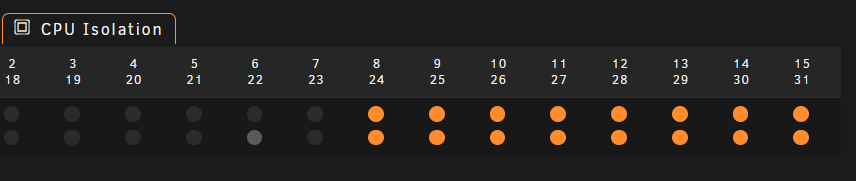
I just read the command information wrong. Seems i had the pinning right for my gaming vm then.
-
Just wanted to post this here. But from the following console commands the CPU lay seems to have CCD 0 on CPU 0 through 15 and CCD 1 on CPU 16 through 31. From the below information it looks like I should do CPU isolation on 16 thru 31. Then pin those to my gaming VM. Am I missing something here? ----------------lstopo command-------------------------------------------------------- Machine (126GB total) Package L#0 NUMANode L#0 (P#0 126GB) L3 L#0 (32MB) L2 L#0 (512KB) + L1d L#0 (32KB) + L1i L#0 (32KB) + Core L#0 PU L#0 (P#0) PU L#1 (P#16) L2 L#1 (512KB) + L1d L#1 (32KB) + L1i L#1 (32KB) + Core L#1 PU L#2 (P#1) PU L#3 (P#17) L2 L#2 (512KB) + L1d L#2 (32KB) + L1i L#2 (32KB) + Core L#2 PU L#4 (P#2) PU L#5 (P#18) L2 L#3 (512KB) + L1d L#3 (32KB) + L1i L#3 (32KB) + Core L#3 PU L#6 (P#3) PU L#7 (P#19) L2 L#4 (512KB) + L1d L#4 (32KB) + L1i L#4 (32KB) + Core L#4 PU L#8 (P#4) PU L#9 (P#20) L2 L#5 (512KB) + L1d L#5 (32KB) + L1i L#5 (32KB) + Core L#5 PU L#10 (P#5) PU L#11 (P#21) L2 L#6 (512KB) + L1d L#6 (32KB) + L1i L#6 (32KB) + Core L#6 PU L#12 (P#6) PU L#13 (P#22) L2 L#7 (512KB) + L1d L#7 (32KB) + L1i L#7 (32KB) + Core L#7 PU L#14 (P#7) PU L#15 (P#23) L3 L#1 (32MB) L2 L#8 (512KB) + L1d L#8 (32KB) + L1i L#8 (32KB) + Core L#8 PU L#16 (P#8) PU L#17 (P#24) L2 L#9 (512KB) + L1d L#9 (32KB) + L1i L#9 (32KB) + Core L#9 PU L#18 (P#9) PU L#19 (P#25) L2 L#10 (512KB) + L1d L#10 (32KB) + L1i L#10 (32KB) + Core L#10 PU L#20 (P#10) PU L#21 (P#26) L2 L#11 (512KB) + L1d L#11 (32KB) + L1i L#11 (32KB) + Core L#11 PU L#22 (P#11) PU L#23 (P#27) L2 L#12 (512KB) + L1d L#12 (32KB) + L1i L#12 (32KB) + Core L#12 PU L#24 (P#12) PU L#25 (P#28) L2 L#13 (512KB) + L1d L#13 (32KB) + L1i L#13 (32KB) + Core L#13 PU L#26 (P#13) PU L#27 (P#29) L2 L#14 (512KB) + L1d L#14 (32KB) + L1i L#14 (32KB) + Core L#14 PU L#28 (P#14) PU L#29 (P#30) L2 L#15 (512KB) + L1d L#15 (32KB) + L1i L#15 (32KB) + Core L#15 PU L#30 (P#15) PU L#31 (P#31) ------------------lscpu -e-------------------------------------------------------- CPU NODE SOCKET CORE L1d:L1i:L2:L3 ONLINE MAXMHZ MINMHZ MHZ 0 0 0 0 0:0:0:0 yes 5083.3979 2200.0000 3696.7129 1 0 0 1 1:1:1:0 yes 5083.3979 2200.0000 3838.7380 2 0 0 2 2:2:2:0 yes 5083.3979 2200.0000 4712.8442 3 0 0 3 3:3:3:0 yes 5083.3979 2200.0000 4323.0791 4 0 0 4 4:4:4:0 yes 5083.3979 2200.0000 4716.0020 5 0 0 5 5:5:5:0 yes 5083.3979 2200.0000 4095.6111 6 0 0 6 6:6:6:0 yes 5083.3979 2200.0000 4717.2632 7 0 0 7 7:7:7:0 yes 5083.3979 2200.0000 4715.3799 8 0 0 8 8:8:8:1 yes 5083.3979 2200.0000 3594.2419 9 0 0 9 9:9:9:1 yes 5083.3979 2200.0000 3400.0000 10 0 0 10 10:10:10:1 yes 5083.3979 2200.0000 3581.8450 11 0 0 11 11:11:11:1 yes 5083.3979 2200.0000 3400.0000 12 0 0 12 12:12:12:1 yes 5083.3979 2200.0000 3400.0000 13 0 0 13 13:13:13:1 yes 5083.3979 2200.0000 3746.9951 14 0 0 14 14:14:14:1 yes 5083.3979 2200.0000 3400.0000 15 0 0 15 15:15:15:1 yes 5083.3979 2200.0000 3400.0000 16 0 0 0 0:0:0:0 yes 5083.3979 2200.0000 3787.1699 17 0 0 1 1:1:1:0 yes 5083.3979 2200.0000 4684.5049 18 0 0 2 2:2:2:0 yes 5083.3979 2200.0000 4675.6758 19 0 0 3 3:3:3:0 yes 5083.3979 2200.0000 4415.8789 20 0 0 4 4:4:4:0 yes 5083.3979 2200.0000 4704.3140 21 0 0 5 5:5:5:0 yes 5083.3979 2200.0000 4511.8540 22 0 0 6 6:6:6:0 yes 5083.3979 2200.0000 4669.6411 23 0 0 7 7:7:7:0 yes 5083.3979 2200.0000 4663.3330 24 0 0 8 8:8:8:1 yes 5083.3979 2200.0000 3400.0000 25 0 0 9 9:9:9:1 yes 5083.3979 2200.0000 3400.0000 26 0 0 10 10:10:10:1 yes 5083.3979 2200.0000 3400.0000 27 0 0 11 11:11:11:1 yes 5083.3979 2200.0000 3400.0000 28 0 0 12 12:12:12:1 yes 5083.3979 2200.0000 3400.0000 29 0 0 13 13:13:13:1 yes 5083.3979 2200.0000 3400.0000 30 0 0 14 14:14:14:1 yes 5083.3979 2200.0000 3593.3479 31 0 0 15 15:15:15:1 yes 5083.3979 2200.0000 3400.0000
-
`virsh start "Windows 11" error: Failed to start domain 'Windows 11' error: internal error: qemu unexpectedly closed the monitor: 2023-09-24T00:26:35.415430Z qemu-system-x86_64: -device {"driver":"virtio-blk-pci","bus":"pci.3","addr":"0x0","drive":"libvirt-3-format","id":"virtio-disk2","bootindex":1,"write-cache":"on","serial":"vdisk1"}: Failed to get "write" lock Is another process using the image [/mnt/ssd_cache/domains/Windows_11/vdisk1.img]?` Any ideas on how i can kill the lock without rebooting entire system?
-
Forgot to add I am not overclocking anything system speeds are default. I have all DIMMS populated with a total RAM give 128GB.
-
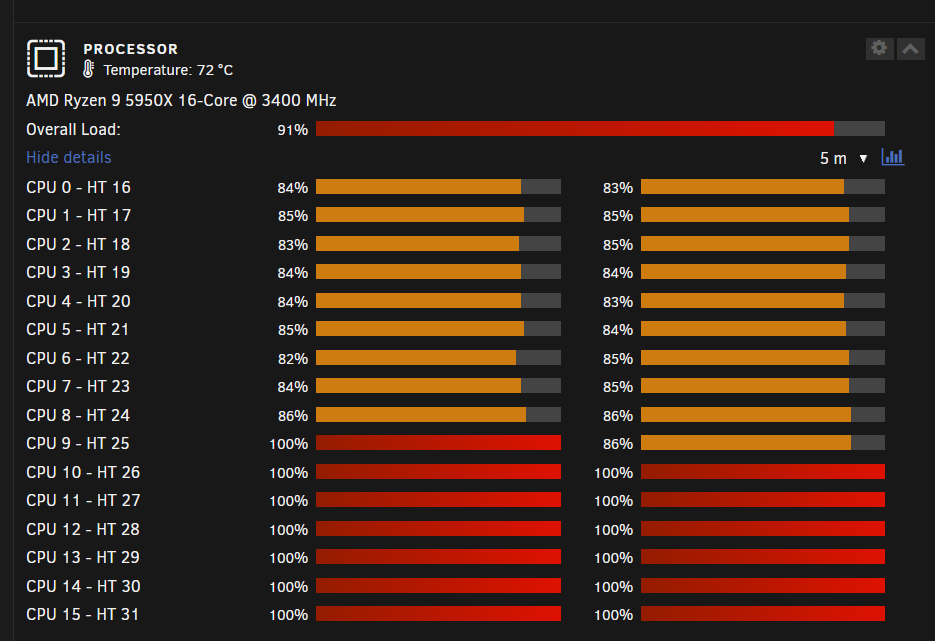
Could the ZFS Pools and Array becausing my high CPU spikes and the hard reboots? I notice every time my unraid system spikes my system reboots. Usually when I am downloading a game on my VM. In this case Baldurs Gate 3. Is there something I should do? I feel like my system is rebooting to protect itself just don't know why.
-
Thanks for the information. I changed the share to most-free and now all my zfs disks are growing evenly.




