





patrickstigler
Members
-
Joined
-
Last visited
Everything posted by patrickstigler
-
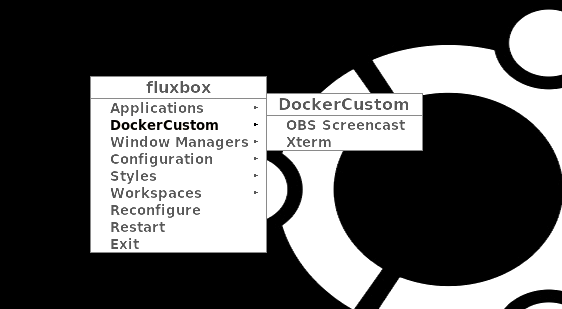
Right click on the screen
-
I am trying to control my fans. Unfortunately the won't be detected. But if I run sensors-detect I get this: Driver `lm75': * Bus `SMBus PIIX4 adapter port 1 at 0b20' Busdriver `i2c_piix4', I2C address 0x4f Chip `Dallas Semiconductor DS75' (confidence: 3) Driver `k10temp' (autoloaded): * Chip `AMD Family 17h thermal sensors' (confidence: 9) Driver `to-be-written': * ISA bus, address 0xa20 Chip `ITE IT8625E Super IO Sensors' (confidence: 9) Where can I set them up (configfile?!) when there not available on the webinterface?
-
Ok found the problem. In case someone tries the Drone container and got the same error. You will need to add an admin user, or in other words you have to make your user admin. By adding the variable to the container: username:YOUR_USERNAME,admin:true
-
Ok I updated the whole image, but I think you will have the same problem. I hope that the rewrite of the NDI tool will improve it. But at the moment I am not 100% sure if it is the NDI or the OBS itself. I might setup a VM to test it and improve the container.
-
Hello, I just installed the containers for Drone (CI CD). And the 2nd container which needs access to docker.sock is complaining that it can't reach it. I used the volume as parameter --volume ... and as Volume (with GUI). Rebootet the system since I read that might be the problem. And also shut down my other containers which use docker.sock. Anyone an idea?
-
ok, I think I will upgrade the Ubuntu image of the container to a newer version. It could help with this issue.
-
Hello, I am looking for a way to block subfolders for requests outside of my network. External: domain.com/ - forward to docker domain.com/admin - block Internal: domain.com/ - forward to docker domain.com/admin - forward to docker Is that possible? At least I haven't found the option for that?
-
ok good, what GPU are you running? What driver version are you running? I am running the long term support version.
-
Just to make sure, you're removed the last part of the GPU ID only in this screenshot, right? Because that is not the full ID.
-
For the wrong links in the description. TBH I don't know how this happend. I must have copied it. Now I fixed it. Created a fork of the repo read the code updated this post updated the App xml updated the image for the container
-
Good question, it was linked in his repo. I gonna update it. @Squid
-
@JonathanM I restartet the container but it will remember the folders. So I guess there is something like a cleanup script required? Do you know what the folders are used for. So can I clean them like every hour or something?
-
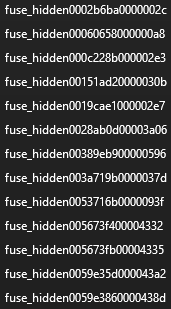
Hi, I got a little problem: Over the time I get more and more folders in my inbox. I can delete them, but new ones will be created. I guess it's something with the spam filter. Maybe you can help here. Using Outlook
-
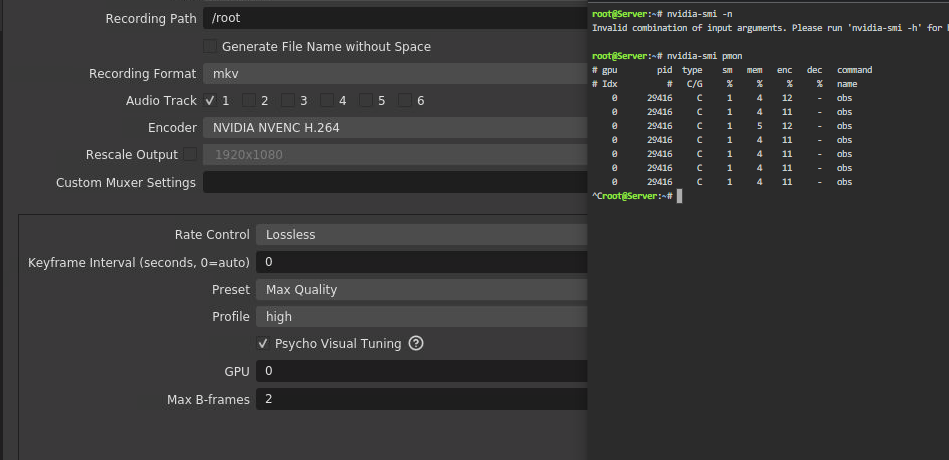
I'd say you GPU is not really used by OBS. Have you checked to NVIDEA parameters in Docker?
-
At lease for me it seems to work fine. Have you tried these settings? Or what kind of settings are you running?
-
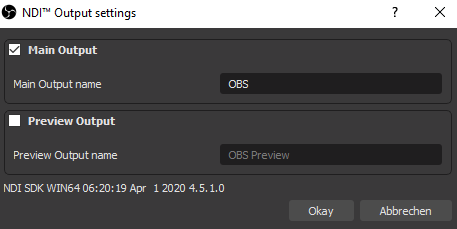
@ich777 Good point with the limit of the encoding. Thanks Yes, the idea is that your main system (Gaming) streams your screen almost raw to your docker who should encode it for i.e. twitch. @Evidenz you have to enable it on your gaming system, basically just turn it on in plugins. Then you should see it on your docker to stream it to i.e. twitch There you need to add a source NDI and you will find it if you setup your docker in the same subnet like your streaming pc. (As far as I know, not working for Mac) Let's say your gaming pc has the IP 192.168.0.20 - Then your docker should have something like 192.168.0.XXX i.e. 192.168.0.220. @Wetterchen Yes and no - I checked the linux version of NDI 5 is not released yet. So I can't upgrade it right now. I have to wait for the release. I also found some problems with NDI on Ubuntu (base of the container) but there is no real fix yet.
-
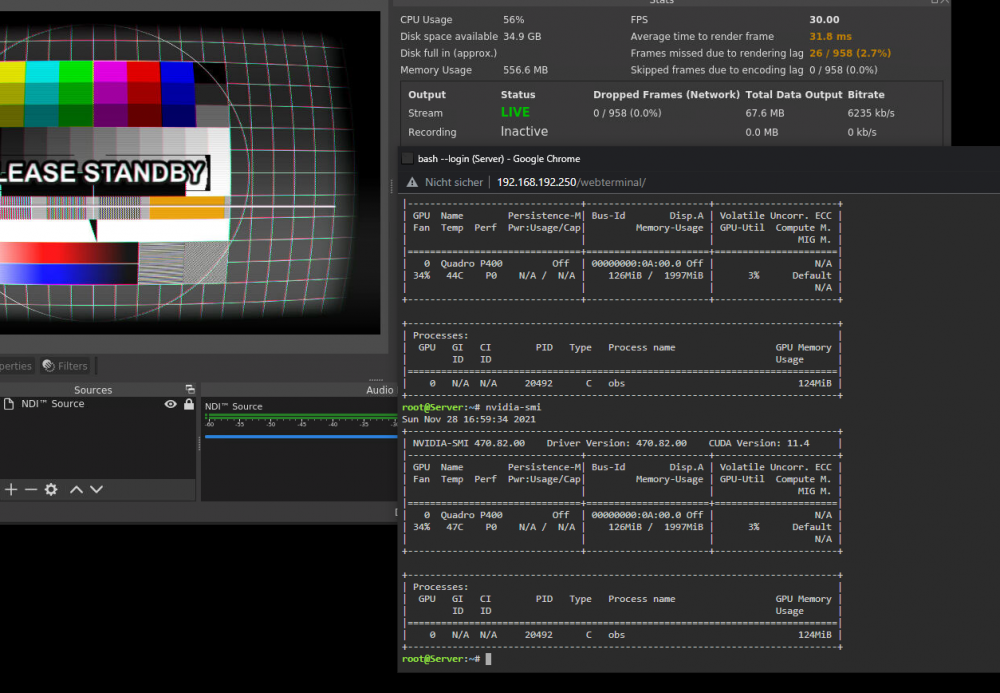
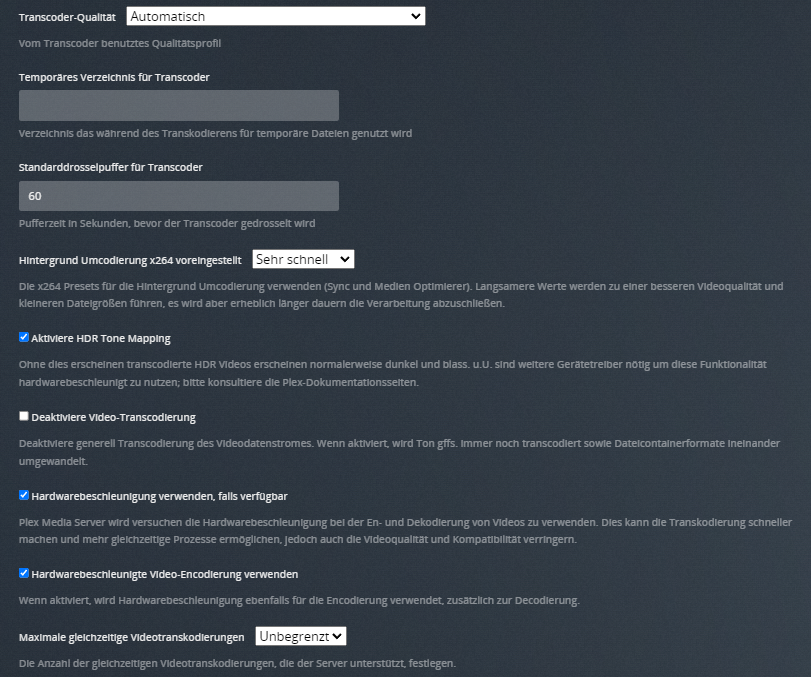
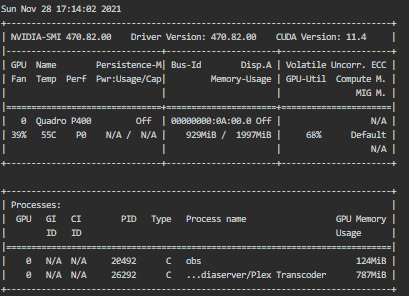
@Ich777 I am starting up plex as soon as unraid is up. It usally doesn't encode at the same time. Both containers have access to all GPUs. I am running a Quadro P400 - no active processes. My Plex Settings are default: I assume you speak german. But it's basically default, auto select Quality, Hardware acceleration and unlimited simultanes Encodings. But none are active. When I run an encoding and OBS as well I see both threads. If I got you right there, you think I have obs running 2times at the same time?! No I am running a docker with OBS and a Docker with Plex which share the GPU. If you have an idea let me know. I will check again. And as soon as I find a solution I will update the container.
-
Hmm good question, I recently notice that also the load on my gpu is kind of low. But I guess it could be something with the driver directly. But I only used OBS for streaming. It is working fine with 30FPS. But not really with 60FPS. I switched to the LTS drivers. But for now it's the same issue. I will take a look at it. And ask @ich777 Maybe you have an idea?
-
Hi you can run it without a GPU, just remove the --runtime=nvidia That should fix it. @parish @phoenixrisen

-
@s449 - I guess no https://obsproject.com/forum/threads/obs-virtual-cam-on-linux.134849/ It's not supported yet.
-
You must be in the same subnet. Than it will work. Just define your container within the same Subnet i.e. 192.168.0.X That is the exact way I am using it. Sometimes it can take a bit till your Desktop will be found. (Have you enabled it on your desktop?)
-
Fetchmail is a handy tool to move / copy your emails from another email provider. Lets say you host your own Mailserver and also want to receive your mails from i.e. googlemail. Fetchmail will take them and put it in your own inbox. Create the "fetchmailrc" file in the mounted data folder. It should contain these lines - but you have to adapt it to fit your needs. i.e. your mail address and remove the "keep" if you want to remove the mails in the fetched remote mailbox. set no syslog set logfile /data/log/fetchmail.log set postmaster "fetchmail" poll imap.gmail.com with proto IMAP user '[email protected]' there with password 'yourpassword' is fetchmail here options fetchall ssl keep smtphost mail.example.org smtpname [email protected] Support for: https://hub.docker.com/r/patrickstigler/docker-fetchmail
-
PY-Stocks A minimal stocks API wrapper of Yfinance. Source: https://github.com/patrickstigler/py-stocks Build: https://hub.docker.com/r/patrickstigler/py-stocks-api Endpoints Download The /download/:symbol/:startDate/:endDate endpoint takes a symbol and a start and end date Params: interval default 1d Example command curl localhost:8000/download/AAPL/2021-08-01/2021-08-03 | jq JSON Response {"schema": {"fields":[{"name":"Date","type":"datetime"},{"name":"Open","type":"number"}, {"name":"High","type":"number"},{"name":"Low","type":"number"},{"name":"Close","type":"number"}, {"name":"Adj Close","type":"number"},{"name":"Volume","type":"integer"}],"primaryKey":["Date"],"pandas_version":"0.20.0"}, "data":[{"Date":"2019-12-31T00:00:00.000Z","Open":289.9299926758,"High":293.6799926758,"Low":289.5199890137,"Close":293.6499938965,"Adj Close":289.8670349121,"Volume":25247625}]} History The /history/:symbol/ endpoint takes a symbol Params: will download all available data about the symbol Example command curl localhost:8000/history/AAPL/ | jq JSON Response {"schema":{"fields":[{"name":"Date","type":"datetime"},{"name":"Open","type":"number"},{"name":"High","type":"number"},{"name":"Low","type":"number"},{"name":"Close","type":"number"},{"name":"Volume","type":"integer"},{"name":"Dividends","type":"number"},{"name":"Stock Splits","type":"number"}],"primaryKey":["Date"],"pandas_version":"0.20.0"},"data":[{"Date":"1980-12-12T00:00:00.000Z","Open":0.4784811735,"High":0.4805576009,"Low":0.4784811735,"Close":0.4784811735,"Volume":117258400,"Dividends":0.0,"Stock Splits":0.0},{"Date":"1980-12-15T00:00:00.000Z","Open":0.4535170794,"High":0.4555935627,"Low":0.4535170794,"Close":0.4535170794,"Volume":43971200,"Dividends":0.0,"Stock Splits":0.0},{"Date":"1980-12-16T00:00:00.000Z","Open":0.4202322364,"High":0.4223087202,"Low":0.4202322364,"Close":0.4202322364,"Volume":26432000,"Dividends":0.0,"Stock Splits":0.0},{"Date":"1980-12-17T00:00:00.000Z","Open":0.4306303263,"High":0.4327067819,"Low":0.4306303263,"Close":0.4306303263,"Volume":21610400,"Dividends":0.0,"Stock Splits":0.0},{"Date":"1980-12-18T00:00:00.000Z","Open":0.4431188107,"High":0.4451952656,"Low":0.4431188107,"Close":0.4431188107,"Volume":18362400,"Dividends":0.0,"Stock Splits":0.0},{"Date":"1980-12-19T00:00:00.000Z","Open":0.4701594412,"High":0.4722368129,"Low":0.4701594412,"Close":0.4701594412,"Volume":12157600,"Dividends":0.0,"Stock Splits":0.0},{"Date":"1980-12-22T00:00:00.000Z","Open":0.4930462837,"High":0.4951236558,"Low":0.4930462837,"Close":0.4930462837,"Volume":9340800,"Dividends":0.0,"Stock Splits":0.0},{"Date":"1980-12-23T00:00:00.000Z","Open":0.5138424039,"High":0.5159197751,"Low":0.5138424039,"Close":0.5138424039,"Volume":11737600,"Dividends":0.0,"Stock Splits":0.0},{"Date":"2021-12-10T00:00:00.000Z","Open":175.2050018311,"High":177.5680999756,"Low":174.6999969482,"Close":177.4848022461,"Volume":61115558,"Dividends":0.0,"Stock Splits":0.0}]} Info The /info/:symbol endpoint takes a symbol and return company information and the current price. Example command: curl localhost:8000/info/AAPL | jq JSON Response: { "52WeekChange": 0.18871057, "SandP52WeekChange": 0.2816925, "address1": "One Apple Park Way", "algorithm": null, "annualHoldingsTurnover": null, "annualReportExpenseRatio": null, "ask": 0, "askSize": 1800, "averageDailyVolume10Day": 70456128, "averageVolume": 77309822, "averageVolume10days": 70456128, "beta": 1.202797, "beta3Year": null, "bid": 0, "bidSize": 1200, "bookValue": 3.882, "category": null, "circulatingSupply": null, "city": "Cupertino", "companyOfficers": [], "country": "United States", "currency": "USD", "currentPrice": 147.54, "currentRatio": 1.062, "dateShortInterest": 1628812800, "dayHigh": 149.12, "dayLow": 147.51, "debtToEquity": 210.782, "dividendRate": 0.88, "dividendYield": 0.006, "earningsGrowth": 1, "earningsQuarterlyGrowth": 0.932, "ebitda": 110934999040, "ebitdaMargins": 0.31955, "enterpriseToEbitda": 22.65, "enterpriseToRevenue": 7.238, "enterpriseValue": 2512655745024, "exDividendDate": 1628208000, "exchange": "NMS", "exchangeTimezoneName": "America/New_York", "exchangeTimezoneShortName": "EDT", "expireDate": null, "fiftyDayAverage": 146.94086, "fiftyTwoWeekHigh": 151.68, "fiftyTwoWeekLow": 103.1, "financialCurrency": "USD", "fiveYearAverageReturn": null, "fiveYearAvgDividendYield": 1.29, "floatShares": 16513305231, "forwardEps": 5.67, "forwardPE": 26.021162, "freeCashflow": 80625876992, "fromCurrency": null, "fullTimeEmployees": 147000, "fundFamily": null, "fundInceptionDate": null, "gmtOffSetMilliseconds": "-14400000", "grossMargins": 0.41005, "grossProfits": 104956000000, "heldPercentInsiders": 0.00071000005, "heldPercentInstitutions": 0.58426, "impliedSharesOutstanding": null, "industry": "Consumer Electronics", "isEsgPopulated": false, "lastCapGain": null, "lastDividendDate": null, "lastDividendValue": null, "lastFiscalYearEnd": 1601078400, "lastMarket": null, "lastSplitDate": null, "lastSplitFactor": null, "legalType": null, "logo_url": "https://logo.clearbit.com/apple.com", "longBusinessSummary": "Apple Inc. designs, manufactures, and markets smartphones, personal computers, tablets, wearables, and accessories worldwide. It also sells various related services. The company offers iPhone, a line of smartphones; Mac, a line of personal computers; iPad, a line of multi-purpose tablets; and wearables, home, and accessories comprising AirPods, Apple TV, Apple Watch, Beats products, HomePod, iPod touch, and other Apple-branded and third-party accessories. It also provides AppleCare support services; cloud services store services; and operates various platforms, including the App Store, that allow customers to discover and download applications and digital content, such as books, music, video, games, and podcasts. In addition, the company offers various services, such as Apple Arcade, a game subscription service; Apple Music, which offers users a curated listening experience with on-demand radio stations; Apple News+, a subscription news and magazine service; Apple TV+, which offers exclusive original content; Apple Card, a co-branded credit card; and Apple Pay, a cashless payment service, as well as licenses its intellectual property. The company serves consumers, and small and mid-sized businesses; and the education, enterprise, and government markets. It sells and delivers third-party applications for its products through the App Store. The company also sells its products through its retail and online stores, and direct sales force; and third-party cellular network carriers, wholesalers, retailers, and resellers. Apple Inc. was founded in 1977 and is headquartered in Cupertino, California.", "longName": "Apple Inc.", "market": "us_market", "marketCap": 2438865616896, "maxAge": 1, "maxSupply": null, "messageBoardId": "finmb_24937", "morningStarOverallRating": null, "morningStarRiskRating": null, "mostRecentQuarter": 1624665600, "navPrice": null, "netIncomeToCommon": 86801997824, "nextFiscalYearEnd": 1664150400, "numberOfAnalystOpinions": 41, "open": 148.35, "openInterest": null, "operatingCashflow": 104414003200, "operatingMargins": 0.28788, "payoutRatio": 0.16309999, "pegRatio": 1.34, "phone": "408-996-1010", "previousClose": 148.36, "priceHint": 2, "priceToBook": 38.00618, "priceToSalesTrailing12Months": 7.025293, "profitMargins": 0.25004, "quickRatio": 0.887, "quoteType": "EQUITY", "recommendationKey": "buy", "recommendationMean": 2, "regularMarketDayHigh": 149.12, "regularMarketDayLow": 147.51, "regularMarketOpen": 148.35, "regularMarketPreviousClose": 148.36, "regularMarketPrice": 147.54, "regularMarketVolume": 48597195, "returnOnAssets": 0.19302, "returnOnEquity": 1.27125, "revenueGrowth": 0.364, "revenuePerShare": 20.61, "revenueQuarterlyGrowth": null, "sector": "Technology", "sharesOutstanding": 16530199552, "sharesPercentSharesOut": 0.0056, "sharesShort": 93105968, "sharesShortPreviousMonthDate": 1626307200, "sharesShortPriorMonth": 96355309, "shortName": "Apple Inc.", "shortPercentOfFloat": 0.0056, "shortRatio": 1.19, "startDate": null, "state": "CA", "strikePrice": null, "symbol": "AAPL", "targetHighPrice": 190, "targetLowPrice": 132, "targetMeanPrice": 165.87, "targetMedianPrice": 168, "threeYearAverageReturn": null, "toCurrency": null, "totalAssets": null, "totalCash": 61696000000, "totalCashPerShare": 3.732, "totalDebt": 135491002368, "totalRevenue": 347155005440, "tradeable": false, "trailingAnnualDividendRate": 0.835, "trailingAnnualDividendYield": 0.0056282016, "trailingEps": 5.108, "trailingPE": 28.884104, "twoHundredDayAverage": 133.05403, "volume": 48597195, "volume24Hr": null, "volumeAllCurrencies": null, "website": "http://www.apple.com", "yield": null, "ytdReturn": null, "zip": "95014" }
-
This is the support Thread for OBS-NDI https://hub.docker.com/r/patrickstigler/obs-ndi # Docker Open Broadcaster Software (OBS) This container is based on [bb12489/gui-docker](https://github.com/bb12489/gui-docker) & [bb12489/docker-obs](https://github.com/bb12489/docker-obs). The OBS with NDI is incorporated into the container and can be used to stream your desktop. The main reason for this fork is to update the container and add it to the unraid app store. Here is a screenshot: # To run You can start the container with: `docker run --shm-size=256m -it -p 5900:5900 -p 5901:5901 -e VNC_PASSWD=123456 patrickstigler/docker-obs-ndi:latest` The shm-size argument is to make sure that the webclient does not run out of shared memory and crash. You can change the default VNC password of '123456' on the docker run command to whatever you wish. You can connect with your own VNC client at 5900 or use the webclient at 5901 To enable GPU Support also add -e NVIDIA_VISIBLE_DEVICES=<your GPU ID> -e NVIDIA_DRIVER_CAPABILITIES=all and also add --runtime=nvidia as extra parameter.



