





gloeckle
Members
-
Joined
-
Last visited
-
Hello, pre-cleared 2 drives over 42h took array offline added the two new drives (new to array but used drives, hence why I wanted the stress test = zero issues) brought array online and Clear starts Unraid documentation here: https://docs.unraid.net/unraid-os/using-unraid-to/manage-storage/array/adding-disks-to-array/ says: "6. Start the array. Unraid will automatically start a clear operation on the new disk, filling it with zeros to ensure it's ready for use while maintaining data integrity. The clear operation runs in the background, so you can still access your array. The disk won't be usable until the process is complete. If you've pre-cleared the disk, Unraid skips this step." Well I can say that right now Clear is running right after I added the new disks. So unraid did not skip this step. I did not format the disks. I did exactly the steps above. Side 'annoyance': the log entries like "Buffer I/O error on dev md5p1, logical block 0, async page read" should be filtered if these are to ignore. Since this just raises eyebrows everytime for a normal user. I add disks maybe every few years and will not remember this and hopefully search for it and find that answer again before opening a ticket. You can not rely on a normal user to just know that after years. There should be measures to mitigate such tickets. googled and found this: https://forums.unraid.net/topic/137937-strange-errors-buffer-io-error/ Thank you. godzilla-diagnostics-20251213-0705.zip
-
no expert here but maybe someone can backup my suggestion. Unraid saves your data on your old disks readable just fine whereever you plug them in. It's Unraid after all ;) so you need to: poweroff your machine install the new drives unraid config > tools > new config setup your array with the new drives add your old drives through unassigned devices create shares copy your data
-
man, I love this so far! thanks so much for the great plugin!
-
very handy! Thanks guys. I can add something to this. The LSI9300-16i for example has 2 controllers. To show them with one command: ./storcli64 /c0-1 show temperature
-
Oh my ... you missed the opertunity to name it "New.Folder.View" 😆 If anyone already made that joke, I apologize.
-
Hello, more an FYI then a "please help" ... tldr: new, clean usb stick with unraid7 = can't set firsttime pwasswd. new, clean usb stick with unraid6 = no issues. I am soon switching to new hardware and wanted to run unraid with a new clean stick on it to see if there are any hardware hurdles and look around a bit. also memtest etc... So i just 1. downloaded usb-creatortool for WIN10 2. formatted a new 64GB stick to 12GB FAT32 3. let the usb-creator do it's thing with UNRAID 7 4. plugged it into my new server HW 5. booted fine and showed me the IP 6. back to my win-machine opened browser 7. got prompted with initial set root passwd (and re-enter) And here it just never did anything. my client-Winbrowser just loads indefinitely. Back on the server-HW I logged into with root and empty-pw and opened syslog. Nothing happens. no new logentries appear. nothing strange. Tried this a few times and then decided to wipe the USB, use the unRAIDServer-6.12.14-x86_64.zip and re-made the usb. works like a charm. So there might be an issue with the new unraid7.zip?! As long as I don't switch I can try some things if you want - let me know. Sure, could be something with the browser too, like I said if you want me to test some things.... Thanks for my favorite NAS-OS btw
-
EU? Anyway, you may find equivalent in your region with these models. Have a look at Intertech or Fantecs: https://geizhals.de/?cat=geh19&xf=902_20 interesting UK shop: https://www.servercase.co.uk/shop/server-cases/rackmount/4u-chassis/logic-case-lc-4680-16b-wh-4u-rackmount-storage-chassis---16x-35-sata-hot-swap---680mm-depth-lc-4680-16b-wh/ https://www.servercase.co.uk/shop/server-cases/rackmount/4u-chassis/logic-case-lc-4680-24b-wh-4u-rackmount-storage-chassis---24x-35-sata-hot-swap---680mm-depth-lc-4680-24b-wh/
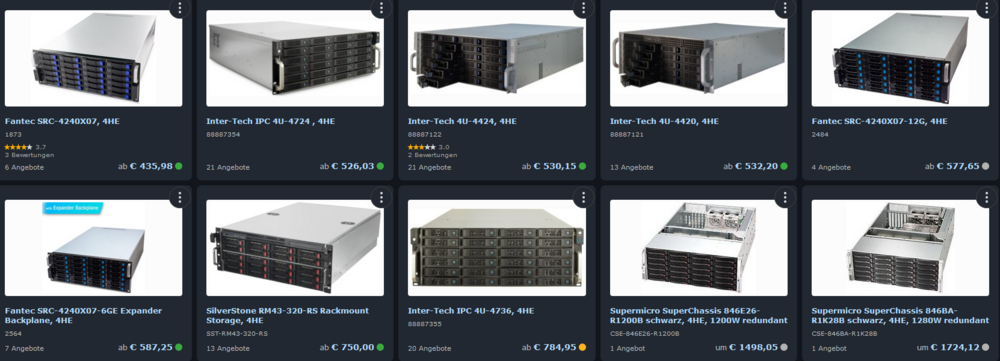
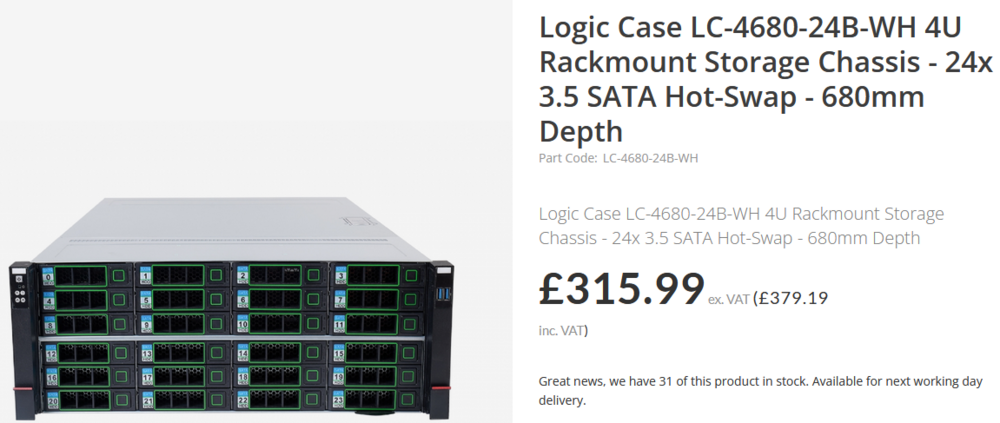
-
I am here because: see below I dunno but makes it realy hard to sponsor / donate since I fix this docker - use it a day - leave it a few weeks - then it breaks in some way again and again. Realy frustrating and I am just too lazy to go through the alternatives with hours of setup. but at the end I spend hours with this docker too. 😑 makemkvcon: /lib/x86_64-linux-gnu/libc.so.6: version `GLIBC_2.33' not found (required by makemkvcon) makemkvcon: /lib/x86_64-linux-gnu/libc.so.6: version `GLIBC_2.34' not found (required by makemkvcon) open error: /dev/sr0 [read/write]: No such file or directory open error: /dev/sr0 [read/write]: No such file or directory Using this daily? Please sponsor me at https://github.com/sponsors/rix1337 - any amount counts! Using MakeMKV beta key: asdf Starting web ui 06.10.2024 15:04:42 : Starting Ripper. Optical Discs will be detected and ripped within 60 seconds. / 06.10.2024 15:04:42 : Unexpected makemkvcon output: 06.10.2024 15:04:42 : Disc type not recognized. / 06.10.2024 15:05:45 : Unexpected makemkvcon output: 06.10.2024 15:05:45 : Disc type not recognized. / 06.10.2024 15:06:49 : Unexpected makemkvcon output: 06.10.2024 15:06:49 : Disc type not recognized. / 06.10.2024 15:07:52 : Unexpected makemkvcon output: 06.10.2024 15:07:52 : Disc type not recognized. / 06.10.2024 15:08:55 : Unexpected makemkvcon output: 06.10.2024 15:08:55 : Too many bad responses, checking stopped.
-
As far as I understand it: it pulls new decryption keys from / of / for makemkv (blurays mainly). They get updated quite often = docker pull / update.
-
Hello folks, I can read corrected - no further action required. Still, since this is my first, I just would like to know if this is hinting towards faulty memory or just a successfull ECC correction, as it is meant to be? Forum search only returns more severe cases... Thank you! Aug 20 09:34:16 godzilla kernel: {1}[Hardware Error]: Hardware error from APEI Generic Hardware Error Source: 4 Aug 20 09:34:16 godzilla kernel: {1}[Hardware Error]: It has been corrected by h/w and requires no further action Aug 20 09:34:16 godzilla kernel: {1}[Hardware Error]: event severity: corrected Aug 20 09:34:16 godzilla kernel: {1}[Hardware Error]: Error 0, type: corrected Aug 20 09:34:16 godzilla kernel: {1}[Hardware Error]: fru_text: A1 Aug 20 09:34:16 godzilla kernel: {1}[Hardware Error]: section_type: memory error Aug 20 09:34:16 godzilla kernel: {1}[Hardware Error]: error_status: Storage error in DRAM memory (0x0000000000000400) Aug 20 09:34:16 godzilla kernel: {1}[Hardware Error]: physical_address: 0x0000000458f297c0 Aug 20 09:34:16 godzilla kernel: {1}[Hardware Error]: node:0 card:0 module:0 rank:1 bank:3 row:15129 column:88 Aug 20 09:34:16 godzilla kernel: {1}[Hardware Error]: error_type: 2, single-bit ECC Aug 20 09:34:16 godzilla kernel: mce: [Hardware Error]: Machine check events logged Aug 21 10:50:38 godzilla root: Fix Common Problems: Error: Machine Check Events detected on your server godzilla-diagnostics-20240821-1111.zip
-
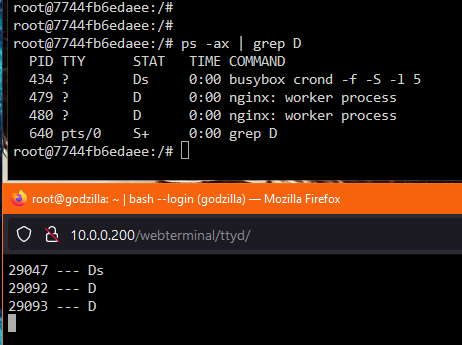
also guys monitor CPU load average in top and if processes get stuck with: unraid CLI: while [ 1 -eq 1 ]; do ps -ax | awk '{ print $1,"---", $3 }' | grep D | grep -v PID && sleep 2 && clear; done to monitor waiting processes PROCESS STATE CODES D uninterruptible sleep (usually IO) if lines appear and do not disappear, these processes build up and bring the system down, at least in my case. And with knowing which processes you can tell what docker is the reason - if it is a docker and if it is processes with status D.
-
to close this topic for now: a lot of processes between nextcloud-nginx and swag-nginx waiting for each other until everything is overwhelmed and unresponsive = CPU load avg rises into oblivion. And they were not killable! unraid CLI: while [ 1 -eq 1 ]; do ps -ax | awk '{ print $1,"---", $3 }' | grep D | grep -v PID && sleep 2 && clear; done to monitor waiting processes PROCESS STATE CODES D uninterruptible sleep (usually IO) I am trying do ditch nextcloud docker and all associated (postgres, swag, redis) and start anew with nextcloud-AIO. So not a specific fix since I have no clue why this happens. Also I want to change way too much around the whole infrastructure... switch, router, firewall etc. So I try nextcloud-AIO instead of fixing this (tried 15h+ I am not willing to invest more time since I do not see any light). ¯\_(ツ)_/¯ Wish me luck on my further journey.
-
I know, old post but I ended up here searching for something different, maybe others come across this too and I know the answer... so: unraid >> apps >> previous apps >> tick / mark what you want to remove >> delete button
-
to summarise many hours searching: Main issue is that nextcloud and swag docker are opening nginx processes again and again when communicating ,which all are waiting and nothing happens = load average rises. In this SYSLOG nextcloud stopped responding pretty exact at 21:45:00. Is it normal that everytime I start a docker-container that eth0=vethXYZ gets renamed? Like: May 22 21:16:00 godzilla kernel: eth0: renamed from veth2b5dd4d May 22 21:16:00 godzilla kernel: IPv6: ADDRCONF(NETDEV_CHANGE): vethca560dc: link becomes ready May 22 21:42:00 godzilla kernel: br-5d08daaed772: port 1(vethca560dc) entered disabled state May 22 21:42:00 godzilla kernel: veth2b5dd4d: renamed from eth0 May 22 21:42:00 godzilla rsyslogd: cannot connect to 10.0.0.200:514: Connection refused [v8.2102.0 try https://www.rsyslog.com/e/2027 ] May 22 21:42:00 godzilla kernel: br-5d08daaed772: port 1(vethca560dc) entered disabled state May 22 21:42:00 godzilla kernel: device vethca560dc left promiscuous mode May 22 21:42:00 godzilla kernel: br-5d08daaed772: port 1(vethca560dc) entered disabled state May 22 21:42:01 godzilla kernel: br-5d08daaed772: port 1(vethdd22d09) entered blocking state May 22 21:42:01 godzilla kernel: br-5d08daaed772: port 1(vethdd22d09) entered disabled state May 22 21:42:01 godzilla kernel: device vethdd22d09 entered promiscuous mode May 22 21:42:01 godzilla kernel: br-5d08daaed772: port 1(vethdd22d09) entered blocking state May 22 21:42:01 godzilla kernel: br-5d08daaed772: port 1(vethdd22d09) entered forwarding state May 22 21:42:01 godzilla kernel: eth0: renamed from veth777bb11 May 22 21:42:01 godzilla kernel: IPv6: ADDRCONF(NETDEV_CHANGE): vethdd22d09: link becomes ready May 22 21:44:27 godzilla kernel: br-5d08daaed772: port 1(vethdd22d09) entered disabled state May 22 21:44:27 godzilla rsyslogd: cannot connect to 10.0.0.200:514: Connection refused [v8.2102.0 try https://www.rsyslog.com/e/2027 ] May 22 21:44:27 godzilla kernel: veth777bb11: renamed from eth0 May 22 21:44:27 godzilla kernel: br-5d08daaed772: port 1(vethdd22d09) entered disabled state May 22 21:44:27 godzilla kernel: device vethdd22d09 left promiscuous mode May 22 21:44:27 godzilla kernel: br-5d08daaed772: port 1(vethdd22d09) entered disabled state May 22 21:45:39 godzilla kernel: br-5d08daaed772: port 1(veth47ec6af) entered blocking state May 22 21:45:39 godzilla kernel: br-5d08daaed772: port 1(veth47ec6af) entered disabled state May 22 21:45:39 godzilla kernel: device veth47ec6af entered promiscuous mode May 22 21:45:39 godzilla rsyslogd: cannot connect to 10.0.0.200:514: Connection refused [v8.2102.0 try https://www.rsyslog.com/e/2027 ] May 22 21:45:39 godzilla kernel: eth0: renamed from veth7c4d745 May 22 21:45:39 godzilla kernel: IPv6: ADDRCONF(NETDEV_CHANGE): veth47ec6af: link becomes ready May 22 21:45:39 godzilla kernel: br-5d08daaed772: port 1(veth47ec6af) entered blocking state May 22 21:45:39 godzilla kernel: br-5d08daaed772: port 1(veth47ec6af) entered forwarding state May 22 21:45:53 godzilla kernel: br-5d08daaed772: port 2(veth62fab02) entered blocking state May 22 21:45:53 godzilla kernel: br-5d08daaed772: port 2(veth62fab02) entered disabled state May 22 21:45:53 godzilla kernel: device veth62fab02 entered promiscuous mode May 22 21:45:53 godzilla kernel: eth0: renamed from veth018449d May 22 21:45:53 godzilla kernel: IPv6: ADDRCONF(NETDEV_CHANGE): veth62fab02: link becomes ready May 22 21:45:53 godzilla kernel: br-5d08daaed772: port 2(veth62fab02) entered blocking state May 22 21:45:53 godzilla kernel: br-5d08daaed772: port 2(veth62fab02) entered forwarding state What I found so far: 1. first issue I found was nginx worker process conf inside docker appdata was set to 56 - deleted is now 12 (6C/12T) 2. nginx processes are waiting indefinetly inside nexctloud & nginx after nextcloud gets started and used 3. nextcloud busybox crond is waiting indefinetly - still don't know why 4. nextcloud and swag have a huge amount of established connections I have a huge issue between nc and swag, yes - But what makes my head hurt the most is: I still don't see any reason for the array to stop responding, even over screen TTY I am currently trying to configure nextcloud as default as possible and try again. But this all feels so bad tbh
-
since the whole array is not responding when this happens I can not point the syslog server to a share (which is the only option beside writing to unraidUSB) I am currently trying to find a way to mirror /var/log/* to an unassigned SSD - I can pull out and connect to WinPC and post whatever is needed. Unfortunately all tutorials and posts I can find are outdated. Still searching how to mirror /var/log/* to the UD-SSD. When I figure that out I will start all dockers again to force the issue again and have updated logs. currently unraid is running fine with docker enabled but no dockers running.




