





gloeckle
Members
-
Joined
-
Last visited
Everything posted by gloeckle
-
Hello, pre-cleared 2 drives over 42h took array offline added the two new drives (new to array but used drives, hence why I wanted the stress test = zero issues) brought array online and Clear starts Unraid documentation here: https://docs.unraid.net/unraid-os/using-unraid-to/manage-storage/array/adding-disks-to-array/ says: "6. Start the array. Unraid will automatically start a clear operation on the new disk, filling it with zeros to ensure it's ready for use while maintaining data integrity. The clear operation runs in the background, so you can still access your array. The disk won't be usable until the process is complete. If you've pre-cleared the disk, Unraid skips this step." Well I can say that right now Clear is running right after I added the new disks. So unraid did not skip this step. I did not format the disks. I did exactly the steps above. Side 'annoyance': the log entries like "Buffer I/O error on dev md5p1, logical block 0, async page read" should be filtered if these are to ignore. Since this just raises eyebrows everytime for a normal user. I add disks maybe every few years and will not remember this and hopefully search for it and find that answer again before opening a ticket. You can not rely on a normal user to just know that after years. There should be measures to mitigate such tickets. googled and found this: https://forums.unraid.net/topic/137937-strange-errors-buffer-io-error/ Thank you. godzilla-diagnostics-20251213-0705.zip
-
no expert here but maybe someone can backup my suggestion. Unraid saves your data on your old disks readable just fine whereever you plug them in. It's Unraid after all ;) so you need to: poweroff your machine install the new drives unraid config > tools > new config setup your array with the new drives add your old drives through unassigned devices create shares copy your data
-
man, I love this so far! thanks so much for the great plugin!
-
very handy! Thanks guys. I can add something to this. The LSI9300-16i for example has 2 controllers. To show them with one command: ./storcli64 /c0-1 show temperature
-
Oh my ... you missed the opertunity to name it "New.Folder.View" 😆 If anyone already made that joke, I apologize.
-
Hello, more an FYI then a "please help" ... tldr: new, clean usb stick with unraid7 = can't set firsttime pwasswd. new, clean usb stick with unraid6 = no issues. I am soon switching to new hardware and wanted to run unraid with a new clean stick on it to see if there are any hardware hurdles and look around a bit. also memtest etc... So i just 1. downloaded usb-creatortool for WIN10 2. formatted a new 64GB stick to 12GB FAT32 3. let the usb-creator do it's thing with UNRAID 7 4. plugged it into my new server HW 5. booted fine and showed me the IP 6. back to my win-machine opened browser 7. got prompted with initial set root passwd (and re-enter) And here it just never did anything. my client-Winbrowser just loads indefinitely. Back on the server-HW I logged into with root and empty-pw and opened syslog. Nothing happens. no new logentries appear. nothing strange. Tried this a few times and then decided to wipe the USB, use the unRAIDServer-6.12.14-x86_64.zip and re-made the usb. works like a charm. So there might be an issue with the new unraid7.zip?! As long as I don't switch I can try some things if you want - let me know. Sure, could be something with the browser too, like I said if you want me to test some things.... Thanks for my favorite NAS-OS btw
-
EU? Anyway, you may find equivalent in your region with these models. Have a look at Intertech or Fantecs: https://geizhals.de/?cat=geh19&xf=902_20 interesting UK shop: https://www.servercase.co.uk/shop/server-cases/rackmount/4u-chassis/logic-case-lc-4680-16b-wh-4u-rackmount-storage-chassis---16x-35-sata-hot-swap---680mm-depth-lc-4680-16b-wh/ https://www.servercase.co.uk/shop/server-cases/rackmount/4u-chassis/logic-case-lc-4680-24b-wh-4u-rackmount-storage-chassis---24x-35-sata-hot-swap---680mm-depth-lc-4680-24b-wh/
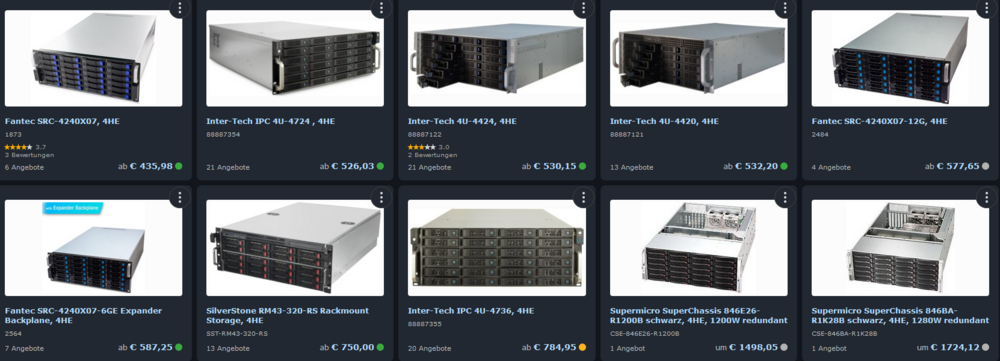
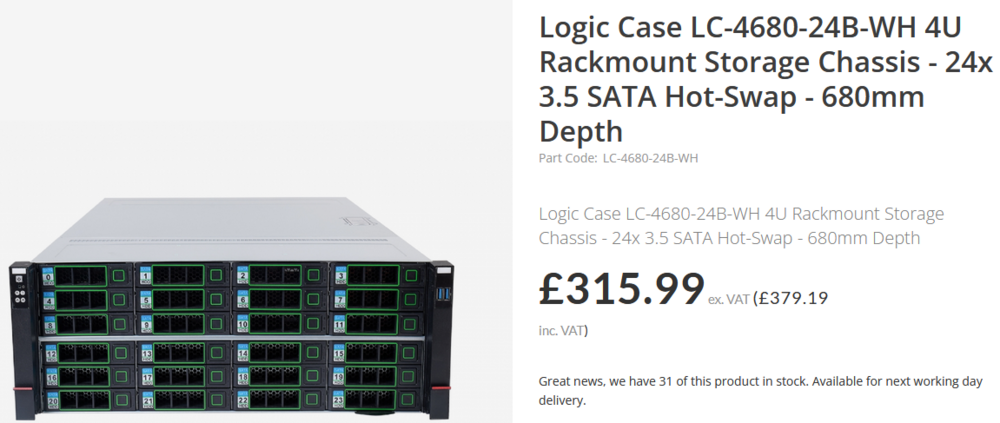
-
I am here because: see below I dunno but makes it realy hard to sponsor / donate since I fix this docker - use it a day - leave it a few weeks - then it breaks in some way again and again. Realy frustrating and I am just too lazy to go through the alternatives with hours of setup. but at the end I spend hours with this docker too. 😑 makemkvcon: /lib/x86_64-linux-gnu/libc.so.6: version `GLIBC_2.33' not found (required by makemkvcon) makemkvcon: /lib/x86_64-linux-gnu/libc.so.6: version `GLIBC_2.34' not found (required by makemkvcon) open error: /dev/sr0 [read/write]: No such file or directory open error: /dev/sr0 [read/write]: No such file or directory Using this daily? Please sponsor me at https://github.com/sponsors/rix1337 - any amount counts! Using MakeMKV beta key: asdf Starting web ui 06.10.2024 15:04:42 : Starting Ripper. Optical Discs will be detected and ripped within 60 seconds. / 06.10.2024 15:04:42 : Unexpected makemkvcon output: 06.10.2024 15:04:42 : Disc type not recognized. / 06.10.2024 15:05:45 : Unexpected makemkvcon output: 06.10.2024 15:05:45 : Disc type not recognized. / 06.10.2024 15:06:49 : Unexpected makemkvcon output: 06.10.2024 15:06:49 : Disc type not recognized. / 06.10.2024 15:07:52 : Unexpected makemkvcon output: 06.10.2024 15:07:52 : Disc type not recognized. / 06.10.2024 15:08:55 : Unexpected makemkvcon output: 06.10.2024 15:08:55 : Too many bad responses, checking stopped.
-
As far as I understand it: it pulls new decryption keys from / of / for makemkv (blurays mainly). They get updated quite often = docker pull / update.
-
Hello folks, I can read corrected - no further action required. Still, since this is my first, I just would like to know if this is hinting towards faulty memory or just a successfull ECC correction, as it is meant to be? Forum search only returns more severe cases... Thank you! Aug 20 09:34:16 godzilla kernel: {1}[Hardware Error]: Hardware error from APEI Generic Hardware Error Source: 4 Aug 20 09:34:16 godzilla kernel: {1}[Hardware Error]: It has been corrected by h/w and requires no further action Aug 20 09:34:16 godzilla kernel: {1}[Hardware Error]: event severity: corrected Aug 20 09:34:16 godzilla kernel: {1}[Hardware Error]: Error 0, type: corrected Aug 20 09:34:16 godzilla kernel: {1}[Hardware Error]: fru_text: A1 Aug 20 09:34:16 godzilla kernel: {1}[Hardware Error]: section_type: memory error Aug 20 09:34:16 godzilla kernel: {1}[Hardware Error]: error_status: Storage error in DRAM memory (0x0000000000000400) Aug 20 09:34:16 godzilla kernel: {1}[Hardware Error]: physical_address: 0x0000000458f297c0 Aug 20 09:34:16 godzilla kernel: {1}[Hardware Error]: node:0 card:0 module:0 rank:1 bank:3 row:15129 column:88 Aug 20 09:34:16 godzilla kernel: {1}[Hardware Error]: error_type: 2, single-bit ECC Aug 20 09:34:16 godzilla kernel: mce: [Hardware Error]: Machine check events logged Aug 21 10:50:38 godzilla root: Fix Common Problems: Error: Machine Check Events detected on your server godzilla-diagnostics-20240821-1111.zip
-
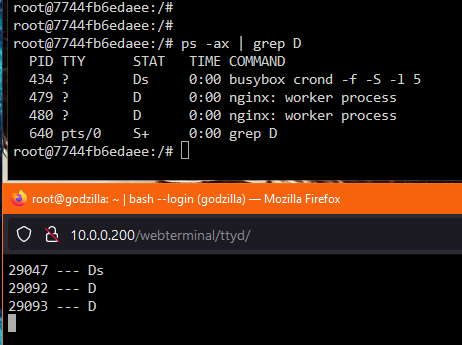
also guys monitor CPU load average in top and if processes get stuck with: unraid CLI: while [ 1 -eq 1 ]; do ps -ax | awk '{ print $1,"---", $3 }' | grep D | grep -v PID && sleep 2 && clear; done to monitor waiting processes PROCESS STATE CODES D uninterruptible sleep (usually IO) if lines appear and do not disappear, these processes build up and bring the system down, at least in my case. And with knowing which processes you can tell what docker is the reason - if it is a docker and if it is processes with status D.
-
to close this topic for now: a lot of processes between nextcloud-nginx and swag-nginx waiting for each other until everything is overwhelmed and unresponsive = CPU load avg rises into oblivion. And they were not killable! unraid CLI: while [ 1 -eq 1 ]; do ps -ax | awk '{ print $1,"---", $3 }' | grep D | grep -v PID && sleep 2 && clear; done to monitor waiting processes PROCESS STATE CODES D uninterruptible sleep (usually IO) I am trying do ditch nextcloud docker and all associated (postgres, swag, redis) and start anew with nextcloud-AIO. So not a specific fix since I have no clue why this happens. Also I want to change way too much around the whole infrastructure... switch, router, firewall etc. So I try nextcloud-AIO instead of fixing this (tried 15h+ I am not willing to invest more time since I do not see any light). ¯\_(ツ)_/¯ Wish me luck on my further journey.
-
I know, old post but I ended up here searching for something different, maybe others come across this too and I know the answer... so: unraid >> apps >> previous apps >> tick / mark what you want to remove >> delete button
-
to summarise many hours searching: Main issue is that nextcloud and swag docker are opening nginx processes again and again when communicating ,which all are waiting and nothing happens = load average rises. In this SYSLOG nextcloud stopped responding pretty exact at 21:45:00. Is it normal that everytime I start a docker-container that eth0=vethXYZ gets renamed? Like: May 22 21:16:00 godzilla kernel: eth0: renamed from veth2b5dd4d May 22 21:16:00 godzilla kernel: IPv6: ADDRCONF(NETDEV_CHANGE): vethca560dc: link becomes ready May 22 21:42:00 godzilla kernel: br-5d08daaed772: port 1(vethca560dc) entered disabled state May 22 21:42:00 godzilla kernel: veth2b5dd4d: renamed from eth0 May 22 21:42:00 godzilla rsyslogd: cannot connect to 10.0.0.200:514: Connection refused [v8.2102.0 try https://www.rsyslog.com/e/2027 ] May 22 21:42:00 godzilla kernel: br-5d08daaed772: port 1(vethca560dc) entered disabled state May 22 21:42:00 godzilla kernel: device vethca560dc left promiscuous mode May 22 21:42:00 godzilla kernel: br-5d08daaed772: port 1(vethca560dc) entered disabled state May 22 21:42:01 godzilla kernel: br-5d08daaed772: port 1(vethdd22d09) entered blocking state May 22 21:42:01 godzilla kernel: br-5d08daaed772: port 1(vethdd22d09) entered disabled state May 22 21:42:01 godzilla kernel: device vethdd22d09 entered promiscuous mode May 22 21:42:01 godzilla kernel: br-5d08daaed772: port 1(vethdd22d09) entered blocking state May 22 21:42:01 godzilla kernel: br-5d08daaed772: port 1(vethdd22d09) entered forwarding state May 22 21:42:01 godzilla kernel: eth0: renamed from veth777bb11 May 22 21:42:01 godzilla kernel: IPv6: ADDRCONF(NETDEV_CHANGE): vethdd22d09: link becomes ready May 22 21:44:27 godzilla kernel: br-5d08daaed772: port 1(vethdd22d09) entered disabled state May 22 21:44:27 godzilla rsyslogd: cannot connect to 10.0.0.200:514: Connection refused [v8.2102.0 try https://www.rsyslog.com/e/2027 ] May 22 21:44:27 godzilla kernel: veth777bb11: renamed from eth0 May 22 21:44:27 godzilla kernel: br-5d08daaed772: port 1(vethdd22d09) entered disabled state May 22 21:44:27 godzilla kernel: device vethdd22d09 left promiscuous mode May 22 21:44:27 godzilla kernel: br-5d08daaed772: port 1(vethdd22d09) entered disabled state May 22 21:45:39 godzilla kernel: br-5d08daaed772: port 1(veth47ec6af) entered blocking state May 22 21:45:39 godzilla kernel: br-5d08daaed772: port 1(veth47ec6af) entered disabled state May 22 21:45:39 godzilla kernel: device veth47ec6af entered promiscuous mode May 22 21:45:39 godzilla rsyslogd: cannot connect to 10.0.0.200:514: Connection refused [v8.2102.0 try https://www.rsyslog.com/e/2027 ] May 22 21:45:39 godzilla kernel: eth0: renamed from veth7c4d745 May 22 21:45:39 godzilla kernel: IPv6: ADDRCONF(NETDEV_CHANGE): veth47ec6af: link becomes ready May 22 21:45:39 godzilla kernel: br-5d08daaed772: port 1(veth47ec6af) entered blocking state May 22 21:45:39 godzilla kernel: br-5d08daaed772: port 1(veth47ec6af) entered forwarding state May 22 21:45:53 godzilla kernel: br-5d08daaed772: port 2(veth62fab02) entered blocking state May 22 21:45:53 godzilla kernel: br-5d08daaed772: port 2(veth62fab02) entered disabled state May 22 21:45:53 godzilla kernel: device veth62fab02 entered promiscuous mode May 22 21:45:53 godzilla kernel: eth0: renamed from veth018449d May 22 21:45:53 godzilla kernel: IPv6: ADDRCONF(NETDEV_CHANGE): veth62fab02: link becomes ready May 22 21:45:53 godzilla kernel: br-5d08daaed772: port 2(veth62fab02) entered blocking state May 22 21:45:53 godzilla kernel: br-5d08daaed772: port 2(veth62fab02) entered forwarding state What I found so far: 1. first issue I found was nginx worker process conf inside docker appdata was set to 56 - deleted is now 12 (6C/12T) 2. nginx processes are waiting indefinetly inside nexctloud & nginx after nextcloud gets started and used 3. nextcloud busybox crond is waiting indefinetly - still don't know why 4. nextcloud and swag have a huge amount of established connections I have a huge issue between nc and swag, yes - But what makes my head hurt the most is: I still don't see any reason for the array to stop responding, even over screen TTY I am currently trying to configure nextcloud as default as possible and try again. But this all feels so bad tbh
-
since the whole array is not responding when this happens I can not point the syslog server to a share (which is the only option beside writing to unraidUSB) I am currently trying to find a way to mirror /var/log/* to an unassigned SSD - I can pull out and connect to WinPC and post whatever is needed. Unfortunately all tutorials and posts I can find are outdated. Still searching how to mirror /var/log/* to the UD-SSD. When I figure that out I will start all dockers again to force the issue again and have updated logs. currently unraid is running fine with docker enabled but no dockers running.
-
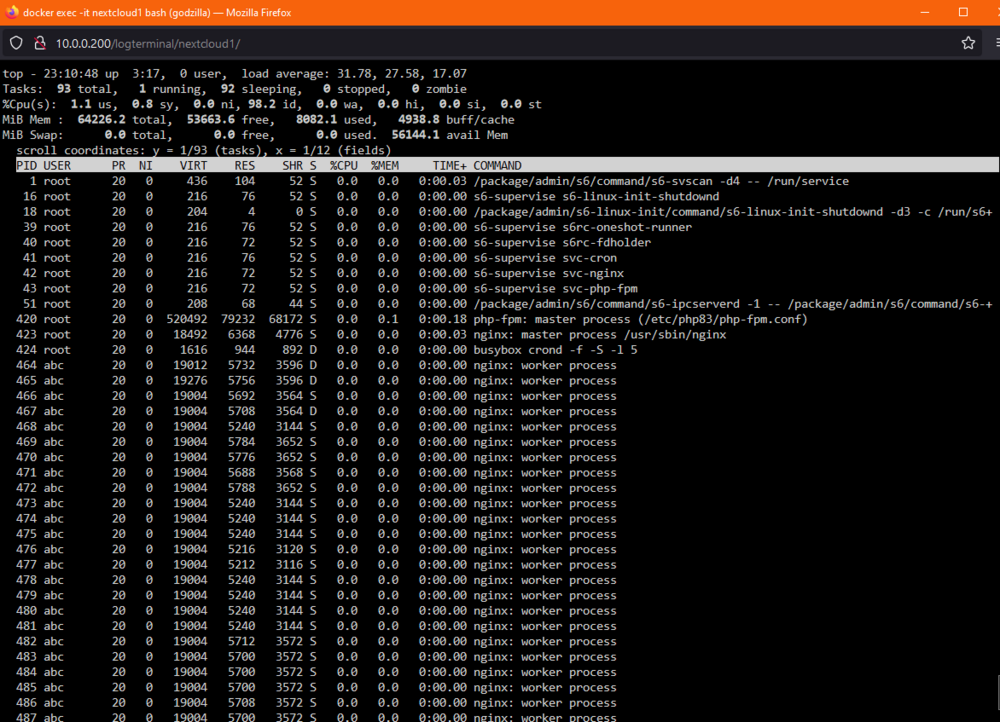
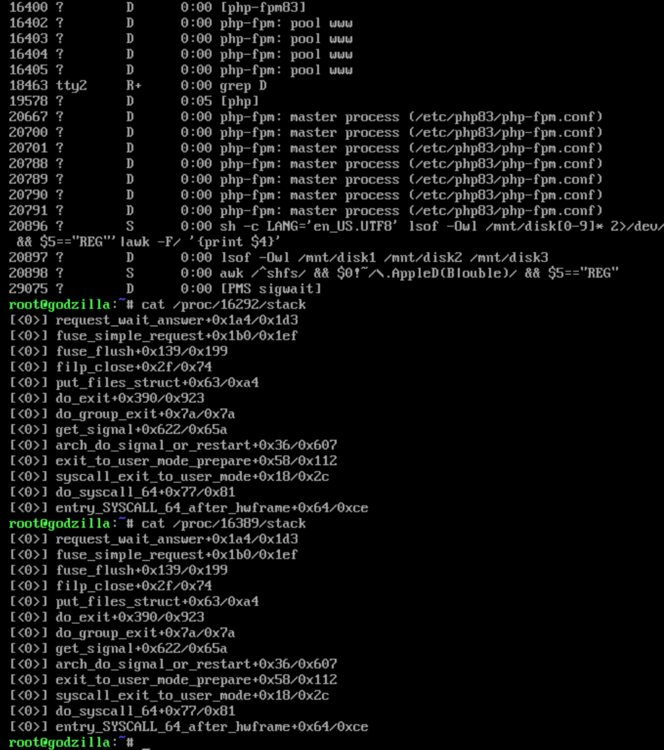
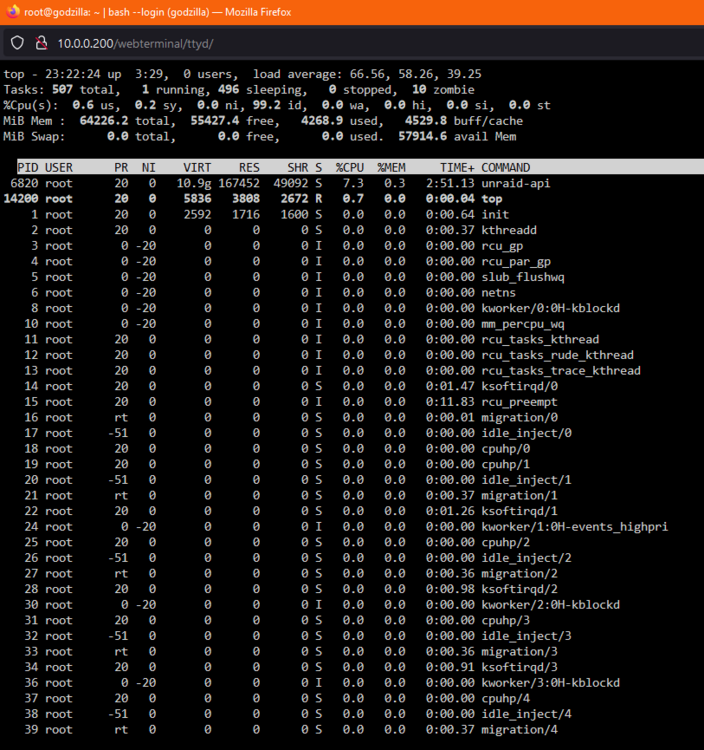
seemingly exact same issue?! load average inside nextcloud LSIO docker: 32 rising load average outside in unraid: 42 rising - suspended processes - docker deamon killed with unraid load average of 66+ - nginx root process with 70+ sub process waiting for I/O - php-fpm root process with 23 sub process waiting for I/O - after reboot I paused parity check caused by my cold boot - istat showed 2.5TB on sda sdb ... from parity check I guess. - any command towards array freezes = opened new tty* - reboot hangs in Forcing shutdown since 15 mins - oh and no: diagnostics did not work leaving it for 1h+ running in one tty. - writing a file to /boot/ was no issue a way more linux experienced friend guided me through a lot of stuff - see screens. Sorry but can not copy IDRAC remote screen. I restart now without any docker and have a look tomorrow what load average tells me when no dockers have been started.
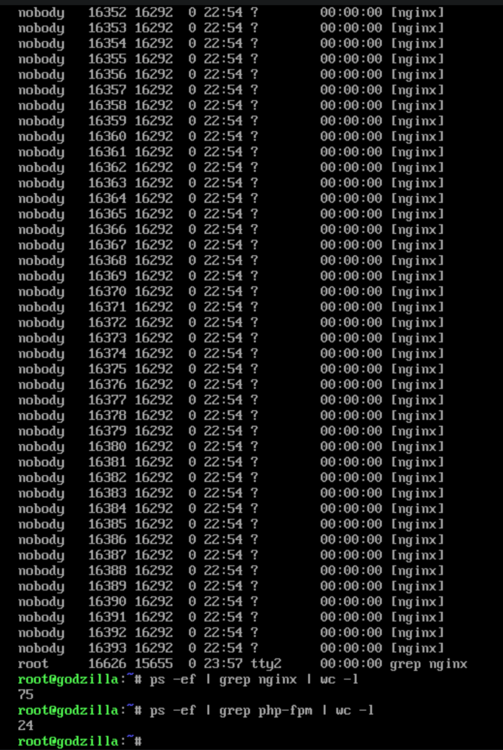
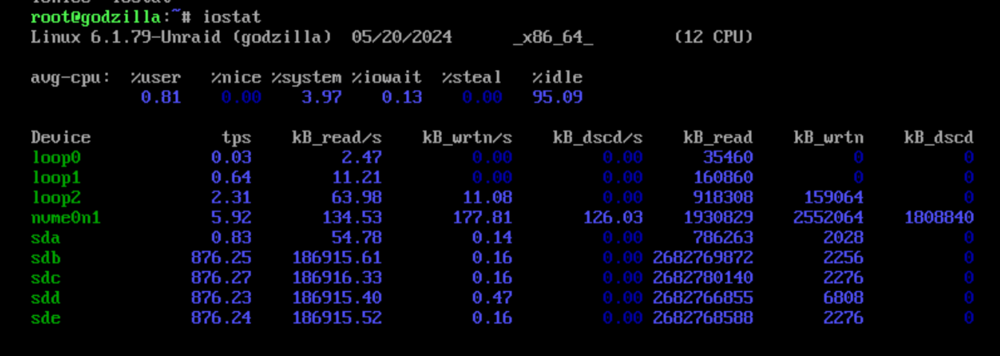
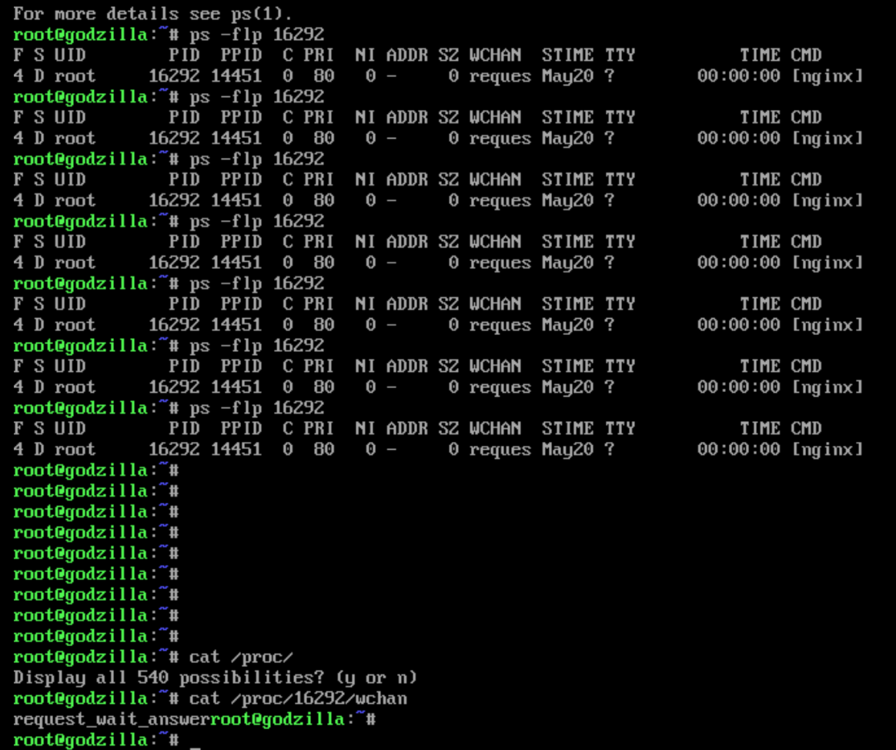
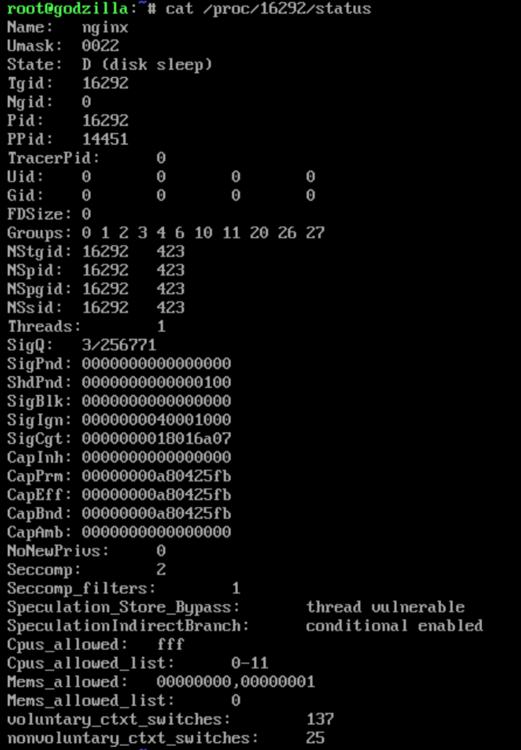
-
could be that my issue is connected to this here. See:
-
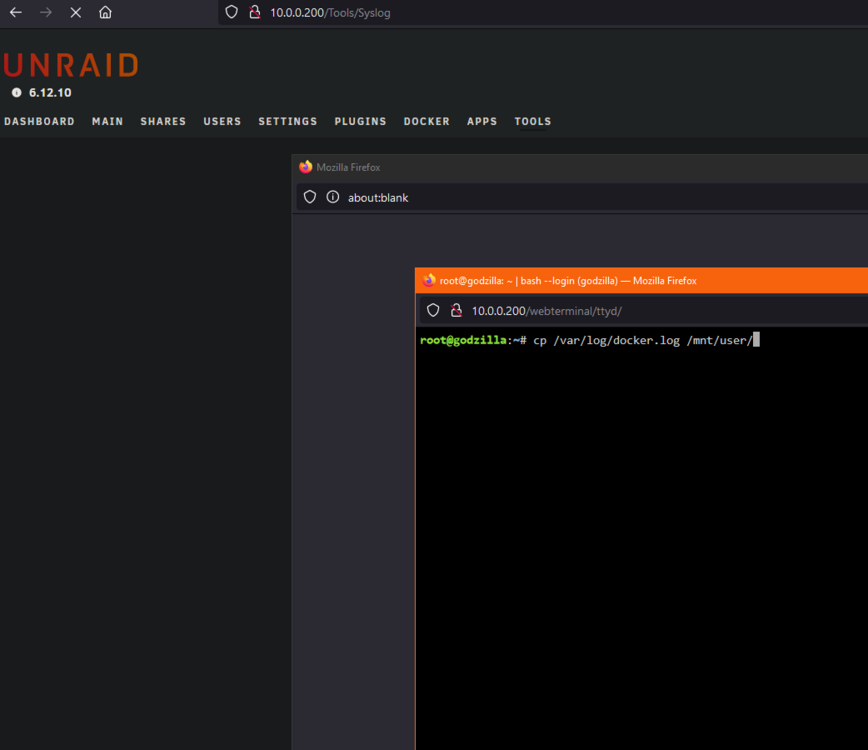
Hello, The following happened in order: 1. my nextcloud was not reachable anymore 2. restart nextcloud container = Server Error 3. clicked on unraid gui >> tools to view syslog page only loads the frame/menu rest is empty and keeps loading 4. server pings 5. web terminal opens, I type "cd /var/us" <TAB> 6. cursor keeps blinking no autotap completions happens; CTRL+C or typing anyhting = nothing happens clock shows 19:31 at this moment (docker logs below per idrac I opened about 19:40) 7. opened iDrac where I am still logged in 8. top shows me nothing fancy. plex is doing its thing overall 1-8% CPU, list change like normal also iDrac Thermals 36°C 9. nano syslog shows me 2 mins after my freeze (timestamp: 19:33) that USB / HID device disconnects no clue tbh maybe my usb dongle from wifi keyboard timed out but it was 2 mins after freeze. Besides that about 10 mins before no entries 10. opened nano docker.log last entries 2h ago were i updated my dockers 11. still in idrac terminal I try to copy the logs typing "cp /var/user/log/*.* /mnt/user/" <TAB> same freeze as before per webterminal. Cursor keeps blinking no further inputs get recognized. 12. had to hardreset per iDrac and that where the diagnostics come from. I noticed another forum post which may be connected: Server (DELL r730xd) is new / I just moved to. 15h RAM check via unraid memtest 3 passes 0 errors. Also I just recreated docker.img and re-installed all dockers via templates. Like 3 boots before. Had it running like 2 days without issues, just racked it today. godzilla-diagnostics-20240520-1956.zip

-
404 Any notes on the lifetime / your experience? still using the samsung to sdcard adapter after years? Thanks for letting me know.
-
Hello, TLDR: A: custom build: better power efficiency, quieter, with way less features, more expensive, non ECC-RAM or B: DELL R730XD solid features, solid case, less perfomant, more power, more noise What I run currently: HPE DL380 gen9 (modded firmware) I hate it -.- toooo much Power! mostly idle, no VMs, ~20 dockers, Plex, Nextcloud, NVIDIA P2000 I am struggling to decide between the following. A: DELL R730XD, single cpu, single PSU, 12x LFF, iDRAC, 2x10Gb 2x1Gb LAN, ECC DDR4 still not sure if I should go for an L CPU to save some power or not ~1100€ B: intel i5-12600K, non-ECC RAM, iGPU ASRock Z690 PG Riptide (8x SATA, 2.5Gb LAN, 2xM.2, 1x16x 1x4x 2x1x PCIe) 19" Case?! with a nice case (EU) >1200€ I want to utalize 1x GPU currently an NVIDIA P2000 for PLEX. the DELL can handle it with CPU1 in 2 risers. So that should not be an issue. The DELL is basically an all in one package minus NVMe support which can be easaly fixed with a pcie-card. It has iDRAC and a pretty perfect case. But I guess the i5-12600k would be more performant, less power, has a quicksync GPU (not sure if I use it in the future) and will be way more power efficient. Power and performance wise I would really like to try the custom B build but to get a nice 19" case in EU is a pain and very quickly get more expensive than the DELL. But it would be way more efficient and quiter since it is in my entrance ~6m away from my desk inside a 20U Rack. So...
-
https://imgur.com/gallery/5UK7gRW got too much money hm? Well that board already got 8x SATA and you want to add LSI controllers to expand it even further? that case has 12xLFF. In that price range maybe consider a refurbished DELL R740xd
-
Thank you JorgeB. 28h MEMTest with 0 errors and I will convert the cache to ZFS the next days. Also want to try out other hardware. I realy hope this does not happen again it ran 1.5y pretty flaweless. cheers!
-
update: root@godzilla:~# umount -l /dev/loop2 root@godzilla:~# dmsetup info No devices found root@godzilla:~# umount -l /dev/loop2 again fixed it. 🤷♀️ Scrub started: Sat Dec 30 00:15:52 2023 Status: finished Duration: 0:00:13 Total to scrub: 7.56GiB Rate: 595.68MiB/s Error summary: no errors found Everything is running again. Still, if anybody could tell me why my cache went read only that would be great! Because I do not trust it it right now
-
Hello, a few weeks back I tried those unraid dashboard dockers which resulkted in full cache / nvme pretty quick. also I felt not realy confident with running them privileged and all I wanted was traffic per docker. All this overkill and issues with the cache led me to relatively quickly uninstall them again and use vnstat. since then I had I think one reboot and so far no issues - everything running fine. Today I watched some stuff via plex as suddently my connection did not work anymore. Log is spammed with: Dec 29 22:19:05 godzilla kernel: BTRFS error (device nvme0n1p1: state EA): parent transid verify failed on logical 1557527003136 mirror 1 wanted 1799110 found 1794281 Cache ist at 61GB / 1TB read only it seems. root@godzilla:~# btrfs dev stats /mnt/cache [/dev/nvme0n1p1].write_io_errs 0 [/dev/nvme0n1p1].read_io_errs 0 [/dev/nvme0n1p1].flush_io_errs 0 [/dev/nvme0n1p1].corruption_errs 0 [/dev/nvme0n1p1].generation_errs 0 I then tried to scrub the docker BTRFS without luck - aborted - no entry in the log. Where do I see why? Then I try to stop the array and it can not stop the array because: Dec 29 22:25:57 godzilla emhttpd: Unmounting disks... Dec 29 22:25:57 godzilla emhttpd: shcmd (5519207): umount /mnt/cache Dec 29 22:25:57 godzilla root: umount: /mnt/cache: target is busy. Dec 29 22:25:57 godzilla emhttpd: shcmd (5519207): exit status: 32 Dec 29 22:25:57 godzilla emhttpd: Retry unmounting disk share(s)... This is now ongoing for 25 mins + and I do not know what I should do godzilla-diagnostics-20231229-2243.zip
-
Hello everyone, yes I am total NEWB here and yes this is my first post. I am currently in the findy-my-way-around phase of building my first server. So my question here is: How to setup unraid caches/shares/pools in the easiest way possible for me to expand and get the most benefits out of? My main concern at the moment: I followed Spaceinvader One's unraid guide, which is great, but when it comes to assigning shares/pools/caches I ask myself: is it worth that much of hassle? Especially in my use case. Every time I add or swap an HDD I do not want to make a road-map what goes where when cached where and how and make a chart and study it for an hour before deciding. Also I think that the way he does it, leads to some limits for specific use cases. So he limits movies on 1 pool and dockers on the other... My thinking is exactly the opposite: I want a server wich expands by itself when I add capacity as good as possible. Of course I see the benefits like faster VMs, which is not important to me. Longer lifespan of HDDs, which is nice. Less power because of standby drives etc... But again: I do not want to print a road-map every time something changes and mess things up. So again: How to setup unraid caches/shares/pools in the easiest way possible for me to expand and get the most benefits out of? __hardware server HPE DL380 gen9 12xLFF Intel® Xeon® CPU E5-2630L v3 @ 1.80GHz 8c/16t RAM DDR4 2x16GB ECC P140i controller currently for testing / will upgrade later when I know that I will keep this machine __available HDDs 1x 60GB SSD 1x 256GB NVME 4x 2TB SATA 4x 3TB SATA + buying one or two new 1TB SSDs for bigger cache drives is not a problem __what I want to do I want an AIO solution for - private cloud friends and family - plex media server - syncthing - nextcloud - jdown2 ++ etc... - VMs but very limited use cases. likely will start them when I need them. 1 to 2 max. I think ignorable for now Thank you very much for your time and helping me design my homelab!






