





Shizlminizel
Members
-
Joined
-
Last visited
-
4 out of 5 Unraids updated without issues. One (the big boy) has API errors now.
-
create a docker network in shell first and switch from Host to your created network open shell: docker network create yourawesomenetwork
-
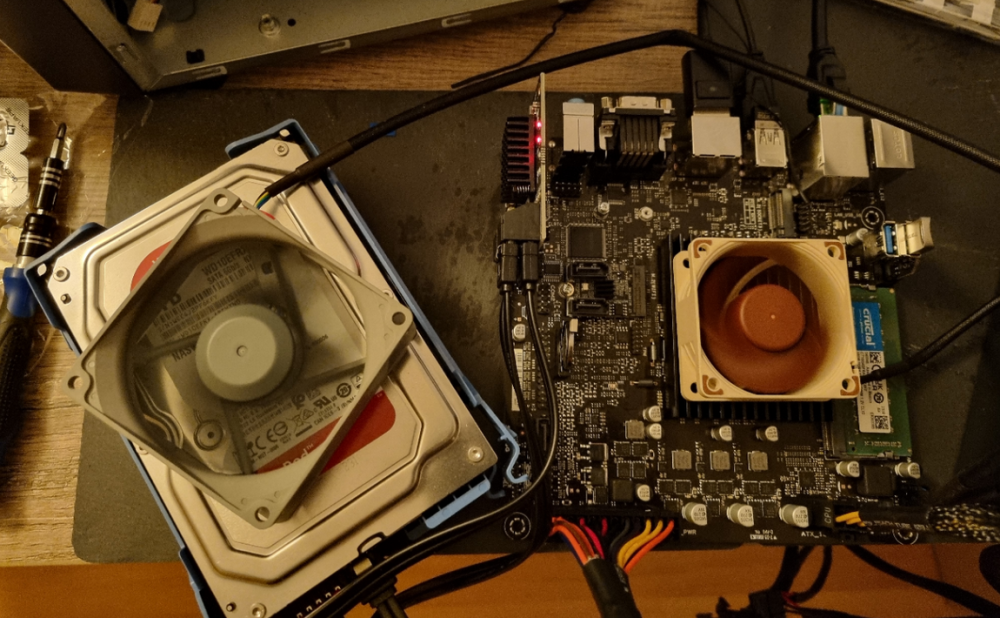
... ach unwesentlich Mich würde mal ein Test mit der T Reihe interessieren, da ich mein Hauptsystem von i5 12400 auf i5 13500T upgraden will. by the way die QNINE M.2 NVME SATA 3.0 Karte (Amazon) hat 1 SATA mehr und läuft jetzt bei mir. Kein Mehrverbrauch festzustellen (abgesehen von den Platten die jetzt drankommen) und wem das nicht reicht es gibt auch 2 Port Adapter um den ungenutzten M.2 E für WIFI als SATA zu nutzen auch der Funktioniert tadelos.
-
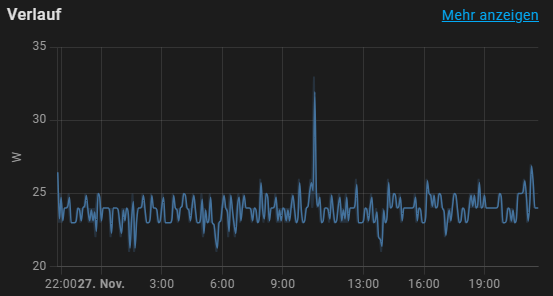
@mgutt mal so ne Frage zu deinem Testsystem, welche CPU hast du denn da beim Test auf dem Board? Spiele grade selber ein bisschen ein schönes Stromsparsystem aufzubauen und selbst ein SOC -> ASUS Prime N100I-D D4 liegt bei mir bei 23W
-
And of course: Thanks @JorgeB for your support.
-
I´ll go ahead and mark as solved as the workaround to use exclude instead of an array of included disks solved the issue.
-
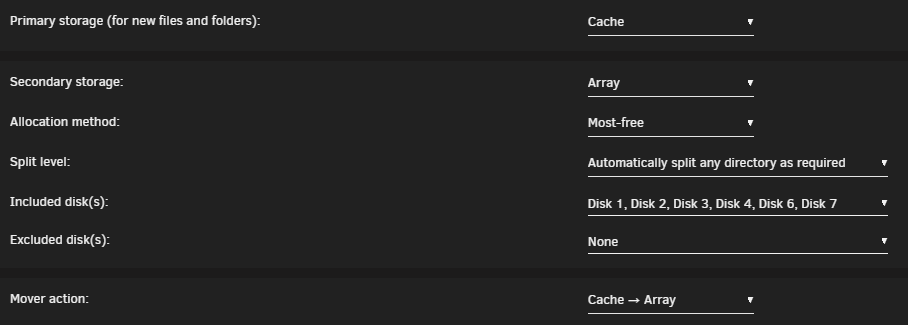
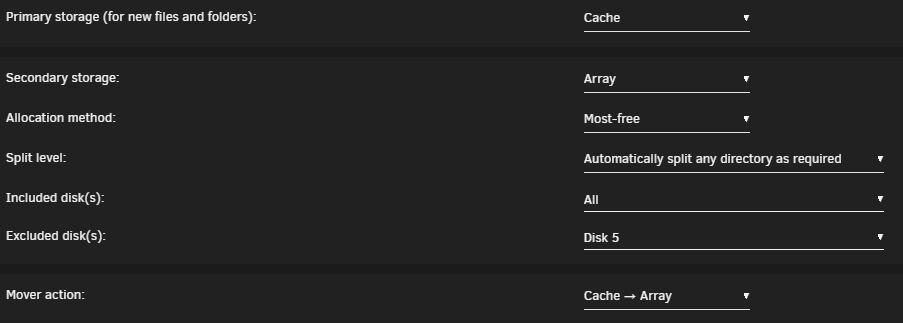
So it seem to work now. And it was not the missing dataset but I will fix that anyway. changed from: to and now mover picked the empty disk. So it seems like mover does not like it when a disk is missing in included.
-
Well no clue why it is not working on my system. I am currently trying to free up one disk to see if mover will pick this up once it is empty. But that takes some time to move 6TB with unbalance
-
Well it seems so when I look on the other 2 systems: working: root@Q-SHIZL:~# zfs list NAME USED AVAIL REFER MOUNTPOINT cache 286G 1.48T 120K /mnt/cache cache/Backup-Repository 283G 1.48T 283G /mnt/cache/Backup-Repository cache/appdata 52.3M 1.48T 52.3M /mnt/cache/appdata cache/domains 96K 1.48T 96K /mnt/cache/domains cache/isos 96K 1.48T 96K /mnt/cache/isos cache/system 2.78G 1.48T 2.78G /mnt/cache/system disk1 640G 2.89T 112K /mnt/disk1 disk1/Backup-Repository 177G 2.89T 177G /mnt/disk1/Backup-Repository disk1/backup-pve 170G 2.89T 170G /mnt/disk1/backup-pve disk1/data 294G 2.89T 294G /mnt/disk1/data disk1/documents 49.7M 2.89T 49.7M /mnt/disk1/documents disk2 158G 3.36T 104K /mnt/disk2 disk2/Backup-Repository 96K 3.36T 96K /mnt/disk2/Backup-Repository disk2/backup-pve 11.9G 3.36T 11.9G /mnt/disk2/backup-pve disk2/data 146G 3.36T 146G /mnt/disk2/data disk3 426G 3.10T 112K /mnt/disk3 disk3/Backup-Repository 271G 3.10T 271G /mnt/disk3/Backup-Repository disk3/backup-pve 96K 3.10T 96K /mnt/disk3/backup-pve disk3/data 155G 3.10T 155G /mnt/disk3/data disk3/documents 152K 3.10T 96K /mnt/disk3/documents and not working: root@Q-ARTM:~# zfs list NAME USED AVAIL REFER MOUNTPOINT cache 849M 898G 104K /mnt/cache cache/appdata 3.81M 898G 3.81M /mnt/cache/appdata cache/backup-tailscale 96K 898G 96K /mnt/cache/backup-tailscale cache/system 814M 898G 814M /mnt/cache/system disk1 522G 4.82T 521G /mnt/disk1 disk1/backup-appdata 109M 4.82T 109M /mnt/disk1/backup-appdata disk2 3.27M 1.76T 96K /mnt/disk2 disk3 3.25M 1.76T 96K /mnt/disk3 so mover seem to be strugeling if you create folders manualy on disk before mover creates the datasets somehow...
-
do you have refering dataset on the disks? Maybe that is my problem as I filled those disks up before creating the root datasets with unbalance: root@yoda:/mnt/cache# zfs list NAME USED AVAIL REFER MOUNTPOINT cache 300G 1.46T 144K /mnt/cache cache/Backup-Repository 96K 1.46T 96K /mnt/cache/Backup-Repository cache/appdata 23.8G 1.46T 23.8G /mnt/cache/appdata cache/backup-pve 96K 1.46T 96K /mnt/cache/backup-pve cache/bootcds 96K 1.46T 96K /mnt/cache/bootcds cache/data 3.77G 1.46T 3.77G /mnt/cache/data cache/domains 96K 1.46T 96K /mnt/cache/domains cache/downloads 96K 1.46T 96K /mnt/cache/downloads cache/secure 223G 1.46T 223G /mnt/cache/secure cache/system 32.5G 1.46T 32.5G /mnt/cache/system cache/transcode 16.9G 1.46T 16.9G /mnt/cache/transcode disk1 4.87T 2.27T 4.87T /mnt/disk1 disk2 5.43T 1.71T 5.43T /mnt/disk2 disk3 4.44T 2.70T 4.44T /mnt/disk3 disk4 4.62T 2.52T 4.61T /mnt/disk4 disk4/testshare 19.2G 2.52T 19.2G /mnt/disk4/testshare disk6 7.68T 1.29T 96K /mnt/disk6 disk6/data 7.68T 1.29T 7.68T /mnt/disk6/data disk7 7.60T 1.36T 96K /mnt/disk7 disk7/data 7.60T 1.36T 7.60T /mnt/disk7/data
-
It is not set at the other shares. Only include is set on the system.
-
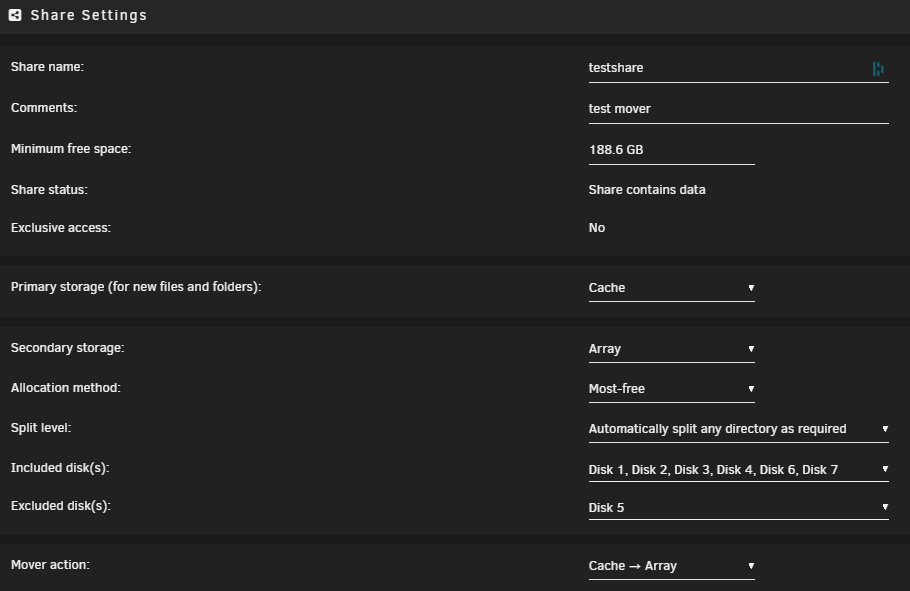
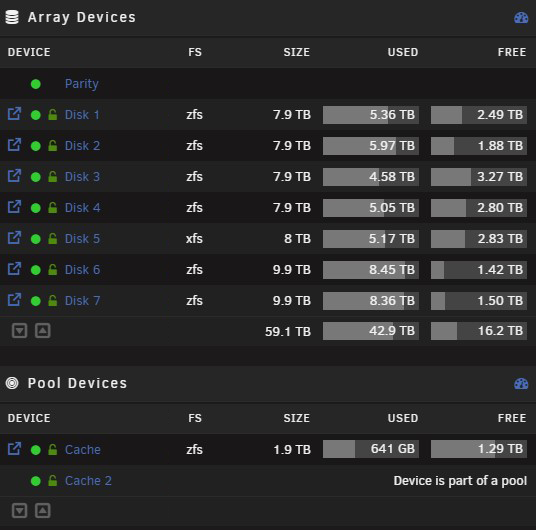
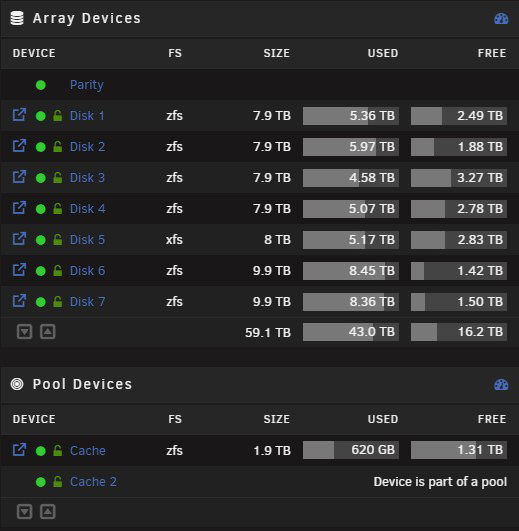
I am on the latest branch 6.12.4 invoked mover to have cache cleared created testshare and enabled mover logging: copied ~20GB to the folder over SMB invoked mover again before: and after (images croped for visibility) so it went again to disk 4 instead of most free disk 3 mover logs: Sep 28 11:16:02 unraid shfs: /usr/sbin/zfs create 'cache/testshare' Sep 28 11:24:12 unraid emhttpd: shcmd (1409): /usr/local/sbin/mover |& logger -t move & Sep 28 11:24:12 unraid move: mover: started Sep 28 11:24:12 unraid shfs: /usr/sbin/zfs unmount 'cache/Backup-Repository' Sep 28 11:24:12 unraid shfs: /usr/sbin/zfs destroy 'cache/Backup-Repository' Sep 28 11:24:12 unraid root: cannot destroy 'cache/Backup-Repository': dataset is busy Sep 28 11:24:12 unraid shfs: retval: 1 attempting 'destroy' Sep 28 11:24:12 unraid shfs: /usr/sbin/zfs mount 'cache/Backup-Repository' Sep 28 11:24:12 unraid shfs: /usr/sbin/zfs unmount 'cache/bootcds' Sep 28 11:24:12 unraid shfs: /usr/sbin/zfs destroy 'cache/bootcds' Sep 28 11:24:12 unraid root: cannot destroy 'cache/bootcds': dataset is busy Sep 28 11:24:12 unraid shfs: retval: 1 attempting 'destroy' Sep 28 11:24:12 unraid shfs: /usr/sbin/zfs mount 'cache/bootcds' Sep 28 11:24:12 unraid move: error: move, 380: No such file or directory (2): lstat: /mnt/cache/data/media/down/mega/B/folder Sep 28 11:24:12 unraid move: skip: /mnt/cache/data/down/folder/nextfolder/file1.mp4 Sep 28 11:24:12 unraid move: skip: /mnt/cache/data/down/folder/nextfolder/file2.mp4 Sep 28 11:24:12 unraid move: skip: /mnt/cache/data/down/folder/nextfolder/file3.mp4 Sep 28 11:24:12 unraid move: skip: /mnt/cache/data/down/folder/nextfolder/file3.mp4 ... Sep 28 11:24:13 unraid shfs: /usr/sbin/zfs unmount 'cache/downloads' Sep 28 11:24:13 unraid shfs: /usr/sbin/zfs destroy 'cache/downloads' Sep 28 11:24:13 unraid root: cannot destroy 'cache/downloads': dataset is busy Sep 28 11:24:13 unraid shfs: retval: 1 attempting 'destroy' Sep 28 11:24:13 unraid shfs: /usr/sbin/zfs mount 'cache/downloads' Sep 28 11:24:14 unraid move: file: /mnt/cache/testshare/file.iso Sep 28 11:24:14 unraid move: file: /mnt/cache/testshare/file2.iso Sep 28 11:24:14 unraid move: file: /mnt/cache/testshare/file3.mp4 ... Sep 28 11:26:39 unraid shfs: /usr/sbin/zfs unmount 'cache/testshare' Sep 28 11:26:39 unraid shfs: /usr/sbin/zfs destroy 'cache/testshare' Sep 28 11:26:39 unraid move: mover: finished
-
I can reproduce this on 3 of my 4 Unraid servers that are on latest branch 2x 4 hdds with full zfs array chooses only the first disk my main unraid with 7 hdds in array chooses only disk 4 (the last disk before the last remaining xfs drive) I already played around with Split level as mentioned in all threads in the forum without success. As the other threads are not refering to the current branch or zfs I belive thats not my issue here. The filesystem is set up with thrash guide and it was working with xfs before. Anyone else seen this issue?
-
the shares tab shows an invalid value for free space (also on Windows file explorer) sample real free space: and on shares: already tried to recreate share and if you click on compute it shows real value:
-
Hi, thank you for the update and sorry for not reading the previous post. I was just notified by github and was a bit concerned about missing updates in my tailscale Dashboard. I can confirm all my unraid instances are up to date now. Thanks for the fast response *thumbsup*



