mikey6283
Members
-
Joined
-
Last visited
Everything posted by mikey6283
-
Thank you, I found it and changed tmpfs size to 200000000 is that correct or should it be 2GB
-
How do I increase the tmpfs file from 94M to 2GB unRaid Frigate as do not have enough space. On the github frigate issue page, I have been informed to Either need more allocated or don't access so many clips? Please could anyone advise how to achieve this in the container. Thanks
-
I have rectified the ffmpeg and now have images in the ui for all camera, however i still have errors on all cameras and unable to view clips/recordings. I can see all links using VLC and chrome , therefore it must be due to the ffmpeg error??? Any advice would be appreciated My config go2rtc: streams: koipond: ffmpeg:rtsp://admin:Koipond1@xxxxxxx:554/h264Preview_01_main - "ffmpeg:koipond#audio=opus" koipond_sub: ffmpeg:rtsp://admin:Koipond1@xxxxxxx:554/h264Preview_01_sub front: ffmpeg:rtsp://admin:Front1@xxxxxx:554/h264Preview_01_main - "ffmpeg:front#audio=opus" front_sub: ffmpeg:rtsp://admin:Front1@1xxxxxx:554/h264Preview_01_sub garage: ffmpeg:rtsp://admin:Garage1@xxxxxxxx.:554/h264Preview_01_main - "ffmpeg:garage#audio=opus" garage_sub: ffmpeg:rtsp://admin:Garage1@xxxxxx/h264Preview_01_sub BackGarden: ffmpeg:rtsp://admin:BackGarden11@xxxxxxx/h264Preview_01_main - "ffmpeg:garage#audio=opus" BackGarden_sub: ffmpeg:rtsp://admin:BackGarden1@xxxxxxxx/h264Preview_01_sub cameras: koipond: ffmpeg: inputs: - path: rtsp://127.0.0.1:8554/koipond?video=copy&audio=aac input_args: preset-rtsp-restream roles: - record - path: rtsp://127.0.0.1:8554/koipond_sub?video=copy input_args: preset-rtsp-restream roles: - detect detect: width: 640 height: 480 fps: 5 objects: track: - person - cat record: enabled: True retain: days: 7 mode: motion events: retain: default: 7 mode: active_objects
-
go2rtc: streams: koipond: ffmpeg:rtsp://admin:[email protected]:554/h264Preview_01_main - "ffmpeg:reolink#audio=opus" koipond_sub: ffmpeg:rtsp://admin:[email protected]:554/h264Preview_01_main front: ffmpeg:rtsp://admin:[email protected]:554/h264Preview_01_main - "ffmpeg:reolink#audio=opus" front_sub: ffmpeg:rtsp://admin:[email protected]:554/h264Preview_01_main I have set streams to rtsp;// and i have images but still have error no recordings as below for some reason ffmpeg is not working? Its strange as Frigate docs say use Http://
-
# yaml-language-server: $schema=http://192.168.55.51:5000/api/config/schema mqtt: host: 192.168.55.51 user: mqtt6283 password: mikey detectors: cora1: type: edgetpu device: pci:0 database: path: /media/frigate/frigate.db record: expire_interval: 20 go2rtc: streams: koipond: ffmpeg:http://10.10.75.25/flv?port=1935&app=bcs&stream=channel0_main.bcs&user=admin&password=Koipond1 - "ffmpeg:reolink#audio=opus" koipond_sub: ffmpeg:http://10.10.75.25/flv?port=1935&app=bcs&stream=channel0_ext.bcs&user=username&password=Koipond1 front: ffmpeg:http://10.10.75.27/flv?port=1935&app=bcs&stream=channel0_main.bcs&user=admin&password=Front1 - "ffmpeg:reolink#audio=opus" front_sub: ffmpeg:http://10.10.75.27/flv?port=1935&app=bcs&stream=channel0_ext.bcs&user=username&password=Front1 cameras: koipond: ffmpeg: inputs: - path: rtsp://127.0.0.1:8554/koipond?video=copy&audio=aac input_args: preset-rtsp-restream roles: - record - path: rtsp://127.0.0.1:8554/koipond_sub?video=copy input_args: preset-rtsp-restream roles: - detect detect: width: 640 height: 480 fps: 5 objects: track: - person - cat record: enabled: True retain: days: 2 front: ffmpeg: inputs: - path: rtsp://127.0.0.1:8554/front?video=copy&audio=aac input_args: preset-rtsp-restream roles: - record - path: rtsp://127.0.0.1:8554/front_sub?video=copy input_args: preset-rtsp-restream roles: - detect detect: width: 640 height: 480 fps: 5 objects: track: - person - cat record: enabled: True retain: days: 2 I have tried many option and been able to see go2rtc config , logs etc but unable to get streams. this is logs from go2rtc . Thanks for your reply , hope that you can make sense of why i can't get ffmpeg to work. I can get stream on VLC
-
I have read the documentation over and over again and still not able to obtain and image , however, The go2rtc shows up the various new option like Config & logs but no image. I hope that you can point me in correct direction,and i apologise regarding the config , not sure how to post with the indents format , it must be correct or near as possible as I can get the config adn logs from go2rtc page. # yaml-language-server: $schema=http://192.168.55.51:5000/api/config/schema mqtt: host: 192.168.55.51 user: mqtt6283 password: mikey detectors: cora1: type: edgetpu device: pci:0 database: path: /media/frigate/frigate.db record: expire_interval: 20 go2rtc: streams: garage: - rtsp://admin:[email protected]:554/h264Preview_01_main - "ffmpeg:reolink#audio=opus" garage_sub: - rtsp://admin:[email protected]:554/h264Preview_01_main cameras: garage: ffmpeg: inputs: - path: rtsp://127.0.0.1:8554/reolink?video=copy&audio=aac input_args: preset-rtsp-restream roles: - record - path: rtsp://127.0.0.1:8554/reolink_sub?video=copy input_args: preset-rtsp-restream roles: - detect detect: width: 640 height: 480 fps: 5 objects: track: - person - cat record: enabled: True retain: days: 2 # mode: active_objects # events: # retain: # default: 5 # mode: motion # pre_capture: 3 # post_capture: 10 _frigate_logs.txt
-
Hi need help installing the latest update , All was working on previous version , now one minute i have the camera showing in Birdseye next minute nothing. i am totally lost at the moment how to set up go2tc , do i have to insert these lines for each camera (4) Any help would be appreciated. config.yml mqtt: host: user: password: detectors: cora1: type: edgetpu device: pci:0 database: path: /media/frigate/frigate.db birdseye: enabled: false mode: object objects: track: - person - cat record: enabled: True retain: days: 5 events: retain: default: 10 rtmp: enabled: false go2rtc: streams: reolink: - http://1xxxxxx/flv?port=1935&app=bcs&stream=channel0_main.bcs&user=admin&password=Garage1# - "ffmpeg:reolink#audio=opus" reolink_sub: - http:/xxxxxx/flv?port=1935&app=bcs&stream=channel0_ext.bcs&user=admin&password=Garage1 cameras: reolink: ffmpeg: hwaccel_args: -c:v h264_qsv -hwaccel_output_format qsv input_args: - -avoid_negative_ts - make_zero - -fflags - genpts+discardcorrupt - -flags - low_delay - -strict - experimental - -analyzeduration - 1000M - -rw_timeout - "5000000" output_args: record: -f segment -segment_time 60 -segment_format mp4 -reset_timestamps 1 -strftime 1 -c copy inputs: - path: http://1xxxxxx/flv?port=1935&app=bcs&stream=channel0_main.bcs&user=admin&password=Garage1 roles: - record - rtmp - path: http://1xxxxxx/flv?port=1935&app=bcs&stream=channel0_ext.bcs&user=admin&password=Garage1 roles: - detect detect: width: 896 height: 672 fps: 5 Container logs to upstream, client: 192.168.55.15, server: , request: "GET /api/stats HTTP/1.1", upstream: "http://127.0.0.1:5001/stats", host: "192.168.55.51:5000" 2023-05-14 08:37:26.477246809 192.168.55.15 - - [14/May/2023:08:37:26 +0100] "GET /api/stats HTTP/1.1" 502 157 "-" "HomeAssistant/2023.5.2 aiohttp/3.8.4 Python/3.10" "-" 2023-05-14 08:37:31.477111235 2023/05/14 08:37:31 [error] 134#134: *1 connect() failed (111: Connection refused) while connecting to upstream, client: 192.168.55.15, server: , request: "GET /api/stats HTTP/1.1", upstream: "http://127.0.0.1:5001/stats", host: "192.168.55.51:5000" 2023-05-14 08:37:31.477159570 192.168.55.15 - - [14/May/2023:08:37:31 +0100] "GET /api/stats HTTP/1.1" 502 157 "-" "HomeAssistant/2023.5.2 aiohttp/3.8.4 Python/3.10" "-" 2023-05-14 08:37:36.477043278 2023/05/14 08:37:36 [error] 134#134: *1 connect() failed (111: Connection refused) while connecting to upstream, client: 192.168.55.15, server: , request: "GET /api/stats HTTP/1.1", upstream: "http://127.0.0.1:5001/stats", host: "192.168.55.51:5000" 2023-05-14 08:37:36.477099228 192.168.55.15 - - [14/May/2023:08:37:36 +0100] "GET /api/stats HTTP/1.1" 502 157 "-" "HomeAssistant/2023.5.2 aiohttp/3.8.4 Python/3.10" "-" 2023-05-14 08:37:41.476395166 2023/05/14 08:37:41 [error] 134#134: *1 connect() failed (111: Connection refused) while connecting to upstream, client: 192.168.55.15, server: , request: "GET /api/stats HTTP/1.1", upstream: "http://127.0.0.1:5001/stats", host: "192.168.55.51:5000" 2023-05-14 08:37:41.476633137 192.168.55.15 - - [14/May/2023:08:37:41 +0100] "GET /api/stats HTTP/1.1" 502 157 "-" "HomeAssistant/2023.5.2 aiohttp/3.8.4 Python/3.10" "-" 2023-05-14 08:37:46.476380119 2023/05/14 08:37:46 [error] 134#134: *1 connect() failed (111: Connection refused) while connecting to upstream, client: 192.168.55.15, server: , request: "GET /api/stats HTTP/1.1", upstream: "http://127.0.0.1:5001/stats", host: "192.168.55.51:5000" 2023-05-14 08:37:46.476411762 192.168.55.15 - - [14/May/2023:08:37:46 +0100] "GET /api/stats HTTP/1.1" 502 157 "-" "HomeAssistant/2023.5.2 aiohttp/3.8.4 Python/3.10" "-" 2023-05-14 08:37:51.476580335 2023/05/14 08:37:51 [error] 134#134: *1 connect() failed (111: Connection refused) while connecting to upstream, client: 192.168.55.15, server: , request: "GET /api/stats HTTP/1.1", upstream: "http://127.0.0.1:5001/stats", host: "192.168.55.51:5000" 2023-05-14 08:37:51.476612447 192.168.55.15 - - [14/May/2023:08:37:51 +0100] "GET /api/stats HTTP/1.1" 502 157 "-" "HomeAssistant/2023.5.2 aiohttp/3.8.4 Python/3.10" "-" 2023-05-14 08:37:56.476707173 2023/05/14 08:37:56 [error] 134#134: *1 connect() failed (111: Connection refused) while connecting to upstream, client: 192.168.55.15, server: , request: "GET /api/stats HTTP/1.1", upstream: "http://127.0.0.1:5001/stats", host: "192.168.55.51:5000" 2023-05-14 08:37:56.476810136 192.168.55.15 - - [14/May/2023:08:37:56 +0100] "GET /api/stats HTTP/1.1" 502 157 "-" "HomeAssistant/2023.5.2 aiohttp/3.8.4 Python/3.10" "-"
-
Jowe Thanks for your reply, your advice was spot on , I managed to get everything setup and working . I have been struggling to understand how Pfsense and unRaid work together. I certainly have learnt't something today as a newbie. Thankyou
-
Hi I have been able to create vlan which work with the rules i have setup for my Frigate NVR and cameras, however i am struggling on how to change the IP address from 192.1.168.xxx.xx;5000 unraid to the Camvlan say 192.168.xxx.123. I should be able to install the cameras directly on the Camvlan. I assume that i can assign the Frigate NVR 192.168.xxx.xx :5000 to the same Camvlan. Any guidance would very much be appreciated.
-
Hi, I trawled the net to find a solution on how to change the ip address for a container on unraid to an external ip address on a pfsense interface . This is for The unRaid IP address say is 192.168. 5.123 subnet : 192.168,5.1, i would like it to be say 192.168.80.123 subnet : 192.168.80.1. Is this possible ? I have a custom network for all container in unRaid. Any advice would be appreciated.
-
Sir, Thank you for your reply. I have a TL-SG108E switch which unraid is connected a so I can create VLans on pfsense. would you be able to give me some pointers or image of your pfsense/ switch setup, this would be helpful.
-
Hi , I am new to networking and pfsense, I have pfs installed on a HPT620 4 gig Nic ( 1 spare for cameras) and Unraid on its own pc. I see that you have a camera Vlan setup. I have Frigate NVR docker with 4 cameras are you able to share how how connected the camera /Vlan to pfsense or guidance where to look. Dose pfsense have to be install in unRaid for this to work?
-
Hi I am new to pfsense, i would like to use a similar setup you have. However i am struggling to get my unRaid server ( running HA and 4 cameras & many IOT devices to be recognise in the dhcp server. Could you share how you managed to get your unRaid server installed . i get to the point where it only connects the VM for Home Assistant it does not recognise the any other ip address. Your advice would be appreciated.
-
Hi all I have upgraded my computer from a lenovo tiny which i used m2 wireless slot the Coral M.2 TPU worked perfectly . My question is what are people using that works using a PCI- E slot. Any links would be helpful
-
Solution solved
-
Hi I purchased a Basic key approx 18 months ago, i had problems so i created a new server on another USB . I am now running on a trial key for the next 10 days. i understand that i can use my old key , however i can only find the encoded key in the old config for that USB. How can i transfer this key to the new USB. Any advice would be appreciated.
-
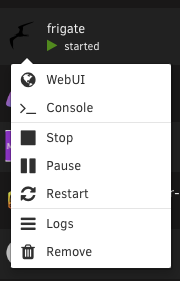
Yes, however i installed unraid on a trial key and it reconfigured it now i can see everything on the network thru macOS/windows. Only problem is that i cannot edit the templates as the edit option has disappeared. Any ideas what i do see below screenshot. I will tag this as solved when i am satisfied and installed my key. Thanks for advice as i have learnt alot by reading the unraid manuals and video.
-
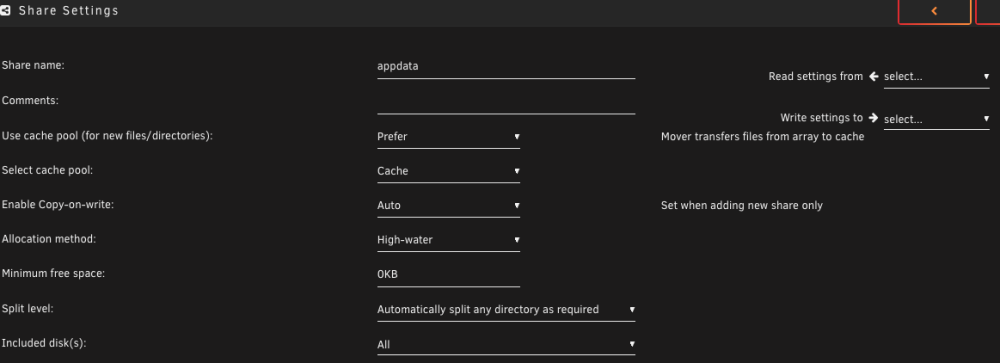
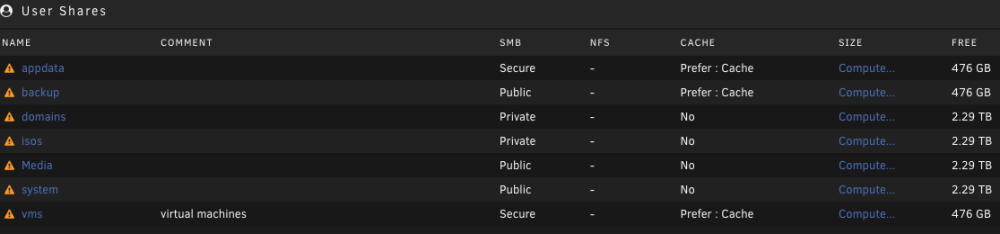
Hi I have tried the above without success. Could you advise/help on the following which i have found regarding my appdata folder in unRaid. After looking at Spaceinvaderone videos in setting unraid and dockers i do not think my unraid configuration is not setup correctly my shares does not show the content of appdata with the dockers the other folders are the same. Yet i can find the /mnt/user/appdata on the terminal. Can i reinstall new unraid OS and restore the docker containers as these have been backup with the CA Backup. pine-diagnostics-20221229-1003.zip

-
Thanks for you comments i will follow them and see how to change things around Thanks for the info much appreciated , i will follow them and see how i go one.
-
The reason for the same post due to it not appearing when I submitted originally. USB drives are not recommended? I'm confused now you see and read that it is used it has been working fine until recently, when i somehow lost my appdata file. How do i provide the smart report and how else can i connect the drives to my bare pc running running unRaid. Is it possible to install Unraid from my Flash Stick or will i lose all my containers?
-
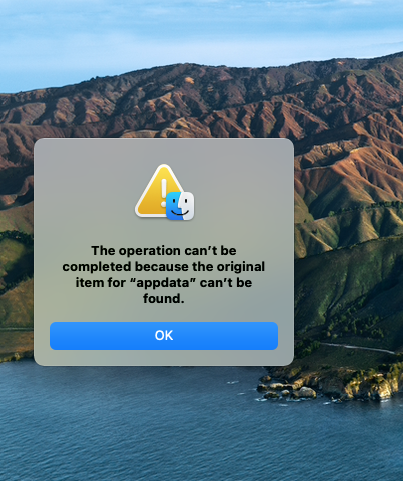
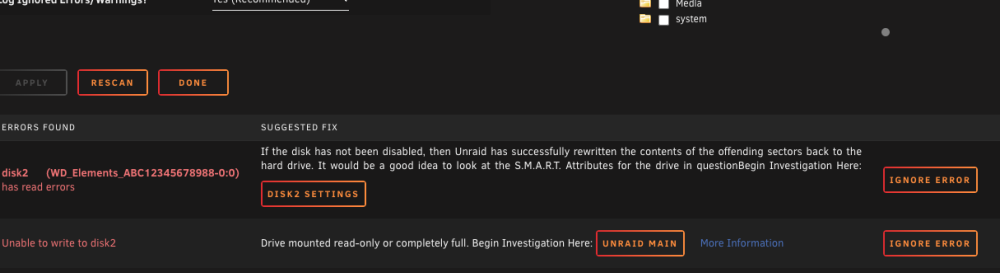
Fix common problem alerted me that i have a problem with disc2 in my array. I looked a possible problems however i unable to find the culprit. I have flowed the Spaceinvaderone video for a possible cause regarding full disk. for a few weeks now i have not been able SMB into my appdata file as it stated that the Appdata Original file is missing. I have not been able to find a solution to reinstate it as this could be my problem? I have included diagnostics and screenshot of the error. Is it possible to reinstall the Flash Drive for a fresh install and not loose my containers setting etc as this my olve my problem?? Any advise and procedure would be appreciated.
-
Fix common problem alerted me that i have a problem with disc2 in my array. I looked a possible problems however i unable to find the culprit. I have flowed the Spaceinvaderone video for a possible cause regarding full disk. for a few weeks now i have not been able SMB into my appdata file as it stated that the Appdata Original file is missing. I have not been able to find a solution to reinstate it as this could be my problem? I have included diagnostics and screenshot of the error. Is it possible to reinstall the Flash Drive for a fresh install and not loose my containers setting etc as this my olve my problem?? Any advise and procedure would be appreciated. pine-diagnostics-20221227-1812.zip
-
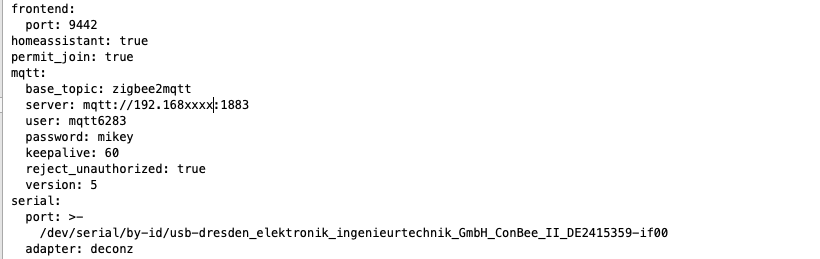
Z@M stopped inthe logs t says stopped a version in config should be 5 was 4. I reinstalled with version 5 , However my logs still says mQTT error Unacceptable protocol version. I have included my partial config. Any help/ advice would be appreciated

-
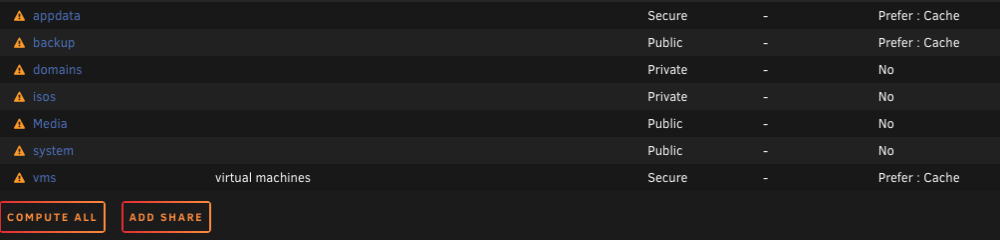
Hi, Thank you for your reply I can connect locally , I was able a few weeks ago , however i did notice a warning sign which i am unsure what it means ( please see below) I was wondering if this has something to do with it. Could you advise as i newbie. Thanks
-
Hi , I have unRaid running and seems to be running fine , however when i try to go to the appdata , i receive the attached error. Therefore i am only able to amend or look at any of the folders. I am unsure what i done as dockers seems to be running fine. Any help or advice would be appreciated.