





Pstark
Members
-
Joined
-
Last visited
Everything posted by Pstark
-
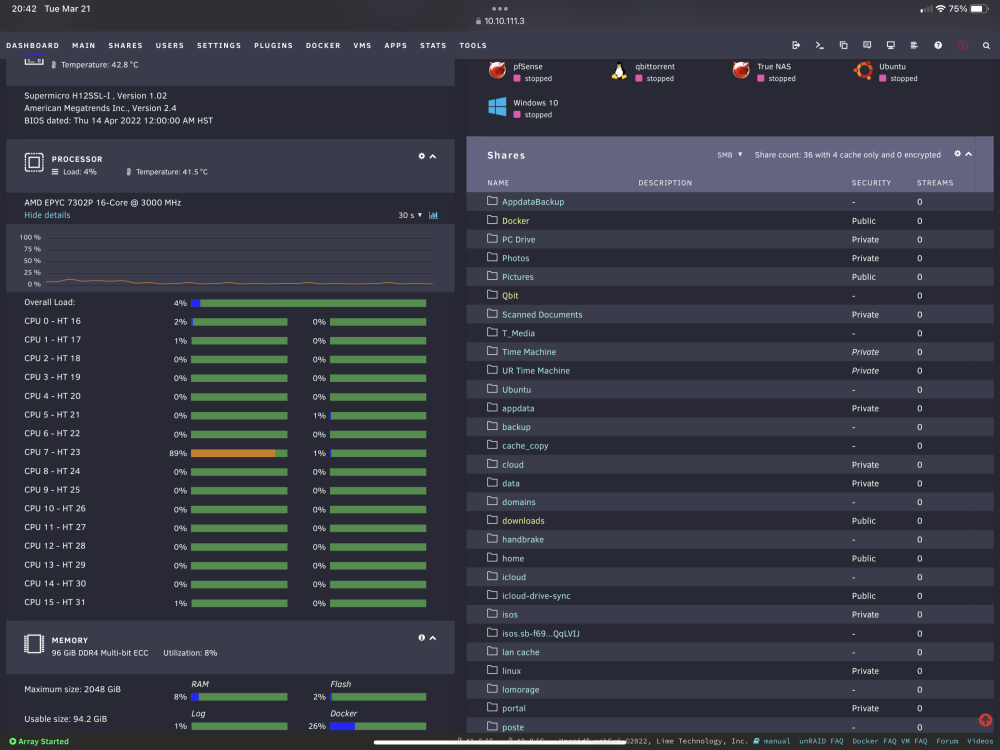
UPDATE/SOLVED Received my new Supermicro H12SSL board and surprise…. Booted without issue (other then a faulty SATA power splitter). All those cores!!!
-
I just spoke with Supermicro tech support and according to them, with just the 24 pin motherboard connected (no CPU or RAM installed) I should get BMC heartbeat led and or IPMI led. Just confirms the board is dead…. Sad face I suspected this and already ordered a new (not used) board and upgraded to H12SSL for 7003 support if needed.
-
PSU was working when I pulled it from the old setup. I did the short the pins on the mb connector and it powered up fine. Can I short the those same pins to power up the PSU while it connected to the board? Will that damage anything?
-
Took the board out and zero activity from board. Shorted power pins briefly; no lights on board or IPMI no fan spin. Did a bios reset and still no luck.
-
I forgot to mention that I have a smart plug that measures power usage and it reads 1W while it should be booting.
-
will try this latter this evening.
-
Is it possible my power supply is the cause? I canceled my order for the CPU power splitter and contacted Supermicro support and they told me to try reseating the DIMMS and CPU. I already replaced the CMOS battery and reseated the DIMMS and CPU but I don't have a torque wrench specific for these CPU's. I'm trying to locate one to eliminate that being the cause. After work I will remove the CPU and inspect pins. Any further advice or suggestions would be appreciated.
-
I took out all pcie devices except m.2 drive and still nothing. I can hear a faint “humming” noise coming from the board also. I think the board is dead. I just hope it didn’t take out the CPU. I was hoping it was something simple.
-
Does that mean I should plug in pcie power into it from PSU?
-
Do these boards have the long post while it checks the memory?
-
I am trying to locate a CPU power cable splitter locally but I might have to order online.
-
Yes it’s rev 2
-
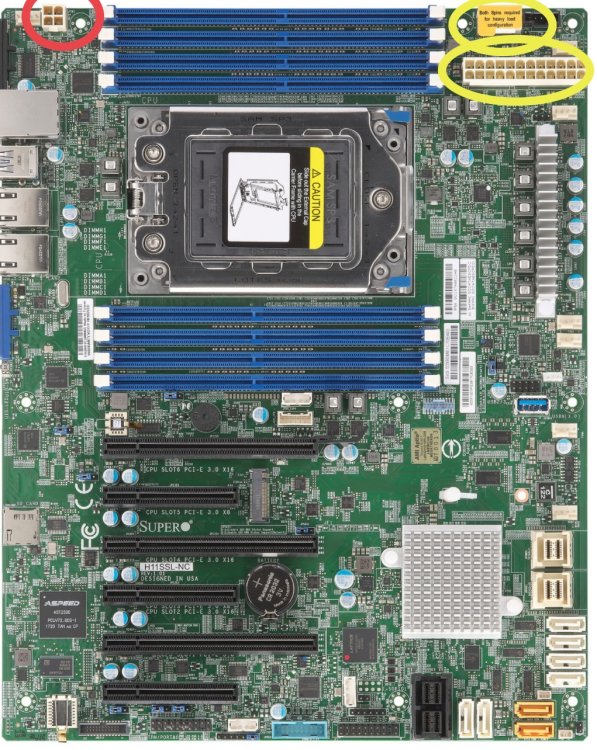
I’m building an Epyc 7302P Supermicro H11SSL-I motherboard and I’m not getting any activity at all. This is my first build with server grade hardware. I attach the large motherboard connector and the 8 pin at the top right. I connected the switch pins at the bottom. Installed the 7302P CPU, cooler and RAM (micron 3200mhz registered pc4 memory). No lights, fan spin or anything. Is the 4 pin (red circle ⭕️ in photo) required? Am I missing anything?
-
I added up how many PCIE lanes I need to have: graphics: 16 LSI: 8 NIC: 8 2 X m.2: 4 +4=8 40 lanes total
-
Does anyone have any experience or know someone that does buying used stuff from china?
-
The equivalent Intel chips seem to be considerably more expensive. Can you explain more on you comment on IOMMU groups?
-
After looking around, I found an Epyc 7551P with moobo and 128 GB memory. https://www.ebay.com/itm/373805842942?mkcid=16&mkevt=1&mkrid=711-127632-2357-0&ssspo=OxLNCOGvR0q&sssrc=2349624&ssuid=mpc-ah6esuu&var=&widget_ver=artemis&media=COPY Is the link and I wanted to know your guys thoughts on it? Advice?
-
Currently I have a Prime Z590-V mobo and 10700k, 64gb non-ECC memory. PCIE: intel 10gb nic, LSI card, 2x 1TB NVME SSD’s Usage: light to moderate VM usage with ~20 dockers running constantly and fairly heavy NAS usage Currently I have to choose between using a graphics card (3060) or the NIC. I want to be able to run the graphics card and NIC but I’m limited on PCIE lanes. I’m currently researching what my options are for accomplishing this. I’m thinking to use ECC memory for increased SMB performance. I’m unsure on what CPU will have the PCIE lanes along with what mobo to use? Not looking to buy new and prefer something used but still decently modern.
-
I use cloudflare tunnels to host all my external services. Issue being I don’t have a way to install the warp client on the device. My mobile and desktop clients work with warp I don’t see a way to install it on my scanner. It has a scan to web address function that I have been trying to use but I can’t seem to figure out the right address to access a share over the web.
-
bump I just want to be able to connect to a share without using a VPN.
-
I have a scanner I use to scan documents and send them to my server over the internet. I also would like to connect my mobile devices (Mac and iOS) to it as well. I tried the proftpd plugin but it always times out. I also tried serverdomain.io/sharename and serverdomain.io/shares/sharename but these don’t work either. The mobile devices can use Nextcloud but the scanner has no such capabilities. I thought it would be fairly straightforward to accomplish this but it’s more difficult than I anticipated. I use cloudflare tunnels for routing traffic to my server.
-
I was looking around online and found NVME HGST SSD’s. I was wondering if my HBA will work with these drives or not? They seem to be cheaper in terms of TB/$.
-
I swapped out the HBA for an LSI SAS9300-16i with new SFF cables. Problem solved. HBA (Dell H310) was the problem or the cables. Cut my parity check time in half too. ➜ ~ for ((i=0;i<12;i++)) do hdparm -tT /dev/sdd; done /dev/sdd: Timing cached reads: 44684 MB in 2.00 seconds = 22393.42 MB/sec SG_IO: bad/missing sense data, sb[]: 70 00 05 00 00 00 00 18 00 00 00 00 20 00 21 c0 00 00 00 00 f8 21 00 00 00 00 00 00 00 00 00 00 Timing buffered disk reads: 3032 MB in 3.00 seconds = 1010.05 MB/sec
-
I purchased a HGST SAS SSD 12Gbps I want to use for a faster read/writes as a UD share. After I connected it to my HBA I was disappointed in the speeds shown. ➜ ~ for ((i=0;i<12;i++)) do hdparm -tT /dev/sdd; done /dev/sdd: Timing cached reads: 44922 MB in 2.00 seconds = 22512.77 MB/sec SG_IO: bad/missing sense data, sb[]: 70 00 05 00 00 00 00 18 00 00 00 00 20 00 21 c0 00 00 00 00 f8 21 00 00 00 00 00 00 00 00 00 00 Timing buffered disk reads: 1208 MB in 3.00 seconds = 402.43 MB/sec When I do the same test with a WD Blue SATA SSD, I get this? ➜ ~ for ((i=0;i<12;i++)) do hdparm -tT /dev/sdb; done /dev/sdb: Timing cached reads: 44336 MB in 2.00 seconds = 22217.10 MB/sec Timing buffered disk reads: 1568 MB in 3.00 seconds = 522.38 MB/sec I enabled write cache but it didn't change anything. ➜ ~ sdparm -g WCE /dev/sdk /dev/sdk: HGST HSCAC2DA2SUN1.6T A29A WCE 0 [cha: y, def: 0, sav: 0] ➜ ~ sdparm --set=WCE /dev/sdk /dev/sdk: HGST HSCAC2DA2SUN1.6T A29A ➜ ~ sdparm -g WCE /dev/sdk /dev/sdk: HGST HSCAC2DA2SUN1.6T A29A WCE 1 [cha: y, def: 0, sav: 0] I'm not sure how to fix "SG_IO: bad/missing sense data, sb[]: 70 00 05 00 00 00 00 18 00 00 00 00 20 00 21 c0 00 00 00 00 f8 21 00 00 00 00 00 00 00 00 00 00" tower-diagnostics-20221017-2052.zip
-
"lsblk" displays this; NAME MAJ:MIN RM SIZE RO TYPE MOUNTPOINTS loop0 7:0 0 116.8M 1 loop /lib/firmware loop1 7:1 0 19.5M 1 loop /lib/modules loop2 7:2 0 75G 0 loop /var/lib/docker/btrfs /var/lib/docker loop3 7:3 0 1G 0 loop /etc/libvirt sda 8:0 1 117.2G 0 disk └─sda1 8:1 1 117.2G 0 part /boot sdb 8:16 0 931.5G 0 disk └─sdb1 8:17 0 931.5G 0 part /mnt/disks/wdblue sdc 8:32 0 10.9T 0 disk └─sdc1 8:33 0 10.9T 0 part sdd 8:48 0 3.6T 0 disk └─sdd1 8:49 0 3.6T 0 part sde 8:64 0 9.1T 0 disk └─sde1 8:65 0 9.1T 0 part sdf 8:80 0 7.3T 0 disk └─sdf1 8:81 0 7.3T 0 part sdg 8:96 0 10.9T 0 disk └─sdg1 8:97 0 10.9T 0 part sdh 8:112 0 16.4T 0 disk └─sdh1 8:113 0 16.4T 0 part sdi 8:128 0 16.4T 0 disk └─sdi1 8:129 0 16.4T 0 part sdj 8:144 0 16.4T 0 disk └─sdj1 8:145 0 16.4T 0 part md1 9:1 0 16.4T 0 md /mnt/disk1 md2 9:2 0 16.4T 0 md /mnt/disk2 md3 9:3 0 10.9T 0 md /mnt/disk3 md4 9:4 0 10.9T 0 md /mnt/disk4 md5 9:5 0 9.1T 0 md /mnt/disk5 md6 9:6 0 7.3T 0 md /mnt/disk6 md7 9:7 0 3.6T 0 md /mnt/disk7 nvme0n1 259:0 0 931.5G 0 disk └─nvme0n1p1 259:1 0 931.5G 0 part nvme1n1 259:2 0 931.5G 0 disk └─nvme1n1p1 259:3 0 931.5G 0 part /mnt/cache ➜ ~


