





Pstark
Members
-
Joined
-
Last visited
Everything posted by Pstark
-
It’s an SSD. The enclosure has an activity LED for this drive (bay5) that is solid all the time. There is one others SAS HDD (bay1) in the same enclosure and its light is solid like this one but works without issue. Bays 2, 3 and 4 are SATA and the light is only on during activity.
-
Would I have to flash the card or can I access the card during boot? The drives don’t populate in the MB bios. I’m thinking the drive needs to be formatted but it’s pretty hard to do that if Unraid can’t see it’s connected.
-
tower-diagnostics-20221015-1131.zip
-
I have an HGST 1.6TB SAS connected to my Dell H310 HBA. I want to use this drive to replace my m.2's (I already purchased another one for a cache pool) but this drive won't populate at all in Unraid. I have never used the drive so it's possible that it's dead but I don't know how I should procceed? The LED lights up and other SAS drives work without issues.
-
So there's no confusion, I found a working (roundabout, but it works) way to do this using gmail smtp that allows me to send and receive emails using my domain via any email I wish. While this is 75% of what I want, it still relies on gmail as the provider and it piggyback of an existing gmail address but all the data is controlled by gmail. This method only allows me to use an email for a domain that I control but does not allow me to "host" my own email service. This means gmail has all my emails on their server instead of my own. So if anyone is wanting to do this as well it requires an email forwarding service and to setup two mx records and a TXT record in your domains DNS records. In my case cloudflare. - Start to finish is about 20-30 min. - I used forwardemail.net to create the email (there is a free option available) - Follow the easy to follow video guides - To use your newly created email outside gmail's webmail, use the credentials created in the first step to create a new mail account in your email client of choice (Mac and iOS Mail Apps and outlook in my case) email being the email you wish to [email protected] and username being your gmail email without the "@gmail.com" Use gmail's smtp (smtp.gmail.com) server and the gmail generated app password for in/out server settings. This will allow you to see the emails sent to your new email on on whatever email client you choose as well as send emails from the same email. I still want to host my emails i.e. on my server instead of using google's server.
-
I am trying to host my own email from the domain that I own. I setup cloudflare email forwarding which is nice but I want to have a full working email I can send emails from as well. I wanted to ask here to see what folks are using to do this? I have two domains and from what I can gather online, this is challenging and requires a decent amount of maintenance but I'm willing to give it a shot to see for myself if it's worth it or not.
-
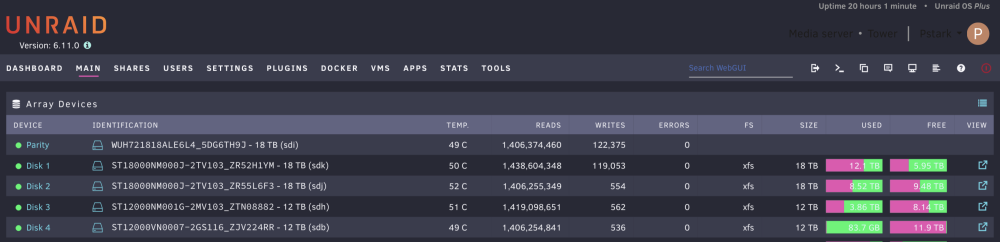
I installed a Pure Wings 2 92mm fan in the rear yesterday and on the high fan setting these are the temps during a parity check. They are better than the fan that came with the unit. No fan in front anymore so just the single 92mm fan now. I might recommend a noctua instead if noise isn’t a concern but the Pure Wings 2 is virtually silent which is a plus.
-
Create a HTTPS public host for nextcloud in zero trust to the IP:WEB UI port then enable no TLS verify
-
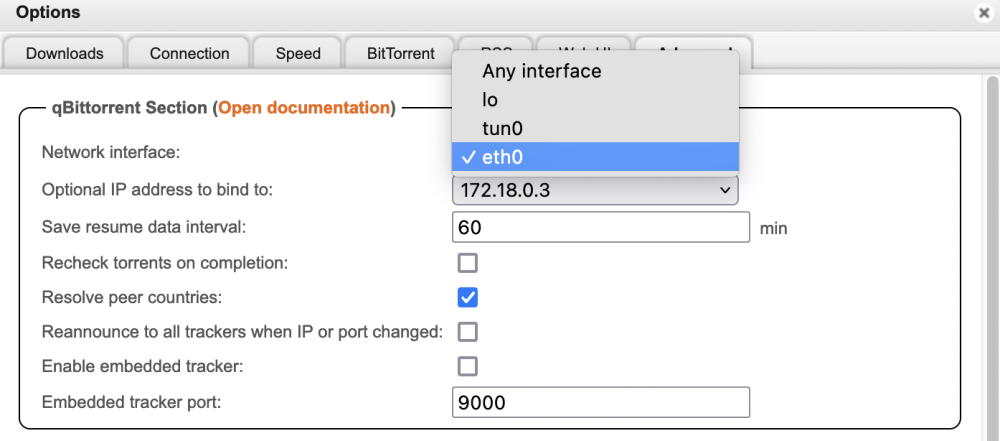
So qBitTorrent is apparently leaking my IP address. I'm not sure how to tell what is causing it so if anyone knows how this is happening, please let me know. I'm just assuming it's leaking when the VPN disconnects. The docker says it uses IP tables to prevent leakage but apparently I don't have it configured correctly. Can anyone confirm? During my research, I discovered I need to bind qBitTorrent to a network interface. I have It configured to a custom network (docker) but that network is not listed as an option inside qBitTorrent. It was originally set to "any interface" so which network type in the docker image do I need to set it to allow me to bind it? Do I need to do anything with the IP address?

-
Yes, I tried this and didn't work for lowering temps so currentlyI have it a 120mm fan in front pushing air into it and the 92mm still in back pulling. While this keeps the HDD temps a lot lower, it's just inefficient. I just ordered a different 92mm fan I'm going to see if it works better and hopefully won't need the fan in front. I ordered a be quiet pure wings 2. I also got a Norco SS-500 and it keeps the temps at the same level with just one fan in the back. The Norco has better airflow than the Icy Dock but then again, I'm not using these in a case as they're intended.
-
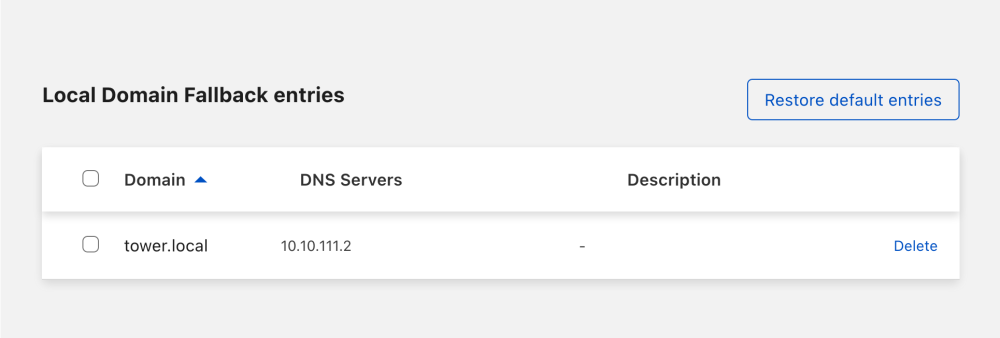
So I am able to access local devices via IP's but domains are not resolving. I'm also unable to access my server. i.e. I can't access 10.10.111.3 (unraid's IP, insecure upstream HTTP response Code: 526) or tower.local (results in nothing but a blank page) but I can access pie hole via 10.10.111.2 (local dns). I setup a domain fallback but this doesn't help either.
-
My case doesn't hold any drives so I have a IcyDock FatCage MB155SP-B with the cables running out the back. I don't have any issues with this setup but I just purchased some new drives bringing my drive count to 10. I would like something like the IcyDock but 10 bays. I would like to have the activity indicator for each drive like the IcyDock. If there's an in-line "adapter" of some sort on the market, that would give me more options. I'm not sure what it would be called and that's probably why even google couldn't find anything. Also 2 of the drives I got are SAS but on the back of the IcyDock is SATA ports. Does this matter? Another problem is powering these drives. It's pretty messy. I got a molex adapter to power them but it still requires 1 molex connector per drive. How many drive is it safe to run off 1 molex?
-
I've been trying for a while to accomplish this but it's just not working out. I want to use cloudflare warp client to route all traffic through my cloudflare tunnel as if I'm connected to my my home network when I'm away. I have the warp client already connected but I'm unable to reach devices on my LAN. I manage my tunnel vie the web.
-
I’m really just asking what a typical setup consists of in terms of PCIe devices.
-
I looking into getting adding a PCIE expansion to add a SAS drive to my server and I think I won’t have the ability due to having to being maxed on PCIE devices already. I currently have: GPU 2x NVME drives 10GBE NIC My question is how many PCIE devices do you have in your setup? Is there something I’m not thinking that would allow me to add this? Setup: 10700k Z590-V 4 SATA drives (2 array and 2 UD) 2 nvme (cache pool)
-
Not sure how to go about this.
-
A couple days ago I found my server to be unresponsive i.e. my dockers weren't running. I was still able to log into it and I found my cache pool to be full along with a whole host of errors. I was able to "fix" the issue after finding my appdata folder to be nearly 1TB. I changed the share to use cache = yes (was only). I started the mover then restarted the server and all was well. I removed the most recent dockers thinking one of them was the culprit. I came home from work to find my cache pool at ~850GB used (of 1TB). I have the mover set to hourly but I don't understand how it's still filling up? Is there a way to monitor what is writing to the array or cache pool? tower-diagnostics-20220822-2133.zip
-
You are definitely right about that so i'm not doing that. I just don't understand why it's so difficult to access files on my server remotely without making it vulnerable to an easy attack. I see there are quite a few options but can't seem to get them to work.
-
I'm trying to avoid VPN. My router has this function and I'd link it to more seamless to access my files. I can't even seem to get access without using any app. ie. sub.domain.???/sharename doesn't even work. I'm aware of the risk but proof of concept I tried it and that didn't even work.
-
How do the majority of Unraid users access their files remotely? I want to use a subdomain to access a specific share on my server. I also want to be able to access it via iOS via “connect to server” function. I have tried a few dockers but none have worked out. Alist- poor documentation FileGator sftp Projectsend- can’t get the db to connect FileBrowser- I got this one up and working but I can’t connect iOS to it.
-
I.e. in NPM when setting a reverse proxy to a container or when routing cloudflare to a container.
-
I see a lot of references to use “localhost” for network path but for me it doesn’t work. I tried putting it in the etc/hosts and etc/host name but it still doesn’t work. How does this work?
-
Here hey are. tower-diagnostics-20220811-0612.zip
-
So far it's been ~24 hours and no lockups after doing this. I will add that I also changed the mover to run hourly. I will test this for about a week and change it back to every 6 hours to see if the issue returns. I attempted this but it was unsure on how to interpret the log file.
-
After clicking the cache drive and under balance status it said 99.9% utilized. I then started the mover and it went down to where it's at now. I also changed the block group usage to 100 thinking that is how much of the drive to use but correct me if I'm wrong. Did this and will report back if it helps or not.


