






gyto6
Members
-
Joined
-
Last visited
Everything posted by gyto6
-
Thanks again for this welcome update. I suggest an idea. Everytime we proceed to an action in the "SNAPS" UI, the windows automaticaly closes. Could it be possible to keep the windows on the selected dataset opened? Else to select several snapshots with a checkbox (Only possible with deletion I think in this case) for massive operations, when we proceed snapshots test for exemple. To be understood, I tested Sanoid earlier, and it tooks 30 snapshots in a row for each dataset (20) due to a bad configuration. I used the CLI to do the work as the window closed by itself for each deletion. And thanks for your work!
-
Good to know. 😆 For now, I'm having to much trouble with Sanoid, so I'm getting my hands with Znapzend to understand where I might have been wrong with Sanoid which seems indeed a bit more powerfull.
-
Hi @steini84, I just took my hands on this plugin and it's amazing! Thanks again for getting it available in Unraid.
-
Sounds like a good idea indeed. 😁 Thanks again, I'm getting my hand on it. For an unknow reason, the "SNAPS" button stays grey, even if the array, docker and VM are stopped. Do I need to manually create a snapshot to get it available? *Some tests have shown that YES* Sounds cooler if we can trigger a snapshot creation on the local pool with a single button from your GUI. Thanks again for this welcomed update! 😄 Edit : The plugin cannot manage snapshots from the Pool. Only from the dataset by now. I don't know if this is by design.
-
I didn't got everything... All I could say is that managing ZFS isn't just install the plugin and see the system being the most briliant and powerfull. ZFS has the ability to manage volumes, file system, and backup on a custom way that requires you to have the knowledges concernings your equipments, volume aggregation, and your files workload. At least, you've to finally take over ZFS that offers a lot of improvement according to your devices and you'll spend months and years to optimize your ZFS system and correct your mistakes. If using RAID on HDD was quite easy due to the lack of innovations compatible with and mostly turned to the final use, there was first many concerns about RAID on SSD drive due to Write Amplification, Overprovisioning, cells degradation etc... And now NVMes drives with namespaces, sets, endurances groups, and over the top speed without talking about low latencies technologies (Optane, Z-NAND) for now expected as SLOG for database mostly. There're tons to talk about drives technologies before talking about ZFS, dataset, L2ARC, Interrupt trouble with NVMe drives, L2ARC calibration... Tons to talk about... I don't know Truenas enough, but all I could say is that is GUI helps a few to take your hands on ZFS. But what helps mostly is practicing. I've read on the forum that ZFS is expecteded unofficialy for Unraid 6.11, but if you're expecting the GUI to do all the work, you shouldn't. It'll works, as a smartwatch works to get the hour. But most ZFS users would take a mechanical watch instead because they like to know how it works. It costs more, but they love it, take care of it, and the watch finally lasts longer.
-
Well, only the truth hurts. I share that point of view, every one is looking for the best ZFS optimization for best performance, and most of the "tutorials" that you can find on the net doesn't talk about the risk it implies. Most of the people writing them are not even aware about that. The best sources of information I could've found except of LVL1Tech are the websites listed at the beginning of the topic. Some books are rare by the way. Mostly english of course, and for some already invested users, they're lacking a lot about daily operations to maintains ZFS. Even if you've to figure out how to manage your ZFS, it's bit disapointting to buy a 20€ book who's learnt you to create your pool from scratch, but doesn't explore the aspect of data transfers between a ZFS send/receive and a ZFS clone. Talking about ZFS on Unraid itself, I didn't meet any troubleshoot on Unraid 6.10. Only storage controllers problem with my NVMe's SSD which was suddenly not recognized with Intel Vt-D (IOMMU) whatever the Unraid version, a well known problem with Crucial P5. Or one of my partition (mounted with /dev/sdx at time) which suddenly changed after a reboot, so I recreated the pool with /dev/disk/by-id/and no more suffered about any problems. And that was still not related to a specific Unraid version.
-
Do you means that with ZFS Master, you can't see tons of datasets with snapshot generated by Docker? Referring to the @BVD interventions, I didn't suffer of any performance troubleshoot. The only matter was thatr all those dataset generated by docker was always flooding the GUI and any zfs list command. Thanks for the precision @Iker, the ZVOL support could be interesting. Meanwhile, I simply mounted the ZVOL within a dataset in order to get it listed in the GUI.
-
Thanks again @BVD ! I'm finally able to run the docker.img inside of a ZVOL. For those interested: zfs create -V 20G pool/docker # -V refers to create a ZVOL cfdisk /dev/pool/docker # To create easily a partition mkfs.btrfs -q /dev/pool/docker-part1 # Simple to format in the desired sgb mount /dev/pool/docker-part1 /mnt/pool/docker # The expected mount point
-
Well, thank you for all these precious advice! The problem to me by now is that I have to mount the ZVOL to Unraid. I'm figuring out how to do this on Unraid without ISCSI. The docker .img is indeed not functional (tons of bugs) and trying this on an USB key is not a good idea at all. Thanks again.
-
Indeed, I posted in the wrong topic once again... My mistake. Indeed, using the directory for docker is actually a mess due to all theses datasets and snapshots as you described very well. I'll manage to migrate to the .img docker. I did a screenshot from every containers configuration as I won't get them back from Previous App and put the .img file in a 1M recordsize dataset. I don't thing that there's too much configuration for a dataset due to the low use of the docker files itself and the NVMe drives do most of the performances. Thanks again! @BVD
-
Hi everyone, It's been a while I noticed it, but some of the dockers datasets display a yellow icon, even the snapshot as we can see in the screenshot. Those managed by docker itself, not mines. I imagine that it means that the dataset or snapshot is damaged if the colors rules are the same as for the pools. Everything is working whatever. I'd simply ask to you how you manage this on your own servers or if you let it sink?

-
Did some benchmark with FIO. I can recommand the ssd-test.fio which can be personnalized with block size and queue depth. It appears that my SSDs are indeed 512 Sector Size if we wanna reach the best IOPS numbers. But talking about Bandwith performance, the 4K block size seems most relevant and the cpu usage is divided by 3. Finally the 8k Block Size is twice better in random read and write speed that the ASHIFT 12 and better too in sequential write speed. So, as it finally depends of my usage too, the 512 sector and block size is not relevant. Going onto the Ashift 12 refers to the most of my usage and might test the ashift 13 later. For some people interested about the block size ina concrete example, you can read this article, else read the benchmarks. Block Size 512 / Ashift 9 Block Size 4k / Ashift 12 Block Size 8k / Ashift 13
-
32Go ECC because it’s the maximal for the dl320e gen8 v2
-
Hi everyone, I'd like to get your point of view about the ASHIFT parameter on SSD. I'm aware that what is usually told is that SSD "lies" by announcing a 512 Sector Size instead of 4K or 8K. So Ashift 12 or 13 is prefered. In order to not suffer from write amplification. But on my DC500R SSDs, the datasheet or internal commands doesn't refers to 4K Sector Size so I ran these benchmarks when I created my array with the differents ASHIFT values. The ASHIFT 9 is whatever the winner in writing speed. The ASHIFT 12 shows some interesting results. I'd simply like to know I did good with a benchmark to determine the ASHIFT or if another method is prefered? Thank you. ASHIFT 9 root@server:/mnt/fastraid# dd if=/dev/zero of=ashift9.bin bs=1M count=100000 100000+0 records in 100000+0 records out 104857600000 bytes (105 GB, 98 GiB) copied, 91.531 s, 1.1 GB/s root@server:/mnt/fastraid# dd if=ashift9.bin of=/dev/null bs=1M 100000+0 records in 100000+0 records out 104857600000 bytes (105 GB, 98 GiB) copied, 64.7996 s, 1.6 GB/s root@server:/mnt/fastraid# df -h Filesystem Size Used Avail Use% Mounted on fastraid 5.1T 98G 5.1T 2% /mnt/fastraid root@server:/mnt/fastraid# zfs list NAME USED AVAIL REFER MOUNTPOINT fastraid 97.6G 5.00T 97.6G /mnt/fastraid ASHIFT 12 root@server:/mnt/fastraid# dd if=/dev/zero of=ashift12.bin bs=1M count=100000 100000+0 records in 100000+0 records out 104857600000 bytes (105 GB, 98 GiB) copied, 88.9758 s, 1.2 GB/s root@server:/mnt/fastraid# dd if=ashift12.bin of=/dev/null bs=1M 100000+0 records in 100000+0 records out 104857600000 bytes (105 GB, 98 GiB) copied, 89.2021 s, 1.2 GB/s root@server:/mnt/fastraid# df -h Filesystem Size Used Avail Use% Mounted on fastraid 5.0T 98G 4.9T 2% /mnt/fastraid root@server:/mnt/fastraid# zfs list NAME USED AVAIL REFER MOUNTPOINT fastraid 97.6G 4.85T 97.6G /mnt/fastraid ASHIFT 13 root@server:/mnt/fastraid# dd if=/dev/zero of=ashift13.bin bs=1M count=100000 100000+0 records in 100000+0 records out 104857600000 bytes (105 GB, 98 GiB) copied, 92.9889 s, 1.1 GB/s root@server:/mnt/fastraid# dd if=ashift13.bin of=/dev/null bs=1M 100000+0 records in 100000+0 records out 104857600000 bytes (105 GB, 98 GiB) copied, 74.625 s, 1.4 GB/s root@server:/mnt/fastraid# df -h Filesystem Size Used Avail Use% Mounted on fastraid 5.0T 98G 4.9T 2% /mnt/fastraid root@server:/mnt/fastraid# zfs list NAME USED AVAIL REFER MOUNTPOINT fastraid 97.6G 4.85T 97.6G /mnt/fastraid Here's the result with the Crucial P5, also displayed with 512 Sector Size and performance dropping is huge. ASHIFT 9 root@server:/mnt/nvmeraid# dd if=/dev/zero of=ashift9.bin bs=1M count=100000 100000+0 records in 100000+0 records out 104857600000 bytes (105 GB, 98 GiB) copied, 21.2881 s, 4.9 GB/s root@server:/mnt/nvmeraid# dd if=ashift9.bin of=/dev/null bs=1M 100000+0 records in 100000+0 records out 104857600000 bytes (105 GB, 98 GiB) copied, 9.82965 s, 10.7 GB/s root@server:/mnt/nvmeraid# df -h Filesystem Size Used Avail Use% Mounted on nvmeraid 1.7T 128K 1.7T 1% /mnt/nvmeraid root@server:/mnt/nvmeraid# zfs list NAME USED AVAIL REFER MOUNTPOINT nvmeraid 1.03M 1.67T 24K /mnt/nvmeraid ASHIFT 12 root@server:/mnt/nvmeraid# dd if=/dev/zero of=ashift12.bin bs=1M count=100000 100000+0 records in 100000+0 records out 104857600000 bytes (105 GB, 98 GiB) copied, 83.2163 s, 1.3 GB/ root@server:/mnt/nvmeraid# dd if=ashift12.bin of=/dev/null bs=1M 100000+0 records in 100000+0 records out 104857600000 bytes (105 GB, 98 GiB) copied, 51.633 s, 2.0 GB/s root@server:/mnt/nvmeraid# df -h Filesystem Size Used Avail Use% Mounted on nvmeraid 1.7T 98G 1.6T 6% /mnt/nvmeraid root@server:/mnt/nvmeraid# zfs list NAME USED AVAIL REFER MOUNTPOINT nvmeraid 97.7G 1.57T 97.7G /mnt/nvmeraid
-
I think that I've found a way around. After many researches, I'm not the first having trouble with the P5 from Crucial. To me, the problem is that it tends to disappear for no reason. So I've found the same troubleshoot on this forum and tested @JorgeB's solution. Link He/She's been suggesting to disable IOMMU (AMD), or Intel VT-d (INTEL) for my old motherboard. As I'm not doing virtualization for now, I find it efficient to just disable IOMMU. My Crucial are back again. I'll be back if I'm having this same trouble again. Thanks a lot for your help.
-
Meanwhile, my nvme drives has once again disappeared from the GUI.
-
My mistake, Docker is a directory which was set on a zraid1 pool on the nvme Drive. I'm aware about the SD Drive as it was only used to create an array to start Unraid and use it. I might use another usb drive then.
-
Yes I do. I'll try to move it to the SD card if there's not to much writing on it. Or maybe that you've a better option?
-
That's what I've seen too. I disconnect the server from power. Plugged it back and... I'll check if I can update my HBA card's firmware. Sorry, everything is fine.. And thanks for your work on ZFS Plugin. ☺️
-
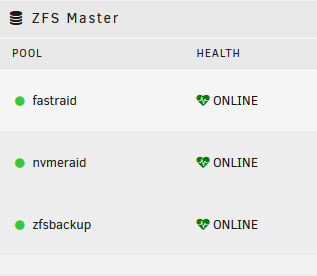
Hi Everyone, I just wanted to share you a problematic trouble I've met. For some unknown reasons, I was no more able to load some part of the Unraid GUI and some dockers's been stopped. I've tried to generate a diagnostic file in the settings, and it's has display in windows a writing to one of my NVMe drive, has it it was executing an operation on it. The problem is that the system was no more responsive and after an hour, I decided to reset the system. After what, I've lost my zpools because the NVMe Drives was no more recognized as ZFS disks. He's the configuration of the ZFS Pool before the lost of the NVMe's drives partition. This not the first time that I've begin to lost control of my unraid server, but until now I didn't lost anything. All I can say, it's begun to appear with the version 2.0 of the plugin, but maybe that it's linked to something else? rohrer-enard.fr-diagnostics-20220220-1151.zip
-
So, The original unbound config is set for DNSSEC. Nothing more to configure else to check the "Use DNSSEC" boxe within Pi-Hole GUI. But even if the box is not checked, it tends to unbound to already use DNSSEC. Furthermore, don't be suprised to see a lot of well known websites not using DNSSEC. Once done, go on your web browser to https://nifc.fr (a domain name I've set with DNSSEC) and check "Queries Logs" Else, you can check this site https://dnssec.vs.uni-due.de/ Source : https://discourse.pi-hole.net/t/how-do-i-interperet-the-dnssec-column-in-the-query-log/7185 https://medium.com/nlnetlabs/dns-over-https-in-unbound-c7a407e8480

-
You're welcome. First, how do you know that unbound isn't using the pihole.conf? Then, I didn't set DoH yet, i'll warn you once done how to do this. And at last, the errors refers to what I said sooner. Except for the ipv6 address as it's disabled in default unbound.conf file. Edit 1 : Concerning the pi-hole.conf file not used, open the unbound console : find / -name pi-hole.conf -print You're supposed to get your file path inside the docker : /opt/unbound/etc/unbound/unbound.conf.d/pi-hole.conf Now, execute the following command and restart Pi-Hole unbound -c /opt/unbound/etc/unbound/unbound.conf.d/pi-hole.conf Edit 2 : I didn't find the docker parameter to use another unbound.conf file aka pi-hole.conf at launch. So you can, as you did, set your pi-hole.conf config into the unbound.conf. But the file given by pi-hole is less configured that the original pi-hole file and I don't see what's better, so be cautious. Especially with certificate and key files path which must be kept in the config for DNSSEC. The only difference from original config file in pi-hole.conf is this line which's been set to "no" : use-caps-for-id: no
-
So, after more investigation I realized many things. My target there was to free a PCIE slot and still getting my 2 NVMe SSDs working this fast as for my SATA SSDs. But, the H240 has no support for NVMe. Only SATA/SAS, so my NVMe wouldn't run or in SATA mode at least. Looking for the 4xM.2 version of my PEX8M2E2, which has native support for NVMe, I imagined using a M.2 to Mini-SAS adapter to connect my bay to this card. But these cards only accept NVMe protocol, and my 4 SATA SSD wouldn't run then. The only thing that could run are "Tri-Mode" card (SATA/SAS/NVMe) and the price is not the same. Look for HBA 9400-16i Tri-Mode Storage Adapter. I can't expect to find it on Ebay for cheap. So i'll considerate to connect back my SATA SSDs to the motherboard and get cut to 3Gb/S instead of 6. PS: I didn't mention SAS connectors as there would be a lot to talk about too, but it's a mess.
-
Hi everyone, I'd like to add to my DL320e Gen8 v2 a graphic card. I've 2 NVMe M.2 drives on a PCIe adapter and 4 2'5 SSD in the bay linked to the other PCIe slot through my HPE P222 Card. So I'm out of PCIe port. To do so, I'll first replace my HPE P222 Raid card (HBA) with a HPE H240 to connect my first 4 drives in the cage through Mini-SAS. Now, I need to connect my two M.2 NVMe drives, but after searching for a while, I can't find the specific card that could solve my problem. Does anyone has a link to the product I'm looking for, else another to solve my problem? Thank you! PS: I can't use the motherboard's Mini-SAS connector as it'ld cut bay's speed to 3Gb/s instead of 6Gb/s due to having 4 drives instead of 2.
-
Doesn't sound good to me as Pi-Hole uses this port to reslove clients DNS queries. Can you check in PiHole's Query Log section if the solver's unbound's docker name (With #53 for you of course)?




