






gyto6
Members
-
Joined
-
Last visited
Everything posted by gyto6
-
What can be done, is to use as Special device to boost your system. The special_small_blocks property authorizes you to store not only metadata, but data. According to your dataset recordsize property value, the special_small_blocks value represents the threshold block size for including small file blocks into the special allocation class. Blocks smaller than or equal to this value will be assigned to the special allocation class while greater blocks will be assigned to the regular class. What I use for my applications datasets is that I put the same value to the recordsize and special_small_blocks, so my whole applications runs on my NVMe drives. In consequence, my SATA metadata files are stored on my NVMe drives for better indexing, and are not troubled by the applications using more R/W operations. I use two Special mirrored dev because if the Special fails, your whole pool is lost. So my personal files which must not be altered, have the parity and checksum running in their pool and is what makes most of its operations as they're rarely used. My applications always running do not interfere on this activity has they run on the NVMe Special drives which are more efficient. An app can be reinstalled, a corrupt picture is not retrievable.. Btw, I don't risk any data loss as all my devices have Power Loss Protection (PLP), runs behind a UPS set to turn off the server softly after 5min without power. Finally, my data are saved every hour on my NAS somewhere else in my house, and on my Sharepoint ou-site. Backup is a must to keep your data safe. Do not hope your system to take care of them without any trouble. What I meant is that you won't optimize your system without caveats or risks. You ALWAYS must imagine the worst, to think about all it implies, then find a solution. You'd be better letting your drives in raidz for know and think about a NVMe drives for your applications which requires a lot of I/O.
-
No. That's how a system works. You use raidz for data that must absolutely not be lost nor altered. If you wan't to run you files with best performances, you then use a Raid-0 / Raid-10 (For redundancy), so two vdev stripped or two mirrors stripped. RAID-0 is faster than RAID-1, which is faster than RAIDZ-1, which is faster than RAIDZ-2, which is faster than RAIDZ-3.
-
I won't expect such a result for many files as a huge one sadly in reality. Whatever, test your config to determine where you're facing a real bottleneck and what you can miss. 🙂
-
Indeed. 😉 L2ARC is a read cache for those wondering. Most Recently Used (MRU) and Most Frequently Used (MFU) composing the ARC hold the files in RAM. The files evicted from these components due to RAM size limite, file usage cycle and ZFS parameter are then stored in the L2ARC, which should be set onto an SSD (even SATA, but prefer NVMe). I must notice that the L2ARC index is stored itself in the RAM, reducing your potential MRU/MFU size! Correct about the 5 seconds Indeed, you need to set this parameter in your share config to enable synchronous writes. Asynchronous writes is used for "efficiency" writing to memory buffer, letting the disks to handle theirs others activity. (Thanks for the correction @jortan ) “strict sync = yes” OpenZFS recommandations are even 4Go/GB : https://openzfs.github.io/openzfs-docs/Performance and Tuning/Hardware.html?highlight=slog#optane-3d-xpoint-ssds
-
Slog is relevant for database and network shares. They do not need to be mirrored. If a Slog is degraded, you'd need to get a unexpected powershutdown in the 5min interval of the degraded state to loose data. When a Slog is degraded, the sync write goes back to the normal transaction and the user/database wait for a real anwser for each sync request. But even without a power outage, according to Slog usage (if database queries or network shares are heavily used by more than 10 persons for example), the data registered in the Slog and not delivered to drive host of the file before the Special failure would be lost. If it's a modification in an excel, the modifications are lost, not the file. Must be understood that it's only an interval of transactions which are lost. Special vDev must be mirrored. Metadata being stored on it, you loose your whole data written since the special vDev has been added if the drive is degraded.
-
You're welcome! Concerning to me, my config doesn't annoy me as I'm fully using SSD probably. Some ZFS tuning are necessary as volblocksize to not get some troubles. Whatever, I'm never coming back by now as, indeed, I don't have any performance issue and furthermore, I've absolutely not any "snapshots/legacy snapshots" flooding from the docker dataset anymore. I'd recommand this setting instead of using the docker folders for the simple reason that you're never really expected to edit the docker folder and it's easier to copy a simple .img file for backup.
-
-
I still need some help please.
-
I confirm. A copy from your data somehere else on another system in your house or online is a backup. You can't bet on any system to take care from your data without any troubleshoot. NEVER
-
Hi @Sally-san, Didn't watch the SpaceInvader video. But what I can recommand you meanwhile is going to the Settings->SMB Settings and edit the smb configuration with something like that : [*Share1*] path = /mnt/*YourPool*/*Share1*/ browseable = yes guest ok = no writeable = yes read only = no create mask = 0775 directory mask = 0775 write list = *YourUser* valid users = *YourUser* For each share, copy past the template on a new line and edit *YourPool*, *Share1* and *YourUser*. Remove the * symbol which only used here for a better visibility. Depends of your config, I'll take my configuration as an example. *YourPool* have a dataset that should be set with "-o recordsize=1M", "-o compression=none" and "-o primarycache=metadata" *Plex* with several subfolders (as recommends Plex) TV Shows, Movies and Transcode. The Transcode should also be a dataset but set with "-o recordsize=128k". Don't know the exact value for the Transcode folder, but I can't recommand the 1M recordsize for every config. It's better for it to be located onto an SSD and you should then create the dataset on your SSD and create a symlink in the Plex folder. So: *YourPool* -> Plex -> Movies -> TV Shows -> Transcode Host 2 is relative to your Transcode Folder, so you must set the path of your transcode folder. In my case : Host 3 is relative to your library folder, so you must set the path of your library folder. In my case :
-
You can use indeed SSD with our without ZFS on Unraid. When creating the ZFS pool, you must add the parameter "-o autotrim" to be certain that ZFS run a "soft" TRIM according to the disk activities. Once per month, you can set the following script with the plugin "User Script" to run an active full disk TRIM : "zpool trim yourpoolname" Don't know for XFS nor BTRFS commands, but you can run with a script a full TRIM "fstrim -v /dev/disks/sdx"
-
Hi everyone, As spelled in the title, my Unraid (UEFI) flash drive can't detect the GPU, and its really weird in the logs. Before that, my motherboard is set to fully run in UEFI, and peripherals can boot only with EFI. Virtualization and VT-D are active as Interupt Remapping. Decode Above 4G (useless in my case) is active and reverting those parameters doesn't works to help Unraid launch the GPU.. At launch, I could detect the GPU as I left the pcie lanes in auto or x16. After setting by mistake my pcie bifurcation in x4x4x4x4 for my GPU and booting, my graphic card finally showed up! As we can notice : May 22 20:16:21 rohrer-enard kernel: pci 0000:06:00.0: [10de:1eb1] type 00 class 0x030000 May 22 20:16:21 rohrer-enard kernel: pci 0000:06:00.0: reg 0x10: [mem 0xfa000000-0xfaffffff] May 22 20:16:21 rohrer-enard kernel: pci 0000:06:00.0: reg 0x14: [mem 0xffe0000000-0xffefffffff 64bit pref] May 22 20:16:21 rohrer-enard kernel: pci 0000:06:00.0: reg 0x1c: [mem 0xfff0000000-0xfff1ffffff 64bit pref] May 22 20:16:21 rohrer-enard kernel: pci 0000:06:00.0: reg 0x24: [io 0xe000-0xe07f] May 22 20:16:21 rohrer-enard kernel: pci 0000:06:00.0: reg 0x30: [mem 0xfb000000-0xfb07ffff pref] May 22 20:16:21 rohrer-enard kernel: pci 0000:06:00.0: PME# supported from D0 D3hot D3cold May 22 20:16:21 rohrer-enard kernel: pci 0000:06:00.0: 63.008 Gb/s available PCIe bandwidth, limited by 8.0 GT/s PCIe x8 link at 0000:00:03.0 (capable of 126.016 Gb/s with 8.0 GT/s PCIe x16 link) May 22 20:16:21 rohrer-enard kernel: pci 0000:06:00.1: [10de:10f8] type 00 class 0x040300 May 22 20:16:21 rohrer-enard kernel: pci 0000:06:00.1: reg 0x10: [mem 0xfb080000-0xfb083fff] May 22 20:16:21 rohrer-enard kernel: pci 0000:06:00.2: [10de:1ad8] type 00 class 0x0c0330 May 22 20:16:21 rohrer-enard kernel: pci 0000:06:00.2: reg 0x10: [mem 0xfff2000000-0xfff203ffff 64bit pref] May 22 20:16:21 rohrer-enard kernel: pci 0000:06:00.2: reg 0x1c: [mem 0xfff2040000-0xfff204ffff 64bit pref] May 22 20:16:21 rohrer-enard kernel: pci 0000:06:00.2: PME# supported from D0 D3hot D3cold May 22 20:16:21 rohrer-enard kernel: pci 0000:06:00.3: [10de:1ad9] type 00 class 0x0c8000 May 22 20:16:21 rohrer-enard kernel: pci 0000:06:00.3: reg 0x10: [mem 0xfb084000-0xfb084fff] May 22 20:16:21 rohrer-enard kernel: pci 0000:06:00.3: PME# supported from D0 D3hot D3cold May 22 20:16:21 rohrer-enard kernel: pci 0000:00:03.0: PCI bridge to [bus 06] May 22 20:16:21 rohrer-enard kernel: pci 0000:00:03.0: bridge window [io 0xe000-0xefff] May 22 20:16:21 rohrer-enard kernel: pci 0000:00:03.0: bridge window [mem 0xfa000000-0xfb0fffff] May 22 20:16:21 rohrer-enard kernel: pci 0000:00:03.0: bridge window [mem 0xffe0000000-0xfff20fffff 64bit pref] May 22 20:16:21 rohrer-enard kernel: pci 0000:00:03.2: PCI bridge to [bus 07] GPU with x4 or 8x lanes is up. But if I set back to x16, the gpu doesn't launch.. It's kind of "skipped", jumping from peripheral 05:00 to 08:00 May 22 21:39:51 rohrer-enard kernel: pci 0000:05:00.0: [8086:f1a8] type 00 class 0x010802 May 22 21:39:51 rohrer-enard kernel: pci 0000:05:00.0: reg 0x10: [mem 0xfb200000-0xfb203fff 64bit] May 22 21:39:51 rohrer-enard kernel: pci 0000:00:02.3: PCI bridge to [bus 05] May 22 21:39:51 rohrer-enard kernel: pci 0000:00:02.3: bridge window [mem 0xfb200000-0xfb2fffff] May 22 21:39:51 rohrer-enard kernel: pci 0000:00:03.0: PCI bridge to [bus 06] May 22 21:39:51 rohrer-enard kernel: pci 0000:00:1c.0: PCI bridge to [bus 07] May 22 21:39:51 rohrer-enard kernel: pci 0000:08:00.0: [1a03:1150] type 01 class 0x060400 May 22 21:39:51 rohrer-enard kernel: pci 0000:08:00.0: enabling Extended Tags May 22 21:39:51 rohrer-enard kernel: pci 0000:08:00.0: supports D1 D2 May 22 21:39:51 rohrer-enard kernel: pci 0000:08:00.0: PME# supported from D0 D1 D2 D3hot D3cold May 22 21:39:51 rohrer-enard kernel: pci 0000:00:1c.2: PCI bridge to [bus 08-09] May 22 21:39:51 rohrer-enard kernel: pci 0000:00:1c.2: bridge window [io 0xe000-0xefff] May 22 21:39:51 rohrer-enard kernel: pci 0000:00:1c.2: bridge window [mem 0xfa000000-0xfb0fffff] May 22 21:39:51 rohrer-enard kernel: pci_bus 0000:09: extended config space not accessible I already tried to set full legacy boot from Unraid and Legacy Oprom from the motherboard, it didn't work. I disabled any virtualization parameter within the motherboard with no more result. I finaly installed Windows Server, set the GPU PCIE lanes in x16, and then the GPU showed up! Does this error speaks to anyone? Is it an Unraid bug or misconfiguration? I managed some parameters in the GRUB, but as far, it didn't helped me by now. Thanks for your help, I dragged the logs files for better support. x8 syslog.txt x16 syslog.txt


-
Hi @Iker, One idea after another, would it be possible to manage automatic scrub through your plugin and user Unraid mails settings to send automatic report once a scrub begins and finishes?
-
Didn't know they're any problem. Only run docker as in img within a zvol, or as folder within a dataset.
-
Got the message disclaimed by @ich777, and it indeed downloaded ZFS at boot. ZVOL and Dataset are still working, everything is fine to me.
-
Sanoid/Syncoid or SEND/RECEIV commands will help you through SSH replication. Maybe you were concerned about another way to clone your pool?
-
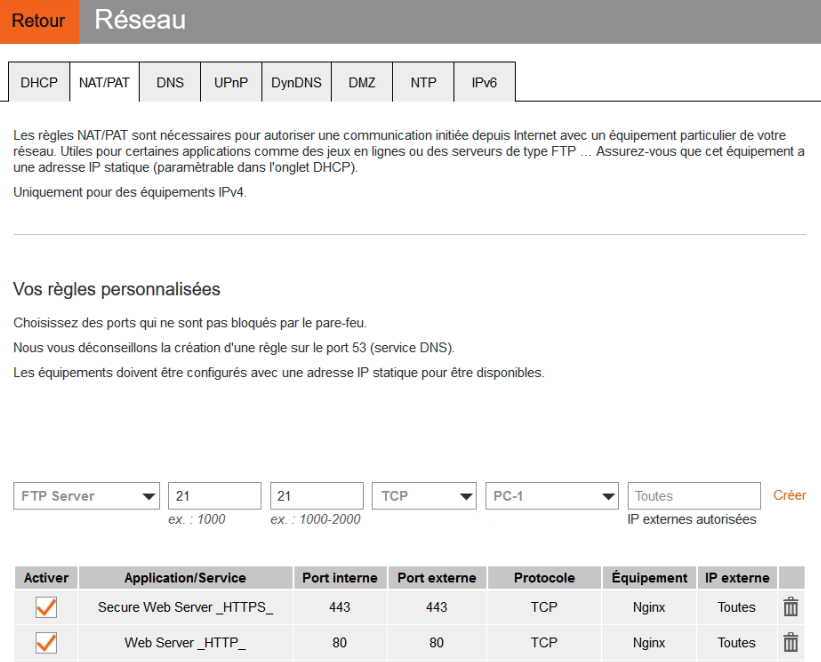
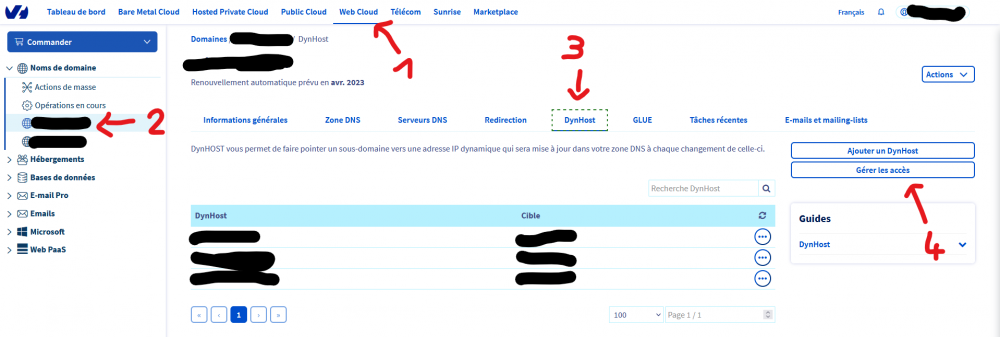
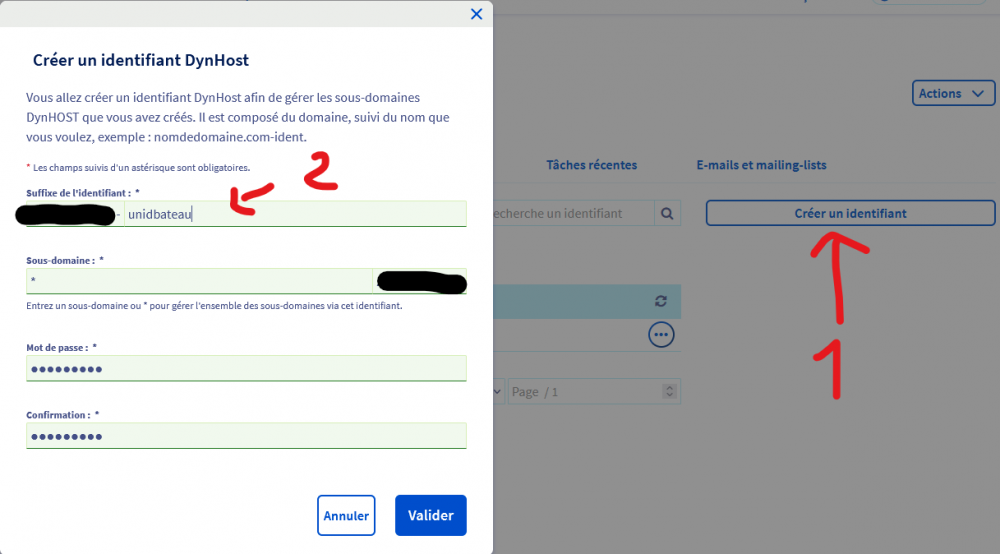
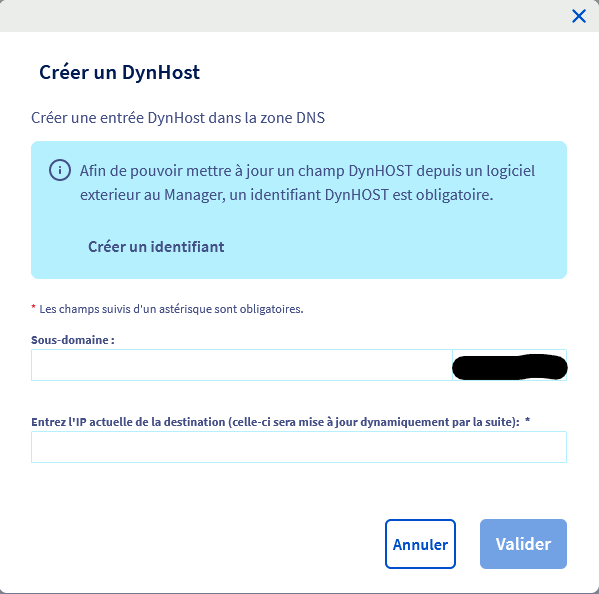
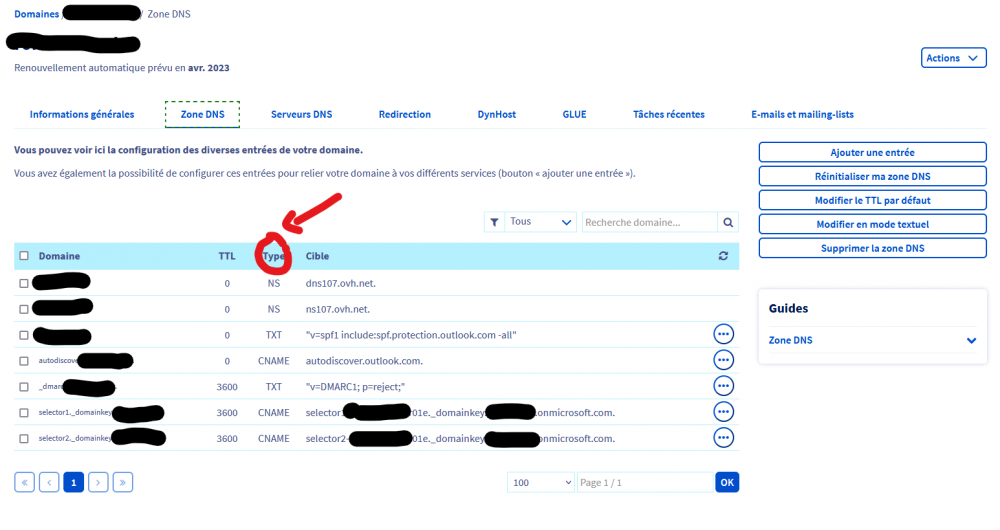
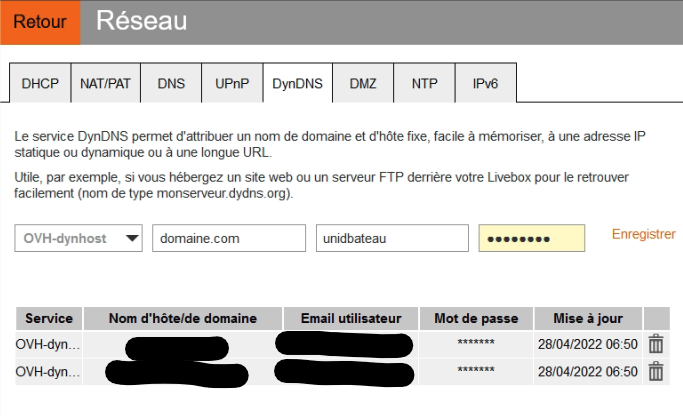
Pour la partie WAN, nous allons ouvrir l'accès à la de Nginx à Internet par HTTP + HTTPS. Cela revient à une redirection des ports 80 et 443 vers l'IP de notre Nginx (192.168.3.253 pour rappel). Sur la LiveBox, connectez-vous à l'espace d'administration en saisissant l'adresse IP de votre Box dans un navigateur et allez dans "Réseau" puis "NAT/PAT". Sélectionnez "Secure Web Server HTTPS" et "Web Server HTTP", TCP uniquement à moins que vous ne sachiez ce que vous faites, et sélectionnez votre Nginx en cible. Laissez IP externes sur toutes. Connectez-vous à votre OVH dans un nouvel onglet, puis : 1 Web Cloud (en haut) -> 2 Déroulez "Noms de domaine" à gauche et cliquez sur votre domaine -> 3 DynHost -> 4 Gérer les accès. Cliquez enfin sur Créer un identifiant, puis créer un suffixe (ou pseudo de connexion) et son mot de passe. Laissez un * dans "Sous-domaine" pour que ces identifiants puissent régir des sous-domaines. Enregistrez quelques part ces informations et validez. Retournez à la fenêtre précédente et sélectionnez cette fois-ci "Ajoutez un DynHost". Ici, nous souhaitons simplement que "domaine.com", nous laissons donc le champs, vierge. Pour test.domaine.com, renseignez "test" dans sous-domaine. Remplir enfin avec votre IP WAN correspondant au serveur ou votre maison et visible ici https://ipv4.lafibre.info/. Si une erreur apparaît, rendez-vous dans la section "Zone DNS" et assurez qu'aucun champ de type A ne figure dans dans la zone. Enfin, nous retournons dans l'espace de la Livebox, dans DynDNS cette fois-ci. On renseigne le nom de domaine auquel noussouhaitons nous connecter, l'ID (le Suffixe) définit auparavant et le mot de passe, et voilà !
-
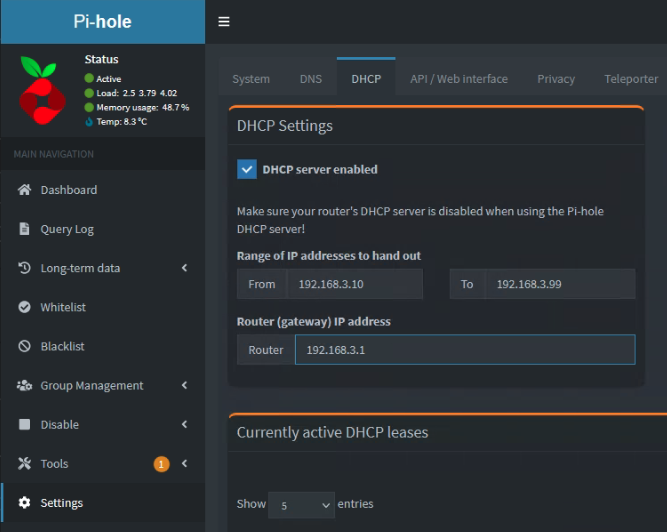
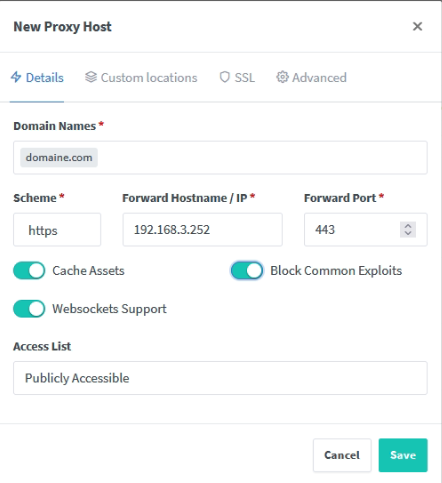
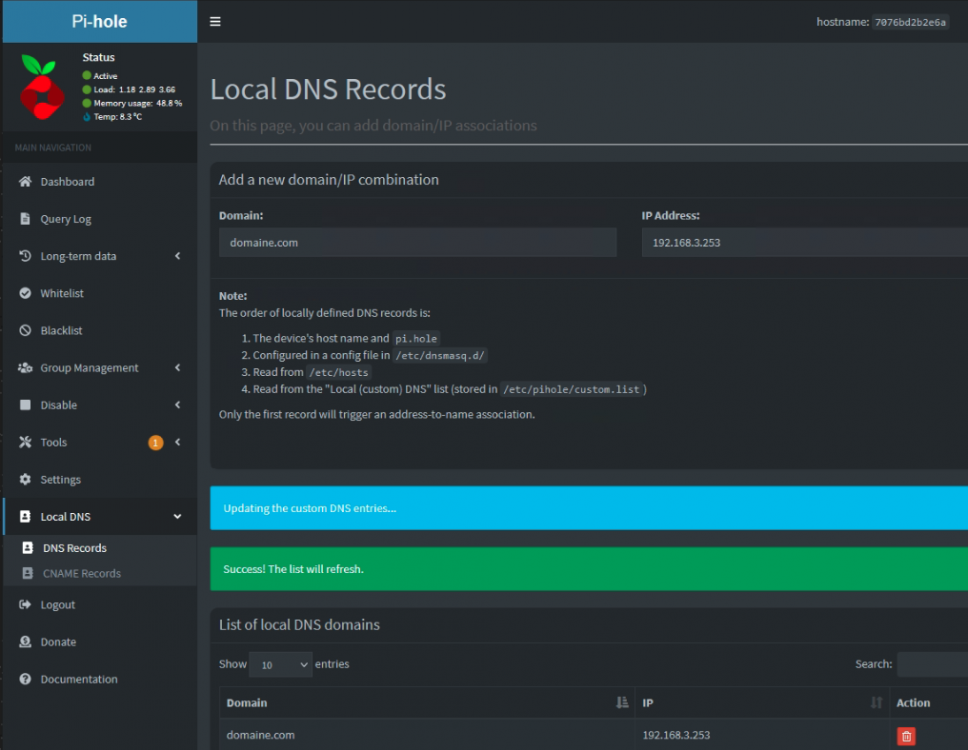
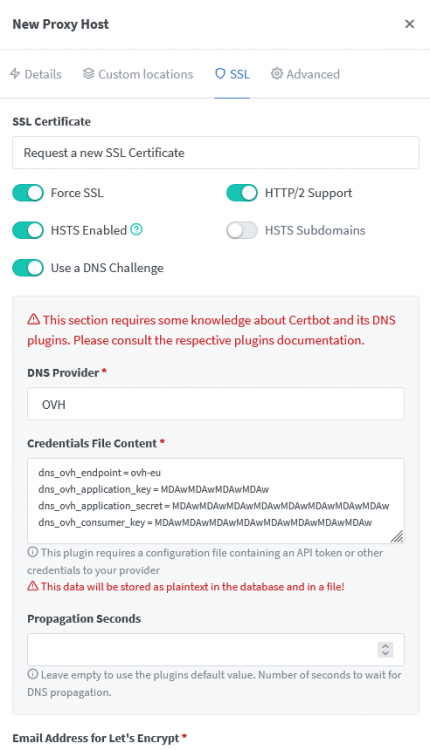
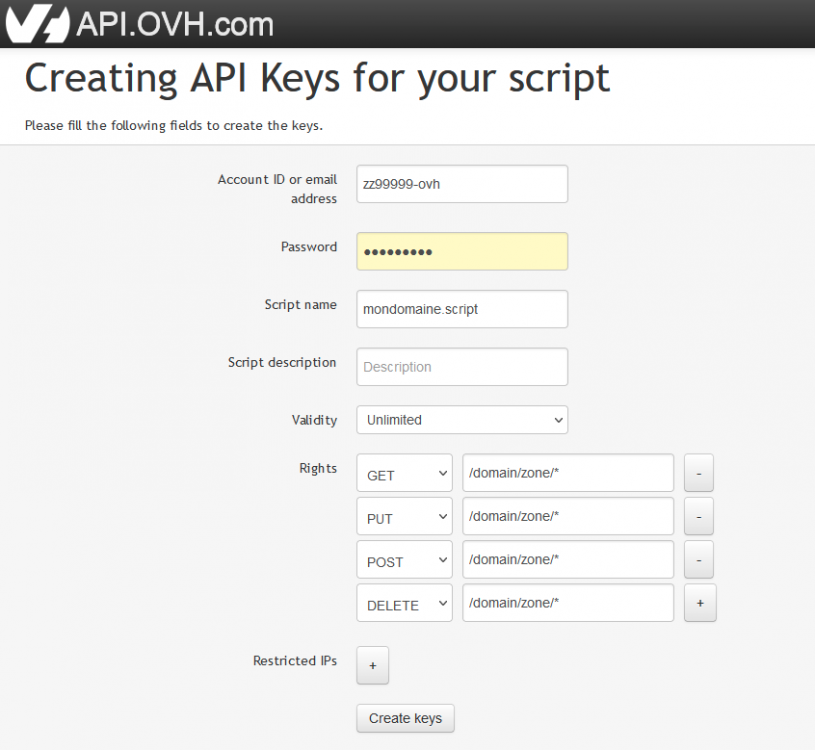
Si je peux être un peu plus exhaustif sur le sujet: Le serveur doit avoir une IP LAN fixe, le WAN peut-être dynamique, tant qu'un DynDNS est configuré. Dans Nginx, selon ton registrar, tu peux lui fournir tes clés d'API pour qu'il s'y connecte et génère automatiquement un nouveau certificat SSL avant son expiration (il fait cette tâche tout seul). Je prend mon cas pour exemple: Mon serveur a une IP LAN Fixe, tout comme le Docker Nginx, le docker Pi-Hole et un Docker pour NextCloud. J'ai une box Orange qui change d'adresse dynamiquement. J'ai enfin un nom de domaine chez OVH. Les IPs -> Box Orange : 192.168.3.1 / Pi-Hole : 192.168.3.254 / Nginx-Proxy-Manager : 192.168.3.253 / NextCloud : 192.168.3.252 / IP WAN Dynamique Pi-Hole va servir de DHCP, et il distribue sa propre IP comme adresse DNS primaire. L'adresse de passerelle est celle de la box Orange 192.168.3.1. Pour accéder à NextCloud depuis le LAN comme le WAN, nous allons procéder ainsi: Dans Local DNS -> DNS Records, on lie notre nom de domaine à l'adresse IP de Nginx, car c'est lui qui fournira le certificat SSL pour le https. A présent, on rajoute notre nom de domaine dans Nginx que l'on lie à l'adresse IP de NextCloud. Notez que NextCloud accepte que le HTTPS par défaut (en forçant https), on le définit donc dans scheme ainsi. A l'inverse, Photoprism n'est accessible que part HTTP et il faudrait définir "scheme" ainsi. On renseigne le port d'accès selon celui que vous avez définit dans le Port Mappings de Docker. "Scheme" définit comment Nginx accède au site, pas le client final. Ports Mappings du docker Maintenant, nous nous rendons dans la partie SSL: Selon les registrars, certaines informations sont à remplir dans "Credentials File Content". Pour OVH, il faut créer les Token dans l'espace API d'OVH : https://api.ovh.com/createToken/ Saisissez-vous identifiants OVH, et saisissez comme dans l'illustration vos rights. Notez que ce sont les droits les plus permissifs et qu'il conviendra quand on a la main d'ajuster comme ceci : En cliquant sur Create Keys, les clés nécessaires sont fournies. Enregistrez les, vous ne les reverrez-plus mais vous en aurez à nouveau besoin si jamais vous perdiez votre configuration. En sélectionnant "Request a New SSL Certificate", et en renseignant les clés précédemment obtenus dans "Credential Files Content", nous pouvons sauvegarder la configuration. Certbot va alors tourner un moment (1 minute). Le résultat précédant apparait, toutes les requêtes clientes adressées à Nginx avec ce nom de domaine sont chiffrées par Let'sEncrypt. Nginx lui communiquera en HTTP ou HTTPS avec l'application selon la configuration sélectionnée dans "scheme". La partie LAN est finie, penchons nous sur le WAN.


-
I'll add that, in the link provided, the user set a 32k recordsize. That's important because it refers to APFS default sector size. So it's important for interoperability to use this recordsize for your dataset.
-
It is. Concerning the automatic snapshot, I'll let you do your choice. Dont forget that a snapshot is not a backup. But sending your snapchots (with Sanoid or ZnapZend) on another system through SSH, USB disk (not prefered) or ISCSI is a backup if the second system is out of touch of the first (fire, stealth.. ) I conclude that most of your files is located on your Unraid only, so what matters is the smb config. It requires the "fruit" argument to let MacOS handle zfs snapshots as Truenas does. https://blog.gwlab.page/building-nas-with-zfs-afp-for-time-machine-d8d67add1980
-
Indeed, you need to backup your data to configure a ZFS pool and then replicate your backup there.
-
You need to set a Zvol to receive an APFS on your pool dataset. https://openzfsonosx.org/wiki/Time_Machine_Backups No plug-in to clearly talk about, only a few commands relative to ZFS and NFS.
-
Hi, First, check the time format there. https://www.samba.org/samba/docs/current/man-html/vfs_shadow_copy2.8.html Are you sure that your time format is correct? Seconds in the begining of names sounds weird to me. Second, I needed to add the attributes "Write lists" and "Valid users" to get my Snapshots Up in the share.
-
Create a folder and it'll work. For the labeltype, always gpt. If you do not use gpt, it's because you know what you're doing.
-
Yep, mount your docker.img into a ZVOL formated as your docker.img filesystem. Set your docker.img there (copy the old one in the new location) and you're good. Create a script to mount the Zvol automatically at first "Start Array" Refer to my older post for specifics commands




