





Vivent
Members
-
Joined
-
Last visited
-
Got the same problem, but I've managed to fix it. Apparently the docker config in apps uses repository with tag "preview" which looks like it's unstable. I've changed it to "latest" which on github is also marked as "stable", so I assumed that it will be stable in future. Before I've changed it, I removed the image and data from appdata, to make a clean install, not sure if dirty would work. You can probably also use just "stable", but I think using "latest" as stable branch is a common thing. I think it should be a default anyway and/or add the option to choose wich branch I want to use.
-
Is there a chance that we would get more Java versions on this container? I'm playing on fabric and some of the mods are compiled with Java 17, and some with even Java 20 (class version 64), but the container seems to only run Java 16
-
I'm not anyone else, but I've just tested it on windows client (also 1.10.6). It took about 1 or 2 minutes to establish the connection, but I can access both unraid GUI and shares. Windows client was connected through the same internet connection as phone (LTE) in previous test. Additionaly I can mention, that currently my unraid server is on network without public ip to the internet (fighting with ISP about it), so it's definietly going through zerotier EDIT: Connection to docker containers also works. Currently listening to music from Jellyfin with zerotier ip
-
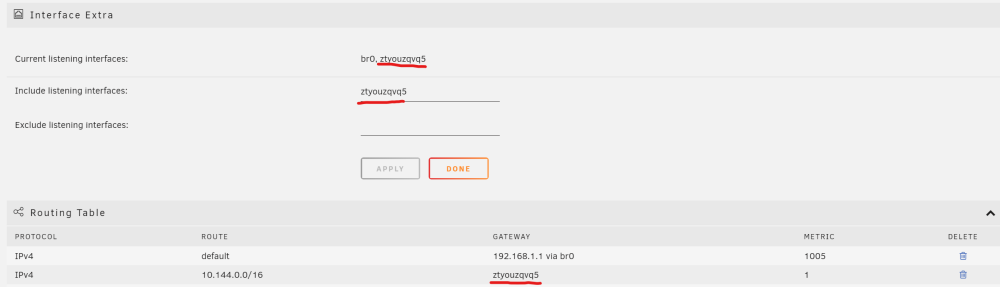
For anyone looking for a solution, I was able to connect to my unraid 6.12.2 from a phone on zerotier 1.10.6. Just go to settings -> Network Settings. In Routing Table section find your zerotier ip and copy interface name from gateway column. Paste the interface name into "Include listening interfaces" field under Interface Extra section, hit apply, and it should all be working.
-
Ok, yesterday I forgot to update. Disk 2 passed, and I restarted the array without the parity. For now everything looks good. My current plan is to upgrade/swap HDDs and then replace PSU to seasonic PX (or both at the same time if possible). Also as the parity disk is fairly new (~1 year old), I'll try to RMA it. Thank you for helping me
-
I'm more talking about the issue that I can plug max 2 disks to one power cable, even though there are 3/4 SATA power connectors. I don't think it's normal, but I'm not sure how to test if what's the real problem here, because in theory 12V is on one line
-
Ok, I found on forum, that there are some GUI bugs with SMART reporting when using dell H310, and smartctl command outputs the current status of extended smart test. The parity drive already failed Num Test_Description Status Remaining LifeTime(hours) LBA_of_first_error # 1 Extended offline Completed: read failure 90% 9656 - # 2 Extended offline Completed: read failure 40% 9595 - and disk 2 is in progress, so as you said it is probably healthy (thank god, because I don't have a spare to rebuild it, if it was the opposite) So for disks everything is pretty clear for me, but there is still a question of what to do with PSU? I don't think that the behavior I described in first post is correct, but I'm not sure (could be because of too much current through one SATA power cable?). Is there anyway for me to check if everything is ok with 12V line, or maybe is it correct behavior, or maybe an obvious sign of pre-fail?
-
I've forgot to mention: I've tried to run an extended SMART few times, but every time it gets stuck on 60% on both disks. I even once tried to leave the parity for over two weeks, but with no luck. I'll try once again as it's been few days and power cycles for them, but I don't have much hope. I know those drives will need few hours for an extended SMART, but is there any way to tell if it's just stuck on 60% or is it actually progressing? I also connected them using unitek docking station to scan them using hd tune (just a quick scan) and everything was fine.
-
I just moved to a new flat, and placed the server in the new case and with dell perc h310 raid card in IT mode. Connected everything, and since then my two youngest disks are behaving strangely. "Z306AABD" was having issues in the old place as well, but I believe it was problem with unstable electricity in the old place (my PC also was having problems there, and there are no problems in the new place). Now both "Z306AABD" (parity) and "Z306S1CT" (disk2) are acting strangely. Both at some point had read errors, disk2 to the point where it was emulated and I had to rebuild it on itself. Also both of them had "offline uncorrectable" count increased and then it went back 0 (for parity it was when I resynced parity in the new place). That behavior of fixing the bad sectors pretty much every time is what makes me think that it may not be a problem with disks, but with power supply. The power supply is Silentium PC Vero M2 600W, and in theory it has one line, so it should not have any problems powering my 4 HDDs, but for some reason if I put more than 2 on one cable, the disks are randomly not detected in the system. Even if I have 1 disk on one cable and 3 disks on second, it usually does not power (connect?) the 1 disk cable, and only two random disks on 3 disk cable. I'm actually so desperate that I want to just replace all my disks with iron wolfs, but for now I don't have budget for that and also I'm not sure if my power supply is ok, so I want to pin point the root cause of all of this. I'm also attaching diagnostics done few hours after rebuild (I've started/stopped array ~2times, but no power cycling) haruhi-diagnostics-20230621-1045.zip
-
Thank you for such a quick response 😊. As this was my biggest dilemma, I'll mark your response as the solution. But if anyone can answer my second and third questions, I would be grateful 😉
-
Long story short, I need to replace two disks, one of which is starting to fail and the other is not mine. I thought my server could use a little bit of an upgrade anyway. I'll split this post into 3 topics, for each of which I have a solution. I just want to get some feedback from more experienced users. Current Server: i5 6600 on H170 with 16GB RAM HDDs: 2x4TB Seagate Terascale, 1x4TB Hitachi HGST, 1x1TB Samsung 2.5" SSD: 256GB Hynix (M.2 from laptop) 1. Storage: For disks, I plan to buy IronWolf drives. Two 8TB for parity and two 4TB to replace the old disks. I would also like to organize my drives a little bit, so I thought to plug the HDDs into an HBA/RAID controller and the SSDs (of which I have one for now) into the MOBO. I tried to research controllers a little bit (just one day), and for now I found it a little bit confusing. However, I found one video where a guy said something that HBA is pretty much equal to IT mode, so I found an offer on a DELL PERC H310 (03P0R3) with a note in the description that "it has been flashed to work as HBA controller". Does that mean it should work out of the box? I'm planning on buying two of these. 2. Case: As for the case, my question is kind of silly. I'm moving to a new place where I don't really have a place for a server, so it will stay in my bedroom (I don't mind the noise). I found a really nice rack shelf/table (19'') in an audio store, but it doesn't have a place for rails. My question is: Do you think I can mount the case with front screws only, or should I get a proper rack cabinet? I'm thinking about this because this "audio rack" looks like actual furniture. 3. Power Supply: Currently, I have a SilentiumPC Vero M2 600W (Bronze). It has 49A available on the 12V rail (single). Will it be sufficient for 5 HDDs (with plans to make it up to 10) and a few (2-3) SSDs? Regardless, I plan to upgrade it to something like SeaSonic SSR-750PX, but if it would be possible to postpone it, then it would save me some budget now.
-
With the help of the professor, I figured out the IP for the domain (any dns lookup couldn't find it for some reason). So now We have a nice domain by just setting up "A" record The "figuring out" was to just ping the domain BUT from the internal university network.
-
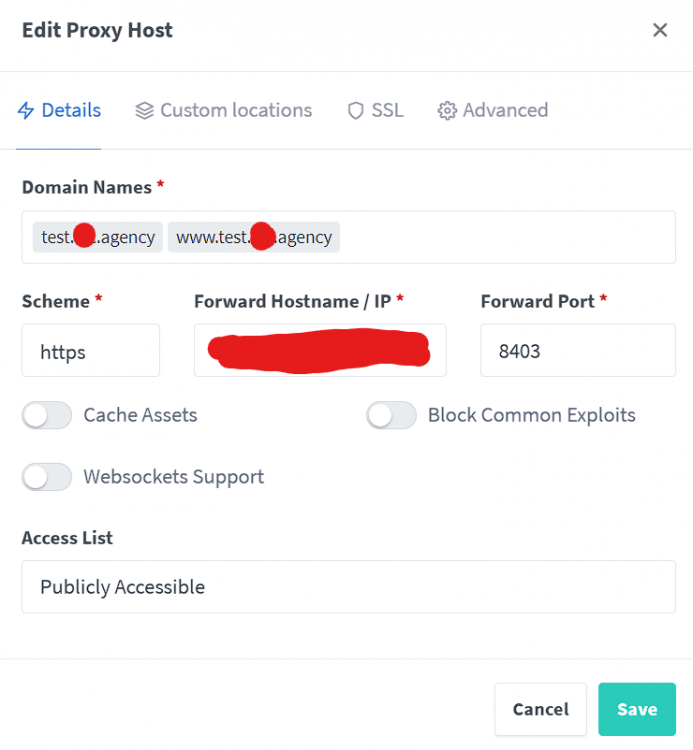
Not sure if I'm putting this question in correct category, but let's go. I am working on project on uni, where we need to write a web app and deploy it on server that we got from uni. Let's assume that the url where our project is avaible is https://projects.uni.com:8403. My group bought a cheap domain to make it easier to get to that app, because the url is long and not convenient to type it. For now we're using nginx (npm) server on my unraid server for redirect us to app/admin panel based on the sub domain. But we thought that it would be really nice if we could proxy all the traffic that goes to our domain through the unraid server and to the uni's application server. How do I do that? SRV record not working, nginx not working, and I don't think SOCKS is gonna do what I want srv record that I've tried: test IN SRV 1 1 8403 projects.uni.com. nginx proxy that I've tried: I tried to install shadowsocks container, but looking at the avaible config, I don't think this is what I want. I just want to proxy all the traffic from point A to B. Is there any easy way to do it? The certifacate on the uni's server is self-signed
-
Sorry for double post, but I think it's important. I kind of found the real issue. It was (is) power. I found out that if I plug 3 drives on the same cable, the last one (the one with problems) is not always detected, and if it is, its behaviour is strange (no temp, showing as 4GB instead of 4TB, or spitting read erros). So I added another cable, and it worked. I discovered this just now, because parity drive arrived so I needed to find a new cable. Now I'm not sure if cable is the problem (broken?), or is it that I shouldn't connect 3HDDs (1 is 2,5) to the same cable. But if it's the second one, then Silentium PC shouldn't add cables that allowed to do that... I don't wanna mangle with those drives too much, so I won't test it, but if someone has similar problem, you can try another/second cable
-
Ok, so I talked to a friend, and he recommended me that I should still use the drive, but get parity drive as fast as possible. The errors that I have encountered may have been caused by me tampering with shares, and moving all data from one drive to the other fixed it. Thank you guys a lot




