





Jaybau
Members
-
Joined
-
Last visited
Everything posted by Jaybau
-
Here is someone that just posted on Reddit (parity error how to identify affected disk). Apparently others have my concerns, and I hope my feedback is not ignored.
-
I think these are some of the examples that I wish the integrity checks were consolidated (parity checks, file system checks, smart checks, dynamix file integrity checks, other 3rd party tools that may exist).
-
SMR versus CMR drive for cache? Desktop/laptop class versus NAS class for cache? The #1 reason why I am considering a desktop/laptop SMR drive is because I can get it in 2.5" size, and I don't have enough 3.5" bays available. I have a SSD drive for dockers/VM's. But I don't want to wear out the SSD drive just to temporarily cache data before moving to the protected array. I also use the drive for downloading torrents, which do frequent tiny read/writes and don't want to wear out a SSD. The drive's speed only needs to be as fast as my 1G network; I don't need the speed when data is moved to the array. SMR +++ 2.5" drive slot + More load/unload cycles + Quieter ++ Less heat = last longer (but over lapping might mean it doesn't last as long) + Cheaper (but not by that much on small drive) +- Slower (but fast enough) The one problem SMR might have is filling up the drive's cache and multiple read/writes on pre-written files (over lapping?). However, I don't expect the unraid cache drive to fill up since data is moved to the array nightly, so not sure if over lapping will be an issue. The next concern I have is that 2.5" SMR drives are considered "desktop" class, and that could mean they aren't meant to operate 24x7 in a home NAS, and there could be load/unload cycle issues. My use is a home media NAS, which isn't a "deskop" and not "enterprise 24x7". Thoughts?
-
How do people know when memory goes bad? When they start seeing data errors? Is there a way to be proactive? Can memory checks be scheduled to reboot the machine, run memory checks, start the machine, and report the analysis?
-
Yes, but I'm suggesting a more consolidated approach to different testing, rather than separate scattered checks, and some checks not known/included to novice users. First, is there a difference between SMART attribute monitoring/flags and running a SMART short/extended test? I assume SMART attributes get triggered when the problem occurs, while a SMART test is proactive and can potentially find problem earlier. Additionally, the SMART tests for my SAS drives don't seem to work at the GUI level, so have to manually run at the console. I have separate checks for file integrity checksums, btrfs, parity, and run SMART tests. Occasionally I bring down the system for memory check.
-
Not sure if there's a better way of doing this, or something built-in and automated for a new user experience (lots of room for ignorance). The last thing I want to deal with is corruption, not knowing what is corrupted, why/how, and trying to recover. I like btrfs scrub/validation feature, but I've read the array (data-parity process) doesn't recover well from an unexpected ungraceful shutdown. Even with a UPS, it still makes me nervous. Perhaps XFS + Dynamix File Integrity (DFI) is the more robust/safest solution. XFS for the unexpected shutdown recovery + DFI that basically does the same thing as btrfs scrub. I'm using BLAKE3 and hope it is as good or better than btrfs metadata/scrubs. Perhaps something in the future: Built-in file integrity check (for XFS too), and perhaps the default for new users. If a parity error happens, knowing if your parity versus your data is corrupt seems absolutely essential. Without knowing this information, it could leave somebody with a lot to try and figure out. Scheduled hardware checks (e.g. memory test), SMART drive tests, file integrity checks, parity checks. I would like to catch problems as early (and conveniently) as possible. Best practices built-in and streamlined. There's already some of these, but it's not intuitive, and I still don't have it nicely figured out with best practices. Thank you.
-
"Ways that there should be parity check errors (https://wiki.unraid.net/Parity#Checking_parity): Undetected hardware fault (such as silent memory corruption)" When there's a hardware fault/memory corruption, how do you know if the parity error is on the parity disk or the data disk? Will the parity check tell me which is corrupted?
-
Thank you...took me forever to figure that out. I was expecting the format option to be next to the drive in "Array Devices", or on the "Disk Settings" tab.
-
This command worked to get my original cache drive back: btrfs-select-super -s 1 /dev/sdX1 I finally got the drive swap to work, but not without issues. Here's what I did to swap a cache disk of a single disk pool (I may have missed something): Stop the array Create an extra slot for the cache pool. Add the new drive to the new slot. (both the original and new drive in the cache pool). In the cache pool section, make sure none of the drives have a note about erasing a drive. I think I saw this warning based on which drive was in which slot (but can't remember which drive was in which slot to get the warning). The warning is not obvious unless you look for it. Can't remember when or what happened to get the message. Start the array. Wait for the activity to stop. This gave me a two drive cache pool. Still need to remove the original drive from the cache pool (next step). Stop the array. Remove the original drive from the cache pool, and reordered so my new drive is slot #1. (again, make sure there's no erasure warning in the cache pool section). Remove slot #2. If you don't do this, I think the filesystem/Unraid will think the pool is broken. Start the array. I think basically what is happening is this process is forcing BTRFS to expand itself (1 drive -> 2 drives), then shrink itself (2 drives -> 1 drive). Hopefully in the future there's a guided script to make this idiot/worry proof (including backup). Thank you for the assistance.
-
I might have the log before the reboot, but it's not anonymized. Which file(s) would be helpful? Original Cache Drive (single drive BTRFS cache pool): SAMSUNG_MZ7LN256HAJQ-000H1_S3TCNX0M705032 (sdf) New Cache Drive: M4-CT256M4SSD2_00000000130309265B2B (sdg) "both devices without a filesystem" There was no warning or confirmation that a drive was going to be erased by simply swapping drives in the dropdown list. "you can still have a single-device "pool" if the number of defined cache slots >= 2" I didn't increase the defined cache slots to 2; I only had 1 slot defined. I was going to try this missed step, but not if the original drive is now erased. What I did is swap sdf -> sdg in the dropdown. When I noticed sdg is unmountable, I swapped back to sdf, and noticed that drive too was unmountable. Other things that I've tried: Rebooting. I also tried mounting the original cache drive sdf to the array to see if I can read it from there. This required a New Config (but only after the problem). Is the sdf drive truly erased and unmountable? Does the swapping in the dropdown (with only 1 slot) initiate a drive erasure? I've read other posts saying this process is "broken" on lower Unraid versions (I'm on 6.10 stable). Might it still be broken? Might it cause a drive erasure? Thank you.
-
Unmountable disk present: Cache I attempted to follow these instructions to Replace/upgrade a cache pool disk. stop the array on the main page click on the cache device you want to replace/upgrade and select the new one from the drop down list (any data on the new device will be deleted) start the array a btrfs device replace will begin, wait for cache activity to stop, the stop array button will be inhibited during the operation, this can take some time depending on how much data is on the pool and how fast your devices are. when the cache activity stops or the stop array button is available the replacement is done. I got to step #3, thinking Unraid was doing #4. The process didn't take very long. When the activity "stopped" or was "done", I didn't have any of my cache drives mountable. I tried the new drive, and it wouldn't mount. I retried the original drive, and it would no longer mount. I did not format any of the drives, so I hope my original drive still has the data. But I did try and switch back to my original drive, and hopefully that didn't delete any data. tower-diagnostics-20220521-1303.zip
-
Might "blk_update_request: protection error" or "Buffer I/O error" be a problem? May 20 13:00:10 Tower kernel: sd 6:0:0:0: [sdf] Enabling DIF Type 2 protection May 20 13:00:10 Tower kernel: sd 6:0:0:0: [sdf] 11721045168 512-byte logical blocks: (6.00 TB/5.46 TiB) May 20 13:00:10 Tower kernel: sd 6:0:0:0: [sdf] 4096-byte physical blocks May 20 13:00:10 Tower kernel: sd 6:0:0:0: [sdf] Write Protect is off May 20 13:00:10 Tower kernel: sd 6:0:0:0: [sdf] Mode Sense: db 00 10 08 May 20 13:00:10 Tower kernel: sd 6:0:0:0: [sdf] Write cache: disabled, read cache: enabled, supports DPO and FUA May 20 13:00:10 Tower kernel: sd 6:0:0:0: [sdf] tag#1685 UNKNOWN(0x2003) Result: hostbyte=0x05 driverbyte=DRIVER_OK cmd_age=0s May 20 13:00:10 Tower kernel: sd 6:0:0:0: [sdf] tag#1685 Sense Key : 0x5 [current] May 20 13:00:10 Tower kernel: sd 6:0:0:0: [sdf] tag#1685 ASC=0x10 ASCQ=0x3 May 20 13:00:10 Tower kernel: sd 6:0:0:0: [sdf] tag#1685 CDB: opcode=0x7f, sa=0x9 May 20 13:00:10 Tower kernel: sd 6:0:0:0: [sdf] tag#1685 CDB[00]: 7f 00 00 00 00 00 00 18 00 09 20 00 00 00 00 00 May 20 13:00:10 Tower kernel: sd 6:0:0:0: [sdf] tag#1685 CDB[10]: 00 00 00 00 00 00 00 00 00 00 00 00 00 00 00 08 May 20 13:00:10 Tower kernel: blk_update_request: protection error, dev sdf, sector 0 op 0x0:(READ) flags 0x0 phys_seg 1 prio class 0 May 20 13:00:10 Tower kernel: Buffer I/O error on dev sdf, logical block 0, async page read May 20 13:00:10 Tower kernel: sd 6:0:0:0: [sdf] tag#1686 UNKNOWN(0x2003) Result: hostbyte=0x05 driverbyte=DRIVER_OK cmd_age=0s May 20 13:00:10 Tower kernel: sd 6:0:0:0: [sdf] tag#1686 Sense Key : 0x5 [current] May 20 13:00:10 Tower kernel: sd 6:0:0:0: [sdf] tag#1686 ASC=0x10 ASCQ=0x3 May 20 13:00:10 Tower kernel: sd 6:0:0:0: [sdf] tag#1686 CDB: opcode=0x7f, sa=0x9 May 20 13:00:10 Tower kernel: sd 6:0:0:0: [sdf] tag#1686 CDB[00]: 7f 00 00 00 00 00 00 18 00 09 20 00 00 00 00 00 May 20 13:00:10 Tower kernel: sd 6:0:0:0: [sdf] tag#1686 CDB[10]: 00 00 00 00 00 00 00 00 00 00 00 00 00 00 00 08 May 20 13:00:33 Tower kernel: blk_update_request: protection error, dev sdf, sector 0 op 0x0:(READ) flags 0x0 phys_seg 1 prio class 0 May 20 13:00:33 Tower kernel: Buffer I/O error on dev sdf, logical block 0, async page read ... May 20 13:00:37 Tower emhttpd: ST6000NM0095_ZAD3Q4NJ0000C829A6YY_35000c50095310bef (sdf) 512 11721045168 May 20 13:00:37 Tower emhttpd: read SMART /dev/sdf May 20 13:01:01 Tower kernel: sd 6:0:0:0: [sdf] tag#1714 UNKNOWN(0x2003) Result: hostbyte=0x05 driverbyte=DRIVER_OK cmd_age=0s May 20 13:01:01 Tower kernel: sd 6:0:0:0: [sdf] tag#1714 Sense Key : 0x5 [current] May 20 13:01:01 Tower kernel: sd 6:0:0:0: [sdf] tag#1714 ASC=0x10 ASCQ=0x3 May 20 13:01:01 Tower kernel: sd 6:0:0:0: [sdf] tag#1714 CDB: opcode=0x7f, sa=0x9 May 20 13:01:01 Tower kernel: sd 6:0:0:0: [sdf] tag#1714 CDB[00]: 7f 00 00 00 00 00 00 18 00 09 20 00 00 00 00 02 May 20 13:01:01 Tower kernel: sd 6:0:0:0: [sdf] tag#1714 CDB[10]: ba a0 f4 a0 ba a0 f4 a0 00 00 00 00 00 00 00 08
-
I'm getting SMART errors on SAS/SCSI disks. I also have the same problem with a different SAS/SCSI drive. There's also some drive intermittent drive buzzing noise that seems related to accessing the GUI self-test web page. I also think I get disk temperature warnings from this web page/screen too. This is an unmounted disk, no data, zero'd. I've run pre-clear, and there's no reported errors. I'm new to SAS/SCSI, so I don't know what normal should be. I don't see the same same kind of SMART information on SATA drives. The "Errors Corrected by ECC" are very concerning to me, but I don't know if that's bad, normal, an uncorrectable problem. #################################################################################################### # Unraid Server Preclear of disk 5000c500863f5d47 # # Cycle 1 of 1, partition start on sector 64. # # # # Step 1 of 5 - Pre-read verification: [9:12:23 @ 181 MB/s] SUCCESS # # Step 2 of 5 - Zeroing the disk: [9:12:41 @ 181 MB/s] SUCCESS # # Step 3 of 5 - Writing Unraid's Preclear signature: SUCCESS # # Step 4 of 5 - Verifying Unraid's Preclear signature: SUCCESS # # Step 5 of 5 - Post-Read verification: [9:12:11 @ 181 MB/s] SUCCESS # # # # # # # #################################################################################################### # Cycle elapsed time: 27:37:23 | Total elapsed time: 27:37:23 # #################################################################################################### --> RESULT: Preclear Finished Successfully!. tower-diagnostics-20220520-0719.zip
-
I would like to simultaneously run two similar containers from different repos. In my example, I'm trying to run both qbittorrent and qbittorrent-hotio. The container names, ports, appdata are different. But I run into problems if I try to have both running at the same time (no problems if I have one of them stopped). I don't know Docker all that well, but I suspect there's a "layer" that is being shared causing a conflict. How do I run multiple containers that might share a layer?
-
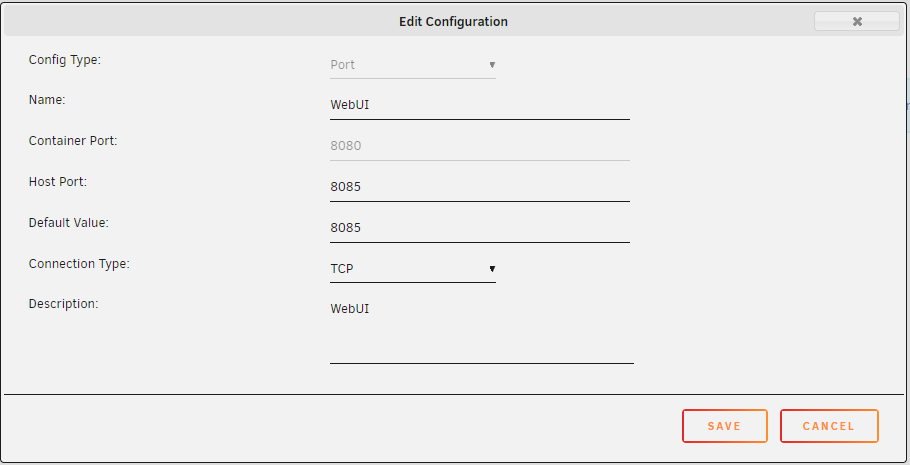
How do I change the WebUI port? It is my understanding I need to change both the Container Port and Host part. It should be -p '8085:8085/tcp' I cannot change the "Container Port" because the option to change it is disabled/grayed/greyed. I get this instead: It should be -p '8085:8080/tcp'

-
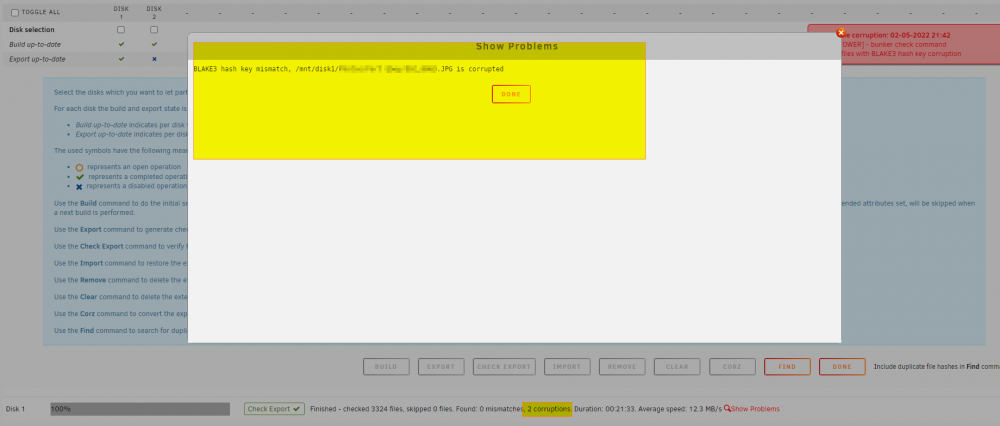
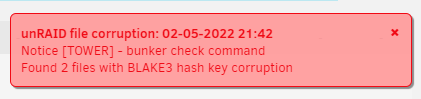
Export check says there are "2 corruptions", but only 1 problem is shown.
-
When User Shares are automatically created, the default SMB security = Public. This means everyone on my network has access to my data! Is there a way to change the default "export" (e.g. Export=No). Is there a way to change the default SMB security (e.g. Security=Private)?
-
Which is the preferred DBMS: MySQL or MariaDB?
-
When people think of defining bitrot they are mostly concerned about data decaying/degradation (rotting) over time (decades). These two comments address the question of how "rotting" could be possible, and address the probability/risks: 1) Random cosmic ray blasts a bit on the drive. 2) Data "decaying" in any reasonable amount of time, really unlikely. Hard disk ECC is not 100% reliable, example: Seagate Ironwolf drives have a 1 per 10E14 unrecoverable read errors per bits read. Seagate Ironwolf Pro drives have a 1 per 10E15 unrecoverable read errors per bits read. I do not know what above really means for a home data hoarder. 1 per 10E14 = 1 URE per 12.5 terabytes? 1 per 10E15 = 1 URE per 125 terabytes? Is that the probability within the MTBR time frame? I'm not sure how many bits would be rotted if such an event would occur (one bit over 100's of years?) Nor how many rotted/decayed bits would make a difference. Especially since the source is not perfect (movies, audio, photos, my eyes, my ears, headphones, TV display). I'm not sure what 1 bit off is going to look or sound like (I presume the file will still be read as normal).
-
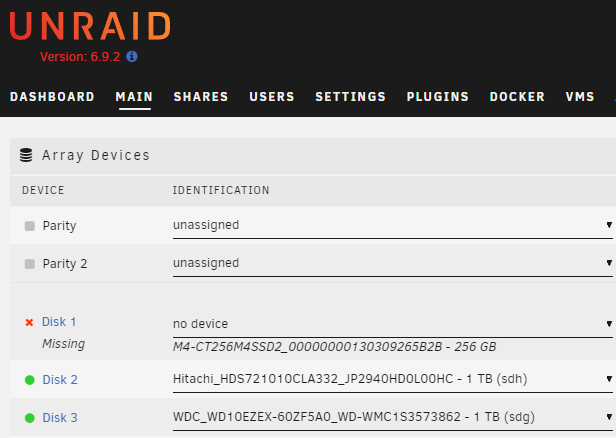
Can I remove a drive from the array? Can I rearrange which hard disks are in which disk slot (i.e. Disk 1, Disk 2, Disk 3)? In the screenshot below, I have a physical drive attached to my computer that I don't want used by Unraid (Disk 1).

-
Is there a potential risk of a write hole if there is a loss of power during writing data? It is my understand a power loss/failure could potentially cause a parity problem (not a data problem if using journal or copy on write filesystem; the data just won't be there, so at least you'll know where to start over). Is there any mitigation done with Unraid?
-
To be more clear regarding my original question: Can bits on a hard disk unintentionally change after the data has been written to disk?
-
If hard disk ECC was all that was needed, then why do we have checksums via Btfrs, ZFS, Dynamix File Integrity, SnapRAID? There's even an Unraid Wiki document for checking disk/filesystems (https://wiki.unraid.net/index.php/Check_Disk_Filesystems). This leads me to believe bit errors can silently occur; a problem hard drive ECC nor Unraid handle. And requires additional maintenance to prevent, detect, and correct (hence the checksum tools mentioned and provided by 3rd parties).
-
Can bits on a hard disk unintentionally change after the data has been written to disk? If yes: How does consumer level hardware handle this? How does Unraid handle this? Will btfrs detect and easily solve this problem? Does Unraid have tools to manage this?
-
Can bits on a hard disk unexpectedly change?


