





Zeragonii
Members
-
Joined
-
Last visited
Everything posted by Zeragonii
-
Any chance we can expedite this? Not keen on messing around with manually installing plugins so getting this update to the AppStore would be a godsend to normies like me 😅
-
Okay that's interesting, I've managed to get it working locally, however when I'm browsing via Unraid Connect the icons disappear again Might have to just download them and point them locally, but idk if the images will still get served properly? Thanks fo your reply though, its most appreciated
-
Hi folks, Loving this plugin so far, however it's not detecting the icons for my docker containers and by proxy wont let me set the folder icons to match that of containers. Any ideas on what's going on or will you need debug info? Thanks :D
-
do you intend on updating the certs yourself? Mine finally gave up and I cant get it to connect securely. Other than that, any recommendations for alternatives? Thanks for your continued work
-
Ran out of random linux kernel threads to defer to, this is my current syslinux config, still getting the same error: "nvme nvme0: controller is down; will reset: CSTS=0xffffffff, PCI_STATUS=0x10" Is there any recourse at all for this? The error doesn't happen if I keep my Tdarr docker container off so for now that's what I'm doing to keep the rest of my services running.

-
Back again. The original error has returned: "nvme nvme0: controller is down" I have isolated the issue to one single docker container, Tdarr, however after scrutinising the logs for that I cant find anything to indicate what's causing the issue. I've added the power state stuff to the bzroot line, I've tried a different physical drive, I just can't for the life of me figure out why my drives are crapping out so hard 🙃
-
Okay so a bit of an update, after a full round of hardware testing I've ended up putting my problematic GPU back in but installing an older driver, that seems to have resolved this issue. I honestly want to break something at this point, so much frustration over a driver update... Gotta love it. Will post full solution details once I've fully confirmed its the GPU driver.
-
Tried everything in that article, no dice. Swapped the CPU and motherboard, no dice. Currently running another round of memtest to rule out possible memory issue. Next port of call after that is GPU, after that I honestly dont know what it could be.
-
Trying now, will report back after I've tried everything, if necessary. Thanks again!
-
Turns out it might be something else dying. Now the system just hard crashes with no error in the log. I'm thinking the CPU may be bad as I had issues with it when it was in my gaming PC for a while, thought it would be under less stress as a server workhorse but I guess bad batches are always going to be bad. Here's the syslog, if anyone thinks they can find a hint at what's wrong. syslog
-
I fixed it, by doing literally nothing other than frustratedly updating to 6.12.2 to install zfs and manually shift all the data rather than clone the drive And the cache is working... all the data is there... I dont understand it, nor do I want to question the voodoo magic that fixed everything.. Thanks for trying though, the UnRaid community is awesome and I'm eternally grateful for you trying to help me solve this headache. Might be back if this drive does the same as the last one though.. Fingers crossed you never see my name again
-
All it's telling me is "Unmountable: Unsupported partition layout" Its a totally cloned drive so I dont get why its unable to mount
-
okay so I've put the new drive in and used clonezilla to duplicate the old drive block for block. Unraid says its unmountable, great. Any ideas?
-
The old one is a Seagate Barracuda, new one is a Kioxia Exceria, fingers crossed
-
Tried this, and tried reseating the drive in another slot. Still getting the same issue. I've ordered a replacement drive that should be arriving today, so here's hoping that fixes the problem. I'm not hopeful though..
-
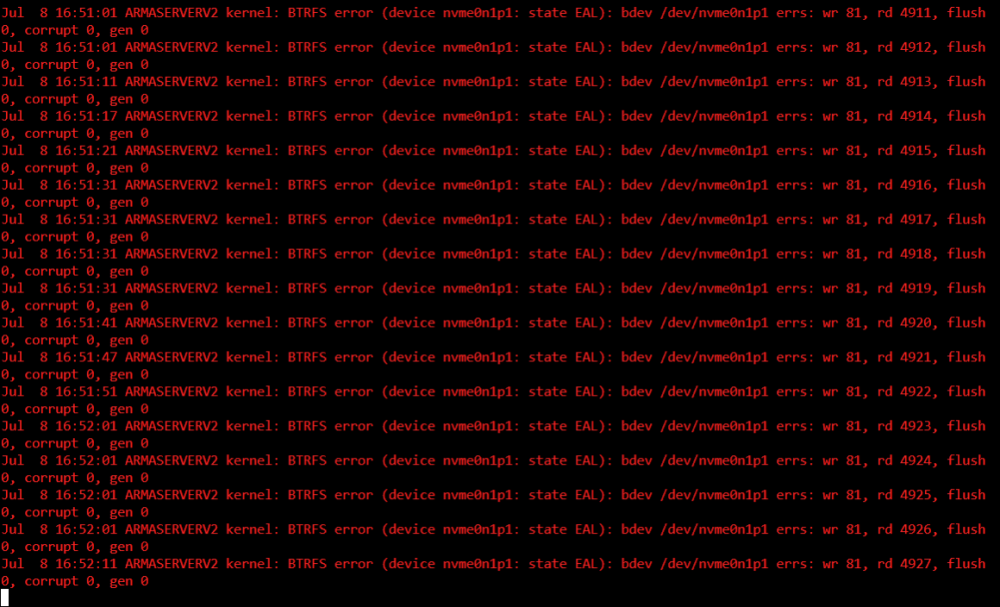
Hi folks, been trying to diagnose what on earth is plaguing my unraid install lately and I think I'm starting to narrow down onto the culprit. I got an error message that said something about my NVMe drive, and it mentioned __btrfs_free_ext, I've attached my diagnostics file too, if anyone can offer any insight I'd be so appreciative. I'm at a total loss right now. Thanks in advance. armaserverv2-diagnostics-20230708-1647.zip
-
Unfortunately the system is still very much not happy. I'm going to have to roll back to an older flash backup and hope to god there's no data loss. Edit: I can't SSH into the system, I cant control it at all remotely, and to top it off I'm at work and can't even manually shut it down. I fear it's going to destroy itself and there's absolutely nothing I can do to stop it. Oh the joys.
-
okay so I rebooted the machine and added it back into the pool, all seems to be well now. Fingers crossed it holds.. This is the last time I update Unraid on patch release... Thankyou so much for your help.
-
I did a temporary mount and it looked like all the files were still there, so fingers crossed the FS is okay. You're sure I can just add it back into the cache pool and it will all be okay?
-
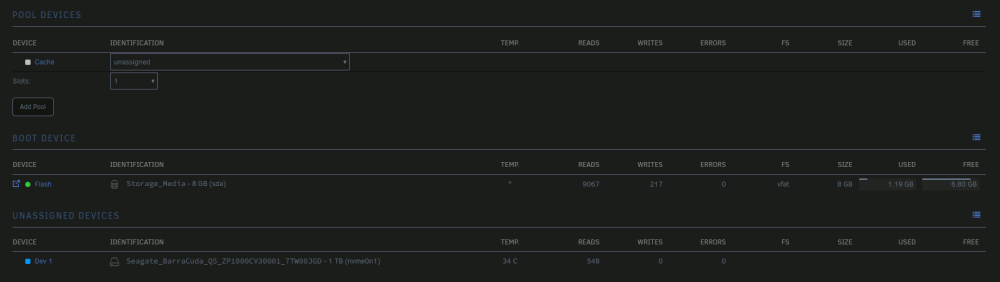
As said in the title, I dont know exactly how it happened, but over the last few days (Since updating to 6.12.2) my unraid install has progressively got worse, to the point where docker containers wouldn't start back up after updating themselves, and now I cant start my array because my cache drive has been removed from the pool? I'm not the most experienced user, I took advantage of unraids plug and play nature and now I'm facing an issue I have no real expertise on diagnosing or troubleshooting. I'll attach my latest diagnostics file, but in short, can I add this drive back into the cache pool without losing the data on it? Or will unraid just wipe it clean? Thanks in advance folks. Sorry if none of this makes sense. tower-diagnostics-20230706-1931.zip
-
I'm getting the exact same issue here, had to disable auto-updates because docker was constantly going offline
-
Yep, tested the same and it works. Nice one for steering me in that direction, I was totally lost.
-
Yeah I'm a total moron, I was typing in "gpustat" wondering why it wasnt showing up. Typed in "gpu statistics" and hey presto.. Thanks hahaha!
-
Hi, how soon can we expect an update for this to be compatible with 6.12 out the box? Thanks for your fantastic work!
-
Hi folks, first time posting so forgive any bad manners. I've been happily using this container for a while now, however since the last update ~2 weeks ago I cant access my guacamole instance at all. The error I get in catalina.out is as follows: 20:37:52.318 [http-nio-8080-exec-2] WARN o.a.g.e.AuthenticationProviderFacade - The "mysql" authentication provider has encountered an internal error which will halt the authentication process. If this is unexpected or you are the developer of this authentication provider, you may wish to enable debug-level logging. If this is expected and you wish to ignore such failures in the future, please set "skip-if-unavailable: mysql" within your guacamole.properties. 20:37:52.319 [http-nio-8080-exec-2] ERROR o.a.g.rest.RESTExceptionMapper - Unexpected internal error: ### Error querying database. Cause: java.sql.SQLException: Unknown system variable 'transaction_isolation' ### The error may exist in org/apache/guacamole/auth/jdbc/user/UserMapper.xml ### The error may involve org.apache.guacamole.auth.jdbc.user.UserMapper.selectOne ### The error occurred while executing a query ### Cause: java.sql.SQLException: Unknown system variable 'transaction_isolation' I use Authentik as my authentication backend and I've never had an issue like this with it before. I do have all my containers set to auto-update and it seems like something somewhere has broken something. Any advice or suggestions would be immensely appreciated, thanks in advance for your time!




