DeekB
Members
-
Joined
-
Last visited
-
Title: Docker container loses its fixed MAC address after restarting the Docker service (Unraid 7.4.0 / Compose) Hi, sorry to post on an old thread but felt relevant to the issue I am having. I've been trying to get a fixed MAC address working for a Docker Compose container on my Unraid 7.4.0 server, but the MAC keeps changing whenever I restart the Docker service or reboot the server. The container is running AdGuard Home with Unbound and Redis, connected to Unraid's eth0 macvlan network. It has a static IP of 192.168.25.9 and I've configured its MAC as 02:42:c0:a8:19:09. Everything works as expected when I initially create or recreate the container using Compose. Docker assigns the correct IP and MAC. However, as soon as I stop and restart the Docker service through Unraid, the container ends up with a different, randomly generated MAC. The static IP remains correct. I can reproduce this consistently without rebooting the server, restarting the docker service from settings seems to cause the issue. My setup: Unraid OS 7.4.0 Docker Engine 29.8.2 Docker Compose v5.5.0 Docker network: eth0 (macvlan, parent vhost0) Container: adguardhome-unbound-redis Static IP: 192.168.25.9 Fixed MAC: 02:42:c0:a8:19:09 The relevant part of my Compose configuration is: services: adguardhome-unbound-redis: image: imthai/adguardhome-unbound-redis container_name: adguardhome-unbound-redis networks: eth0: ipv4_address: 192.168.25.9 mac_address: "02:42:c0:a8:19:09" networks: eth0: external: true name: eth0Steps to reproduce: Create the container using Compose with the fixed IP and MAC. Check the MAC using docker inspect. It shows the correct address. Stop and restart the Docker service through Unraid. Check the MAC again. It has changed, even though the IP is still correct. For example, I captured the network configuration immediately before restarting Docker: MAC=02:42:c0:a8:19:09After restarting the Docker service: MAC=52:04:5c:4e:79:20I've tried setting the MAC at both the service and network attachment levels in Compose. I've also disconnected and reconnected the container using the Docker API with an explicit MAC. All of these methods assign the correct MAC initially, but it changes again after restarting Docker. I also ran a separate test using a Docker-managed macvlan network on the same vhost0 parent interface, with a disposable Alpine container and a fixed MAC. That network survived a full Unraid reboot, and when I started the test container again, it retained the correct MAC. This makes me suspect something is happening when Unraid recreates and restores its own eth0 network. I had a look at /etc/rc.d/rc.docker and noticed that Unraid recreates the managed network when Docker starts. In the logs, the AdGuard container is treated as having an additional network that needs restoring, and the restoration process connects it without the configured MAC. I also noticed some skipping invalid stored IP messages during network restoration, although I'm not sure whether they're related. The AdGuard container is managed through Compose and doesn't have an Unraid Docker XML template, which might be relevant. I've seen that Unraid added fixed MAC address handling in recent versions, so I'm wondering whether this is a case that isn't covered by that functionality, particularly for Compose-managed containers using Unraid's built-in macvlan networks. Is this expected behaviour, or could the network restoration process be updated to retain the MAC that was configured before Docker stopped? Happy to provide diagnostics or test a fix if it would help. This is a test server, so I can reproduce the issue without affecting a production setup. Thanks!
-
Thank you, I will safely ignore it then.
-
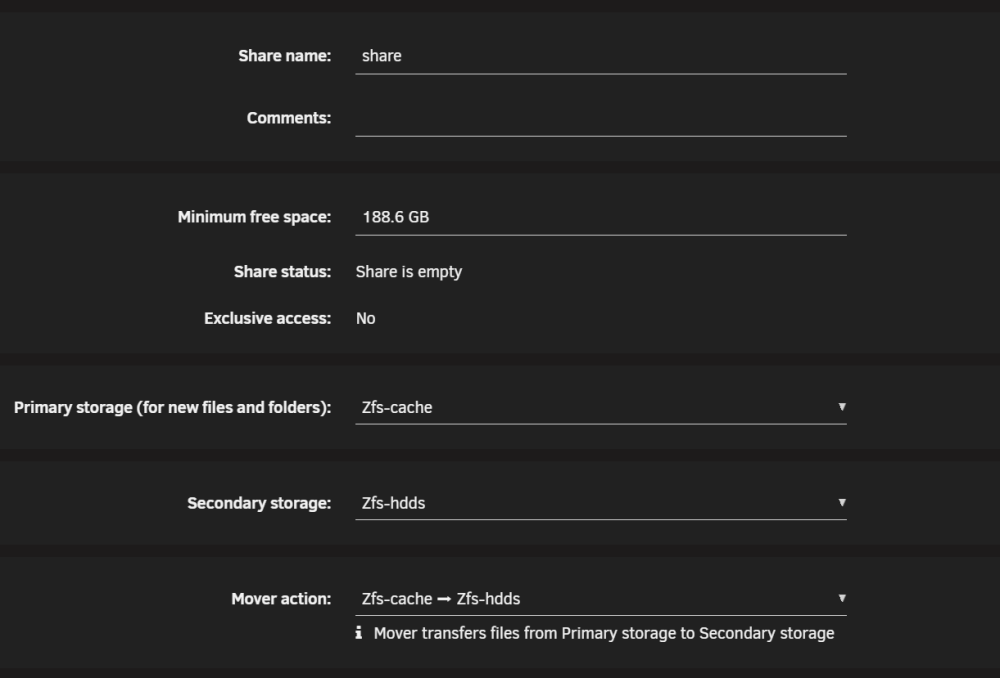
Just set up another unraid server and have a strange issue I am scratching my head with trying to figure out. the set up is basically a 4 bay NAS, x4 6TB disks set up in ZFS & x2 NVME's set up in ZFS, each NVMe is its own pool. the x4 disk are called zfs-hdds and one of the 2 nvme's is called zfs-cache. I have a share set up called share (How original) This share currently has no files within it apart from a .RcycleBin folder from the recycle bin plugin. The share is set like this for mover So the primary storage is the zfs-cache, when mover runs it moves the share folder to the secondary storage as expected. then I get the error below from fix common problems, It seems any shares I set this way have the same issue, have one for nextcloud too that does the same, is there a better way to set this up, my other server isnt running zfs and was wondering if its possible due to that. The server was also only set up in recent days and updated from 7.3.4 to 7.4.0 last night and I didnt notice the issue before then, not saying it wasnt present before 7.4.0 as I did only set the server up 2 days ago so had to say and hoping someone can provide some inseight or guidance into what I am doing wrong and if theres a better way to set up the system with zfs. us01-diagnostics-20261111-2209.zip

-
Do you have a link to the latest 24.00.07 firmware?
-
Yes I am in the UK, thats really nice of you to offer, I would happy send you some beer money if you wanted to do that!
-
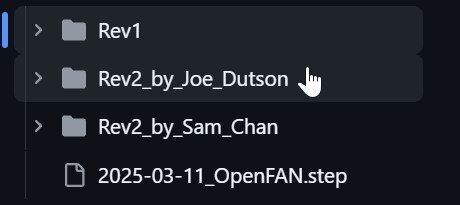
I purchased one of these today, I am curious about the enclosures, I know the unit doesn't come with an enclosure but will pay to get one made from a 3d printing company as I don't own a 3d printer. It looks like there are 3 potential enclosures on the Githb page Does anyone have pictures of each of the enclosures to help me make a decision on what one I should get printed?
-
Thanks, I have tried different hardware and different ports previously, so have proceeded to replace the drive with a spare I had, I restored a backup of the key I had using the unraid media creation tool. I now have a new issue I have tried replacing the key from the registration page but it seems it reported as a blacklisted key (I may have used that key for a trail version in the past) Have opened a ticket with UnRaid support, also I have ordered a new key from Amazon which should arrive tomorrow as I dont think black listed kesy can be unblocked. Thanks you for your help.

-
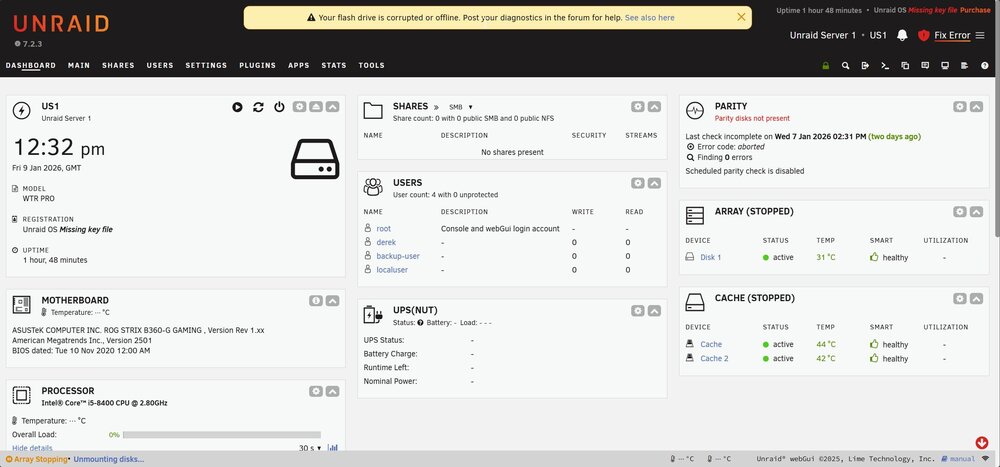
Hi all, I am running a server on an Aoostar WTR Pro, Everything been running stable on that machine since I changed to it in October 2024, Running Unraid since June 2022. Recently upgraded to Un-Raid 7.2.3, was running 7.2.2 for the last few weeks months and again it was pretty stable. Since the 3rd of January My unRaid server would drop offline (No Ping) and become unresponsive (Console not repsonding) Rebooting the server would get it back up temporarily. I then downgraded to 7.2.2, at this point the problem become worse, the server would freeze and hung up within 30 minutes where as before it was taking 12 hours or more, I then went back to version 7.2.3 but same problem with the very frequent crashes. I had a look at the logs and couldn't see much around errors, I stopped dockers and VM's and left it running just as a NAS but the same would happen, I then stopped the array and removed the disks from the machine but the same would happen with the O\S locking up, I then copied all the files to another USB Drive that I had and put in the server, the same thing happened (It was showing unlicenced and I didn't recover the key to the new USB) but the same lockups were present after a short period of time, usually within 60 minutes on the different USB Drive) I suspected a fault with the AOOSTAR Hardware so pulled an old computer that was un-used and installed the original USB and Disks, the server did seem to be more stable at this point. went to access the server last night after doing this (Things ran fine for an hour or 2 but it then went down again on the different hardware) I rebooted the server this morning and it ran for maybe 60 minutes, it didn't go completely unresponsive this time I got the following error: It's reporting the key file is missing and the USB is offline, if I reboot the server it comes back online but the same happens after a random period in time. I have done what the screen request and posted diags if anyone can have a look and try to help me understand the issue and what needs to be done. us1-diagnostics-20260109-1233.zip
-
yep, seems you are right, I must have mistaken the minutes for seconds when looking at the issue this morning (Before the coffee kicked in), will need to revisit it again tomorrow morning, seems to be the last 3-4 days druing the back up my GITEA instance has been stuck in a stopped state. The logs for GITEA show the database is not available, the container starts tries to connect to the DB 10 times then dies, but the database instance is up, I just start the GITEA container and it starts fine so something strange happening during the back up so will revisit it tomorrow morning, sorry to have wasted you time here!
-
Hi @Ludditus I am also using the same APi, I upgraded to 6.12.13 and have started having some issues since then. I removed the full container, directory and reinstalled but now I have some different issues, it seems to be adding a second server to the name when creating the entites, as an example my server is called US1, my entities were US1_Server, they seem to have changed to US1_Server_Server and this seems to have happened with the most recent update, as per the original post this docker is scraping the GUI so my gut is telling me some GUI changes are now causing this issue. But to answer your question regarding the error in the logs, I see the same error, I dont have that config file present either, however I did manage to go through some old backups and found that file is present. you could easily create the file, the contents of the file looks like its looking for an array of items but mines is blank (Nothing in the array) I hope this helps, I am still trying to understand why the APi on my unraid machine is now adding an additiona _Server to the end of the current _Server.

-
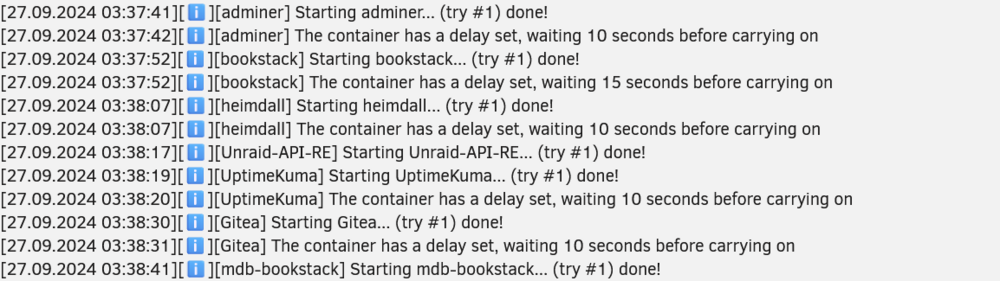
Good Morning, Looking for some guidnace on an issue I spotted this morning. See Screenshot: I have a delay set for most of my containers as my server is running an N100 CPU, I have around 30 containers and starting them all at once usually results in some items not starting correctly. if I reboot the server the start up sequence is fine (Due to the delays) The issue I have only started happening in the last few days, I noticed my GITEA server is down most morning and it looks like when the container starts the databaase is not ready as its still starting, my delays define there should be 2-3 minutes between the DB starting and the GITEA container starting. I am finding during the back up it is stated in the log regarding the delays but the delays dont actually happen, see time stamp on the left hand side. Is it expected that the delay will not work during the back up?
-
I made this discovery just a short while ago, my ISP DNS Servers must be having a moment, thanks for the reply!
-
I got my dockers back, the issue above was actually a network problem. I found by moving away from my ISP DNS servers to cloudflare\google DNS servers that I was able to download the containers again, mostly everthing is back up now!
-
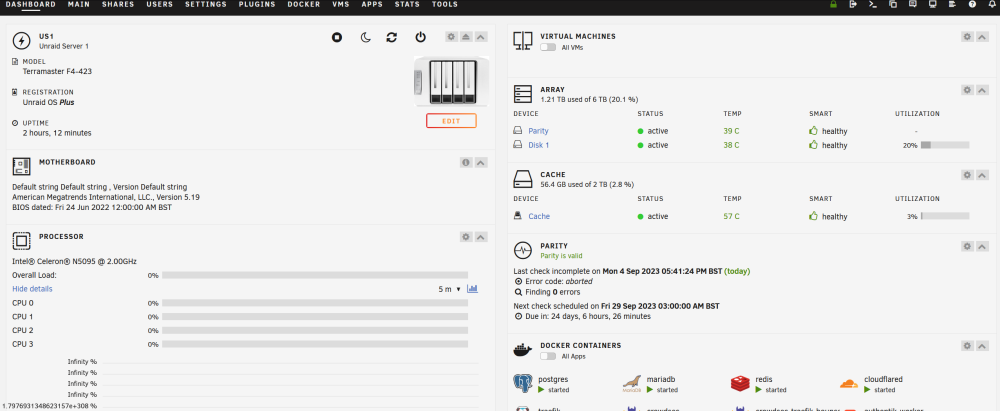
Hi, I upgraded to 6.12.4, had some more issues which look to be network related. anyway I enabled VM manager just now and the CPU Graph isnt working, see screenshot. I then re-enabled, confirmed the CPU graph was working then generated a diag as requested. Sorry for the delay I didnt get any notification that I had a a post waiting and I am not using the forum often, only noticed it now when I had issues after 6.12.4 us1-diagnostics-20230904-2035.zip
-
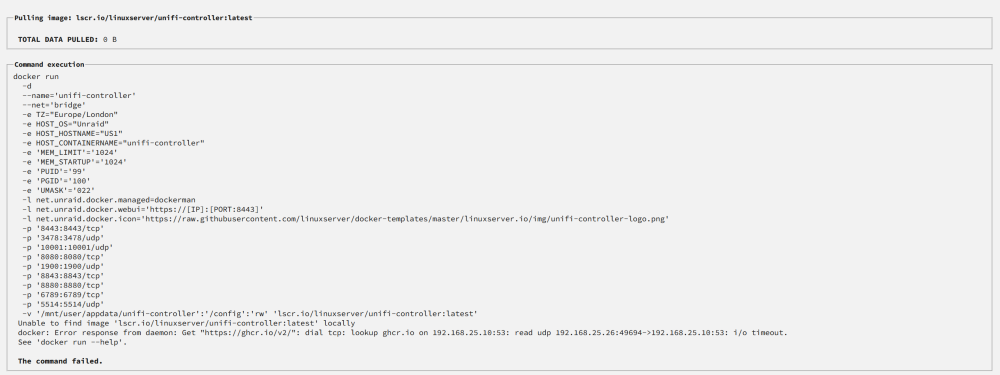
Hello, Hoping someone can help me with an issue I am having, I was running UnRaid 6.12.3, didnt have any issues prior to the upgrade. Was using MacVlan with docker, basically I am running Unraid on a Terramaster NAS with x2 2.5GBe NIC's, one NIC is in VLAN1 and the other NIC is within an IOT Vlan, I have some containers mapped on Vlan one and other mapped on the IOT Vlan. I had about 18 containers running on my server (I did have soem VM's but those broke when IU upgraded to 6.12.3) The main issue I faced today was I upgraded and after the upgrade my server was hitting 100% CPU due to docker (HTOP was showing all docker processes using the CPU) I then tried to downgrade but I was facd with the exact same issue with high CPU. Prior to the upgrade my CPU would be about 5% average, I then ended up in a state where I could not even start docker, I found that it wass likely my docker image was corrupt do I deleted this and lost all my containers. I have tried various configs from the release notes but I cannot seem to get my docker back up and running, docker starts ok but anytime I try to install any containers I am faced with below docker: Error response from daemon: Get "https://ghcr.io/v2/": dial tcp: lookup ghcr.io on 192.168.25.10:53: read udp 192.168.25.26:49694->192.168.25.10:53: i/o timeout. (see attached screenshot) I have tried with my network set up as brigded, unbridged, ipvlan, mac vlan, no matter what setting I choose I cannot seem to overcome the error below, thats the last twice now I have upgraded I have ran into really major issues, with the upgrade to 6.12.3 I lost the dockers and vm's then but only managaed to get the dockers back up, tghe really annoying thing is I had no need to upgrade everyhting was working pefectly on the previous set up Please help!!!! us1-diagnostics-20230904-1943.zip