





BreakfastPurrito
Members
-
Joined
Everything posted by BreakfastPurrito
-
I'm having the same problem with the udev rules but I'm not as versed in Linux as you guys. What do I do? Do I just copy the rc.udev file from the github link mentioned above to etc/rc.d/rc.udev and overwrite the file already there?
-
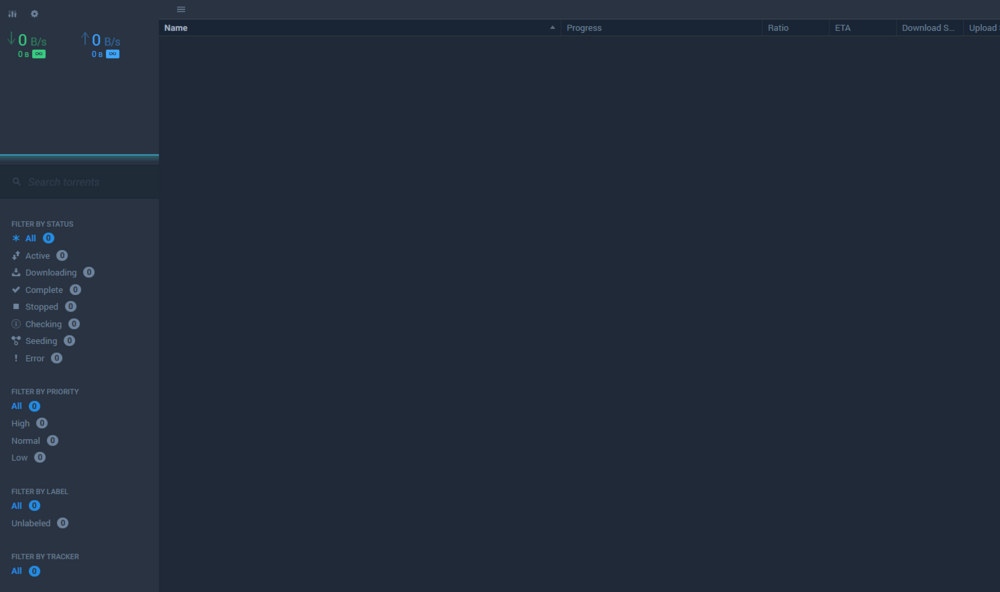
I'm having the following problem. Often Transmission stops updating the browser window and it looks frozen. I say looks because it continues to work on the server side. Then when I F5 the screen I a blank screen. The only way to fix it is to close the browser and reopen it. I tried flushing the browser cache manually, but really the only thing that helps is restarting the browser. This happens in multiple browser and on multiple PC's.
-
Ok I have solved it. I deleted the entire docker vdisk, rebooted and installed all apps again. Somehow br0 appeared again and is working now.
-
I tried that. It doesn't do that. All I have is bridge, host and null.
-
after switching from macvlan to ipvlan I still need to make an ipvlan.
-
How do I do that?
-
Because of this bug I've had to switch from macvlan to ipvlan. The problem is that I can't reach any of the containers connected with ipvlan. I've tried everything, but I can't figure out what it is. This is the line I use to create the ipvlan: docker network create --driver ipvlan --subnet 192.168.1.0/24 --gateway 192.168.1.1 --opt ipvlan_mode=l2 ipvlan The symptoms: I can start the containers and they show up as having the correct ip addresses and gateway when I do 'docker inspect' in the console. It doesn't matter if I use L3 or L2. It doesn't matter if I specify eth0 as parent or not. The containers won't start at all if I use br0. The containers can ping eachother, but can't ping the outside world, like google.com. I've tried creating the ipvlan in Portainer, but that gives the same result. I've looked everywhere, but every tutorial seems to just have it up and running after creating the container. All I want is that it works as easily as with macvlan. Why is it being so obtuse?
-
I deleted the image and reinstalled everything, and it works. So something must've been corrupted. Thanks!
-
By recreate, do you mean plopping in a docker.img from a backup or is there a specific procedure?
-
I made a bit of a booboo by creating a network that conflicts with others, causing Docker to crash when I start it. I need to: 1) remove the conflicting network without docker running OR 2) start docker without the containers How do I do that?
-
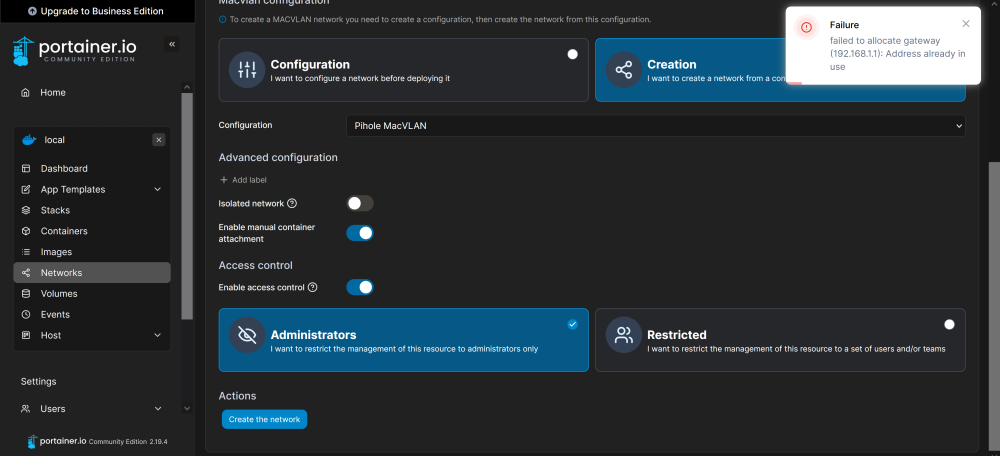
Recently I upgraded to 6.12.6 from 6.11.1. Ever since then, I got crashes which after a bit of investigation were due to the macvlan bug introduced in 6.12.6. The first thing I tried was to remove the macvlan and create it again. However I am thwarted with the error 'gateway already in use'. I tried searching online or what that meant or how to solve it and got nowhere. (Sidenote: why is that error message so vague and unhelpful? A gateway is supposed to be used by multiple devices. It's a gateway. It has literally no other function than to serve multiple devices on a network.) People did suggest trying IPvlan instead, but I got the same error. I thought it might be a problem with Portainer, but I get the same error in command line. So today I decided I had enough and downgraded to 6.11.1 again. However, the problem hasn't gone away and I now also get the same error in 6.11.1, whereas before it used to run just fine. This is all very frustrating. Does anyone have a solution? I just want everything to work the way it did before.
-
This has to be one of the all time most unhelpful conversations I've ever had.
-
The error is not coming from any container, because I'm not interacting with any container. I'm trying to set up a macvlan. I haven't even gotten to the point where I attach it to a container yet.
-
I'm not following you either. I just want to get everything back the way it was before the latest unraid update ruined it.
-
But the problem is not with any specific container, its with getting macvlan up and running at all.
-
I tried those settings, it doesn't help. I tried every combination of those settings. No dice. As for the error, this is all I get:
-
Recently I upgraded to 6.12.6 from 6.11.1. Ever since then, I got crashes which after a bit of investigation were due to the macvlan bug introduced in 6.12.6. The first thing I tried was to remove the macvlan and create it again. However I am thwarted with the error 'gateway already in use'. I tried searching online or what that meant or how to solve it and got nowhere. (Sidenote: why is that error message so vague and unhelpful? A gateway is supposed to be used by multiple devices. It's a gateway. It has literally no other function than to serve multiple devices on a network.) People did suggest trying IPvlan instead, but I got the same error. I thought it might be a problem with Portainer, but I get the same error in command line. So today I decided I had enough and downgraded to 6.11.1 again. However, the problem hasn't gone away and I now also get the same error in 6.11.1, whereas before it used to run just fine. This is all very frustrating. Does anyone have a solution? I just want everything to work the way it did before.
-
My server also started crashing after updating to 6.12.6. I use a macvlan for Pihole. I tried removing the macvlan and creating a new one, but now I'm getting the error "gateway already in use". Which is just the most useless error message. No shit the gateway is already in use. It's a gateway. But it's stopping me dead in my tracks. I get the same error message when I try to make an IPVlan. So now I have neither. I've been scouring the internet for the last few days trying to find a solution, but to no avail. Changing the setting described above doesn't help. I just want it to work the way it did before I updated.
-
Sorry, I should have been more specific. In Transmission itself, using "set download location".
-
Every time I want to change the download location outside of /downloads/ I get a 'permission denied (13)' error. I have tried resetting the permissions in unraid for user 99/100, and I have tried making a new user specifically for Transmission with explicit access to the folders I want to use. I still keep getting the error. What can I do to fix this?
-
I've got NVME drives as a cache pool and I would like to benchmark them. I get the error: However I can't find any info on what changes I need to make?
-
it is. I've tried it several times now.
-
I tried it, and every time I start transmission, it changes `rpc-authentication-required` false back to true and asks for a password.
-
I'm having a peculiar problem. I want to run transmission without a username and pass. If I remove the USER and PASS variables from the docker container, all my torrents disappear. As in, I just get an empty interface if I go to the Transmission web address. If I then put the USER and PASS back, my torrents reappear. This happens regardless of what user and pass I use. It also happens when I leave them both blank, or leave either blank. What am I doing wrong?
-
I tried it. Didn't work.

