





EdgarWallace
Members
-
Joined
-
Last visited
Everything posted by EdgarWallace
-
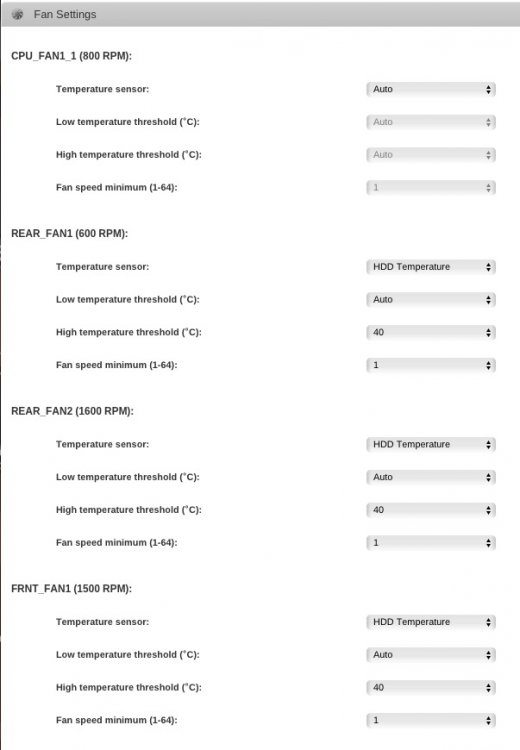
The pictures above are the same, no matter if I am using network settings or not so I am going to stay with local. Let's see if the new BMC file is going to restore the correct FRU data. News from today: I used the tool that ASRock sent me: FRUWRITE.EXE. I was able to update my board and suddenly: root@Tower:~# ipmi-fru FRU Inventory Device: Default FRU Device (ID 00h) FRU Chassis Type: Main Server Chassis FRU Board Manufacturing Date/Time: 08/04/15 - 08:24:00 FRU Board Manufacturer: ASRock FRU Board Product Name: E3C224D4I-14S FRU Board Serial Number: E8R-4C001800045 FRU Product Manufacturer Name: ASRock PLUS....auto fan is WORKING NOW !!! Thanks a lot for this dmacias!!! I made some changes on the settings and is it correct that the fans are running at a different speed?
-
Yes I can access the mainboard by using localhost. AsRock is going to send me "ready flashed BMC". Let's see if that helps.
-
Thanks for your advise guy's. I deleted all orphaned images, just discovered it when I was checking the mappings. Emby is now running the "Scan media library" because of the changes from /mnt/user/ to /mnt/ But to be complete honest I still don't get it. I didn't had these directories before. It came up when I changed my Docker share from /mnt/cache/.Docker towards /mnt/cache/Docker. Maybe one of the Emby plugins still had /.Docker as setting? But why /mnt/user/user/Kino/Emby/metadata/artists?
-
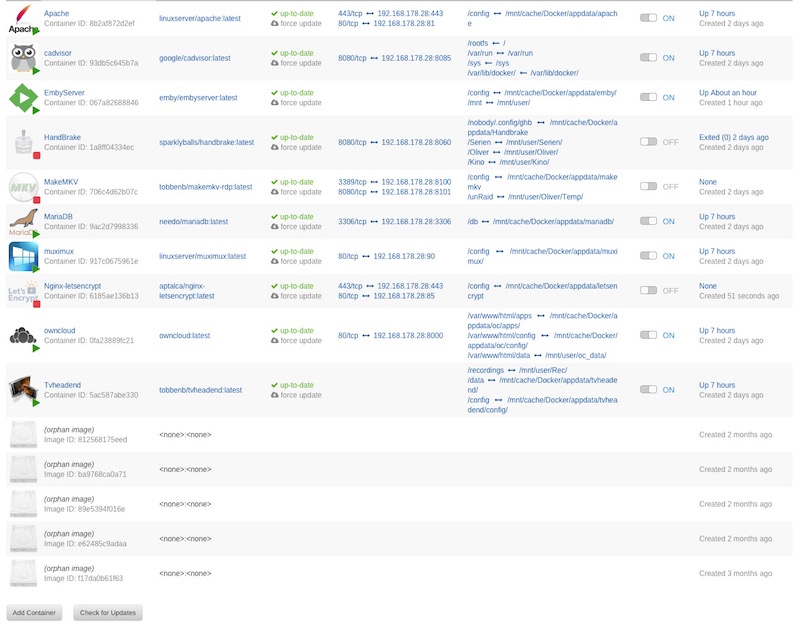
Thanks Squid. As far as I can see none of the Dockers are using any of these directories and the name of these 2 paths are clearly indicating that Emby is the culprit. I attached the requested volume mapping which doesn't indicate wrong definitions. Do you have any other idea?
-
Unfortunately not dmacias. Here is the reply from the AsrockRack EU support: I honestly don't know how to handle this. There is a clear error message that I send and they don'T understand the underlying issue?
-
Same here Lebowski. This is an issue since a couple of weeks.
-
I think that Emby Docker was just upgraded to 3.0.5972.0 which is great. Thanks to hurricanehrndz My issue is that Emby is now adding to shares under /mnt: 1.) /mnt/user/.Docker/appdata/emby/metadata/artists (I recently removed mnt/cache/.Docker and defined mnt/cache/Docker instead) 2.) /mnt/user/user/Kino/Emby/metadata/artists Metadata path that I defined under Emby Settings is: /mnt/Docker/appdata/emby/metadata What is wrong?
-
It's not working because of the checksum error. I'll shorten the grep to Manufacturer instead of Board Manufacturer. That should fix it for you. But I'd still check into that error. bmc-device --cold-reset will reset the bmc as if you unplugged it from the wall. A reflash or factory reset of the BMC may be necessary. bmc-device --cold reset gave me a syslog entry: IPMI message handler: BMC returned incorrect response, expected netfn b cmd 20, got netfn 0 cmd 0 Also a reset via the ASRock webUI was not working.
-
First make sure you are on the latest. I just pushed an update. What does the command ipmi-fru show? Have you updated your BIOS and BMC also. They made some recent changes to ASRockRack models. It won't work completely for all ASRock boards but should for most. It should work with your model and mine since those are really the only two that have been tested thoroughly using the ipmi raw commands and hex values to match those to corresponding fans. Fan control works by fan name and board manufacturer name. There's a multidimensional array (/boot/config/plugins/ipmi/boards.json) that the plugin checks for board manufacturer name. Right now there's just ASRock and ASRockRack. It works by matching the fan name with the position of the fan name in the array and then creates the ipmi raw hex command in the right order. On some boards the cpu fan control won't work (those with CPU_FAN1_1 and CPU_FAN2_1) until I create a fix. Other fans should work. Also right now board.json is automatically updated from github periodically or if missing. I am gonna add a button under fan control to manually update board.json and remove auto update so the array can be edited and not overwritten unless you choose to. I had installed 2016.05.15 and just upgraded to 2016.05.16 which was making no difference. BIOS Version was already P3.20 but I had to upgrade BMC from 0.12 to 0.16. However that was not resolving the issue: oot@Tower:~# ipmi-fru FRU Inventory Device: Default FRU Device (ID 00h) FRU Error: board info area checksum invalid FRU Product Manufacturer Name: ASRockRack The syslog doesn't show any errors.
-
I wanted to activate the fan control for my main server (ASRock - E3C224D4I-14S) but the plugin is showing: "Your board is not currently supported" Is that a correct statement? My understanding was that all ASRock boards are being supported but this might be a misunderstanding on my side. Thanks for you plugin!!!
-
Here you are Bungy: http://lime-technology.com/forum/index.php?topic=43696.0
-
@hunter69, you might want to look at my config files above....including Bungy's advise it is running all well now. @Bungy, thank you so much, I was really desperate without ownCloud. I will not move away from apache reverse proxy for now as I have a running system again. The letsencrypt docker would have been a great replacement but it was running a couple of days and stopped working at all. fail2ban and the ssl certificate renewal are great features but if the whole thing isn't running .... Maybe I will follow you as soon as you got it up and running
-
Bungy, after some test with aptalcas docker I followed your advise and installed linuxserver.io's apache container. Below are my config files and the error message that I am getting. Can anyone help me with the correct setup of all this? Thanks a lot. default.conf <VirtualHost *:80> ServerName confidential.myfritz.net ServerAlias confidential.myfritz.net DocumentRoot /config/www/ Redirect permanent / https://confidential.myfritz.net/ </VirtualHost> <VirtualHost *:443> ServerName confidential.myfritz.net ServerAdmin webmaster@localhost DocumentRoot /config/www/ SSLCertificateFile "/config/keys/cert.crt" SSLCertificateKeyFile "/config/keys/cert.key" SSLEngine on SSLProxyEngine On RewriteEngine On ProxyPreserveHost On SSLProxyVerify none SSLProxyCheckPeerCN off SSLProxyCheckPeerName off SSLProxyCheckPeerExpire off SSLProtocol -All +TLSv1 +TLSv1.1 +TLSv1.2 SSLCipherSuite ECDH+AESGCM:DH+AESGCM:ECDH+AES256:DH+AES256:ECDH+AES128:DH+AES:ECDH+3DES:DH+3DES:RSA+AESGCM:RSA+AES:RSA+3DES:!aNULL:!MD5:!DSS SSLHonorCipherOrder on ProxyRequests Off ProxyPreserveHost Off ProxyPass / https://192.168.178.28:8000/ ProxyPassReverse / https://192.168.178.28:8000/ </VirtualHost> config.php <?php $CONFIG = array ( 'instanceid' => 'confidential', 'passwordsalt' => 'confidential', 'secret' => 'confidential', 'trusted_domains' => array ( 0 => '192.168.178.28', 1 => 'confidential.myfritz.net', ), 'datadirectory' => '/var/www/html/data', 'overwritehost' => 'confidential.myfritz.net', 'overwriteprotocol' => 'https', 'overwrite.cli.url' => 'https://confidential.myfritz.net', 'dbtype' => 'mysql', 'version' => '9.0.1.3', 'dbname' => 'oc', 'dbhost' => '192.168.178.28', 'dbtableprefix' => 'oc_', 'dbuser' => 'oc_admin3', 'dbpassword' => 'confidential', 'logtimezone' => 'UTC', 'installed' => true, 'forcessl' => true, 'forceSSLforSubdomains' => true, 'mail_smtpmode' => 'smtp', 'mail_smtpsecure' => 'ssl', 'theme' => '', 'loglevel' => 2, 'maintenance' => false, ); Proxy Error The proxy server received an invalid response from an upstream server. The proxy server could not handle the request GET /apps/files/. Reason: Error reading from remote server Apache/2.4.7 (Ubuntu) Server at confidential.myfritz.net Port 443
-
Here is what I am getting: root@Tower2:~# ipmi-raw 00 3a 01 00 00 00 00 00 00 00 00 rcvd: 01 C1 root@Tower2:~# ipmi-sensors -t fan ID | Name | Type | Reading | Units | Event 205 | FAN 1 | Fan | 450.00 | RPM | 'OK' 272 | FAN 2 | Fan | 525.00 | RPM | 'OK' 339 | FAN 3 | Fan | N/A | RPM | N/A 406 | FAN 4 | Fan | 525.00 | RPM | 'OK' 473 | FAN A | Fan | 1575.00 | RPM | 'OK' Only FAN1 seems to be reacting: root@Tower2:~# ipmi-raw 00 3a 01 64 64 64 64 64 64 64 64 rcvd: 01 C1 root@Tower2:~# ipmi-sensors -t fan ID | Name | Type | Reading | Units | Event 205 | FAN 1 | Fan | 525.00 | RPM | 'OK' 272 | FAN 2 | Fan | 525.00 | RPM | 'OK' 339 | FAN 3 | Fan | N/A | RPM | N/A 406 | FAN 4 | Fan | 525.00 | RPM | 'OK' 473 | FAN A | Fan | 1575.00 | RPM | 'OK' I have PWM fans in my main server (with the ASRock board). These are all bequiet Silent Wings 2. The non-PWM fans in my backup server (the one with the Supermicro board) are the fans that came with the Fractal Design case.
-
Hi dmacias, no issues with your great plugin on my ASRock main server but some strange behavior on my Supermicro backup machine (see my signature for detail information). I have changed the values like so: Lower_Non_Critical_Threshold 0.000000 Lower_Critical_Threshold 0.000000 Lower_Non_Recoverable_Threshold 0.000000 These changes do survive a rebooted so all great here. My issue is that the command for the fan control isn't working properly which might be linked to the fact that I haven't attached PWM fans? root@Tower2:~# ipmitool raw 0x30 0x91 0x5A 0x3 0x10 0xff -bash: ipmitool: command not found Slightly more success here: root@Tower2:~# ipmi-raw 0x30 0x91 0x5A 0x3 0x11 0xff Invalid netfn value Do you have any further guidance?
-
Thanks for the advise bonienl. I removed the attributes by using: /usr/local/emhttp/plugins/dynamix.file.integrity/scripts/bunker -r /mnt/user/Movies ! *.nfo and excluded *.nfo's in Settings afterwards. I might have overlooked it but can you explain, what's excluded by using the Apple metadata switch? Thanks for the great plugin!!!
-
bonienl, I received another ~190 corruption messages, e.g. BLAKE2 hash key mismatch, /mnt/disk3/Kino/Mighty Heart, A (2007).nfo is corrupted BLAKE2 hash key mismatch, /mnt/disk3/Kino/Se7en (1995).nfo is corrupted BLAKE2 hash key mismatch, /mnt/disk3/Kino/Panic Room (2002).nfo is corrupted BLAKE2 hash key mismatch, /mnt/disk3/Kino/Silence of the Lambs, The (1991).nfo is corrupted BLAKE2 hash key mismatch, /mnt/disk3/Kino/Oculus (2013).nfo is corrupted BLAKE2 hash key mismatch, /mnt/disk3/Kino/Oblivion (2013).nfo is corrupted BLAKE2 hash key mismatch, /mnt/disk3/Kino/Unbreakable (2000).nfo is corrupted Emby docker was modifying almost all info files so I would rather have expected messages like these: BLAKE2 hash key mismatch (updated), /mnt/disk3/Kino/Savages (2012).nfo was modified BLAKE2 hash key mismatch (updated), /mnt/disk3/Kino/Prometheus (2012).nfo was modified BLAKE2 hash key mismatch (updated), /mnt/disk3/Kino/Resident Evil (2002).nfo was modified BLAKE2 hash key mismatch (updated), /mnt/disk3/Kino/Stereo (2014).nfo was modified It is showing the same pattern as yesterday. Before having forced the update: root@Tower:/# getfattr -R -d "/mnt/disk3/Kino/Mighty Heart, A (2007).nfo" # file: mnt/disk3/Kino/Mighty Heart, A (2007).nfo user.blake2="e51e01038906c6a80e8f6cc6a13b7b7399f3128fc00e778ab97eb5dba0d74251d0d745d56c2ceff70c84d216b0b28292e2cf075bbb6c51237bb2b204ef8a9147" user.filedate="1459962347" user.filesize="9841" user.scandate="1459964230" After the update: root@Tower:/# /usr/local/emhttp/plugins/dynamix.file.integrity/scripts/bunker -ub2 "/mnt/disk3/Kino" Finished - verified 6796 files, skipped 0 files. Found: 0 mismatches, 0 corruptions. Duration: 02:23:13. Average speed: 47.9 MB/s root@Tower:/# getfattr -R -d "/mnt/disk3/Kino/Mighty Heart, A (2007).nfo" # file: mnt/disk3/Kino/Mighty Heart, A (2007).nfo user.blake2="e51e01038906c6a80e8f6cc6a13b7b7399f3128fc00e778ab97eb5dba0d74251d0d745d56c2ceff70c84d216b0b28292e2cf075bbb6c51237bb2b204ef8a9147" user.filedate="1459962347" user.filesize="9841" user.scandate="1460020802" Would it be save to force updates for all these incidents (/usr/local/emhttp/plugins/dynamix.file.integrity/scripts/bunker -ub2)? Your advise is highly appreciated. Thanks a lot.
-
This was reported for Wagner: Finished - verified 38 files, skipped 0 files. Found: 38 mismatches (updated), 0 corruptions. Duration: 00:00:35. Average speed: 44.2 MB/s ...and this for Miles Davis: Finished - verified 9 files, skipped 0 files. Found: 0 mismatches, 6 corruptions (updated). Duration: 00:00:03. Average speed: 129 MB/s Here is a compare of the same file before and after using bunker -ub2: root@Tower:~# getfattr -R -d "/mnt/disk6/iTunes/Richard Wagner/Das Rheingold/07 Szene I. Orchesterzwischenspiel.aiff" # file: mnt/disk6/iTunes/Richard Wagner/Das Rheingold/07 Szene I. Orchesterzwischenspiel.aiff user.blake2="cb312ef20185a9f5c44d27ccfe1dc9bd11a9f7545218ba15e854db7aa918f19b22185b4f93fafd54db31951944b626d8cf0d5e8bf43be39fce5d13dc5f6791da" user.filedate="1454754816" user.filesize="30892288" user.scandate="1459789201" root@Tower:~# getfattr -R -d "/mnt/disk6/iTunes/Richard Wagner/Das Rheingold/07 Szene I. Orchesterzwischenspiel.aiff" # file: mnt/disk6/iTunes/Richard Wagner/Das Rheingold/07 Szene I. Orchesterzwischenspiel.aiff user.blake2="8e75ad9d6cf8b0e1d6804f9cedcad7cb54f76f8484de736d0afbdb1db639f2d6398876367af9c9794e2acf8e206d31ea4166d5cd5653dba810d52f7330e0f665" user.filedate="1459845249" user.filesize="30892288" user.scandate="1459955608"
-
Thanks bonienl. Here is the output (I moved the Wagner stuff but left Miles Davis where he was :-)) root@Tower:~# getfattr -R -d "/mnt/disk6/iTunes/Richard Wagner/Das Rheingold/05 Szene I. Lugt, Schwestern! Die Weckerin lacht in den Grund.aiff" getfattr: Removing leading '/' from absolute path names # file: mnt/disk6/iTunes/Richard Wagner/Das Rheingold/05 Szene I. Lugt, Schwestern! Die Weckerin lacht in den Grund.aiff user.blake2="17ad470f522b40999f7dece7199cf854cdb039cffd182bd754fd1233f6785f640d305fda5ae2fb07582089d9cd94dbe110c7a2127d8f6db950fa87eba266fed5" user.filedate="1454754812" user.filesize="64525942" user.scandate="1459789201" root@Tower:~# getfattr -R -d "/mnt/disk6/iTunes/Richard Wagner/Das Rheingold/07 Szene I. Orchesterzwischenspiel.aiff" getfattr: Removing leading '/' from absolute path names # file: mnt/disk6/iTunes/Richard Wagner/Das Rheingold/07 Szene I. Orchesterzwischenspiel.aiff user.blake2="cb312ef20185a9f5c44d27ccfe1dc9bd11a9f7545218ba15e854db7aa918f19b22185b4f93fafd54db31951944b626d8cf0d5e8bf43be39fce5d13dc5f6791da" user.filedate="1454754816" user.filesize="30892288" user.scandate="1459789201" root@Tower:~# getfattr -R -d "/mnt/disk6/iTunes/The Miles Davis Quintet/Relaxin' with the Miles Davis Quintet/01 If I Were A Bell.aif" getfattr: Removing leading '/' from absolute path names # file: mnt/disk6/iTunes/The Miles Davis Quintet/Relaxin' with the Miles Davis Quintet/01 If I Were A Bell.aif user.blake2="caf7b1382282519b061a47253f80686ee8ca5249e2bcff8425650ee6c0130d89b626464266d7afb0785d58b91fc0312b7141f2fb42b80b83a18d547e42b4066a" user.filedate="1457559927" user.filesize="88088986" user.scandate="1459789201" root@Tower:~# getfattr -R -d "/mnt/disk6/iTunes/The Miles Davis Quintet/Relaxin' with the Miles Davis Quintet/02 You're My Everything.aif" getfattr: Removing leading '/' from absolute path names # file: mnt/disk6/iTunes/The Miles Davis Quintet/Relaxin' with the Miles Davis Quintet/02 You're My Everything.aif user.blake2="2a97a0553dd5fc0a45dd8abae7faa72385b7d58052ced4b2ef3bfdecf5a7557659e486fdfb854d20bc293dd347475882dc20d62ab0dd71e4457c15295f6e70b9" user.filedate="1457559929" user.filesize="56847394" user.scandate="1459789201" root@Tower:~# getfattr -R -d "/mnt/disk6/iTunes/The Miles Davis Quintet/Relaxin' with the Miles Davis Quintet/03 I Could Write A Book.aif" getfattr: Removing leading '/' from absolute path names # file: mnt/disk6/iTunes/The Miles Davis Quintet/Relaxin' with the Miles Davis Quintet/03 I Could Write A Book.aif user.blake2="aac664b60cde279b5064510ee570f420d9c986ca2e6ef9e6076c05e150c0deb979b6334b7a324ea66c391f46a6c3c5e9a1e274eea7f25dfa06cec5dde39f5870" user.filedate="1457559931" user.filesize="55255084" user.scandate="1459789201" root@Tower:~# getfattr -R -d "/mnt/disk6/iTunes/The Miles Davis Quintet/Relaxin' with the Miles Davis Quintet/04 Oleo.aif" getfattr: Removing leading '/' from absolute path names # file: mnt/disk6/iTunes/The Miles Davis Quintet/Relaxin' with the Miles Davis Quintet/04 Oleo.aif user.blake2="5cc639c98986a63270ec2c56a48c8a4ff8daef3db01d065ef1887388da6c314cf4861e1f68522e61fc6baefdaf4e50ebf039856fe242c440f251837e5f8092d5" user.filedate="1457559933" user.filesize="62859070" user.scandate="1459789201" root@Tower:~# getfattr -R -d "/mnt/disk6/iTunes/The Miles Davis Quintet/Relaxin' with the Miles Davis Quintet/05 It Could Happen To You.aif" getfattr: Removing leading '/' from absolute path names # file: mnt/disk6/iTunes/The Miles Davis Quintet/Relaxin' with the Miles Davis Quintet/05 It Could Happen To You.aif user.blake2="2a196043f37a46ae5596b8e9643ca9838a8ee875a4824f7dccdce6d40af4a511700e36ff33e090f0c9e6acc2e32726aa1a91a24698a7f3c75cc1141dde957a18" user.filedate="1457559935" user.filesize="70931164" user.scandate="1459789201" root@Tower:~# getfattr -R -d "/mnt/disk6/iTunes/The Miles Davis Quintet/Relaxin' with the Miles Davis Quintet/06 Woody'n You.aif" getfattr: Removing leading '/' from absolute path names # file: mnt/disk6/iTunes/The Miles Davis Quintet/Relaxin' with the Miles Davis Quintet/06 Woody'n You.aif user.blake2="6228cbba3e158e557eab8058b1b496c419f91aecea24c3b6bd1e02b6e10435d88c6802fd8d1047f49057e91133a44c783557923d858e66dc6d887bea1fea2f24" user.filedate="1457559937" user.filesize="53542808" user.scandate="1459789201"
-
Any idea what is causing this?
-
The plugin keeps complaining about the files you see below in spite they are all ok. Does is has something to do with the file names? Event: unRAID file corruption Subject: Notice [TOWER] - bunker verify command Description: Found 8 files with BLAKE2 hash key corruption Importance: alert BLAKE2 hash key mismatch, /mnt/disk6/iTunes/Richard Wagner; Bayreuther Festspiele, Pierre Boulez/Das Rheingold/05 Szene I. Lugt, Schwestern! Die Weckerin lacht in den Grund.aiff is corrupted BLAKE2 hash key mismatch, /mnt/disk6/iTunes/Richard Wagner; Bayreuther Festspiele, Pierre Boulez/Das Rheingold/07 Szene I. Orchesterzwischenspiel.aiff is corrupted BLAKE2 hash key mismatch, /mnt/disk6/iTunes/The Miles Davis Quintet/Relaxin' with the Miles Davis Quintet/01 If I Were A Bell.aif is corrupted BLAKE2 hash key mismatch, /mnt/disk6/iTunes/The Miles Davis Quintet/Relaxin' with the Miles Davis Quintet/02 You're My Everything.aif is corrupted BLAKE2 hash key mismatch, /mnt/disk6/iTunes/The Miles Davis Quintet/Relaxin' with the Miles Davis Quintet/03 I Could Write A Book.aif is corrupted BLAKE2 hash key mismatch, /mnt/disk6/iTunes/The Miles Davis Quintet/Relaxin' with the Miles Davis Quintet/04 Oleo.aif is corrupted BLAKE2 hash key mismatch, /mnt/disk6/iTunes/The Miles Davis Quintet/Relaxin' with the Miles Davis Quintet/05 It Could Happen To You.aif is corrupted BLAKE2 hash key mismatch, /mnt/disk6/iTunes/The Miles Davis Quintet/Relaxin' with the Miles Davis Quintet/06 Woody'n You.aif is corrupted Thanks for looking into this.
-
Seems that this isn't an option for me....whenever I am deselecting the SSL box on my Mac's accounts for calendar and address book it will be switched on again after a second. @Bungy isn't there a simpler solution? The forum here is full of patchy information around reverse proxy setup and it seems that only the best of the best here were getting this up and running.
-
I have the same issue. I was using gfjardim's docker since it was available but I like the way how you can store the app config and the own cloud files in different locations. I do believe that you must generate own SSL certificates plus editing the /mnt/cache/.Docker/appdata/oc/config/config.php file. Is that all? I had server.key and server.pem from the previous docker plus an additional entry in Environment Variables: SUBJECT /C=DE/ST=xxxx/L=xxxx/O=Privat/OU=na/CN=xxxxx.us Where to copy these file into?
-
Ah - that sounds good :-) Thanks for the great plugin bonienl.
-
I received the first file corruption alert today: Event: unRAID file corruption Subject: Notice [TOWER] - bunker command Description: Found 2 files with BLAKE2 hash key corruption Importance: alert BLAKE2 hash key mismatch, /mnt/disk6/iTunes/Richard Wagner; Bayreuther Festspiele, Pierre Boulez/Das Rheingold/05 Szene I. Lugt, Schwestern! Die Weckerin lacht in den Grund.aiff is corrupted BLAKE2 hash key mismatch, /mnt/disk6/iTunes/Richard Wagner; Bayreuther Festspiele, Pierre Boulez/Das Rheingold/07 Szene I. Orchesterzwischenspiel.aiff is corrupted BLAKE2 hash key mismatch (updated), /mnt/disk6/iTunes/Wolfgang Amadeus Mozart/artist.nfo was modified BLAKE2 hash key mismatch (updated), /mnt/disk6/iTunes/Wolfgang Amadeus Mozart/Complete Mozart Edition, Volume 17_ Piano Sonatas/album.nfo was modified BLAKE2 hash key mismatch (updated), /mnt/disk6/iTunes/Wolfgang Amadeus Mozart/Complete Mozart Edition, Volume 17_ Piano Sonatas/01 Sonata for Piano No. 1 in C major, K. 189d_279_ I. Allegro.aiff was modified BLAKE2 hash key mismatch (updated), /mnt/disk6/iTunes/Wolfgang Amadeus Mozart/Complete Mozart Edition, Volume 17_ Piano Sonatas/02 Sonata for Piano No. 1 in C major, K. 189d_279_ II. Andante.aiff was modified BLAKE2 hash key mismatch (updated), /mnt/disk6/iTunes/Wolfgang Amadeus Mozart/Complete Mozart Edition, Volume 17_ Piano Sonatas/03 Sonata for Piano No. 1 in C major, K. 189d_279_ III. Allegro.aiff was modified BLAKE2 hash key mismatch (updated), /mnt/disk6/iTunes/Wolfgang Amadeus Mozart/Complete Mozart Edition, Volume 17_ Piano Sonatas/04 Sonata for Piano No. 2 in F major, K. 189e_280_ I. Allegro assai.aiff was modified BLAKE2 hash key mismatch (updated), /mnt/disk6/iTunes/Wolfgang Amadeus Mozart/Complete Mozart Edition, Volume 17_ Piano Sonatas/05 Sonata for Piano No. 2 in F major, K. 189e_280_ II. Adagio.aiff was modified BLAKE2 hash key mismatch (updated), /mnt/disk6/iTunes/Wolfgang Amadeus Mozart/Complete Mozart Edition, Volume 17_ Piano Sonatas/06 Sonata for Piano No. 2 in F major, K. 189e_280_ III. Presto.aiff was modified BLAKE2 hash key mismatch (updated), /mnt/disk6/iTunes/Wolfgang Amadeus Mozart/Complete Mozart Edition, Volume 17_ Piano Sonatas/07 Sonata for Piano No. 3 in B-flat major, K. 189f_281_ I. Allegro.aiff was modified BLAKE2 hash key mismatch (updated), /mnt/disk6/iTunes/Wolfgang Amadeus Mozart/Complete Mozart Edition, Volume 17_ Piano Sonatas/08 Sonata for Piano No. 3 in B-flat major, K. 189f_281_ II. Andante amoroso.aiff was modified BLAKE2 hash key mismatch (updated), /mnt/disk6/iTunes/Wolfgang Amadeus Mozart/Complete Mozart Edition, Volume 17_ Piano Sonatas/09 Sonata for Piano No. 3 in B-flat major, K. 189f_281_ III. Rondeau. Allegro.aiff was modified BLAKE2 hash key mismatch (updated), /mnt/disk6/iTunes/Wolfgang Amadeus Mozart/Complete Mozart Edition, Volume 17_ Piano Sonatas/10 Sonata for Piano No. 4 in E-flat major, K. 189g_282_ I. Adagio.aiff was modified BLAKE2 hash key mismatch (updated), /mnt/disk6/iTunes/Wolfgang Amadeus Mozart/Complete Mozart Edition, Volume 17_ Piano Sonatas/11 Sonata for Piano No. 4 in E-flat major, K. 189g_282_ III. Menutetto I-II.aiff was modified BLAKE2 hash key mismatch (updated), /mnt/disk6/iTunes/Wolfgang Amadeus Mozart/Complete Mozart Edition, Volume 17_ Piano Sonatas/12 Sonata for Piano No. 4 in E-flat major, K. 189g_282_ IV. Allegro.aiff was modified BLAKE2 hash key mismatch (updated), /mnt/disk6/iTunes/Wolfgang Amadeus Mozart/Complete Mozart Edition, Volume 17_ Piano Sonatas/13 Sonata for Piano No. 5 in G major, K. 189h_283_ I. Allegro.aiff was modified BLAKE2 hash key mismatch (updated), /mnt/disk6/iTunes/Wolfgang Amadeus Mozart/Complete Mozart Edition, Volume 17_ Piano Sonatas/14 Sonata for Piano No. 5 in G major, K. 189h_283_ II. Andante.aiff was modified BLAKE2 hash key mismatch (updated), /mnt/disk6/iTunes/Wolfgang Amadeus Mozart/Complete Mozart Edition, Volume 17_ Piano Sonatas/15 Sonata for Piano No. 5 in G major, K. 189h_283_ III. Presto.aiff was modified[code] [/code] However, when I am playing the first 2 files they are playing well (corrupted). All the other 16 are doing fine. I have two iTunes devices that are accessing the files (a Mac and a Win10 VM) as well as my Emby Docker. Is it possible that this is causing the issue? Or is is generated by the file names? Any advise please?


