





EdgarWallace
Members
-
Joined
-
Last visited
Everything posted by EdgarWallace
-
Thanks a lot for this upgrade dmacias!! One plugin less (Dynamic Temperatures) is a good thing. The Fan Control tab is looking great, really looking forward to further updates
-
Thanks for the swift feedback. If I can help testing please let me know.
-
Quick question. I have 2 directories installed: root@Tower:/boot/config/plugins/ipmitool# v total 416 -rwxrwxrwx 1 root root 344016 May 8 2015 ipmitool-1.8.13-x86_64-1_slack.txz* -rwxrwxrwx 1 root root 28012 Nov 18 10:42 ipmitool-2015.11.18.tar.gz* -rwxrwxrwx 1 root root 78 Nov 17 14:43 ipmitool.cfg* and: root@Tower:/boot/config/plugins/ipmitool-plugin# v total 448 -rwxrwxrwx 1 root root 344016 Dec 16 17:05 ipmitool-1.8.13-x86_64-1_slack.txz* -rwxrwxrwx 1 root root 74 Jan 18 08:06 ipmitool-plugin-2016.01.17-x86_64-1.md5* -rwxrwxrwx 1 root root 22604 Jan 18 08:06 ipmitool-plugin-2016.01.17-x86_64-1.txz* -rwxrwxrwx 1 root root 71 Dec 17 11:42 ipmitool-plugin.cfg* Is it safe to delete /boot/config/plugins/ipmitool as this seems to be to version? Anything else to consider? Thanks for the great plugin (...still hoping to get the fan speed control via IPMI for these ASRock boards...but I don't want to push you )
-
Bungy, do you remember our openHAB discussion? The docker is working now I just removed the TUNNEL definition in the KNX part of openhab.cfg.....that was doing the trick. Will try now passing a zwave USB stick to the docker. I need cabman for that. Issue is here: HTTP ERROR 404 Problem accessing /habmin. Reason: ProxyServlet: /habmin
-
/output 1-3 would be great to have for moving files right into the correct media shares (FileBot is using Episode Mode, Movie Mode & Music Mode).
-
Thanks coppit, no error messages anymore. May I ask you to have a look at my request of implementing different /output shares?
-
Coppit, would it be possible to change your docker by adding 3 different /output folder (movies, tv shows, music) ? This would allow to move files directly into the respective shares. Thanks for consideration.
-
No change since my last post Katherine. You can use FileBot UI just fine without installing FileBot
-
Any idea what is causing these messages? And any advise how to automatically move files after renaming? Thanks a lot {EDIT} Found some information here: https://www.filebot.net/forums/viewtopic.php?f=5&t=2#p51 and will give it a try after having access to my server
-
Thanks a lot coppit - maybe someone else has any hint or advise. Another thing that is filling my log: touch: cannot touch ‘/var/lib/tomcat7/logs/catalina.out’: No such file or directory ./run: line 8: /usr/lib/jvm/java-7-openjdk-amd64/bin/java: No such file or directory touch: cannot touch ‘/var/lib/tomcat7/logs/catalina.out’: No such file or directory ./run: line 8: /usr/lib/jvm/java-7-openjdk-amd64/bin/java: No such file or directory touch: cannot touch ‘/var/lib/tomcat7/logs/catalina.out’: No such file or directory ./run: line 8: /usr/lib/jvm/java-7-openjdk-amd64/bin/java: No such file or directory
-
I discovered FileBot over the weekend and just saw that a Docker is even existing Thanks a lot for providing it. Question: is the UI version for FileBot also capable of moving files after having it renamed (...there is /input and /output existing, so that's why I was hoping.....)?
-
No problem at all Bungy, I'm thankful for your help. Seems that a fixed IP for that Docker is needed.
-
Yes not working either. I have to go now. Great Docker anyhow :-)
-
Sorry for causing so many troubles...this is not working either: root@Tower:/mnt/cache/.Docker/appdata/openhab/config# docker exec -it openhab ifconfig eth0 Link encap:Ethernet HWaddr 02:42:ac:11:00:1a inet addr:172.17.0.26 Bcast:0.0.0.0 Mask:255.255.0.0 ################################ KNX Binding ########################################## # KNX gateway IP address knx:ip=192.168.178.100 # Local endpoint to specify the multicast interface, no port is used (optional) knx:localIp=172.17.0.26
-
Interesting new message on my console: Message from syslogd@Tower at Sep 1 18:03:26 ... kernel:unregister_netdevice: waiting for lo to become free. Usage count = 1
-
..this is what I have in my cfg file: knx:ip=192.168.178.100 knx:localIp=127.0.0.1 Let me give you all IP addresses: KNX gateway: 192.168.178.100 RPI: 192.168.178.101 unRAID: 192.168.178.28
-
....try to specify the actual IP address of the local host.... 2015-09-01 17:54:01.331 [iNFO ] [b.k.i.connection.KNXConnection] - Trying to (re-)connect to KNX... 2015-09-01 17:54:01.332 [ERROR] [b.k.i.connection.KNXConnection] - Error connecting to KNX bus: on connect to /192.168.178.100:3671: Invalid argument 2015-09-01 17:54:01.333 [iNFO ] [b.k.i.connection.KNXConnection] - KNX link will be retried in 30 seconds 2015-09-01 17:54:01.334 [ERROR] [tuwien.auto.calimero ] - [Timer-3] KNXnet/IP Tunneling 192.168.178.100:3671: communication failure on connect java.io.IOException: Invalid argument at java.net.PlainDatagramSocketImpl.send(Native Method) ~[na:1.8.0_45] at java.net.DatagramSocket.send(DatagramSocket.java:693) ~[na:1.8.0_45] at tuwien.auto.calimero.knxnetip.ClientConnection.connect(ClientConnection.java:143) ~[na:na] at tuwien.auto.calimero.knxnetip.KNXnetIPTunnel.<init>(KNXnetIPTunnel.java:117) ~[na:na] at tuwien.auto.calimero.link.KNXNetworkLinkIP.<init>(KNXNetworkLinkIP.java:180) ~[na:na] at org.openhab.binding.knx.internal.connection.KNXConnection.connectByIp(KNXConnection.java:263) ~[na:na] at org.openhab.binding.knx.internal.connection.KNXConnection.connect(KNXConnection.java:159) ~[na:na] at org.openhab.binding.knx.internal.connection.KNXConnection$ConnectTimerTask.run(KNXConnection.java:483) ~[na:na] at java.util.TimerThread.mainLoop(Timer.java:555) ~[na:1.8.0_45] at java.util.TimerThread.run(Timer.java:505) ~[na:1.8.0_45] 2015-09-01 17:54:01.334 [WARN ] [tuwien.auto.calimero ] - [Timer-3] KNXnet/IP Tunneling 192.168.178.100:3671: try to specify the actual IP address of the local host
-
Exactly right - only difference is this line: knx:localIp=192.168.178.100 (this is the RPI IP, the unRIAD IP is 192.168.178.28)
-
Well, is is only about the little changes that I made (openhab.cfg file) and then to add the KNX binding file into the addon folder: knx:ip=192.168.178.100 knx:type=TUNNEL knx:localIp=192.168.178.28 knx:autoReconnectPeriod=30 I can't think of anything else...I also tried the Network Type Bridge and Host which made no difference.
-
Thanks Bungy, here you are: root@Tower:~# docker exec -it openhab ping 192.168.178.100 PING 192.168.178.100 (192.168.178.100) 56(84) bytes of data. 64 bytes from 192.168.178.100: icmp_seq=1 ttl=15 time=2.39 ms 64 bytes from 192.168.178.100: icmp_seq=2 ttl=15 time=1.52 ms 64 bytes from 192.168.178.100: icmp_seq=3 ttl=15 time=1.47 ms Thanks for the Habmin link...you might add that to the initial post? Just a thought and I might just have overlooked it
-
Bungy, thanks a lot for the great openHAB docker. I'm running openHAB on a RPI right now but want to switch to your docker moving forward. Here is the log that I'm getting from the webgui: Addons are up-to-date configuration found. Linking openhab configuration Installing HABmin Copying HABmin addon files to persistant storage and to the addons directory '/etc/openhab/habmin/addons/org.openhab.binding.zwave-1.5.0-SNAPSHOT.jar' -> '/opt/openhab/addons/org.openhab.binding.zwave-1.5.0-SNAPSHOT.jar' '/etc/openhab/habmin/addons/org.openhab.io.habmin-1.5.0-SNAPSHOT.jar' -> '/opt/openhab/addons/org.openhab.io.habmin-1.5.0-SNAPSHOT.jar' Linking the HABmin to the webapps directory No webapps require linking 2015-09-01 11:24:36,015 CRIT Supervisor running as root (no user in config file) 2015-09-01 11:24:36,015 WARN Included extra file "/etc/supervisor/conf.d/openhab.conf" during parsing 2015-09-01 11:24:36,015 WARN Included extra file "/etc/supervisor/conf.d/openhab_debug.conf" during parsing 2015-09-01 11:24:36,120 INFO RPC interface 'supervisor' initialized 2015-09-01 11:24:36,120 CRIT Server 'inet_http_server' running without any HTTP authentication checking 2015-09-01 11:24:36,120 INFO RPC interface 'supervisor' initialized 2015-09-01 11:24:36,120 CRIT Server 'unix_http_server' running without any HTTP authentication checking 2015-09-01 11:24:36,120 INFO supervisord started with pid 1 2015-09-01 11:24:37,123 INFO spawned: 'openhab' with pid 20 2015-09-01 11:24:38,125 INFO success: openhab entered RUNNING state, process has stayed up for > than 1 seconds (startsecs) I followed your guidance here: So this is what I'm having in my addons folder (all other add ons have been moved into an "unused" folder): root@Tower:/mnt/cache/.Docker/appdata/openhab/config/addons# ls -ali total 37112 6617042 drwxrwxr-x 1 nobody users 1454 Sep 1 12:01 ./ 6617035 drwxrwxr-x 1 nobody users 248 Aug 31 09:32 ../ 6617043 -rwxrwxr-x 1 nobody users 874 Aug 31 09:32 README.TXT* 6636532 drwxrwxrwx 1 root root 11422 Sep 1 12:01 not\ used/ 6617062 -rwxrwxr-x 1 nobody users 80977 Aug 31 09:32 org.openhab.binding.astro-1.7.1.jar* 6617091 -rwxrwxr-x 1 nobody users 63873 Aug 31 09:32 org.openhab.binding.exec-1.7.1.jar* 6617105 -rwxrwxr-x 1 nobody users 19558 Aug 31 09:32 org.openhab.binding.http-1.7.1.jar* 6617115 -rwxrwxr-x 1 nobody users 430031 Aug 31 09:32 org.openhab.binding.knx-1.7.1.jar* 6617137 -rwxrwxr-x 1 nobody users 10156 Aug 31 09:32 org.openhab.binding.ntp-1.7.1.jar* 6617175 -rwxrwxr-x 1 nobody users 325425 Aug 31 09:32 org.openhab.binding.weather-1.7.1.jar* 6617184 -rwxrwxr-x 1 nobody users 38729 Aug 31 09:32 org.openhab.core.jsr223-1.7.1.jar* 6617185 -rwxrwxr-x 1 nobody users 645724 Aug 31 09:32 org.openhab.io.cv-1.7.1.jar* 6617188 -rwxrwxr-x 1 nobody users 143118 Aug 31 09:32 org.openhab.io.gpio-1.7.1.jar* 6618028 -rwxrwxr-x 1 nobody users 1123714 Sep 1 11:24 org.openhab.io.habmin-1.5.0-SNAPSHOT.jar* 6617190 -rwxrwxr-x 1 nobody users 9175347 Aug 31 09:32 org.openhab.io.multimedia.tts.freetts-1.7.1.jar* 6617193 -rwxrwxr-x 1 nobody users 22250374 Aug 31 09:32 org.openhab.io.multimedia.tts.marytts-1.7.1.jar* 6617194 -rwxrwxr-x 1 nobody users 36586 Aug 31 09:32 org.openhab.io.multimedia.tts.speechdispatcher-1.7.1.jar* 6617195 -rwxrwxr-x 1 nobody users 322270 Aug 31 09:32 org.openhab.io.myopenhab-1.7.0.jar* 6617196 -rwxrwxr-x 1 nobody users 322391 Aug 31 09:32 org.openhab.io.myopenhab-1.7.1.jar* 6617201 -rwxrwxr-x 1 nobody users 2340480 Aug 31 09:32 org.openhab.persistence.db4o-1.7.1.jar* 6617202 -rwxrwxr-x 1 nobody users 6163 Aug 31 09:32 org.openhab.persistence.exec-1.7.1.jar* 6617206 -rwxrwxr-x 1 nobody users 7386 Aug 31 09:32 org.openhab.persistence.logging-1.7.1.jar* 6617211 -rwxrwxr-x 1 nobody users 624538 Aug 31 09:32 org.openhab.persistence.rrd4j-1.7.1.jar* 1.) I can see all the elements that I have defined but I can't switch on/off anything. I'm afraid that the issues is here: 2015-09-01 12:25:45.730 [ERROR] [b.k.i.connection.KNXConnection] - Error connecting to KNX bus: on connect to /192.168.178.100:3671: Cannot assign requested address 2.) How do I invoke Habmin? Thanks a lot.
-
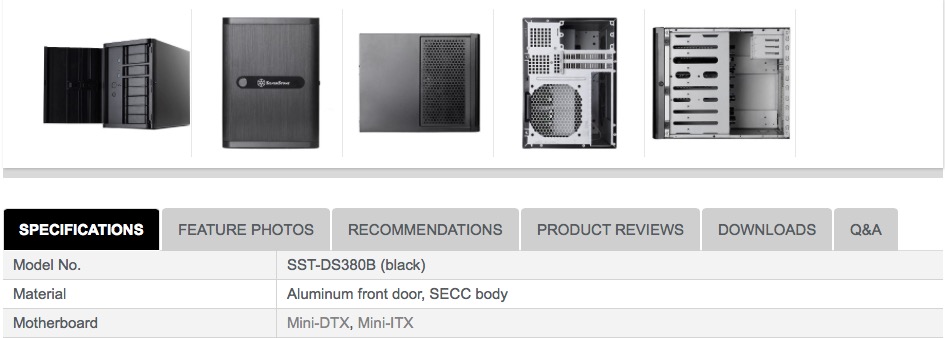
Thanks to both of you. I was trying to capture all information that is available. I don't want to further hijacking this thread and have opened another one: http://lime-technology.com/forum/index.php?topic=42585.0 @Gary, the Silverstone site is still talking about Mini-DTX and Mini-ITX. Please see picture below.
-
Has anyone used the Silverstone DS380 with the Asrock E3C224D4I-14S board? I'm asking because it's slightly larger than mini-ITX. I looked at this thread and found the mobo pretty impressive: http://lime-technology.com/forum/index.php?topic=32704.0 Advantages over the C2750D4I (using the E3C224D4I-14S with the XEON E3-1230L v3): * supports VT-D * Better PassMark score (7,3 vs 3,9 and almost 3x single PassMark score) Downside is the slightly higher TDP (25W vs. 20W CPU only, so I guess it will use around 40W in total). Any other items to consider using this board in the DS380? Apologies, just saw, that Gary covered this already here: The DS380 specifications indicates it will work with DTX boards. The E3C224D4I-14S is well within the 9.6" max width spec for DTX (it's 8.4" wide). In addition, it looks like the mini-SAS connectors are just ahead of the 2 SATA connectors ... NOT on the extended portion of the board. Why don't you think this board would work ??
-
saarg, this much appreciated and making that whole discussion redundant: http://lime-technology.com/forum/index.php?topic=35504.0 Working very well!! Thank you so much.
-
Hi piotrasd, this might be caused by a DVB-T USB tuner that I'm using as test device. That means that I have to enter commands into the "Custom commands before sleep" as well as into the "Custom commands after wake-up" entry fields? That means I have to enter "modprobe -r DRIVER"? Can you advise what the correct command would be? I'm using your media build btw.

