





fr500
Members
-
Joined
-
Last visited
Everything posted by fr500
-
alright, so is kswapd even available on unraid by default? or did I install something and screw myself up?
-
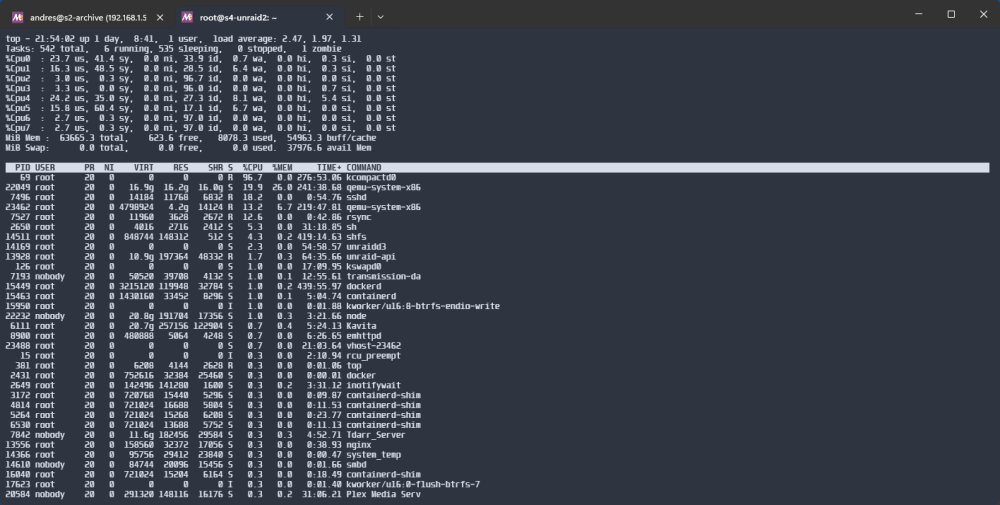
Hello Not sure if the cause is that I used to have the swap plugin, but now I have this issue. kcompactd0 kicks in and uses a lot of CPU very often killing VM performance despite CPU pinning. I also noticed that I have bery little free ram? MiB Mem : 63665.3 total, 862.2 free, 10738.7 used, 52064.4 buff/cache MiB Swap: 0.0 total, 0.0 free, 0.0 used. 35281.2 avail Mem Is this normal behavior? s4-unraid2-diagnostics-20240127-2055.zip
-
Hi I uninstalled this plugin, but I still see kswapd0 and kcompactd0 using CPU. I have asked on unraid discord and it seems it's not usually running at all for other unraid users. Anyway to remove kswap entirely?
-
6.12.6, and yup rebooted my server again and it's gone again
-
For some reason I have found this plugin gone twice after a reboot
-
I guess I could backup to a temporary location without snapshots or anything, then use something like virtsync to sync only changed blocks to the "old file", then my incremental backups would work with minimal space usage
-
So I have a question... I backup my ESXi to my unraid server using ghettovcb. I have modified it so it always writes to the same directory, so my strategy is always remove the backup and then backup again. Will that "deletion" negate the benefit of snapshots? it's a single gigantic file in most cases and the method I use doesn't support overwriting the old backup, so it's always a completely new file in the same folder (despite the files being mostly identical, actually completely identical when I backup a stopped VM). Right now I tried it, and it I get 2x the file usage so I guess that's just how it is
-
Hello, Is there any way I can specify BTRFS compression when mounting with UD?
-
-
Hello My log partition is full, and I see this being spammed on syslog: My GPU is used exclusively for passthrough. That being the case, would it be fine to remove the NVIDIA driver from unraid altogether?
-
Did you ever find a solution for this?
-
Switching from virtio-net to e1000 gave me back 10ms
-
Hey Long story short: I had an ancient microserver gen8 running esxi. I now virtualized my pfsense in unraid on a system waaaay more powerful than the old one. Everything works, but there is a slight (~15ms) increase in latency compared to the old system. Basically my site to site VPN went from 93ms to 108ms. 64 bytes from 192.168.200.200: icmp_seq=44 ttl=62 time=93.8 ms 64 bytes from 192.168.200.200: icmp_seq=45 ttl=62 time=94.0 ms 64 bytes from 192.168.200.200: icmp_seq=46 ttl=62 time=93.8 ms 64 bytes from 192.168.200.200: icmp_seq=47 ttl=62 time=93.8 ms 64 bytes from 192.168.200.200: icmp_seq=48 ttl=62 time=93.5 ms 64 bytes from 192.168.200.200: icmp_seq=49 ttl=62 time=93.9 ms 64 bytes from 192.168.200.200: icmp_seq=50 ttl=62 time=93.7 ms 64 bytes from 192.168.200.200: icmp_seq=51 ttl=62 time=95.6 ms 64 bytes from 192.168.200.200: icmp_seq=52 ttl=62 time=94.0 ms 64 bytes from 192.168.200.200: icmp_seq=53 ttl=62 time=94.0 ms 64 bytes from 192.168.200.200: icmp_seq=54 ttl=62 time=93.8 ms 64 bytes from 192.168.200.200: icmp_seq=55 ttl=62 time=94.1 ms 64 bytes from 192.168.200.200: icmp_seq=56 ttl=62 time=94.2 ms 64 bytes from 192.168.200.200: icmp_seq=57 ttl=62 time=93.9 ms 64 bytes from 192.168.200.200: icmp_seq=58 ttl=62 time=95.9 ms 64 bytes from 192.168.200.200: icmp_seq=59 ttl=62 time=93.7 ms 64 bytes from 192.168.200.200: icmp_seq=60 ttl=62 time=94.3 ms 64 bytes from 192.168.200.200: icmp_seq=63 ttl=62 time=107 ms 64 bytes from 192.168.200.200: icmp_seq=64 ttl=62 time=107 ms 64 bytes from 192.168.200.200: icmp_seq=65 ttl=62 time=107 ms 64 bytes from 192.168.200.200: icmp_seq=66 ttl=62 time=107 ms 64 bytes from 192.168.200.200: icmp_seq=67 ttl=62 time=107 ms 64 bytes from 192.168.200.200: icmp_seq=68 ttl=62 time=107 ms 64 bytes from 192.168.200.200: icmp_seq=69 ttl=62 time=107 ms 64 bytes from 192.168.200.200: icmp_seq=70 ttl=62 time=107 ms 64 bytes from 192.168.200.200: icmp_seq=71 ttl=62 time=107 ms 64 bytes from 192.168.200.200: icmp_seq=72 ttl=62 time=107 ms 64 bytes from 192.168.200.200: icmp_seq=73 ttl=62 time=107 ms 64 bytes from 192.168.200.200: icmp_seq=74 ttl=62 time=108 ms 64 bytes from 192.168.200.200: icmp_seq=75 ttl=62 time=107 ms 64 bytes from 192.168.200.200: icmp_seq=76 ttl=62 time=108 ms 64 bytes from 192.168.200.200: icmp_seq=77 ttl=62 time=108 ms It's minimal but it's there. I figure virtualizing the NIC may even out this issue, but I don't have enough slots or a PCIE nic. Also.. maybe it's just wireguard, because my LAN to WAN latency didn't budge, but it would be weird, the configurations were identical, only thing that changed was hardware.
-
Ah cool! nice to know, there is a non-F too available so that would be fine.
-
Hey there, Trying to consolidate a number of old servers in a good enough build that can handle everything. Currently I have: - 1 x microserver gen8 for firewall, seedbox - 1 x microserver gen8 for unraid, 28tb (2 disks) - 1 x microserver gen10 with a LVM array, 24tb (4 disks) - 1 x nuc 5th gen for plex and several other tools Most of these have been bought for customers and once decomissioned have landed here. Now I'm trying to reduce my power bill a bit and removing old stuff. So between my stuff found an old pc, i5-760 without a heatsink, the case though, it would be pretty good for my build, it's a cooler master advance 2, it has 6 3.5" bays and 4 5.25" bays, which I guess I could convert to 3.5" in the future. So motherboard, I have not found current gen motherboards with more than 4 SATA that won't be over $250 (I'm in Ecuador, availability is different over here) But, I just found this for a good price https://www.gigabyte.com/Motherboard/Q570M-D3H-rev-10 That paired with a Core i5 10400F and 32GB of DDR4 will set me around $350. Case has a Corsair 650W PSU that should be enough for the time being. Questions: - How good would be the i5-10400F for transcoding? am I missing much compared with a current gen equivalent? (with regards with quicksync) - What do you think of the motherboard, I like it, has dual GBe, 6 SATA ports and 2 NVME ports, also enough PCIe ports to expand my array in the future Would this save some power? server is mostly idle... except for the firewall which wouldn't require any spinning media I have seen each of the microservers idle at 35W, so I guess it should. Would passthrough work? I have a 1080ti sitting in a drawer, would be cool for a dedicated sunshine/moonlight VM. My main PC is usually busy and I have had my brothers fire a game while I'm working, so having a dedicated VM for that would be nice for me.
-
Hi I seem to have an issue. I have two unraid servers, and an old ubuntu server acting as a NAS. - unraid server 1, I just have apps, like plex, bazarr, radarr, sonarr - unraid server 2, media library, movies basically - old NAS running ubuntu, music I use NFS for all my shares, everything is mapped in all the servers. So, what happens is that once every few days, I can't access movies in plex. I go to unraid, and I can browse every folder just fine. But if I got to any container that has access to the movies library... If I open a terminal in the container: root@s3-unraid1:/media/archive/Video# cd Movies bash: cd: Movies: Stale file handle Surprisingly though, the shares on the old ubuntu server are still working fine. Everything is using NFSv3. If I restart the containers everything works again... but this is getting super annoying. This is a recent development. It wasn't happening even a month ago. Does anyone have any idea on what is happening?
-
I have tried installing my key multiple times, it says installation succeded, but the topbar remains like this... Any way to fix it?
-
Unlikely, your client most likely has that IP, but the topology is a bit more than that. Most likely you have to add your unraid server IP address to the whitelist

