





WeeboTech
Moderators
-
Joined
-
Last visited
Everything posted by WeeboTech
-
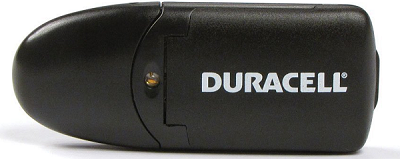
Blacklisted. Tom reports as non unique GUID: 14CD-121F-0000-121F20110712 Duracell SD Card Reader http://www.amazon.com/o/ASIN/B003VQY40W?tag=mixtame-20Black
-
Asked on Amazon and got: After consulting with Kingston Support, the answers are: 1) Yes. It has it's unique GUID 2) No, it cannot boot from any of the two ports Kingston Technology U.S. Sales Support - End User +1 (800) 835-6575 U.S./Canada Technical Support +1 (800) 435-0640 +1 (714) 435-2639 My experience with this one. 1. It does NOT have a unique GUID, Tom reported it as duplicate. 2. Boots from the SD card port. (at least on my HP Micro Servers).
-
45MB/s is a good number. It depends on how much writing you are doing at once. Small bursts (for me) can achieve 90MB/s but it slows down as more data gets queued into the server. Since I write all day long updating mp3 tags, I do notice a difference with the turbo write as long as the other drives aren't busy. If the other drives are busy all bets are off!
-
If you want speed. 3tb 7200 RPM Parity and 4 * 3tb drives using the seagate 7200 RPM drives These drives are fast and can get 190MB/s on the outer tracks. For my smaller high use servers I use Seagate 7200 RPM 3TB's because of the speed. I have 3TB 7200RPM parity, 3TB 7200 RPM disk1, 3TB 5400 RPMs for the next 2 drives which are more archival. This/was for my most often used file server and is now the setup for my torrent server. For my archiver server. on the data drives, I used 4TB Seagate 5400 RPM drive. Any good NAS drive in the parity slot there will be fine. For the data drives I mix between needs of 3TB and 4TB. I.E. I grow and purchase what I needed at the time. - For my new Gen8 File server, I've switched it up to the following 4TB Hitachi 7200 RPM NAS drive for parity. 3TB Seagate 7200 RPM home folders drive 4TB Seagate 5400 RPM backup archive drive 4TB Seagate HYBRID 5400 RPM Music drive, since this has over 350,000 files I'm testing to see if there is a benefit to the hybrid nature. This is now my high use main home file server. Point being here. Purchase the largest for what you need, however I probably would not go with 4 3TB drives at this point in time. I would purchase at least the 4TB Hitachi NAS drive for parity. If I had a very often used disk, I would choose the appropriate size and 7200 RPM for that. I.E. Hitachi 4TB 7200 RPM NAS drive. For archive write once read many, I would choose the largest I could afford at the moment that I have a data space need for in green/red 5400 configuration. Over the next week I plan to upgrade the archiver server to 6TB parity and 1 data disk of 6TB, then upgrade as I need to expand into. This leaves me with the smaller spares that I can swap somewhere else or sell as I need to. They say that your parity check speed can only go as fast as your slowest drive. Plus your write speed is limited to the slowest drive of the pair. With the new Turbo Write feature this changes it. So I choose the highest RPM in the size I can afford for parity. I turn turbo write on and off as I need via cron schedule.
-
I should add, in comparison with a SAS card and a SAS external controller, Each drive will have full bandwidth vs shared bandwidth with a port multiplier. Which is why I'm contemplating the SAS route.
-
First of all, thanks for replying and the advice! Looks like an excellent solution for a ssd cache drive - i've no experience with PMP, that may be something to investigate for external drive arrays. i see there are two pcie slots on the N54L? It doesnt matter which one you connected it to? It doesn't matter, the card is X1 Gen 2, So I would use the x1 slot unless I were installing the ILO module. Leaving the 16x slot for another eSATA card. I've been thinking of SAS cards, LSI SAS card with two external SAS connectors or the HP P411 card with two external SAS connectors. That could provide another 4 or 8 drives at full speed. With PMP and Silicon image chipsets, Each parallel read divides up the total bandwidth. 1 - 190MB/s 2 - 130MB/s ~ 99MB/s 3 - 66MB/s 4 - 33MB/s These were actual tests using dd and some pretty fast spinners. The ASM chipset on the startech card is not as smooth for PMP applications. Doing the same tests proved it wasn't useful enough. I was better off purchasing a cheapo SIL3132 x1 card for the external SATA PMP units. The ASM PMP drivers just don't work as well with unRAID 5.x. At least by my benchmarks. With 4 drives accessing the eSATA/PMP array I was getting like 10MB/s in a very choppy manner. So if the intent is to use PMP for an external array (other then SSD). Use silicon image. Where PMP on the Startech unit becomes useful is for manual backup of one mSATA to another or internal (jumper) to RAID1 or RAID 0. I haven't tested the Startech mSATA PMP and ASM card performance. One of these days I'll get a round to it. But if one is mostly idle, while the other is busy, you can get away with it. As in a cache drive with a swap drive application.
-
and Finally. This is what use in the top bay(s) of my N54L's ICY DOCK MB971SP-B DuoSwap 5.25" Hot-Swap Drive Caddy for 2.5" and 3.5" SATA HD/SSD http://www.newegg.com/Product/Product.aspx?Item=N82E16817994143 3.5 on internal SATA 2.5 SSD on Startech Internal Port
-
Also, if you take a peek at this thread. My experience with the HP Microserver Gen 8 http://lime-technology.com/forum/index.php?topic=36048.0 You'll see a startech device to mount mSATA's in a 2.5" unit. I use this on my Gen 8. Startech mSATA Raid/PMP. StarTech.com Dual mSATA SSD to 2.5-Inch SATA RAID Adapter Converter (25SAT22MSAT) http://www.amazon.com/gp/product/B00ITJ7WDC/ref=oh_aui_detailpage_o01_s02?ie=UTF8&psc=1 Dying to try one of these, but I have no need right now. KINGWIN HDCV-2 Dual 2.5" to 3.5" SATA HDD Converter w/ Raid http://www.newegg.com/Product/Product.aspx?Item=N82E16817990020
-
I used this one. 2 Port PCI Express SATA 6 Gbps eSATA Controller Card - Dual Port PCIe SATA III Card - 2 Int/2 Ext http://eu.startech.com/Cards-Adapters/HDD-Controllers/SATA-Cards/2-Port-PCI-Express-SATA-6-Gbps-eSATA-Controller-Card~PEXESAT322I I set it so that 1 port is internal 1 port is external. It does port multiplier, albeit choppy. The silicon image linux drivers & chipsets do port multipliers smoother. In any case, I was testing it last night on my N54L for benchmarks. I was getting 285MB/s on the internal N54L port with a Samsung Pro 256GB When I moved it to this card I was getting 450MB/s make sure the PCIe type is set to GEN2 The card also works under ESX 5.0. It says unknown HBA but it's been working for me so far. Also it may not provide much to use both ports internally unless they are for SSD's. Spinners rarely go above 200MB/s and the internal port can reach 285MB/s, so it's plenty for a spinner. However, if you used it for the Parity drive it may provide some small benefit during parity checks. I.E. there would be plenty of bus bandwidth. The PCIe GEN2 slots can achive 500MB/s full duplex vs the GEN1 Slot's 256MB/s full duplex.
-
Not sure which one may work for you. StarTech ESATAUSBBO3 3 ft. Power eSATA Male to eSATA Male and USB A Female Cable http://www.newegg.com/Product/Product.aspx?Item=N82E16812200502 StarTech ESATAUSBMM3 3 ft. eSATA and USB A to Power eSATA Cable - M/M M-M http://www.newegg.com/Product/Product.aspx?Item=N82E16812200797
-
I would check any 'required' parameters for null rather then falling through an assumed check later on. consider the following snippet added to the top also. [ ${DEBUG:=0} -gt 0 ] && set -x -v Then consider #!/bin/bash [ ${DEBUG:=0} -gt 0 ] && set -x -v if [ -d "$1" ] then FULLNAME=$(readlink -e "$1") # Handle relative path MERGEDIR=${FULLNAME#/mnt/*/} # Remove any /mnt/*/ prefix else MERGEDIR="$1" fi if [ ! -d "/mnt/user/$MERGEDIR" ] then echo "$1 is not a valid user share" exit 1 fi SRCDISK=${2#/mnt/} #Remove any leading /mnt/ prefix SRCDISK=${SRCDISK%%/*} #Remove any trailing path if [[ ! -d "/mnt/$SRCDISK" \ || "$SRCDISK" != disk[1-9] && "$SRCDISK" != disk[1-9][0-9] && "$SRCDISK" != "cache" \ ]] then echo "$2 is not a valid disk" exit 1 fi DESTDISK=${3#/mnt/} #Remove any leading /mnt/ prefix DESTDISK=${DESTDISK%%/*} #Remove any trailing path if [[ ! -d "/mnt/$DESTDISK" \ || "$DESTDISK" != disk[1-9] && "$DESTDISK" != disk[1-9][0-9] && "$DESTDISK" != "cache" \ ]] then echo "$3 is not a valid disk" exit 1 fi echo "Merging /mnt/$SRCDISK/$MERGEDIR into /mnt/$DESTDISK/$MERGEDIR" then... root@unRAIDx:/# /tmp/test.bash BACKUPS disk2 is not a valid disk root@unRAIDx:/# DEBUG=3 /tmp/test.bash BACKUPS disk2 if [ -d "$1" ] then FULLNAME=$(readlink -e "$1") # Handle relative path MERGEDIR=${FULLNAME#/mnt/*/} # Remove any /mnt/*/ prefix else MERGEDIR="$1" fi + '[' -d BACKUPS ']' + MERGEDIR=BACKUPS if [ ! -d "/mnt/user/$MERGEDIR" ] then echo "$1 is not a valid user share" exit 1 fi + '[' '!' -d /mnt/user/BACKUPS ']' SRCDISK=${2#/mnt/} #Remove any leading /mnt/ prefix + SRCDISK=disk2 SRCDISK=${SRCDISK%%/*} #Remove any trailing path + SRCDISK=disk2 if [[ ! -d "/mnt/$SRCDISK" \ || "$SRCDISK" != disk[1-9] && "$SRCDISK" != disk[1-9][0-9] && "$SRCDISK" != "cache" \ ]] then echo "$2 is not a valid disk" exit 1 fi + [[ ! -d /mnt/disk2 ]] + [[ disk2 != disk[1-9] ]] DESTDISK=${3#/mnt/} #Remove any leading /mnt/ prefix + DESTDISK= DESTDISK=${DESTDISK%%/*} #Remove any trailing path + DESTDISK= if [[ ! -d "/mnt/$DESTDISK" \ || "$DESTDISK" != disk[1-9] && "$DESTDISK" != disk[1-9][0-9] && "$DESTDISK" != "cache" \ ]] then echo "$3 is not a valid disk" exit 1 fi + [[ ! -d /mnt/ ]] + [[ '' != disk[1-9] ]] + [[ '' != disk[1-9][0-9] ]] + [[ '' != \c\a\c\h\e ]] + echo ' is not a valid disk' is not a valid disk + exit 1 So while the error condition is reported, there is no usage condition that says, there are 3 required parameters and this is how you use the program.
-
I didn't go too deep with it yet, but my first comment is test for empty arguments. In one script I see $1 and $2 referenced before they are tested with null if [ -z "$1" -o -z "$2" ]; then usage exit 1 fi next, "$1" should always be encapsulated in quotes to handle spaces. you could have some disastrous results without it. Especially since you are running as root.
-
I did not say, or mean to imply, that full backups should not be done. Point is par2 can do the hash/checksum and recover from a small percentage of bitrot, mistaken changes, data loss or corruption. This would even protect your backups. if let's say a few sectors cannot be read. While you can maintain md5's of the files, you cannot recover from them, with par2 you can detect (as in the md5) and recover from a small percentage of corruption at the same time. I'm considering to contact the author of corz and see if he'll add a par2 option.
-
If you can organize the files into folders that change and do not change, you can use par2 to protect the non changing files also. it works like a hash but a little better. The hash will tell you there is change, the par2 file will allow you to fix bit rot or recover missing files. This is up to a selected specific percentage of recovery. hash tells you something is wrong. Par2 tells you it's wrong and recovers.
-
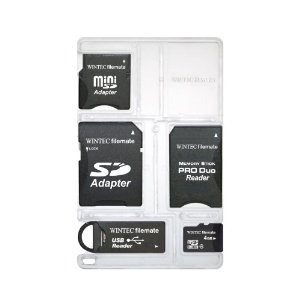
Wintec Filemate - GUID is not unique
-
I'm cross posting a pointer here to show how I do my own exercise pre-clear and provide ideas for a future native preclear. http://lime-technology.com/forum/index.php?topic=32564.msg335021#msg335021 Each of these 'steps' could be a checkbox to enable on demand. 1. save the smartctl log - Marks a point in time in the log directory. 2. I usually do a smartctl -t long to pre-read the drive and mark a point in time within the self test logs. (equivilent to JoeL's pre-read) 3. Save the smartctl log again and compare for issues. 4. badblocks -- here is where I differ. I'll usually use shifting bit patterns with badblocks. Here's an example command line. badblocks -sv -w -c 512 -t0xaa -t0x55 -t0xff -t0x00 -o /boot/logs/ST4000DX001-1CE168_Z3014JCE.201410221000.badblocks /dev/sdd http://linux.die.net/man/8/badblocks Sometimes I add -t0x7f -t0xf7 for extra passes/patterns on drives I may question, but the final pattern is always -t0x00. I do not adjust the block size as that has shown to sometimes shorten the test's final blocks. I adjust the count of blocks to be 2x the largest cache size. This can be adjusted as needed. There's also the ability to microsleep between blocks. I suppose if the block count were adjusted to cache size, then add in the micro sleeps it would do bursty writes to cache and limit interference with other array activities. This has always been my beef with a massive DD down a drive. Sure I want it to be fast, but I do not want it to flush my cache and make the array unusable. A checkbox for each of these patterns (With a mandatory 0x00 at the end) would be neat. I'm sure there will be a comment about wearing the drive out. I prefer to call it burning the drive in. I see many people running multiple clear pass'es anyway. Therefore the multiple pattern tests of badblocks is my equivalent to that. (depending on my confidence in the drive) 5. Save the smartctl log again and compare for issues. again. I also keep these logs because the mtime can be used to calculate durations from the prior steps. 6. Another smartctl -t long to post-read the drive and mark a point in time within the self test logs. (equivilent to JoeL's post-read) 7. Save the smartctl log again and compare for issues. Again saving the log for historical review and to calculate duration from the prior step. After review and insuring there are no pending sectors, I'll use JoeL's script to add the precleared signature.
-
It shouldn't. It does a fork() then setsid() and execvp(). root@unRAID:~# strings /usr/bin/setsid | egrep 'fork|setsid|exec' fork execvp setsid fork setsid execvp *shrug* if /usr/bin/at works, so be it!
-
For those who are not familiar with setsid, here's some information for starting the program in the background in a new session id. http://linux.die.net/man/1/setsid root@unRAID:~# setsid usage: setsid program [arg ...] root@unRAID:~# setsid sleep 30 root@unRAID:~# pgrep sleep 21635 root@unRAID:~# ps -fp 21635 UID PID PPID C STIME TTY TIME CMD root 21635 1 0 11:14 ? 00:00:00 sleep 30
-
I think this is a great idea. I know the tools use DD in a blind write to clear the drive. Preclear then reads it. badblocks can go further to use multiple pass pattern tests which can go a long way towards really exercising a drive. While it's been said that badblocks alone cannot detect drive problems, it's pretty much the same with a blind dd write then read. At least with badblocks, if there's an issue, there's a file that contains the list of bad blocks. Plus it does multipass with any set of characters you choose. As far as drive testing, Perhaps some of this logic could be borrowed to do drive read tests
-
Forked off here. RFC: MD5 checksum/Hash Software http://lime-technology.com/forum/index.php?topic=34988.0
-
That six pack icon stack is nice!
-
Would be nice if it were automatic before the filesystem were mounted.
-
Excellent suggestiion and maybe one of those yellow triangles with the ! in the middle for cautionary states.
-
get wget or curl for your machine. While wget is simpler, curl is more powerful in the various protocols available. unRAID 5.x includes curl and unRAID 6.x will have curl access compiled into php. What you learn in using curl can be used in multiple places.
-
Try setting a maximum depth and/or adjusting timing. Frankly, the low memory thing goes away with the 64 bit kernel. So if you are brave enough to run the beta, try that. Keep in mind that EACH disk that is part of the array, takes up kernel memory in low ram. Each disk has buffers which are part of the equation.

