





fir3drag0n
Members
-
Joined
-
Last visited
-
Hi, In light of new Unraid release, I just started to migrate my existing nvme to boot drive. Therefore, I wanted to move my files from one nvme to another (bigger) one. By doing so, I use mover, but I justed noted it is incredibly slow for just around 600 gigs. Is this really true in case of nvmes? What can I do in order to speed it up? Of course I stopped docker and VM service. And how to safely stop mover in order to restart it? Best wishes! ur-adrian-diagnostics-20260517-1701.zip
-
I cannot understand the decision to hide/delete it. Still, there is the github project which tries to adopt the unifi server os in docker/kubernetes. Why this should not be allowed?
-
Is there any reason why you have deleted your support thread?
-
yes, not in docker: root@UR-Adrian:~# docker network ls NETWORK ID NAME DRIVER SCOPE 3b3a77cb0afe bridge bridge local 472f88c92d00 host host local 0ed6c823f8b1 hyundai_monitor_default bridge local dee474128fa0 none null local 93e5e73b4334 wyoming-vosk-standalone_default bridge local
-
it happened when I powered off the server. now it is not available anymore. Any help?
-
After my server restart, BR0 is still missing, running 7.2.4 I already tried to restart server and docker, but no success diagnostics is attached ur-adrian-diagnostics-20260313-1504.zip
-
Which fork works now?
-
Gibt es Empfehlungen für einen Coral, der aspm und powertop bzw Stromsparmaßnahmen unterstützt?
-
Hi, I use the container in conjunction with home assistant docker without any problems. But recently, the mariadb container started to develop a rather high CPU utilization. Htop always states mariadb as container with 20% or so cpu usage. I didn't change any settings in home Assistant. Do you have an idea to lower down CPU consumption?
-
Did you solve it? If yes, how?
-
Hi, My unraid DNS settings are always overwritten by tailscale, how to resolve that? After some time, I always have the problem that my "resolv.conf" in unraid gets overwritten by tailscale. Thus, resulting that the apps store is not available anymore or that docker container updates are failing, etc.: # resolv.conf(5) file generated by tailscale # For more info, see https://tailscale.com/s/resolvconf-overwrite # DO NOT EDIT THIS FILE BY HAND -- CHANGES WILL BE OVERWRITTEN nameserver 100.100.100.100 search example.com How to prevent that? I am using the tailscale plugin and the headscale docker container. A fix is that I have to manually change the dns server in the webinteface, but I want to prevent that.
-
After some time, I always have the problem that my "resolv.conf" in unraid gets overwritten by tailscale. Thus, resulting that the apps store is not available anymore or that docker container updates are failing, etc.: # resolv.conf(5) file generated by tailscale # For more info, see https://tailscale.com/s/resolvconf-overwrite # DO NOT EDIT THIS FILE BY HAND -- CHANGES WILL BE OVERWRITTEN nameserver 100.100.100.100 search example.com How to prevent that? I am using the tailscale plugin and the headscale docker container. A fix is that I have to manually change the dns server in the webinteface, but I want to prevent that.
-
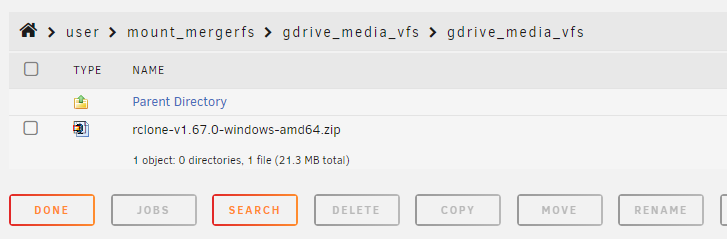
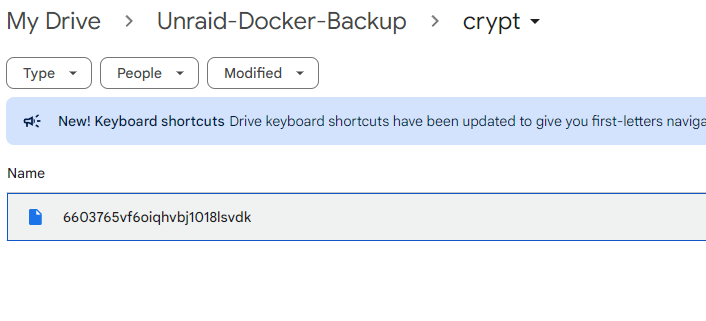
Hi at all, I am new to rclone. I setup the necessary scripts, but now I face the issue that the upload script always reports that there was nothing to upload: #!/bin/bash ###################### #### Mount Script #### ###################### ## Version 0.96.9.3 ## ###################### ####### EDIT ONLY THESE SETTINGS ####### # INSTRUCTIONS # 1. Change the name of the rclone remote and shares to match your setup # 2. NOTE: enter RcloneRemoteName WITHOUT ':' # 3. Optional: include custom command and bind mount settings # 4. Optional: include extra folders in mergerfs mount # REQUIRED SETTINGS RcloneRemoteName="gdrive_media_vfs" # Name of rclone remote mount WITHOUT ':'. NOTE: Choose your encrypted remote for sensitive data RcloneMountShare="/mnt/user/mount_rclone" # where your rclone remote will be located without trailing slash e.g. /mnt/user/mount_rclone RcloneMountDirCacheTime="720h" # rclone dir cache time LocalFilesShare="/mnt/user/local" # location of the local files and MountFolders you want to upload without trailing slash to rclone e.g. /mnt/user/local. Enter 'ignore' to disable RcloneCacheShare="/mnt/user0/mount_rclone" # location of rclone cache files without trailing slash e.g. /mnt/user0/mount_rclone RcloneCacheMaxSize="400G" # Maximum size of rclone cache RcloneCacheMaxAge="336h" # Maximum age of cache files MergerfsMountShare="/mnt/user/mount_mergerfs" # location without trailing slash e.g. /mnt/user/mount_mergerfs. Enter 'ignore' to disable #DockerStart="nzbget plex sonarr radarr ombi" # list of dockers, separated by space, to start once mergerfs mount verified. Remember to disable AUTOSTART for dockers added in docker settings page #MountFolders=\{"downloads/complete,downloads/intermediate,downloads/seeds,movies,tv"\} # comma separated list of folders to create within the mount # Note: Again - remember to NOT use ':' in your remote name above # OPTIONAL SETTINGS # Add extra paths to mergerfs mount in addition to LocalFilesShare LocalFilesShare2="ignore" # without trailing slash e.g. /mnt/user/other__remote_mount/or_other_local_folder. Enter 'ignore' to disable LocalFilesShare3="ignore" LocalFilesShare4="ignore" # Add extra commands or filters Command1="--rc" Command2="" Command3="" Command4="" Command5="" Command6="" Command7="" Command8="" CreateBindMount="N" # Y/N. Choose whether to bind traffic to a particular network adapter RCloneMountIP="192.168.1.252" # My unraid IP is 172.30.12.2 so I create another similar IP address NetworkAdapter="eth0" # choose your network adapter. eth0 recommended VirtualIPNumber="2" # creates eth0:x e.g. eth0:1. I create a unique virtual IP addresses for each mount & upload so I can monitor and traffic shape for each of them ####### END SETTINGS ####### ############################################################################### ##### DO NOT EDIT ANYTHING BELOW UNLESS YOU KNOW WHAT YOU ARE DOING ####### ############################################################################### ####### Preparing mount location variables ####### RcloneMountLocation="$RcloneMountShare/$RcloneRemoteName" # Location for rclone mount LocalFilesLocation="$LocalFilesShare/$RcloneRemoteName" # Location for local files to be merged with rclone mount MergerFSMountLocation="$MergerfsMountShare/$RcloneRemoteName" # Rclone data folder location ####### create directories for rclone mount and mergerfs mounts ####### mkdir -p /mnt/user/appdata/other/rclone/remotes/$RcloneRemoteName # for script files mkdir -p $RcloneCacheShare/cache/$RcloneRemoteName # for cache files if [[ $LocalFilesShare == 'ignore' ]]; then echo "$(date "+%d.%m.%Y %T") INFO: Not creating local folders as requested." LocalFilesLocation="/tmp/$RcloneRemoteName" eval mkdir -p $LocalFilesLocation else echo "$(date "+%d.%m.%Y %T") INFO: Creating local folders." eval mkdir -p $LocalFilesLocation/"$MountFolders" fi mkdir -p $RcloneMountLocation if [[ $MergerfsMountShare == 'ignore' ]]; then echo "$(date "+%d.%m.%Y %T") INFO: Not creating MergerFS folders as requested." else echo "$(date "+%d.%m.%Y %T") INFO: Creating MergerFS folders." mkdir -p $MergerFSMountLocation fi ####### Check if script is already running ####### echo "$(date "+%d.%m.%Y %T") INFO: *** Starting mount of remote ${RcloneRemoteName}" echo "$(date "+%d.%m.%Y %T") INFO: Checking if this script is already running." if [[ -f "/mnt/user/appdata/other/rclone/remotes/$RcloneRemoteName/mount_running" ]]; then echo "$(date "+%d.%m.%Y %T") INFO: Exiting script as already running." exit else echo "$(date "+%d.%m.%Y %T") INFO: Script not running - proceeding." touch /mnt/user/appdata/other/rclone/remotes/$RcloneRemoteName/mount_running fi ####### Checking have connectivity ####### echo "$(date "+%d.%m.%Y %T") INFO: *** Checking if online" ping -q -c2 google.com > /dev/null # -q quiet, -c number of pings to perform if [ $? -eq 0 ]; then # ping returns exit status 0 if successful echo "$(date "+%d.%m.%Y %T") PASSED: *** Internet online" else echo "$(date "+%d.%m.%Y %T") FAIL: *** No connectivity. Will try again on next run" rm /mnt/user/appdata/other/rclone/remotes/$RcloneRemoteName/mount_running exit fi ####### Create Rclone Mount ####### # Check If Rclone Mount Already Created if [[ -f "$RcloneMountLocation/mountcheck" ]]; then echo "$(date "+%d.%m.%Y %T") INFO: Success ${RcloneRemoteName} remote is already mounted." else echo "$(date "+%d.%m.%Y %T") INFO: Mount not running. Will now mount ${RcloneRemoteName} remote." # Creating mountcheck file in case it doesn't already exist echo "$(date "+%d.%m.%Y %T") INFO: Recreating mountcheck file for ${RcloneRemoteName} remote." touch mountcheck rclone copy mountcheck $RcloneRemoteName: -vv --no-traverse # Check bind option if [[ $CreateBindMount == 'Y' ]]; then echo "$(date "+%d.%m.%Y %T") INFO: *** Checking if IP address ${RCloneMountIP} already created for remote ${RcloneRemoteName}" ping -q -c2 $RCloneMountIP > /dev/null # -q quiet, -c number of pings to perform if [ $? -eq 0 ]; then # ping returns exit status 0 if successful echo "$(date "+%d.%m.%Y %T") INFO: *** IP address ${RCloneMountIP} already created for remote ${RcloneRemoteName}" else echo "$(date "+%d.%m.%Y %T") INFO: *** Creating IP address ${RCloneMountIP} for remote ${RcloneRemoteName}" ip addr add $RCloneMountIP/24 dev $NetworkAdapter label $NetworkAdapter:$VirtualIPNumber fi echo "$(date "+%d.%m.%Y %T") INFO: *** Created bind mount ${RCloneMountIP} for remote ${RcloneRemoteName}" else RCloneMountIP="" echo "$(date "+%d.%m.%Y %T") INFO: *** Creating mount for remote ${RcloneRemoteName}" fi # create rclone mount rclone mount \ $Command1 $Command2 $Command3 $Command4 $Command5 $Command6 $Command7 $Command8 \ --allow-other \ --umask 000 \ --dir-cache-time $RcloneMountDirCacheTime \ --attr-timeout $RcloneMountDirCacheTime \ --log-level INFO \ --poll-interval 10s \ --cache-dir=$RcloneCacheShare/cache/$RcloneRemoteName \ --drive-pacer-min-sleep 10ms \ --drive-pacer-burst 1000 \ --vfs-cache-mode full \ --vfs-cache-max-size $RcloneCacheMaxSize \ --vfs-cache-max-age $RcloneCacheMaxAge \ --vfs-read-ahead 1G \ --bind=$RCloneMountIP \ $RcloneRemoteName: $RcloneMountLocation & # Check if Mount Successful echo "$(date "+%d.%m.%Y %T") INFO: sleeping for 5 seconds" # slight pause to give mount time to finalise sleep 5 echo "$(date "+%d.%m.%Y %T") INFO: continuing..." if [[ -f "$RcloneMountLocation/mountcheck" ]]; then echo "$(date "+%d.%m.%Y %T") INFO: Successful mount of ${RcloneRemoteName} mount." else echo "$(date "+%d.%m.%Y %T") CRITICAL: ${RcloneRemoteName} mount failed - please check for problems. Stopping dockers" docker stop $DockerStart rm /mnt/user/appdata/other/rclone/remotes/$RcloneRemoteName/mount_running exit fi fi ####### Start MergerFS Mount ####### if [[ $MergerfsMountShare == 'ignore' ]]; then echo "$(date "+%d.%m.%Y %T") INFO: Not creating mergerfs mount as requested." else if [[ -f "$MergerFSMountLocation/mountcheck" ]]; then echo "$(date "+%d.%m.%Y %T") INFO: Check successful, ${RcloneRemoteName} mergerfs mount in place." else # check if mergerfs already installed if [[ -f "/bin/mergerfs" ]]; then echo "$(date "+%d.%m.%Y %T") INFO: Mergerfs already installed, proceeding to create mergerfs mount" else # Build mergerfs binary echo "$(date "+%d.%m.%Y %T") INFO: Mergerfs not installed - installing now." mkdir -p /mnt/user/appdata/other/rclone/mergerfs docker run -v /mnt/user/appdata/other/rclone/mergerfs:/build --rm trapexit/mergerfs-static-build mv /mnt/user/appdata/other/rclone/mergerfs/mergerfs /bin # check if mergerfs install successful echo "$(date "+%d.%m.%Y %T") INFO: *sleeping for 5 seconds" sleep 5 if [[ -f "/bin/mergerfs" ]]; then echo "$(date "+%d.%m.%Y %T") INFO: Mergerfs installed successfully, proceeding to create mergerfs mount." else echo "$(date "+%d.%m.%Y %T") ERROR: Mergerfs not installed successfully. Please check for errors. Exiting." rm /mnt/user/appdata/other/rclone/remotes/$RcloneRemoteName/mount_running exit fi fi # Create mergerfs mount echo "$(date "+%d.%m.%Y %T") INFO: Creating ${RcloneRemoteName} mergerfs mount." # Extra Mergerfs folders if [[ $LocalFilesShare2 != 'ignore' ]]; then echo "$(date "+%d.%m.%Y %T") INFO: Adding ${LocalFilesShare2} to ${RcloneRemoteName} mergerfs mount." LocalFilesShare2=":$LocalFilesShare2" else LocalFilesShare2="" fi if [[ $LocalFilesShare3 != 'ignore' ]]; then echo "$(date "+%d.%m.%Y %T") INFO: Adding ${LocalFilesShare3} to ${RcloneRemoteName} mergerfs mount." LocalFilesShare3=":$LocalFilesShare3" else LocalFilesShare3="" fi if [[ $LocalFilesShare4 != 'ignore' ]]; then echo "$(date "+%d.%m.%Y %T") INFO: Adding ${LocalFilesShare4} to ${RcloneRemoteName} mergerfs mount." LocalFilesShare4=":$LocalFilesShare4" else LocalFilesShare4="" fi # make sure mergerfs mount point is empty mv $MergerFSMountLocation $LocalFilesLocation mkdir -p $MergerFSMountLocation # mergerfs mount command mergerfs $LocalFilesLocation:$RcloneMountLocation$LocalFilesShare2$LocalFilesShare3$LocalFilesShare4 $MergerFSMountLocation -o rw,async_read=false,use_ino,allow_other,func.getattr=newest,category.action=all,category.create=ff,cache.files=partial,dropcacheonclose=true # check if mergerfs mount successful echo "$(date "+%d.%m.%Y %T") INFO: Checking if ${RcloneRemoteName} mergerfs mount created." if [[ -f "$MergerFSMountLocation/mountcheck" ]]; then echo "$(date "+%d.%m.%Y %T") INFO: Check successful, ${RcloneRemoteName} mergerfs mount created." else echo "$(date "+%d.%m.%Y %T") CRITICAL: ${RcloneRemoteName} mergerfs mount failed. Stopping dockers." docker stop $DockerStart rm /mnt/user/appdata/other/rclone/remotes/$RcloneRemoteName/mount_running exit fi fi fi ####### Starting Dockers That Need Mergerfs Mount To Work Properly ####### # only start dockers once if [[ -f "/mnt/user/appdata/other/rclone/remotes/$RcloneRemoteName/dockers_started" ]]; then echo "$(date "+%d.%m.%Y %T") INFO: dockers already started." else # Check CA Appdata plugin not backing up or restoring if [ -f "/tmp/ca.backup2/tempFiles/backupInProgress" ] || [ -f "/tmp/ca.backup2/tempFiles/restoreInProgress" ] ; then echo "$(date "+%d.%m.%Y %T") INFO: Appdata Backup plugin running - not starting dockers." else touch /mnt/user/appdata/other/rclone/remotes/$RcloneRemoteName/dockers_started echo "$(date "+%d.%m.%Y %T") INFO: Starting dockers." docker start $DockerStart fi fi rm /mnt/user/appdata/other/rclone/remotes/$RcloneRemoteName/mount_running echo "$(date "+%d.%m.%Y %T") INFO: Script complete" exit #!/bin/bash ###################### ### Upload Script #### ###################### ### Version 0.95.5 ### ###################### ####### EDIT ONLY THESE SETTINGS ####### # INSTRUCTIONS # 1. Edit the settings below to match your setup # 2. NOTE: enter RcloneRemoteName WITHOUT ':' # 3. Optional: Add additional commands or filters # 4. Optional: Use bind mount settings for potential traffic shaping/monitoring # 5. Optional: Use service accounts in your upload remote # 6. Optional: Use backup directory for rclone sync jobs # REQUIRED SETTINGS RcloneCommand="move" # choose your rclone command e.g. move, copy, sync RcloneRemoteName="gdrive_media_vfs" # Name of rclone remote mount WITHOUT ':'. RcloneUploadRemoteName="gdrive_media_vfs" # If you have a second remote created for uploads put it here. Otherwise use the same remote as RcloneRemoteName. LocalFilesShare="/mnt/user/local" # location of the local files without trailing slash you want to rclone to use RcloneMountShare="/mnt/user/mount_rclone" # where your rclone mount is located without trailing slash e.g. /mnt/user/mount_rclone MinimumAge="15m" # sync files suffix ms|s|m|h|d|w|M|y ModSort="ascending" # "ascending" oldest files first, "descending" newest files first # Note: Again - remember to NOT use ':' in your remote name above # Bandwidth limits: specify the desired bandwidth in kBytes/s, or use a suffix b|k|M|G. Or 'off' or '0' for unlimited. The script uses --drive-stop-on-upload-limit which stops the script if the 750GB/day limit is achieved, so you no longer have to slow 'trickle' your files all day if you don't want to e.g. could just do an unlimited job overnight. BWLimit1Time="01:00" BWLimit1="off" BWLimit2Time="08:00" BWLimit2="15M" BWLimit3Time="16:00" BWLimit3="12M" # OPTIONAL SETTINGS # Add name to upload job JobName="_daily_upload" # Adds custom string to end of checker file. Useful if you're running multiple jobs against the same remote. # Add extra commands or filters Command1="--exclude downloads/**" Command2="" Command3="" Command4="" Command5="" Command6="" Command7="" Command8="" # Bind the mount to an IP address CreateBindMount="N" # Y/N. Choose whether or not to bind traffic to a network adapter. RCloneMountIP="192.168.1.253" # Choose IP to bind upload to. NetworkAdapter="eth0" # choose your network adapter. eth0 recommended. VirtualIPNumber="1" # creates eth0:x e.g. eth0:1. # Use Service Accounts. Instructions: https://github.com/xyou365/AutoRclone UseServiceAccountUpload="N" # Y/N. Choose whether to use Service Accounts. ServiceAccountDirectory="/mnt/user/appdata/other/rclone/service_accounts" # Path to your Service Account's .json files. ServiceAccountFile="sa_gdrive_upload" # Enter characters before counter in your json files e.g. for sa_gdrive_upload1.json -->sa_gdrive_upload100.json, enter "sa_gdrive_upload". CountServiceAccounts="15" # Integer number of service accounts to use. # Is this a backup job BackupJob="N" # Y/N. Syncs or Copies files from LocalFilesLocation to BackupRemoteLocation, rather than moving from LocalFilesLocation/RcloneRemoteName BackupRemoteLocation="backup" # choose location on mount for deleted sync files BackupRemoteDeletedLocation="backup_deleted" # choose location on mount for deleted sync files BackupRetention="90d" # How long to keep deleted sync files suffix ms|s|m|h|d|w|M|y ####### END SETTINGS ####### ############################################################################### ##### DO NOT EDIT BELOW THIS LINE UNLESS YOU KNOW WHAT YOU ARE DOING ##### ############################################################################### ####### Preparing mount location variables ####### if [[ $BackupJob == 'Y' ]]; then LocalFilesLocation="$LocalFilesShare" echo "$(date "+%d.%m.%Y %T") INFO: *** Backup selected. Files will be copied or synced from ${LocalFilesLocation} for ${RcloneUploadRemoteName} ***" else LocalFilesLocation="$LocalFilesShare/$RcloneRemoteName" echo "$(date "+%d.%m.%Y %T") INFO: *** Rclone move selected. Files will be moved from ${LocalFilesLocation} for ${RcloneUploadRemoteName} ***" fi RcloneMountLocation="$RcloneMountShare/$RcloneRemoteName" # Location of rclone mount ####### create directory for script files ####### mkdir -p /mnt/user/appdata/other/rclone/remotes/$RcloneUploadRemoteName #for script files ####### Check if script already running ########## echo "$(date "+%d.%m.%Y %T") INFO: *** Starting rclone_upload script for ${RcloneUploadRemoteName} ***" if [[ -f "/mnt/user/appdata/other/rclone/remotes/$RcloneUploadRemoteName/upload_running$JobName" ]]; then echo "$(date "+%d.%m.%Y %T") INFO: Exiting as script already running." exit else echo "$(date "+%d.%m.%Y %T") INFO: Script not running - proceeding." touch /mnt/user/appdata/other/rclone/remotes/$RcloneUploadRemoteName/upload_running$JobName fi ####### check if rclone installed ########## echo "$(date "+%d.%m.%Y %T") INFO: Checking if rclone installed successfully." if [[ -f "$RcloneMountLocation/mountcheck" ]]; then echo "$(date "+%d.%m.%Y %T") INFO: rclone installed successfully - proceeding with upload." else echo "$(date "+%d.%m.%Y %T") INFO: rclone not installed - will try again later." rm /mnt/user/appdata/other/rclone/remotes/$RcloneUploadRemoteName/upload_running$JobName exit fi ####### Rotating serviceaccount.json file if using Service Accounts ####### if [[ $UseServiceAccountUpload == 'Y' ]]; then cd /mnt/user/appdata/other/rclone/remotes/$RcloneUploadRemoteName/ CounterNumber=$(find -name 'counter*' | cut -c 11,12) CounterCheck="1" if [[ "$CounterNumber" -ge "$CounterCheck" ]];then echo "$(date "+%d.%m.%Y %T") INFO: Counter file found for ${RcloneUploadRemoteName}." else echo "$(date "+%d.%m.%Y %T") INFO: No counter file found for ${RcloneUploadRemoteName}. Creating counter_1." touch /mnt/user/appdata/other/rclone/remotes/$RcloneUploadRemoteName/counter_1 CounterNumber="1" fi ServiceAccount="--drive-service-account-file=$ServiceAccountDirectory/$ServiceAccountFile$CounterNumber.json" echo "$(date "+%d.%m.%Y %T") INFO: Adjusted service_account_file for upload remote ${RcloneUploadRemoteName} to ${ServiceAccountFile}${CounterNumber}.json based on counter ${CounterNumber}." else echo "$(date "+%d.%m.%Y %T") INFO: Uploading using upload remote ${RcloneUploadRemoteName}" ServiceAccount="" fi ####### Upload files ########## # Check bind option if [[ $CreateBindMount == 'Y' ]]; then echo "$(date "+%d.%m.%Y %T") INFO: *** Checking if IP address ${RCloneMountIP} already created for upload to remote ${RcloneUploadRemoteName}" ping -q -c2 $RCloneMountIP > /dev/null # -q quiet, -c number of pings to perform if [ $? -eq 0 ]; then # ping returns exit status 0 if successful echo "$(date "+%d.%m.%Y %T") INFO: *** IP address ${RCloneMountIP} already created for upload to remote ${RcloneUploadRemoteName}" else echo "$(date "+%d.%m.%Y %T") INFO: *** Creating IP address ${RCloneMountIP} for upload to remote ${RcloneUploadRemoteName}" ip addr add $RCloneMountIP/24 dev $NetworkAdapter label $NetworkAdapter:$VirtualIPNumber fi else RCloneMountIP="" fi # Remove --delete-empty-src-dirs if rclone sync or copy if [[ $RcloneCommand == 'move' ]]; then echo "$(date "+%d.%m.%Y %T") INFO: *** Using rclone move - will add --delete-empty-src-dirs to upload." DeleteEmpty="--delete-empty-src-dirs " else echo "$(date "+%d.%m.%Y %T") INFO: *** Not using rclone move - will remove --delete-empty-src-dirs to upload." DeleteEmpty="" fi # Check --backup-directory if [[ $BackupJob == 'Y' ]]; then echo "$(date "+%d.%m.%Y %T") INFO: *** Will backup to ${BackupRemoteLocation} and use ${BackupRemoteDeletedLocation} as --backup-directory with ${BackupRetention} retention for ${RcloneUploadRemoteName}." LocalFilesLocation="$LocalFilesShare" BackupDir="--backup-dir $RcloneUploadRemoteName:$BackupRemoteDeletedLocation" else BackupRemoteLocation="" BackupRemoteDeletedLocation="" BackupRetention="" BackupDir="" fi # process files rclone $RcloneCommand $LocalFilesLocation $RcloneUploadRemoteName:$BackupRemoteLocation $ServiceAccount $BackupDir \ --user-agent="$RcloneUploadRemoteName" \ -vv \ --buffer-size 512M \ --drive-chunk-size 512M \ --tpslimit 8 \ --checkers 8 \ --transfers 4 \ --order-by modtime,$ModSort \ --min-age $MinimumAge \ $Command1 $Command2 $Command3 $Command4 $Command5 $Command6 $Command7 $Command8 \ --exclude *fuse_hidden* \ --exclude *_HIDDEN \ --exclude .recycle** \ --exclude .Recycle.Bin/** \ --exclude *.backup~* \ --exclude *.partial~* \ --drive-stop-on-upload-limit \ --bwlimit "${BWLimit1Time},${BWLimit1} ${BWLimit2Time},${BWLimit2} ${BWLimit3Time},${BWLimit3}" \ --bind=$RCloneMountIP $DeleteEmpty # Delete old files from mount if [[ $BackupJob == 'Y' ]]; then echo "$(date "+%d.%m.%Y %T") INFO: *** Removing files older than ${BackupRetention} from $BackupRemoteLocation for ${RcloneUploadRemoteName}." rclone delete --min-age $BackupRetention $RcloneUploadRemoteName:$BackupRemoteDeletedLocation fi ####### Remove Control Files ########## # update counter and remove other control files if [[ $UseServiceAccountUpload == 'Y' ]]; then if [[ "$CounterNumber" == "$CountServiceAccounts" ]];then rm /mnt/user/appdata/other/rclone/remotes/$RcloneUploadRemoteName/counter_* touch /mnt/user/appdata/other/rclone/remotes/$RcloneUploadRemoteName/counter_1 echo "$(date "+%d.%m.%Y %T") INFO: Final counter used - resetting loop and created counter_1." else rm /mnt/user/appdata/other/rclone/remotes/$RcloneUploadRemoteName/counter_* CounterNumber=$((CounterNumber+1)) touch /mnt/user/appdata/other/rclone/remotes/$RcloneUploadRemoteName/counter_$CounterNumber echo "$(date "+%d.%m.%Y %T") INFO: Created counter_${CounterNumber} for next upload run." fi else echo "$(date "+%d.%m.%Y %T") INFO: Not utilising service accounts." fi # remove dummy file rm /mnt/user/appdata/other/rclone/remotes/$RcloneUploadRemoteName/upload_running$JobName echo "$(date "+%d.%m.%Y %T") INFO: Script complete" exit and my rclone config: [gdrive] type = drive client_id = XYZ.apps.googleusercontent.com client_secret = SECRET scope = drive token = {"access_token":"TOKEN","token_type":"Bearer","refresh_token":"TOKENR","expiry":"2024-09-03T09:55:08.048903628+02:00"} server_side_across_configs = true root_folder_id = 1ZB6bv97Qclb-axzij07fUKUOycAQNXm_ [gdrive_media_vfs] type = crypt remote = gdrive:crypt filename_encryption = standard directory_name_encryption = true password = pw1 password2 = pw2 and my upload does not recognize the file to upload: Script location: /tmp/user.scripts/tmpScripts/rclone_upload/script Note that closing this window will abort the execution of this script 03.09.2024 09:49:21 INFO: *** Rclone move selected. Files will be moved from /mnt/user/local/gdrive_media_vfs for gdrive_media_vfs *** 03.09.2024 09:49:21 INFO: *** Starting rclone_upload script for gdrive_media_vfs *** 03.09.2024 09:49:22 INFO: Script not running - proceeding. 03.09.2024 09:49:22 INFO: Checking if rclone installed successfully. 03.09.2024 09:49:22 INFO: rclone installed successfully - proceeding with upload. 03.09.2024 09:49:22 INFO: Uploading using upload remote gdrive_media_vfs 03.09.2024 09:49:22 INFO: *** Using rclone move - will add --delete-empty-src-dirs to upload. 2024/09/03 09:49:22 INFO : Starting bandwidth limiter at 15Mi Byte/s 2024/09/03 09:49:22 INFO : Starting transaction limiter: max 8 transactions/s with burst 1 2024/09/03 09:49:22 DEBUG : --min-age 15m0s to 2024-09-03 09:34:22.218928157 +0200 CEST m=-899.902207347 2024/09/03 09:49:22 DEBUG : rclone: Version "v1.67.0" starting with parameters ["rcloneorig" "--config" "/boot/config/plugins/rclone/.rclone.conf" "move" "/mnt/user/local/gdrive_media_vfs" "gdrive_media_vfs:" "--user-agent=gdrive_media_vfs" "-vv" "--buffer-size" "512M" "--drive-chunk-size" "512M" "--tpslimit" "8" "--checkers" "8" "--transfers" "4" "--order-by" "modtime,ascending" "--min-age" "15m" "--exclude" "downloads/**" "--exclude" "*fuse_hidden*" "--exclude" "*_HIDDEN" "--exclude" ".recycle**" "--exclude" ".Recycle.Bin/**" "--exclude" "*.backup~*" "--exclude" "*.partial~*" "--drive-stop-on-upload-limit" "--bwlimit" "01:00,off 08:00,15M 16:00,12M" "--bind=" "--delete-empty-src-dirs"] 2024/09/03 09:49:22 DEBUG : Creating backend with remote "/mnt/user/local/gdrive_media_vfs" 2024/09/03 09:49:22 DEBUG : Using config file from "/boot/config/plugins/rclone/.rclone.conf" 2024/09/03 09:49:22 DEBUG : Creating backend with remote "gdrive_media_vfs:" 2024/09/03 09:49:22 DEBUG : Creating backend with remote "gdrive:crypt" 2024/09/03 09:49:22 DEBUG : gdrive: detected overridden config - adding "{y5r0i}" suffix to name 2024/09/03 09:49:22 DEBUG : fs cache: renaming cache item "gdrive:crypt" to be canonical "gdrive{y5r0i}:crypt" 2024/09/03 09:49:23 DEBUG : Added delayed dir = "gdrive_media_vfs", newDst= 2024/09/03 09:49:23 DEBUG : gdrive_media_vfs/rclone-v1.67.0-windows-amd64.zip: Excluded (ModTime Filter) 2024/09/03 09:49:23 DEBUG : gdrive_media_vfs/rclone-v1.67.0-windows-amd64.zip: Excluded 2024/09/03 09:49:23 DEBUG : Encrypted drive 'gdrive_media_vfs:': Waiting for checks to finish 2024/09/03 09:49:23 DEBUG : Encrypted drive 'gdrive_media_vfs:': Waiting for transfers to finish 2024/09/03 09:49:23 INFO : gdrive_media_vfs: Removing directory 2024/09/03 09:49:23 DEBUG : gdrive_media_vfs: Failed to Rmdir: remove /mnt/user/local/gdrive_media_vfs/gdrive_media_vfs: directory not empty 2024/09/03 09:49:23 DEBUG : Local file system at /mnt/user/local/gdrive_media_vfs: failed to delete 1 directories 2024/09/03 09:49:23 INFO : There was nothing to transfer 2024/09/03 09:49:23 INFO : Transferred: 0 B / 0 B, -, 0 B/s, ETA - Deleted: 0 (files), 1 (dirs), 0 B (freed) Elapsed time: 0.9s 2024/09/03 09:49:23 DEBUG : 8 go routines active 03.09.2024 09:49:23 INFO: Not utilising service accounts. 03.09.2024 09:49:23 INFO: Script complete I cannot find the error and any help is appreciated.
-
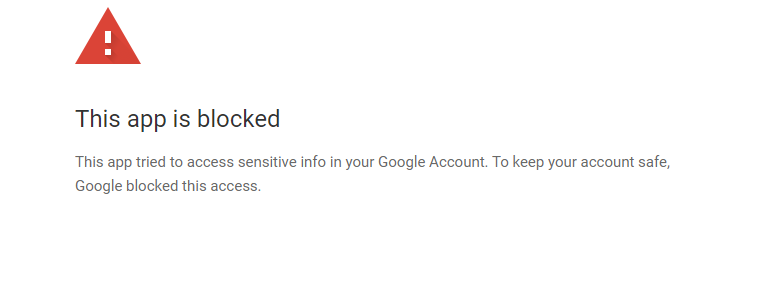
I am a new duplicacy user with a personal licence. I tried to setup my docker instance with your template with google drive (Duplicacy Web Edition 1.8.1), but I always get the result “This app is blocked”. What can I do in order to connect to google drive?
-
Did you resolve it? I do have quite the same error, interestingly as well with home assistant container: [08.07.2024 07:22:06][❌][hassConfigurator] tar verification failed! Tar said: tar: Removing leading `/' from member names; mnt/user/appdata/Home-Assistant-Container/.storage/scheduler.storage: Mod time differs; mnt/user/appdata/Home-Assistant-Container/homematicip_local/cache/RaspberryMatic_homematic_devices.json: Mod time differs; mnt/user/appdata/Home-Assistant-Container/homematicip_local/cache/RaspberryMatic_homematic_paramsets.json: Mod time differs; mnt/user/appdata/Home-Assistant-Container/home-assistant.log: Mod time differs; mnt/user/appdata/Home-Assistant-Container/home-assistant.log: Size differs
